精选列表

搜索[SpringBoot],共4126篇文章
优秀的个人博客,低调大师

第二篇 : SpringBoot 2.x中使用JdbcTemplate

数据文件 DROP TABLE IF EXISTS users; CREATE TABLE users ( id INT ( 11 ) PRIMARY KEY AUTO_INCREMENT, username VARCHAR ( 255 ) NOT NULL, passwd VARCHAR ( 255 ) ) ENGINE = INNODB DEFAULT CHARSET = utf8; INSERT users VALUES ( NULL, '翠花', '123' ); INSERT users VALUES ( NULL, '王卫国', '123' ); INSERT users VALUES ( NULL, '李小花', '123' ); INSERT users VALUES ( NULL, '王二柱', '123' ); INSERT users VALUES ( NULL, '赵铁蛋', '123' ); 需要引入的依赖 <dependencies> <dependency> <groupId>org.springframework.boot</groupId> <artifactId>spring-boot-starter-jdbc</artifactId> </dependency> <dependency> <groupId>org.springframework.boot</groupId> <artifactId>spring-boot-starter-web</artifactId> </dependency> <dependency> <groupId>mysql</groupId> <artifactId>mysql-connector-java</artifactId> <scope>runtime</scope> </dependency> <dependency> <groupId>org.springframework.boot</groupId> <artifactId>spring-boot-starter-test</artifactId> <scope>test</scope> </dependency> </dependencies> application.properties spring.datasource.driver-class-name=com.mysql.jdbc.Driver spring.datasource.url=jdbc:mysql///test spring.datasource.username=root spring.datasource.password=root application.yml spring: datasource: driver-class-name: com.mysql.jdbc.Driver url: jdbc:mysql///test username: root password: root User.java package com.prvi.gabriel.springbootforjdbctemplate.entity; /** * Created with Intellij IDEA. * * @Author: Gabriel * @Date: 2018-10-08 * @Desciption: */ public class User { private long id; private String username; private String password; public long getId() { return id; } public void setId(long id) { this.id = id; } public String getUsername() { return username; } public void setUsername(String username) { this.username = username; } public String getPassword() { return password; } public void setPassword(String password) { this.password = password; } @Override public String toString() { return "User{" + "id=" + id + ", username='" + username + '\'' + ", password='" + password + '\'' + '}'; } } UserController.java package com.prvi.gabriel.springbootforjdbctemplate.controller; import com.prvi.gabriel.springbootforjdbctemplate.entity.User; import com.prvi.gabriel.springbootforjdbctemplate.service.UserService; import org.springframework.beans.factory.annotation.Autowired; import org.springframework.web.bind.annotation.PathVariable; import org.springframework.web.bind.annotation.RequestMapping; import org.springframework.web.bind.annotation.RequestMethod; import org.springframework.web.bind.annotation.RestController; import java.util.List; /** * Created with Intellij IDEA. * * @Author: Gabriel * @Date: 2018-10-08 * @Desciption: */ @RestController @RequestMapping("/users") public class UserController { @Autowired private UserService userService; @RequestMapping(name = "/",method = RequestMethod.GET) public List<User> usersList(){ List<User> users = null; return userService.findUsers(); } @RequestMapping(value = "/{id}",method = RequestMethod.GET) public User getUserById(@PathVariable long id){ return userService.findUserById(id); } @RequestMapping(name = "/",method = RequestMethod.POST,produces = "text/plain;charset=utf-8") public String addUser(User user){ System.out.println(user); if(userService.saveUser(user) > 0 ){ return "新增成功"; }else{ return "新增失败"; } } @RequestMapping(name = "/",method = RequestMethod.PUT) public String updateUserById(User user){ if(userService.updateUser(user) > 0 ){ return "修改成功"; }else{ return "修改失败"; } } @RequestMapping(value = "/{id}",method = RequestMethod.DELETE) public String deleteUserById(@PathVariable long id){ if(userService.delUserById(id) > 0 ){ return "删除成功"; }else{ return "删除失败"; } } } UserService.java package com.prvi.gabriel.springbootforjdbctemplate.service; import com.prvi.gabriel.springbootforjdbctemplate.entity.User; import java.util.List; /** * Created with Intellij IDEA. * * @Author: Gabriel * @Date: 2018-10-08 * @Desciption: */ public interface UserService { List<User> findUsers(); User findUserById(long id); int saveUser(User user); int delUserById(long id); int updateUser(User user); } UserServiceImpl.java package com.prvi.gabriel.springbootforjdbctemplate.service; import com.prvi.gabriel.springbootforjdbctemplate.entity.User; import com.prvi.gabriel.springbootforjdbctemplate.repository.UserRepository; import org.springframework.beans.factory.annotation.Autowired; import org.springframework.stereotype.Service; import org.springframework.transaction.annotation.Transactional; import java.util.List; /** * Created with Intellij IDEA. * * @Author: Gabriel * @Date: 2018-10-08 * @Desciption: */ @Service public class UserServiceImpl implements UserService { @Autowired private UserRepository repository; @Transactional(readOnly = true) @Override public List<User> findUsers() { return repository.findUsers(); } @Transactional(readOnly = true) @Override public User findUserById(long id) { return repository.findUserById(id); } @Transactional @Override public int saveUser(User user) { return repository.saveUser(user); } @Transactional @Override public int delUserById(long id) { return repository.delUserById(id); } @Transactional @Override public int updateUser(User user) { return repository.updateUser(user); } } UserRepository.java package com.prvi.gabriel.springbootforjdbctemplate.repository; import com.prvi.gabriel.springbootforjdbctemplate.entity.User; import java.util.List; /** * Created with Intellij IDEA. * * @Author: Gabriel * @Date: 2018-10-08 * @Desciption: */ public interface UserRepository { List<User> findUsers(); User findUserById(long id); int saveUser(User user); int delUserById(long id); int updateUser(User user); } UserRepositoryImpl.java package com.prvi.gabriel.springbootforjdbctemplate.repository; import com.prvi.gabriel.springbootforjdbctemplate.entity.User; import org.springframework.beans.factory.annotation.Autowired; import org.springframework.jdbc.core.JdbcTemplate; import org.springframework.jdbc.core.PreparedStatementCreator; import org.springframework.jdbc.core.RowMapper; import org.springframework.stereotype.Repository; import java.sql.Connection; import java.sql.PreparedStatement; import java.sql.ResultSet; import java.sql.SQLException; import java.util.List; /** * Created with Intellij IDEA. * * @Author: Gabriel * @Date: 2018-10-08 * @Desciption: */ @Repository public class UserRepositoryImpl implements UserRepository { @Autowired private JdbcTemplate jdbcTemplate; @Override public List<User> findUsers() { return jdbcTemplate.query("select * from users",new UserMapper()); } @Override public User findUserById(long id) { List<User> users = jdbcTemplate.query("select * from users where id = ?",new Object[]{id},new UserMapper()); User user = null; if(users != null&&!users.isEmpty()){ user = users.get(0); } return user; } @Override public int saveUser(User user) { return jdbcTemplate.update("insert into users (username,password) values (?,?)",new Object[]{user.getUsername(),user.getPassword()}); } @Override public int delUserById(long id) { return jdbcTemplate.update("delete from users where id = ?",new Object[]{id}); } @Override public int updateUser(User user) { return jdbcTemplate.update("update users set username = ? , password = ? where id = ?",new Object[]{user.getUsername(),user.getPassword(),user.getId()}); } } class UserMapper implements RowMapper<User>{ @Override public User mapRow(ResultSet resultSet, int i) throws SQLException { User user = new User(); user.setId(resultSet.getLong("id")); user.setUsername(resultSet.getString("username")); user.setPassword(resultSet.getString("password")); return user; } } UserControllerTest.java package com.prvi.gabriel.springbootforjdbctemplate.controller; import org.junit.Before; import org.junit.Test; import org.junit.runner.RunWith; import org.springframework.beans.factory.annotation.Autowired; import org.springframework.boot.test.context.SpringBootTest; import org.springframework.test.context.junit4.SpringJUnit4ClassRunner; import org.springframework.test.web.servlet.MockMvc; import org.springframework.test.web.servlet.request.MockMvcRequestBuilders; import org.springframework.test.web.servlet.setup.MockMvcBuilders; import org.springframework.web.context.WebApplicationContext; /** * Created with Intellij IDEA. * * @Author: Gabriel * @Date: 2018-10-08 * @Desciption: */ @RunWith(SpringJUnit4ClassRunner.class) @SpringBootTest public class UserControllerTest { @Autowired private WebApplicationContext context; private MockMvc mockMvc; @Before public void setUp(){ mockMvc = MockMvcBuilders.webAppContextSetup(context).build(); } @Test public void usersList() throws Exception { mockMvc.perform(MockMvcRequestBuilders.get("/users")); } @Test public void getUserById() throws Exception { mockMvc.perform(MockMvcRequestBuilders.get("/users/1")); } @Test public void addUser() throws Exception { mockMvc.perform(MockMvcRequestBuilders.post("/users").param("username","脚后跟").param("password","123")); } @Test public void updateUserById() throws Exception { mockMvc.perform(MockMvcRequestBuilders.put("/users").param("id","1").param("username","李海军").param("password","456")); } @Test public void deleteUserById() throws Exception { mockMvc.perform(MockMvcRequestBuilders.delete("/users/3")); } }


优秀的个人博客,低调大师

精通SpringBoot——第十一篇:使用自定义配置

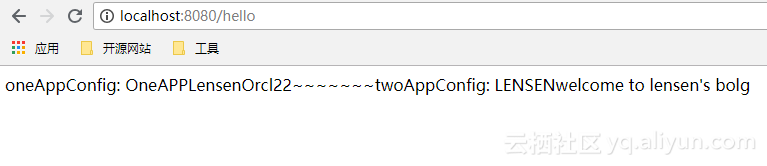
今天这篇文章给大家介绍自定义配置的两种方式第一式: 使用@ConfigurationProperties,且看代码 package com.developlee.customconfig.config; import org.springframework.boot.context.properties.ConfigurationProperties; import org.springframework.boot.context.properties.NestedConfigurationProperty; import org.springframework.context.annotation.Configuration; /** * @author Lensen * @desc * @since 2018/8/22 12:59 */ @Configuration @ConfigurationProperties(prefix = "one-app") public class OneAppConfig { @NestedConfigurationProperty public Account account = new Account(); public String appName; public Account getAccount() { return account; } public void setAccount(Account account) { this.account = account; } public String getAppName() { return appName; } public void setAppName(String appName) { this.appName = appName; } public class Account { private String username; private String password; private String age; public String getUsername() { return username; } public void setUsername(String username) { this.username = username; } public String getPassword() { return password; } public void setPassword(String password) { this.password = password; } public String getAge() { return age; } public void setAge(String age) { this.age = age; } } } 很明显,这就是我们要在properties文件中要配置的配置项。再看第二种方式 /** * @author Lensen * @desc * @since 2018/8/22 13:19 */ @Configuration public class TwoAppConfig { @Value("${two-app.welcome.message}") public String twoAppWelcomeMessage; @Value("${two-app.welcome.person}") public String twoAppWelcomePerson; public String getTwoAppWelcomeMessage() { return twoAppWelcomeMessage; } public void setTwoAppWelcomeMessage(String twoAppWelcomeMessage) { this.twoAppWelcomeMessage = twoAppWelcomeMessage; } public String getTwoAppWelcomePerson() { return twoAppWelcomePerson; } public void setTwoAppWelcomePerson(String twoAppWelcomePerson) { this.twoAppWelcomePerson = twoAppWelcomePerson; } } 这个就简单粗暴啦。没有第一种方式结构那么清晰,具体怎么使用,完全取决于项目配置项的关联关系和复杂度,需要大家根据实际情况权衡。接下来我写了个简单的测试类,来获取我们的配置信息先看配置文件: one-app: app-name: OneAPP account: username: Lensen password: Orcl age: 22 two-app: welcome: message: welcome to lensen's bolg person: LENSEN 一个简单的Controller类 package com.developlee.customconfig.controller; import com.developlee.customconfig.config.OneAppConfig; import com.developlee.customconfig.config.TwoAppConfig; import org.springframework.beans.factory.annotation.Autowired; import org.springframework.http.HttpStatus; import org.springframework.http.ResponseEntity; import org.springframework.web.bind.annotation.GetMapping; import org.springframework.web.bind.annotation.RestController; /** * @author Lensen * @desc * @since 2018/8/22 16:40 */ @RestController public class AppController { @Autowired private OneAppConfig oneAppConfig; @Autowired private TwoAppConfig twoAppConfig; @GetMapping("/hello") public ResponseEntity getConfig() { String str1 = "oneAppConfig: " + oneAppConfig.getAppName() + oneAppConfig.getAccount().getUsername() + oneAppConfig.getAccount().getPassword() + oneAppConfig.getAccount().getAge(); String str2 = "twoAppConfig: " + twoAppConfig.getTwoAppWelcomePerson() + twoAppConfig.getTwoAppWelcomeMessage(); return new ResponseEntity(str1 +"~~~~~~~"+ str2, HttpStatus.OK); } } 在地址栏输入http:localhost:8080/hello, 回车也可以自己指定文件,只需在类上加上注解@PropertySource注解就好了~~ @Configuration @PropertySource("classpath:my.properties") public class ThreeConfig { @Value("${my.name}") private String myName; public String getMyName() { return myName; } public void setMyName(String myName) { this.myName = myName; } } my.properties文件内容: my.name=developlee 测试结果: 如果配置文件是yml格式的,则要使用YamlPropertiesFactoryBean来加载并设置到PropertySourcesPlaceholderConfigurer中 // 加载YML格式自定义配置文件 @Bean public static PropertySourcesPlaceholderConfigurer properties() { PropertySourcesPlaceholderConfigurer configurer = new PropertySourcesPlaceholderConfigurer(); YamlPropertiesFactoryBean yaml = new YamlPropertiesFactoryBean(); yaml.setResources(new FileSystemResource("config.yml"));//File引入 // yaml.setResources(new ClassPathResource("youryml.yml"));//class引入 configurer.setProperties(yaml.getObject()); return configurer; end...浮躁的社会,浮躁的人生,唯有代码,宁静致远。(又开始装13了,见谅.....) 最后,以上示例代码可在我的github.com中找到。 我的个人公众号:developlee的潇洒人生。 关注了也不一定更新,更新就不得了了。

优秀的个人博客,低调大师

精通SpringBoot——第七篇:整合Redis实现缓存

项目中用到缓存是很常见的事情, 缓存能够提升系统访问的速度,减轻对数据库的压力等好处。今天我们来讲讲怎么在spring boot 中整合redis 实现对数据库查询结果的缓存。首先第一步要做的就是在pom.xml文件添加spring-boot-starter-data-redis。要整合缓存,必不可少的就是我们要继承一个父类CachingConfigurerSupport。我们先看看这个类的源码 public class CachingConfigurerSupport implements CachingConfigurer { // Spring's central cache manage SPI , @Override @Nullable public CacheManager cacheManager() { return null; } //key的生成策略 @Override @Nullable public KeyGenerator keyGenerator() { return null; } //Determine the Cache instance(s) to use for an intercepted method invocation. @Override @Nullable public CacheResolver cacheResolver() { return null; } //缓存错误处理 @Override @Nullable public CacheErrorHandler errorHandler() { return null; } } RedisConfig类 @Configuration @EnableCaching public class RedisConfig extends CachingConfigurerSupport { @Bean RedisMessageListenerContainer container(RedisConnectionFactory connectionFactory, MessageListenerAdapter listenerAdapter) { RedisMessageListenerContainer container = new RedisMessageListenerContainer(); container.setConnectionFactory(connectionFactory); container.addMessageListener(listenerAdapter, new PatternTopic("chat")); return container; } @Bean MessageListenerAdapter listenerAdapter(Receiver receiver) { return new MessageListenerAdapter(receiver, "receiveMessage"); } @Bean Receiver receiver(CountDownLatch latch) { return new Receiver(latch); } @Bean CountDownLatch latch() { return new CountDownLatch(1); } public class Receiver { private CountDownLatch latch; @Autowired public Receiver(CountDownLatch latch) { this.latch = latch; } public void receiveMessage(String message) { latch.countDown(); } } @Bean public KeyGenerator myKeyGenerator() { return new KeyGenerator() { @Override public Object generate(Object o, Method method, Object... objects) { StringBuilder sb = new StringBuilder(); sb.append(o.getClass().getName()); sb.append(method.getName()); for (Object obj : objects) { sb.append(JSON.toJSONString(obj)); } return sb.toString(); } }; } /** * @param redisConnectionFactory * @return * @// TODO: 2018/4/27 redis fastjson序列化 */ @Bean @ConditionalOnMissingBean(name = "redisTemplate") public RedisTemplate<Object, Object> redisTemplate(RedisConnectionFactory redisConnectionFactory) { RedisTemplate<Object, Object> template = new RedisTemplate<>(); //使用fastjson序列化 FastJsonRedisSerializer fastJsonRedisSerializer = new FastJsonRedisSerializer<>(Object.class); // 全局开启AutoType,不建议使用 // ParserConfig.getGlobalInstance().setAutoTypeSupport(true); // 建议使用这种方式,小范围指定白名单 ParserConfig.getGlobalInstance().addAccept("com.developlee.models."); // value值的序列化采用fastJsonRedisSerializer template.setValueSerializer(fastJsonRedisSerializer); template.setHashValueSerializer(fastJsonRedisSerializer); // key的序列化采用StringRedisSerializer template.setKeySerializer(new StringRedisSerializer()); template.setHashKeySerializer(new StringRedisSerializer()); template.setConnectionFactory(redisConnectionFactory); return template; } @Bean @ConditionalOnMissingBean(StringRedisTemplate.class) public StringRedisTemplate stringRedisTemplate(RedisConnectionFactory redisConnectionFactory) { StringRedisTemplate template = new StringRedisTemplate(); template.setConnectionFactory(redisConnectionFactory); return template; } /** * @return * @// TODO: 2018/4/27 设置redis 缓存时间 5 分钟 */ @Bean public RedisCacheConfiguration redisCacheConfiguration() { FastJsonRedisSerializer<Object> fastJsonRedisSerializer = new FastJsonRedisSerializer<>(Object.class); RedisCacheConfiguration configuration = RedisCacheConfiguration.defaultCacheConfig(); configuration = configuration.serializeValuesWith(RedisSerializationContext.SerializationPair.fromSerializer(fastJsonRedisSerializer)).entryTtl(Duration.ofMinutes(5)); return configuration; } } 这段代码中,重点关注对象是RedisTemplate 和StringRedisTemplate还有RedisMessageListenerContainer,RedisTemplate和StringRedisTemplate设置了一些序列化的参数和指定序列化的范围(主要为了防止黑客利用Redis的序列化漏洞),@ConditionalOnMissingBean注解的意思就是如果容器中没有这个类型Bean就选择当前Bean。RedisMessageListenerContainer是为Redis消息侦听器提供异步行为的容器,主要处理低层次的监听、转换和消息发送的细节。 再来看看application.xml我们的配置 , so easy~~ spring: redis: database: 0 # Redis数据库索引(默认为0) host: 192.168.0.100 # Redis服务器地址 (默认为127.0.0.1) port: 6379 # Redis服务器连接端口 (默认为6379) password: 123456 # Redis服务器连接密码(默认为空) timeout: 2000 # 连接超时时间(毫秒) cache: type: redis 接下来我们就可以使用Redis缓存了,在Service层我们用注解@Cacheable来缓存查询的结果。 @Cacheable(value= "orderDetailCache", keyGenerator = "myKeyGenerator", unless = "#result eq null") public OrderDetailEntity findOrderDetail(OrderDetailEntity orderDetailEntity) { return orderDetailDao.findEntity(orderDetailEntity); } 到这里我们就已经整合了Redis缓存了,是不是很简单的呢?自己多动手尝试哦! 最后,以上示例代码可在我的github.com中找到。我的个人公众号:developlee的潇洒人生。关注了也不一定更新,更新就不得了了。

资源下载

更多资源
Mario,低调大师唯一一个Java游戏作品

Mario,低调大师唯一一个Java游戏作品

马里奥是站在游戏界顶峰的超人气多面角色。马里奥靠吃蘑菇成长,特征是大鼻子、头戴帽子、身穿背带裤,还留着胡子。与他的双胞胎兄弟路易基一起,长年担任任天堂的招牌角色。

Apache Tomcat7、8、9(Java Web服务器)

Apache Tomcat7、8、9(Java Web服务器)

Tomcat是Apache 软件基金会(Apache Software Foundation)的Jakarta 项目中的一个核心项目,由Apache、Sun 和其他一些公司及个人共同开发而成。因为Tomcat 技术先进、性能稳定,而且免费,因而深受Java 爱好者的喜爱并得到了部分软件开发商的认可,成为目前比较流行的Web 应用服务器。

Java Development Kit(Java开发工具)

Java Development Kit(Java开发工具)

JDK是 Java 语言的软件开发工具包,主要用于移动设备、嵌入式设备上的java应用程序。JDK是整个java开发的核心,它包含了JAVA的运行环境(JVM+Java系统类库)和JAVA工具。

Sublime Text 一个代码编辑器

Sublime Text 一个代码编辑器

Sublime Text具有漂亮的用户界面和强大的功能,例如代码缩略图,Python的插件,代码段等。还可自定义键绑定,菜单和工具栏。Sublime Text 的主要功能包括:拼写检查,书签,完整的 Python API , Goto 功能,即时项目切换,多选择,多窗口等等。Sublime Text 是一个跨平台的编辑器,同时支持Windows、Linux、Mac OS X等操作系统。