首页 文章 精选 留言 我的

精选列表

搜索[读写分离],共10000篇文章
优秀的个人博客,低调大师

Tangdao 2.0.1 发布,更新前后分离,完成基础角色权限,数据权限组件

Tangdao 是基于角色的权限管理系统(RBAC),采用Springboot开发。系统简单易懂,前端使用Vue、Quasarframework开发,页面简洁美观。后端核心框架使用Springboot、Mybatis-plus、SpringSecurity为主要,扩展基于框架的权限校验、参数校验、统一异常、统一响应的通用功能。 预览效果 前端使用: Vue、Quasarframework开发,页面简洁美观 后端使用:Springboot、Mybatis-plus主要框架开发,封装统异常处理,认证,数据权限 前端地址 后端地址 本次更新: 1、项目结构调整,使用优秀的开源工具包,简化项目重复开发量。 2、数据权限组件,简化数据权限开发流程使用注解配置的方式。 其他: 1、前端使用Vue Quasarframework框架,目前看ts写的比较全也比较好的组件框架。 2、开发业务功能如:社区、商品、支付等模块方便快捷。 3、第三方登录对接 4、微信生态小程序等接口对接 注:佛系开发,无任何计划规划。有问题可以 issues 错误问题会修复。 Copyright 2020 ruyangit Inc. Licensed under the Apache License, Version 2.0: http://www.apache.org/licenses/LICENSE-2.0

优秀的个人博客,低调大师

前后端分离架构使用shiro框架进行登录的两种实现

方法一:重写FormAuthenticationFilter 原理: 假设在shiro.xml中配置了 /** = authc 而默认authc对应org.apache.shiro.web.filter.authc.FormAuthenticationFilter过滤器 则表示所有路径都被此过滤器拦截 当未登录请求被拦截,会调用FormAuthenticationFilter.onAccessDeny(): 如果请求的是loginUrl,则调用AuthenticatingFilter.executeLogin() 如果不是,则使request重定向到loginUrl,并return false; AuthenticatingFilter.executeLogin(): 调用subject.login(token) 如果登录成功,则调用onLoginSuccess() 失败则调用onLoginFailure() AuthenticatingFilter.onLoginSuccess(): return true; AuthenticatingFilter.onLoginFailure(): return false; subject.login(token): 最终会调用realm的doGetAuthenticationInfo 思路 重写默认的FormAuthenticationFilter, 在onAccessDeny()方法中: 如果请求的是loginUrl,则调用AuthenticatingFilter.executeLogin() 如果不是,则返回json,提示“未登录,无法访问该地址” @Override protectedbooleanonAccessDenied(ServletRequestrequest,ServletResponseresponse)throwsException{ if(this.isLoginRequest(request,response)){ if(this.isLoginSubmission(request,response)){ if(log.isTraceEnabled()){ log.trace("Loginsubmissiondetected.Attemptingtoexecutelogin."); } returnthis.executeLogin(request,response); }else{ if(log.isTraceEnabled()){ log.trace("Loginpageview."); } returntrue; } }else{ if(log.isTraceEnabled()){ log.trace("Attemptingtoaccessapathwhichrequiresauthentication.ForwardingtotheAuthenticationurl["+this.getLoginUrl()+"]"); } response.setContentType("application/json"); response.setCharacterEncoding("UTF-8"); PrintWriterout=response.getWriter(); ServerResponseserverResponse=ServerResponse.createByErrorMessage("未登录,无法访问该地址"); Gsongson=GsonFactory.getGson(); Strings=gson.toJson(serverResponse); out.println(s); out.flush(); out.close(); returnfalse; } } 由于AuthenticatingFilter.executeLogin()会调用onLoginSuccess()和onLoginFailure()方法 所以我们重写两个方法,前者返回登录成功的json,并把当前用户放入session;后者返回登录失败的json @Override protectedbooleanonLoginSuccess(AuthenticationTokentoken,Subjectsubject,ServletRequestrequest,ServletResponseresponse)throwsException{ response.setContentType("application/json"); response.setCharacterEncoding("UTF-8"); PrintWriterout=null; try{ out=response.getWriter(); }catch(IOExceptione1){ e1.printStackTrace(); } HttpSessionsession=((HttpServletRequest)request).getSession(); Useruser=userMapper.selectByUserName(token.getPrincipal().toString()); session.setAttribute(Const.CURRENT_USER,user); ServerResponseserverResponse=ServerResponse.createBySuccessMsg("登录成功"); Gsongson=GsonFactory.getGson(); Strings=gson.toJson(serverResponse); out.println(s); out.flush(); out.close(); returntrue; } @Override protectedbooleanonLoginFailure(AuthenticationTokentoken,AuthenticationExceptione,ServletRequestrequest,ServletResponseresponse){ response.setContentType("application/json"); response.setCharacterEncoding("UTF-8"); PrintWriterout=null; try{ out=response.getWriter(); }catch(IOExceptione1){ e1.printStackTrace(); } ServerResponseserverResponse=ServerResponse.createByErrorMessage("登录失败"); Gsongson=GsonFactory.getGson(); Strings=gson.toJson(serverResponse); out.println(s); out.flush(); out.close(); returnfalse; } } 最后配置shiro.xml将authc对应的默认的FormAuthenticationFilter,替换成我们的MyAuthenticationFilter <beanid="shiroFilter"class="org.apache.shiro.spring.web.ShiroFilterFactoryBean"> <propertyname="securityManager"ref="securityManager"/> <propertyname="loginUrl"value="/user/login.do"/> <propertyname="unauthorizedUrl"value="/user/unauthorized_err"/> <propertyname="filters"> <map> <entrykey="authc"value-ref="myAuthenticationFilter"/> </map> </property> <propertyname="filterChainDefinitions"> <value> /user/login_err.do=anon /user/unauthorized_err.do=anon /**=authc </value> </property> </bean> <beanid="myAuthenticationFilter"class="com.mmall.shiro.filter.MyAuthenticationFilter"/> 方法二:使用PassThruAuthenticationFilter代替FormAuthenticationFilter 原理: org.apache.shiro.web.filter.authc.PassThruAuthenticationFilter源码: publicclassPassThruAuthenticationFilterextendsAuthenticationFilter{ publicPassThruAuthenticationFilter(){ } protectedbooleanonAccessDenied(ServletRequestrequest,ServletResponseresponse)throwsException{ if(this.isLoginRequest(request,response)){ returntrue; }else{ this.saveRequestAndRedirectToLogin(request,response); returnfalse; } } } 官方文档: An authentication filter that redirects the user to the login page when they are trying to access a protected resource. However, if the user is trying to access the login page, the filter lets the request pass through to the application code. The difference between this filter and the FormAuthenticationFilter is that on a login submission (by default an HTTP POST to the login URL), the FormAuthenticationFilter filter attempts to automatically authenticate the user by passing the username and password request parameter values to Subject.login(usernamePasswordToken) directly. Conversely, this controller always passes all requests to the loginUrl through, both GETs and POSTs. This is useful in cases where the developer wants to write their own login behavior, which should include a call to Subject.login(AuthenticationToken) at some point. For example, if the developer has their own custom MVC login controller or validator, this PassThruAuthenticationFilter may be appropriate. 我们继承PassThruAuthenticationFilter并重写onAccessDenied方法,和redirectToLogin方法 publicclassMyPassThruAuthenticationFilterextendsPassThruAuthenticationFilter{ privateStringloginErrUrl="/"; publicvoidsetLoginErrUrl(StringloginErrUrl){ this.loginErrUrl=loginErrUrl; } @Override protectedbooleanonAccessDenied(ServletRequestrequest,ServletResponseresponse)throwsException{ if(this.isLoginRequest(request,response)){ returntrue; }else{ this.saveRequestAndRedirectToLogin(request,response); returnfalse; } } //重写redirectToLogin方法是因为saveRequestAndRedirectToLogin方法会调用它,而原始的redirectToLogin方法会使得请求重定向到loginUrl @Override protectedvoidredirectToLogin(ServletRequestrequest,ServletResponseresponse)throwsIOException{ WebUtils.issueRedirect(request,response,loginErrUrl); } } 首先修改shiro.xml , 将authc默认对应的FormAuthenticationFilter修改为MyPassThruAuthenticationFilter <beanid="shiroFilter"class="org.apache.shiro.spring.web.ShiroFilterFactoryBean"> <propertyname="securityManager"ref="securityManager"/> <propertyname="loginUrl"value="/user/login.do"/> <propertyname="unauthorizedUrl"value="/user/unauthorized_err"/> <propertyname="filters"> <map> <entrykey="authc"> <beanclass="com.mmall.shiro.filter.MyPassThruAuthenticationFilter"> <propertyname="loginErrUrl"value="/user/login_err.do"/><!--注意这里的loginErrUrl与上面的loginUrl的区别--> </bean> </entry> </map> </property> <propertyname="filterChainDefinitions"> <value> /=anon /user/login_err.do=anon /user/unauthorized_err.do=anon /user/logout.do=logout /**=authc </value> </property> </bean> 然后修改loginUrl对应的Contoller的方法,在其中要调用subject.login()完成shiro的认证 //UserController中:结合shiro,使用PassThruAuthenticationFilter的登录,需要调用subject.login()完成shiro的认证 @RequestMapping(value="login.do",method=RequestMethod.POST) @ResponseBody publicServerResponselogin(@RequestBodyUseruser,HttpSessionsession){ Subjectsubject=SecurityUtils.getSubject(); UsernamePasswordTokentoken=newUsernamePasswordToken(user.getUsername(),user.getPassword()); //ServerResponseserverResponse=iUserService.login(user.getUsername(),user.getPassword()); try{ /**subject.login(token)提交申请,验证能不能通过,也就是交给shiro。这里会回调reaml(或自定义的realm)里的一个方法 protectedAuthenticationInfodoGetAuthenticationInfo()*/ subject.login(token); }catch(AuthenticationExceptione){//验证身份失败 returnServerResponse.createByErrorMessage("登陆客户身份失败!"); } /**Shiro验证后,跳转到此处,这里判断验证是否通过*/ if(subject.isAuthenticated()){//验证身份通过 session.setAttribute(Const.CURRENT_USER,subject.getPrincipal()); returnServerResponse.createBySuccessMsg("登录成功"); }else{ returnServerResponse.createByErrorMessage("登陆客户身份失败!"); } } 而loginErrUrl对应的方法则返回Json提示未登录: @RequestMapping(value="login_err.do",method=RequestMethod.GET) @ResponseBody publicServerResponselogin_error(){ returnServerResponse.createByErrorMessage("用户未登录"); }

优秀的个人博客,低调大师

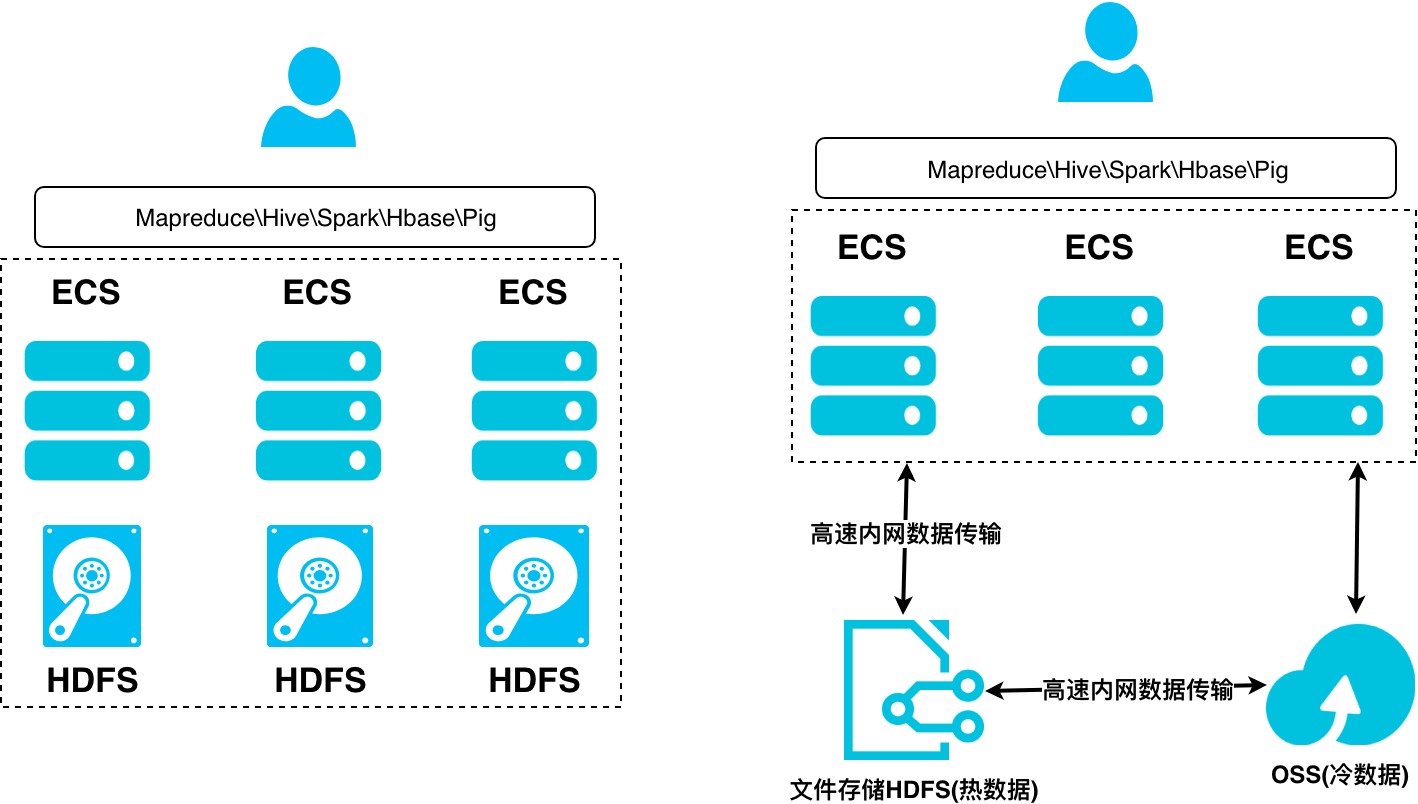
阿里云HybridDB for PG 空间紧张的解法 - 冷热分离、空间锁定、分区、压缩

标签 PostgreSQL , Greenplum , HybridDB for PG 背景 数据库空间不够用怎么办? HDB PG是分布式数据库,空间不够用,扩容呗。但是用户如果不想扩容呢?还有哪些处理方法? 例子 1 查看当前已使用空间 查看数据库空间使用,表的空间使用,索引的空间使用等。 postgres=# select datname,pg_size_pretty(pg_database_size(datname)) from pg_database order by pg_database_size(datname) desc; datname | pg_size_pretty -----------+---------------- postgres | 32 MB template1 | 31 MB template

优秀的个人博客,低调大师

nginx反代varnish缓存服务器实现后端amp动静分离架构

1.前端nginx做调度器及反代服务器,将用户的请求调度至后端的两台varnish,缓存调度算法使用一致性hash算法保证缓存命中率; 2.两台varnish反向代理用户请求至三个(组)后端主机,分别为存储静态资源(htm,html,css,js),应用程序服务器(可以部署wordpress或Discuz!),图片统一保存至图片服务器; 3.用户登录后,可以通过wordpress发布新的博文,并且可以上传图片; 4.如果后端主机全部宕机,varnish可以使用过期缓存响应客户端; 实验规划: director1: 172.16.1.4 nginx+keepalived 主 director2: 172.16.1.2 nginx+keepalived 备 varnish1: 172.16.1.5 varnish2: 172.16.1.6 static server: 172.16.1.10 php server: 172.16.1.3 拓扑图 一、配置两台nginx调度器主机 director1的keepalived配置 director2的keepalived配置 两台nginx的配置 在nginx.conf配置文件中的http段内添加upstream内容,将后端两台varnish服务器加入到该upstream中,同时做一致性hash算法保证缓存命中率。 后端健康状态检查设置:max_fails=1设定Nginx与服务器通信的尝试失败的次数。在fail_timeout参数定义的时间段内,如果失败的次数达到此值,Nginx就认为服务器不可用。在下一个fail_timeout时间段,服务器不会再被尝试。 二、两台varnish主机的配置 更改varnish的监听端口为80 [root@varnish1 ~]# vim /etc/varnish/varnish.params VARNISH_LISTEN_PORT=80 varnish配置文件内容 [root@varnish1 ~]# vim /etc/varnish/default.vcl 编译使配置生效 [root@varnish1 ~]# varnishadm -S /etc/varnish/secret -T 127.0.0.1:6082 200 ----------------------------- Varnish Cache CLI 1.0 ----------------------------- Linux,3.10.0-327.el7.x86_64,x86_64,-smalloc,-smalloc,-hcritbit varnish-4.0.5 revision 07eff4c29 Type 'help' for command list. Type 'quit' to close CLI session. vcl.list 200 available 0 boot active 0 myconf3 varnish> vcl.load conf1 default.vcl 200 VCL compiled. vcl.use conf1 200 VCL 'conf1' now active vcl.list 200 available 0 boot available 0 myconf3 active 0 conf1 三、后端wordpress主机配置 wordpress的主要如下步骤,详细步骤不做赘述 下载安装配置wordpress cp wp-config-sample.php wp-config.php 数据库配置 MariaDB [(none)]> create database wordpress; MariaDB [(none)]> grant all on wordpress.* to 'wpuser'@'172.16.%.%' identified by '123456'; MariaDB [(none)]> flush privileges; 在动态主机的/var/www/html/下创建health.php用于动态健康状态检查 <h1>DynamicServer is Health.</h1> 在静态主机的/var/www/html/下创建health.html用于静态健康状态检查 <h1>StaticServer is Health.</h1> 四、测试 对后端主机健康状态检查 [root@varnish1 ~]# varnishadm -S /etc/varnish/secret -T 127.0.0.1:6082 200 ----------------------------- Varnish Cache CLI 1.0 ----------------------------- Linux,3.10.0-327.el7.x86_64,x86_64,-smalloc,-smalloc,-hcritbit varnish-4.0.5 revision 07eff4c29 Type 'help' for command list. Type 'quit' to close CLI session. backend.list 200 Backend name Refs Admin Probe default(127.0.0.1,,8080) 2 probe Healthy (no probe) dynamic(172.16.1.10,,80) 1 probe Healthy 3/3 static(172.16.1.3,,80) 1 probe Healthy 3/3 客户端登陆keepalived生成的虚拟ip地址172.16.1.100 第一次查看静态页面,未缓存X-Cache为miss 刷新一下,缓存服务器就缓存了X-Cache为HIT 查看动态页面 登陆wordpress可以看到刚才正常上传图片的博客 本文转自 Runs_ 51CTO博客,原文链接:http://blog.51cto.com/12667170/2049990,如需转载请自行联系原作者

资源下载

更多资源
腾讯云软件源

腾讯云软件源

为解决软件依赖安装时官方源访问速度慢的问题,腾讯云为一些软件搭建了缓存服务。您可以通过使用腾讯云软件源站来提升依赖包的安装速度。为了方便用户自由搭建服务架构,目前腾讯云软件源站支持公网访问和内网访问。

Nacos

Nacos

Nacos /nɑ:kəʊs/ 是 Dynamic Naming and Configuration Service 的首字母简称,一个易于构建 AI Agent 应用的动态服务发现、配置管理和AI智能体管理平台。Nacos 致力于帮助您发现、配置和管理微服务及AI智能体应用。Nacos 提供了一组简单易用的特性集,帮助您快速实现动态服务发现、服务配置、服务元数据、流量管理。Nacos 帮助您更敏捷和容易地构建、交付和管理微服务平台。

Spring

Spring

Spring框架(Spring Framework)是由Rod Johnson于2002年提出的开源Java企业级应用框架,旨在通过使用JavaBean替代传统EJB实现方式降低企业级编程开发的复杂性。该框架基于简单性、可测试性和松耦合性设计理念,提供核心容器、应用上下文、数据访问集成等模块,支持整合Hibernate、Struts等第三方框架,其适用范围不仅限于服务器端开发,绝大多数Java应用均可从中受益。

Rocky Linux

Rocky Linux

Rocky Linux(中文名:洛基)是由Gregory Kurtzer于2020年12月发起的企业级Linux发行版,作为CentOS稳定版停止维护后与RHEL(Red Hat Enterprise Linux)完全兼容的开源替代方案,由社区拥有并管理,支持x86_64、aarch64等架构。其通过重新编译RHEL源代码提供长期稳定性,采用模块化包装和SELinux安全架构,默认包含GNOME桌面环境及XFS文件系统,支持十年生命周期更新。