首页 文章 精选 留言 我的

精选列表

搜索[加密工具],共10000篇文章
优秀的个人博客,低调大师

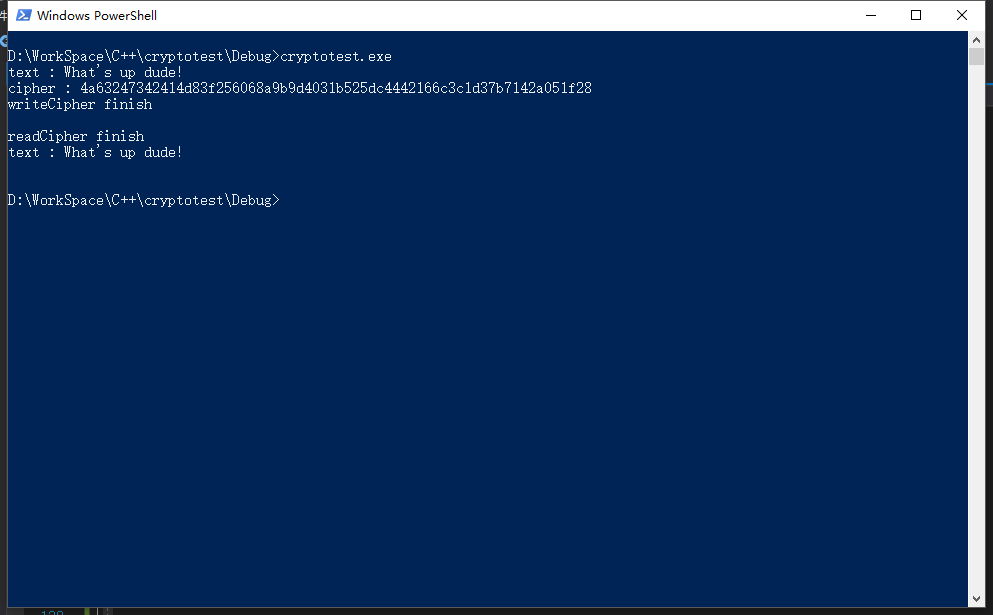
Windows10 VS2017 C++使用crypto++库加密解密(AES)

版权声明:本文可能为博主原创文章,若标明出处可随便转载。 https://blog.csdn.net/Jailman/article/details/85262234 参考文章:https://blog.csdn.net/tangcaijun/article/details/42110319 首先下载库:https://www.cryptopp.com/#download 使用vs2017打开cryptest.sln文件,解决方案选择“重订解决方案目标”,升级sdk。 编译库和dll文件 将生成的cryptopp.lib和cryptopp.dll放到项目文件夹,如果单独运行需要将dll文件拷贝到debug文件夹和生成的exe文件放在一起使用。 新建win32 c++控制台程序,工程->配置属性->vc++目录->包含目录,填写cryptopp的目录,需要使用其中的头文件. 编码: #include "pch.h" #include <iostream> #include <fstream> #include <aes.h> #include <filters.h> #include <modes.h> #include <Windows.h> #pragma comment(lib, "cryptopp.lib") using namespace std; byte key[CryptoPP::AES::DEFAULT_KEYLENGTH], iv[CryptoPP::AES::BLOCKSIZE]; void initKV() { memset(key, 0x00, CryptoPP::AES::DEFAULT_KEYLENGTH); memset(iv, 0x00, CryptoPP::AES::BLOCKSIZE); // 或者也可以 /* char tmpK[] = "1234567890123456"; char tmpIV[] = "1234567890123456"; for (int j = 0; j < CryptoPP::AES::DEFAULT_KEYLENGTH; ++j) { key[j] = tmpK[j]; } for (int i = 0; i < CryptoPP::AES::BLOCKSIZE; ++i) { iv[i] = tmpIV[i]; } */ } string encrypt(string plainText) { string cipherText; // CryptoPP::AES::Encryption aesEncryption(key, CryptoPP::AES::DEFAULT_KEYLENGTH); CryptoPP::CBC_Mode_ExternalCipher::Encryption cbcEncryption(aesEncryption, iv); CryptoPP::StreamTransformationFilter stfEncryptor(cbcEncryption, new CryptoPP::StringSink(cipherText)); stfEncryptor.Put(reinterpret_cast<const unsigned char*>(plainText.c_str()), plainText.length() + 1); stfEncryptor.MessageEnd(); string cipherTextHex; for (int i = 0; i < cipherText.size(); i++) { char ch[3] = { 0 }; sprintf_s(ch, "%02x", static_cast<byte>(cipherText[i])); cipherTextHex += ch; } return cipherTextHex; } void writeCipher(string output) { ofstream out("cipher.data"); out.write(output.c_str(), output.length()); out.close(); cout << "writeCipher finish " << endl << endl; } string decrypt(string cipherTextHex) { string cipherText; string decryptedText; int i = 0; while (true) { char c; int x; stringstream ss; ss << hex << cipherTextHex.substr(i, 2).c_str(); ss >> x; c = (char)x; cipherText += c; if (i >= cipherTextHex.length() - 2)break; i += 2; } // CryptoPP::AES::Decryption aesDecryption(key, CryptoPP::AES::DEFAULT_KEYLENGTH); CryptoPP::CBC_Mode_ExternalCipher::Decryption cbcDecryption(aesDecryption, iv); CryptoPP::StreamTransformationFilter stfDecryptor(cbcDecryption, new CryptoPP::StringSink(decryptedText)); stfDecryptor.Put(reinterpret_cast<const unsigned char*>(cipherText.c_str()), cipherText.size()); stfDecryptor.MessageEnd(); return decryptedText; } string readCipher() { ifstream in("cipher.data"); string line; string decryptedText; while (getline(in, line)) { if (line.length() > 1) { decryptedText += decrypt(line) + "\n"; } line.clear(); } cout << "readCipher finish " << endl; in.close(); return decryptedText; } int main() { string text = "What's up dude!"; cout << "text : " << text << endl; initKV(); string cipherHex = encrypt(text); cout << "cipher : " << cipherHex << endl; writeCipher(cipherHex); string decrpt_text = readCipher(); cout << "text : " << decrpt_text << endl; return 0; } 运行结果:


优秀的个人博客,低调大师

SSLClient 工具

import org.apache.http.conn.ClientConnectionManager; import org.apache.http.conn.scheme.Scheme; import org.apache.http.conn.scheme.SchemeRegistry; import org.apache.http.conn.ssl.SSLSocketFactory; import org.apache.http.impl.client.DefaultHttpClient; import javax.net.ssl.SSLContext; import javax.net.ssl.TrustManager; import javax.net.ssl.X509TrustManager; import java.security.cert.CertificateException; import java.security.cert.X509Certificate; /** * 〈一句话功能简述〉<br> * 〈避免需要证书用于进行Https请求的HttpClient 〉 * * @author zhoumoxuan * @create 9/14/18 * @since 1.0.0 */ public class SSLClient extends DefaultHttpClient { public SSLClient() throws Exception { super(); SSLContext ctx = SSLContext.getInstance("TLS"); X509TrustManager tm = new X509TrustManager() { @Override public void checkClientTrusted(X509Certificate[] chain, String authType) throws CertificateException { } @Override public void checkServerTrusted(X509Certificate[] chain, String authType) throws CertificateException { } @Override public X509Certificate[] getAcceptedIssuers() { return null; } }; ctx.init(null, new TrustManager[]{tm}, null); SSLSocketFactory ssf = new SSLSocketFactory(ctx, SSLSocketFactory.ALLOW_ALL_HOSTNAME_VERIFIER); ClientConnectionManager ccm = this.getConnectionManager(); SchemeRegistry sr = ccm.getSchemeRegistry(); sr.register(new Scheme("https", 443, ssf)); } }

优秀的个人博客,低调大师

Python工具

PyEnv python -V --> 显示版本 pyenv install --list --> 列出所有可以安装的包 pyenv versions --> 显示所有的版本 pyenv version --> 显示当前的版本 pyenv install versionId --> 安装 pyenv install versionId -v --> 采用缓存的方式安装 pyenv local 3.6.2 --> 在当期目录创建一个.python-version, 执行pyenv local 自动读取当前目录下的该文件修改PATH变量, 但是这种方式不是基于虚拟环境的, 没有实现隔离 pyenv virtualenv versionId envName --> 创建一个独立的虚拟环境(对PATH做了手脚, 还在工作目录~/.pyenv/versions/对应的versionId目录下创建了名为envName的目录, 虚拟环境独立提供了binary执行文件和site-packages目录) pyevn active envName --> 求换python版本(python的虚拟环境, 修理了PATH) pyenv deactive --> 退出当前虚拟化境 建议对于不同目的的project创建不同的python虚拟环境, 爬虫创建web(有flask等包), 数据分析创建datanalysis(有numpy等包) pyenv uninstall vir --> 删除虚拟化境 更改pip源 cd mkdir .pip cd .pip vim pip.conf [global] trusted-host = mirrors.aliyun.com index-url = http://mirrors.aliyun.com/pypi/simple pip freeze > /tmp/packages.list --> 导出所有已经安装的Python包 pip install -r /tmp/packages.list --> 安装所有在packages.list中的包 jupyter notebookp配置 jupyter notebook --generate-config jupyter notebook password jupyter notebook --ip 0.0.0.0 --no-browser

资源下载

更多资源
Mario

Mario

马里奥是站在游戏界顶峰的超人气多面角色。马里奥靠吃蘑菇成长,特征是大鼻子、头戴帽子、身穿背带裤,还留着胡子。与他的双胞胎兄弟路易基一起,长年担任任天堂的招牌角色。

Spring

Spring

Spring框架(Spring Framework)是由Rod Johnson于2002年提出的开源Java企业级应用框架,旨在通过使用JavaBean替代传统EJB实现方式降低企业级编程开发的复杂性。该框架基于简单性、可测试性和松耦合性设计理念,提供核心容器、应用上下文、数据访问集成等模块,支持整合Hibernate、Struts等第三方框架,其适用范围不仅限于服务器端开发,绝大多数Java应用均可从中受益。

Rocky Linux

Rocky Linux

Rocky Linux(中文名:洛基)是由Gregory Kurtzer于2020年12月发起的企业级Linux发行版,作为CentOS稳定版停止维护后与RHEL(Red Hat Enterprise Linux)完全兼容的开源替代方案,由社区拥有并管理,支持x86_64、aarch64等架构。其通过重新编译RHEL源代码提供长期稳定性,采用模块化包装和SELinux安全架构,默认包含GNOME桌面环境及XFS文件系统,支持十年生命周期更新。

Sublime Text

Sublime Text

Sublime Text具有漂亮的用户界面和强大的功能,例如代码缩略图,Python的插件,代码段等。还可自定义键绑定,菜单和工具栏。Sublime Text 的主要功能包括:拼写检查,书签,完整的 Python API , Goto 功能,即时项目切换,多选择,多窗口等等。Sublime Text 是一个跨平台的编辑器,同时支持Windows、Linux、Mac OS X等操作系统。

用户登录
用户注册