鸿蒙HI3516-驱动开发(1.1-LTS)
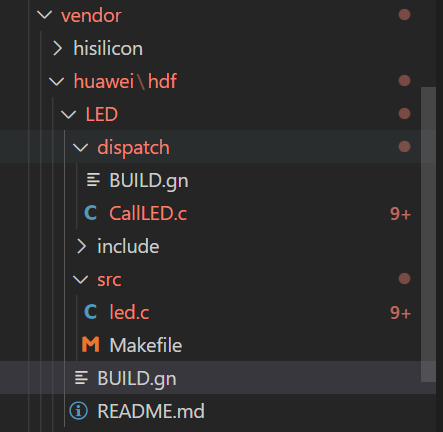
代码在:https://gitee.com/kwydm/open-harmony-taurus 目录大致结构 1.驱动开发 创建目录://vendor/huawei/hdf/LED/src 新建Makefile include $(LITEOSTOPDIR)/../../drivers/adapter/khdf/liteos/lite.mk MODULE_NAME := hdf_led_driver LOCAL_SRCS += led.c LOCAL_INCLUDE := ./include LOCAL_CFLAGS += -fstack-protector-strong -Wextra -Wall -Werror include $(HDF_DRIVER) 打开//device/hisilicon/drivers/lite.mk 编译结果文件链接到内核镜像 ## 在头部添加变量 VENDOR_HDF_DRIVERS_ROOT := $(LITEOSTOPDIR)/../../vendor/huawei/hdf LITEOS_BASELIB += -lhdf_led_driver LIB_SUBDIRS += $(VENDOR_HDF_DRIVERS_ROOT)/LED/src 新建led.c #include "hdf_device_desc.h" // HDF框架对驱动开放相关能力接口的头文件 #include "hdf_log.h" // HDF 框架提供的日志接口头文件 #include "device_resource_if.h" #include "osal_io.h" #include "osal_mem.h" #include "gpio_if.h" #include "osal_irq.h" #include "osal_time.h" #define HDF_LOG_TAG led_driver // 打印日志所包含的标签,如果不定义则用默认定义的HDF_TAG标签 #define LED_WRITE_READ 1 // 读写操作码1 static int32_t CtlLED(int mode) { int32_t ret; uint16_t valRead; /* LED的GPIO管脚号 */ uint16_t gpio = 5 * 8 + 1; // 红外补光灯 // uint16_t gpio = 2 * 8 + 3; // 绿色指示灯 // uint16_t gpio = 3 * 8 + 4; // 红色指示灯 /* 将GPIO管脚配置为输出 */ ret = GpioSetDir(gpio, GPIO_DIR_OUT); if (ret != 0) { HDF_LOGE("GpioSerDir: failed, ret %d\n", ret); return ret; } if (mode == -1) { // 翻转输出口 (void)GpioRead(gpio, &valRead); ret = GpioWrite(gpio, (valRead == GPIO_VAL_LOW) ? GPIO_VAL_HIGH : GPIO_VAL_LOW); } else { ret = GpioWrite(gpio, mode); } if (ret != 0) { HDF_LOGE("GpioWrite: failed, ret %d\n", ret); return ret; } return ret; } // Dispatch是用来处理用户态发下来的消息 int32_t LedDriverDispatch(struct HdfDeviceIoClient *client, int cmdCode, struct HdfSBuf *data, struct HdfSBuf *reply) { int32_t result = HDF_FAILURE; HDF_LOGE("Led driver dispatch"); if (client == NULL || client->device == NULL) { HDF_LOGE("Led driver device is NULL"); return HDF_ERR_INVALID_OBJECT; } switch (cmdCode){ case LED_WRITE_READ: const char *recv = HdfSbufReadString(data); if (recv != NULL) { //HDF_LOGI("recv: %s", recv); result = CtlLED(-1); // CtlLED(GPIO_VAL_HIGH); if (!HdfSbufWriteInt32(reply, result)){ //HDF_LOGE("replay is fail"); } return HdfDeviceSendEvent(client->device, cmdCode, data); } break; default: break; } return result; } //驱动对外提供的服务能力,将相关的服务接口绑定到HDF框架 int32_t HdfLedDriverBind(struct HdfDeviceObject *deviceObject) { if (deviceObject == NULL) { HDF_LOGE("Led driver bind failed!"); return HDF_ERR_INVALID_OBJECT; } static struct IDeviceIoService ledDriver = { .Dispatch = LedDriverDispatch, }; deviceObject->service = (struct IDeviceIoService *)(&ledDriver); HDF_LOGD("Led driver bind success"); return HDF_SUCCESS; } // 驱动自身业务初始的接口 int32_t HdfLedDriverInit(struct HdfDeviceObject *deviceObject) { if (deviceObject == NULL) { HDF_LOGE("Led driver Init failed!"); return HDF_ERR_INVALID_OBJECT; } HDF_LOGD("Led driver Init success"); return HDF_SUCCESS; } // 驱动资源释放的接口 void HdfLedDriverRelease(struct HdfDeviceObject *deviceObject) { if (deviceObject == NULL) { HDF_LOGE("Led driver release failed!"); return; } HDF_LOGD("Led driver release success"); return; } // 定义驱动入口的对象,必须为HdfDriverEntry(在hdf_device_desc.h中定义)类型的全局变量 struct HdfDriverEntry g_ledDriverEntry = { .moduleVersion = 1, .moduleName = "led_driver", .Bind = HdfLedDriverBind, .Init = HdfLedDriverInit, .Release = HdfLedDriverRelease, }; // 调用HDF_INIT将驱动入口注册到HDF框架中,在加载驱动时HDF框架会先调用Bind函数,再调用Init函数加载该驱动,当Init调用异常时,HDF框架会调用Release释放驱动资源并退出。 HDF_INIT(g_ledDriverEntry); 2.用户态 \vendor\huawei\hdf\LED\dispatch\CallLED.c #include <stdio.h> #include <fcntl.h> #include <sys/stat.h> #include <sys/ioctl.h> #include <unistd.h> #include "hdf_log.h" #include "hdf_sbuf.h" #include "hdf_io_service_if.h" #define LED_WRITE_READ 1 #define HDF_LOG_TAG LED_APP #define LED_SERVICE "led_service" // 接收驱动上报事件 static int OnDevEventReceived(void *priv, uint32_t id, struct HdfSBuf *data) { const char *string = HdfSbufReadString(data); if (string == NULL) { HDF_LOGE("fail to read string in event data"); return HDF_FAILURE; } HDF_LOGE("%s: dev event received: %u %s", (char *)priv, id, string); return HDF_SUCCESS; } static int SendEvent(struct HdfIoService *serv, char *eventData) { int ret = 0; struct HdfSBuf *data = HdfSBufObtainDefaultSize(); if (data == NULL) { HDF_LOGE("fail to obtain sbuf data"); return 1; } struct HdfSBuf *reply = HdfSBufObtainDefaultSize(); if (reply == NULL) { HDF_LOGE("fail to obtain sbuf reply"); ret = HDF_DEV_ERR_NO_MEMORY; goto out; } if (!HdfSbufWriteString(data, eventData)) { HDF_LOGE("fail to write sbuf"); ret = HDF_FAILURE; goto out; } ret = serv->dispatcher->Dispatch(&serv->object, LED_WRITE_READ, data, reply); if (ret != HDF_SUCCESS) { HDF_LOGE("fail to send service call"); goto out; } int replyData = 0; if (!HdfSbufReadInt32(reply, &replyData)) { HDF_LOGE("fail to get service call reply"); ret = HDF_ERR_INVALID_OBJECT; goto out; } HDF_LOGE("Get reply is: %d", replyData); out: HdfSBufRecycle(data); HdfSBufRecycle(reply); return ret; } int main(void) { struct HdfIoService *serv = HdfIoServiceBind(LED_SERVICE);// 用户态获取驱动的服务 if (serv == NULL) { HDF_LOGE("fail to get service %s", LED_SERVICE); return HDF_FAILURE; } static struct HdfDevEventlistener listener = { .callBack = OnDevEventReceived, .priv = "Service0"}; // 用户态程序注册接收驱动上报事件的操作方法。 if (HdfDeviceRegisterEventListener(serv, &listener) != HDF_SUCCESS) { HDF_LOGE("fail to register event listener"); return HDF_FAILURE; } char *send_cmd = "toggle LED"; while (1) { if (SendEvent(serv, send_cmd)) { HDF_LOGE("fail to send event"); return HDF_FAILURE; } sleep(1); } if (HdfDeviceUnregisterEventListener(serv, &listener)) { HDF_LOGE("fail to unregister listener"); return HDF_FAILURE; } HdfIoServiceRecycle(serv);// 释放驱动服务。 HDF_LOGI("exit"); return HDF_SUCCESS; } \vendor\huawei\hdf\LED\dispatch\BUILD.gn # Copyright (c) 2020 Huawei Device Co., Ltd. # Licensed under the Apache License, Version 2.0 (the "License"); # you may not use this file except in compliance with the License. # You may obtain a copy of the License at # # http://www.apache.org/licenses/LICENSE-2.0 # # Unless required by applicable law or agreed to in writing, software # distributed under the License is distributed on an "AS IS" BASIS, # WITHOUT WARRANTIES OR CONDITIONS OF ANY KIND, either express or implied. # See the License for the specific language governing permissions and # limitations under the License. HDF_FRAMEWORKS = "//drivers/framework" # 暂时放在这里编译用户态设备驱动消息调用程序,回头在考虑移到独立组件去编译Gavin Lee executable("CallLED") { sources = [ "//vendor/huawei/hdf/LED/dispatch/CallLED.c" ] include_dirs = [ "//vendor/huawei/hdf/LED/include", "$HDF_FRAMEWORKS/core/adapter/vnode/include", "$HDF_FRAMEWORKS/core/adapter/syscall/include", "$HDF_FRAMEWORKS/core/shared/include", "$HDF_FRAMEWORKS/core/host/include", "$HDF_FRAMEWORKS/core/manager/include", "$HDF_FRAMEWORKS/ability/sbuf/include", "$HDF_FRAMEWORKS/include/core", "$HDF_FRAMEWORKS/include/utils", "$HDF_FRAMEWORKS/utils/include", "$HDF_FRAMEWORKS/include/osal", "$HDF_FRAMEWORKS/../adapter/uhdf/posix/include", "//third_party/bounds_checking_function/include", "//base/hiviewdfx/hilog_lite/interfaces/native/innerkits", ] deps = [ "//base/hiviewdfx/hilog_lite/frameworks/featured:hilog_shared", "//drivers/adapter/uhdf/posix:hdf_posix", "//drivers/adapter/uhdf/manager:hdf_core", "//drivers/adapter/uhdf/posix:hdf_posix_osal" ] public_deps = [ "//third_party/bounds_checking_function:libsec_shared", ] defines = [ "__USER__", ] cflags = [ "-Wall", "-Wextra", "-Werror", ] } vendor\huawei\hdf\LED\BUILD.gn import("//build/lite/config/component/lite_component.gni") lite_component("led_gpio"){ features = ["dispatch:CallLED"] } build\lite\components\drivers.json 3.烧录运行 串口发送下面的代码 ./bin/CallLED 执行之后这个补光灯会1S闪一次 参考:https://harmonyos.51cto.com/posts/2820,Gavin,Dweb九弓子