首页 文章 精选 留言 我的

精选列表

搜索[API集成],共10000篇文章
优秀的个人博客,低调大师

Hadoop MapReduce编程 API入门系列之Crime数据分析(二十五)(未完)

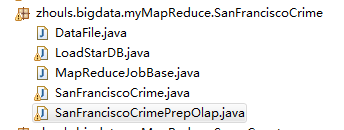
一共12列,我们只需提取有用的列:第二列(犯罪类型)、第四列(一周的哪一天)、第五列(具体时间)和第七列(犯罪场所)。 思路分析 基于项目的需求,我们通过以下几步完成: 1、首先根据数据集,分别统计出不同犯罪类别在周时段内发生犯罪次数和不同区域在周时段内发生犯罪的次数。 2、然后根据第一步的输出结果,再按日期统计出每天每种犯罪类别在每个区域发生的犯罪次数。 3、将前两步的输出结果,按需求插入数据库,便于对犯罪数据的分析。 程序开发 我们要编写5个文件: 编写基类,MapReduceJobBase.java 数据处理类,DataFile.java 编写第一个任务类,SanFranciscoCrime.java 编写第二个任务类,SanFranciscoCrimePrepOlap.java 编写第三个任务,插入数据库类,LoadStarDB.java Hive那边的 数据库首先需要创建4个表, 分别为:category(name,cid)、 district(name,did)、 fact(fid,district_id,category_id,time_id,crimes)和 timeperiod(tpid,year,month,week,day)。 编译和执行MapReduce作业 1、myclipse将项目编译和打包为crime.jar,使用SSH将crime.jar上传至hadoop的/home/hadoop/目录下。 2、使用cd /home/hadoop/djt 切换到当前目录,通过命令行执行任务。 2.1 首先执行第一个作业 SanFranciscoCrime.java。 hadoop jar crime.jar zhouls.bigdata.myMapReduce.SanFranciscoCrime.SanFranciscoCrime 2.2 然后执行第二个作业SanFranciscoCrimePrepOlap.java。 hadoop jar crime.jar zhouls.bigdata.myMapReduce.SanFranciscoCrime.SanFranciscoCrimePrepOlap 2.3 最后执行第三个作业LoadStarDB.java,将数据插入数据库。 hadoop jar crime.jar zhouls.bigdata.myMapReduce.SanFranciscoCrime.LoadStarDB 运行结果 任务的最终结果插入数据库,数据结果如下图所示。字段分别为:区域主键district_id、类别主键category_id、时间主键time_id、犯罪次数crimes和主键fid。 代码 package zhouls.bigdata.myMapReduce.SanFranciscoCrime; import java.text.DateFormat; import java.text.ParseException; import java.text.SimpleDateFormat; import java.util.Date; import org.apache.hadoop.conf.Configured; /** * * @function 在 MapReduce 基类中,定义基础成员变量,减少 MapReduce 主类的工作量 * * */ public class MapReduceJobBase extends Configured { /** * 犯罪类型在犯罪数据数组的下标为1的位置 */ protected static final int CATEGORY_COLUMN_INDEX = 1; /** * 礼拜几在犯罪数据数组的下标为3的位置 */ protected static final int DAY_OF_WEEK_COLUMN_INDEX = 3; /** * 日期在犯罪数据数组的下标为4的位置 */ protected static final int DATE_COLUMN_INDEX = 4; /** * 犯罪区域在犯罪数据数组的下标为6的位置 */ protected static final int DISTRICT_COLUMN_INDEX = 6; /** * 定义日期的数据格式 */ protected static final DateFormat df = new SimpleDateFormat("MM/dd/yyyy"); /** * 定义 map/reduce job结果中,日期的输出格式 */ protected static final DateFormat outputDateFormat = new SimpleDateFormat("yyyy/MM/dd"); /** * @function 将字符串格式的日期转换为自定义Date类型的日期 * @param value 包含完整的日期字符串 * @return Date类型的日期 * @throws ParseException */ protected static Date getDate(String value) throws ParseException { Date retVal = null; String[] dp = value.split(" "); if (dp.length > 0) { retVal = df.parse(dp[0]); } return retVal; } } package zhouls.bigdata.myMapReduce.SanFranciscoCrime; import java.io.BufferedReader; import java.io.ByteArrayInputStream; import java.io.IOException; import java.io.InputStreamReader; import java.util.ArrayList; import java.util.Collections; import java.util.List; import org.apache.hadoop.fs.FSDataInputStream; import org.apache.hadoop.fs.FileSystem; import org.apache.hadoop.fs.Path; import com.opencsv.CSVReader; /** * * @function 从 map/reduce的输出结果中读取并提取数据 * * */ public abstract class DataFile { /** * @function 从 map/reduce job 的输出结果,提取key值集合 * @param fn HDFS上的文件路径 * @return list key值的集合 * @throws IOException */ public static List<String> extractKeys(String fn,FileSystem fs) throws IOException { FSDataInputStream in = fs.open(new Path(fn));//打开文件 List<String> retVal = new ArrayList<String>();//新建存储key值的集合list BufferedReader br = new BufferedReader(new InputStreamReader(in)); String line = br.readLine();//按行读取数据 while (line != null) { String[] lp = line.split("\t"); if (lp.length > 0) { retVal.add(lp[0]);//提取每行的第一个字段key } line = br.readLine(); } br.close(); Collections.sort(retVal);//对key值进行排序 return retVal; } /** * @function 将 csv文件格式的每行内容转换为数组返回 * @param 读取的一行数据 * @return array 数组 * @throws IOException */ public static String[] getColumns(String line) throws IOException { CSVReader reader = new CSVReader(new InputStreamReader(new ByteArrayInputStream(line.getBytes()))); String[] retVal = reader.readNext(); reader.close(); return retVal; } } package zhouls.bigdata.myMapReduce.SanFranciscoCrime; import java.io.IOException; import java.text.MessageFormat; import java.text.ParseException; import java.util.ArrayList; import java.util.Calendar; import java.util.Collections; import java.util.Date; import java.util.HashMap; import java.util.List; import java.util.logging.Level; import java.util.logging.Logger; import org.apache.hadoop.conf.Configuration; import org.apache.hadoop.conf.Configured; import org.apache.hadoop.fs.FileSystem; import org.apache.hadoop.fs.Path; import org.apache.hadoop.io.LongWritable; import org.apache.hadoop.io.Text; import org.apache.hadoop.mapreduce.Job; import org.apache.hadoop.mapreduce.Mapper; import org.apache.hadoop.mapreduce.Reducer; import org.apache.hadoop.mapreduce.lib.input.FileInputFormat; import org.apache.hadoop.mapreduce.lib.jobcontrol.ControlledJob; import org.apache.hadoop.mapreduce.lib.jobcontrol.JobControl; import org.apache.hadoop.mapreduce.lib.output.FileOutputFormat; import org.apache.hadoop.util.Tool; import org.apache.hadoop.util.ToolRunner; /** * * 时段系统(bucketed system),在物料需求计划(MRP)、配销资源规划(DRP)或其他时程化(time-phased)的系统里, * 所有时程化的资料都累积在同一时期,或称时段(buchet)。如果累积的时间是以周为时间单位,此系统就称为周时段(weekly buckets)。 * 周时段(weekly buckets)即是一种以周为单位的统计方式 * @function 统计每个事件在每个周时段内发生的次数 * * */ public class SanFranciscoCrime extends MapReduceJobBase implements Tool { private static Logger log = Logger .getLogger(SanFranciscoCrime.class.getCanonicalName()); /** * CrimeMapper是一个公共的父类 */ public static class CrimeMapper extends Mapper<LongWritable, Text, Text, Text> { protected int keyID = 0; protected int valueID = 0; public void map(LongWritable key, Text value, Context context) throws IOException, InterruptedException { String line = value.toString(); try { String[] col = DataFile.getColumns(line); if (col != null) { // 防止数组超界 if (col.length >= (DISTRICT_COLUMN_INDEX + 1)) { //过滤文件第一行头部名称 if (!"date".equalsIgnoreCase(col[valueID])) { Text tk = new Text(); tk.set(col[keyID]); Text tv = new Text(); tv.set(col[valueID]); context.write(tk, tv); } } else { log.warning(MessageFormat.format( "Data {0} did not parse into columns.", new Object[] { line })); } } else { log.warning(MessageFormat.format( "Data {0} did not parse into columns.", new Object[] { line })); } } catch (NumberFormatException nfe) { log.log(Level.WARNING, MessageFormat .format("Expected {0} to be a number.\n", new Object[] { line }), nfe); } catch (IOException e) { log.log(Level.WARNING, MessageFormat.format( "Cannot parse {0} into columns.\n", new Object[] { line }), e); } } } /** * 输出key为犯罪类别,value为日期 */ public static class CategoryMapByDate extends CrimeMapper { public CategoryMapByDate() { keyID = CATEGORY_COLUMN_INDEX;//key为犯罪类别 valueID = DATE_COLUMN_INDEX;//value为日期 } } /** * 输出key为犯罪区域,value为日期 */ public static class DistrictMapByDate extends CrimeMapper { public DistrictMapByDate() { keyID = DISTRICT_COLUMN_INDEX;//key为犯罪区域 valueID = DATE_COLUMN_INDEX;//value为日期 } } /** * 统计并解析 Mapper 端的输出结果 */ public static class CrimeReducerByWeek extends Reducer<Text, Text, Text, Text> { public void reduce(Text key, Iterable<Text> values, Context context) throws IOException, InterruptedException { List<String> incidents = new ArrayList<String>(); // 将values放入incidents列表中 for (Text value : values) { incidents.add(value.toString()); } if (incidents.size() > 0) { //对incidents列表排序 Collections.sort(incidents); java.util.Map<Integer, Integer> weekSummary = new HashMap<Integer, Integer>(); //因为是对1-3月数据分析,周时段(weekly buckets)最大为15,所以weekSummary长度为15即可 for (int i = 0; i < 16; i++) { weekSummary.put(i, 0); } //统计每个周时段(weekly buckets)内,该事件发生的次数 for (String incidentDay : incidents) { try { Date d = getDate(incidentDay); Calendar cal = Calendar.getInstance(); cal.setTime(d); int week = cal.get(Calendar.WEEK_OF_MONTH);//这个月的第几周 int month = cal.get(Calendar.MONTH);//第几个月,从0开始 //如果累积的时间是以周为时间单位,此系统就称为周时段(weekly buckets)。 //周时段的计算公式,最大为15,它只是一种统计方式,不必深究 int bucket = (month * 5) + week; //统计每个周时段内,该事件发生的次数 if (weekSummary.containsKey(bucket)) { weekSummary.put(bucket, new Integer(weekSummary .get(bucket).intValue() + 1)); } else { weekSummary.put(bucket, new Integer(1)); } } catch (ParseException pe) { log.warning(MessageFormat.format("Invalid date {0}", new Object[] { incidentDay })); } } // 将该事件在每个周时段内发生的次数生成字符串输出 StringBuffer rpt = new StringBuffer(); boolean first = true; for (int week : weekSummary.keySet()) { if (first) { first = false; } else { rpt.append(","); } rpt.append(new Integer(weekSummary.get(week)).toString()); } String list = rpt.toString(); Text tv = new Text(); tv.set(list); //value为0-15周时段内,该事件发生的次数 context.write(key, tv); } } } @Override public int run(String[] args) throws Exception { Configuration conf1 = new Configuration(); Path out1 = new Path(args[1]); FileSystem hdfs1 = out1.getFileSystem(conf1); if (hdfs1.isDirectory(out1)) { hdfs1.delete(out1, true); } // 任务1 Job job1 = new Job(conf1, "crime"); job1.setJarByClass(SanFranciscoCrime.class); job1.setMapperClass(CategoryMapByDate.class); job1.setReducerClass(CrimeReducerByWeek.class); job1.setOutputKeyClass(Text.class); job1.setOutputValueClass(Text.class); FileInputFormat.addInputPath(job1, new Path(args[0])); FileOutputFormat.setOutputPath(job1, new Path(args[1])); // 任务2 Configuration conf2 = new Configuration(); Path out2 = new Path(args[2]); FileSystem hdfs2 = out2.getFileSystem(conf2); if (hdfs2.isDirectory(out2)) { hdfs2.delete(out2, true); } Job job2 = new Job(conf2, "crime"); job2.setJarByClass(SanFranciscoCrime.class); job2.setMapperClass(DistrictMapByDate.class); job2.setReducerClass(CrimeReducerByWeek.class); job2.setOutputKeyClass(Text.class); job2.setOutputValueClass(Text.class); FileInputFormat.addInputPath(job2, new Path(args[0])); FileOutputFormat.setOutputPath(job2, new Path(args[2])); // 构造一个 cJob1 ControlledJob cJob1 = new ControlledJob(conf1); //设置 MapReduce job1 cJob1.setJob(job1); // 构造一个 cJob2 ControlledJob cJob2 = new ControlledJob(conf2); //设置 MapReduce job2 cJob2.setJob(job2); //cJob2.addDependingJob(cJob1);// cjob2依赖cjob1 // 定义job管理对象 JobControl jobControl = new JobControl("12"); //把两个构造的job加入到JobControl中 jobControl.addJob(cJob1); jobControl.addJob(cJob2); //启动线程运行任务 Thread t = new Thread(jobControl); t.start(); while (true) { if (jobControl.allFinished()) { jobControl.stop(); break; } } return 0; } public static void main(String[] args) throws Exception { String[] args0 = { "hdfs://HadoopMaster:9000/middle/crime/crime.csv", "hdfs://HadoopMaster:9000/middle/test/out1/", "hdfs://HadoopMaster:9000/middle/test/out2/" }; int ec = ToolRunner.run(new Configuration(), new SanFranciscoCrime(), args0); System.exit(ec); } } package zhouls.bigdata.myMapReduce.SanFranciscoCrime; import java.io.IOException; import java.net.URI; import java.text.MessageFormat; import java.text.ParseException; import java.util.HashMap; import java.util.List; import java.util.logging.Level; import java.util.logging.Logger; import org.apache.hadoop.conf.Configuration; import org.apache.hadoop.fs.FileSystem; import org.apache.hadoop.fs.Path; import org.apache.hadoop.io.LongWritable; import org.apache.hadoop.io.Text; import org.apache.hadoop.mapreduce.Job; import org.apache.hadoop.mapreduce.Mapper; import org.apache.hadoop.mapreduce.Reducer; import org.apache.hadoop.mapreduce.lib.input.FileInputFormat; import org.apache.hadoop.mapreduce.lib.output.FileOutputFormat; import org.apache.hadoop.util.Tool; import org.apache.hadoop.util.ToolRunner; /** * * @function 统计每天每种犯罪类型在每个区域发生的次数 * * */ public class SanFranciscoCrimePrepOlap extends MapReduceJobBase implements Tool { private static Logger log = Logger.getLogger(SanFranciscoCrimePrepOlap.class.getCanonicalName()); private static List<String> categories = null; private static List<String> districts = null; private static final java.util.Map<String, Integer> categoryLookup = new HashMap<String, Integer>(); private static final java.util.Map<String, Integer> districtLookup = new HashMap<String, Integer>(); public static abstract class Map extends Mapper<LongWritable, Text, Text, Text> { protected int keyID = 0; protected int valueID = 0; protected int value2ID = 0; /** * @function 将key值转换为规范的数据格式 * @param value 包含不规范的 key值 * @return 返回规范的key值 * @throws ParseException */ protected abstract String formatKey(String value) throws ParseException; public void map(LongWritable key, Text value, Context context) throws IOException, InterruptedException { String line = value.toString(); try { String[] col = DataFile.getColumns(line);//将读取的每行数据转换为数组 if (col != null) { if (col.length >= (DISTRICT_COLUMN_INDEX + 1)) { Text tk = new Text(); tk.set(formatKey(col[keyID]));//将日期作为key值 Text tv = new Text(); StringBuffer sv = new StringBuffer(); sv.append("\""); sv.append(col[valueID]);//犯罪区域 sv.append("\""); sv.append(","); sv.append("\""); sv.append(col[value2ID]);//犯罪类型 sv.append("\""); tv.set(sv.toString()); context.write(tk, tv); } else { log.warning(MessageFormat.format("Data {0} did not parse into columns.", new Object[]{line})); } } else { log.warning(MessageFormat.format("Data {0} did not parse into columns.", new Object[]{line})); } } catch (NumberFormatException nfe) { log.log(Level.WARNING, MessageFormat.format("Expected {0} to be a number.\n", new Object[]{line}), nfe); } catch (IOException e) { log.log(Level.WARNING, MessageFormat.format("Cannot parse {0} into columns.\n", new Object[]{line}), e); } catch (ParseException e) { log.log(Level.WARNING, MessageFormat.format("Expected {0} to be a date but it was not.\n", new Object[]{line}), e); } } } /** * @function 将 map 输入数据的日期作为key,犯罪区域和犯罪类型作为value,然后输出 */ public static class DateMapByCategoryAndDistrict extends Map { public DateMapByCategoryAndDistrict() { keyID = DATE_COLUMN_INDEX;//代表日期下标 valueID = DISTRICT_COLUMN_INDEX;//代表犯罪区域下标 value2ID = CATEGORY_COLUMN_INDEX;//代表犯罪类型下标 } @Override protected String formatKey(String value) throws ParseException { return outputDateFormat.format(getDate(value)); } } public static class Reduce extends Reducer<Text, Text, Text, Text> { public void reduce(Text key, Iterable<Text> values, Context context) throws IOException, InterruptedException { // 分配和初始化犯罪类型所在区域的二维数组 int[][] crimes = new int[categories.size()][districts.size()]; for (int i = 0; i < categories.size(); i++) { for (int j = 0; j < districts.size(); j++) { crimes[i][j] = 0; } } //统计犯罪类型/区域二维数组的值(即每种犯罪类型在每个区域发生的次数) for (Text crime:values) { String[] cols = DataFile.getColumns(crime.toString()); if (cols.length == 2) { if (categoryLookup.containsKey(cols[1])) { if (districtLookup.containsKey(cols[0])) { int cat = categoryLookup.get(cols[1]); int dist = districtLookup.get(cols[0]); crimes[cat][dist]++; } else { log.warning(MessageFormat.format("District {0} not found.", new Object[]{cols[0]})); } } else { log.warning(MessageFormat.format("Category {0} not found.", new Object[]{cols[1]})); } } else { log.warning(MessageFormat.format("Input {0} was in unexpected format", new Object[]{crime})); } } //将非0二维数组的犯罪类别下标,犯罪区域下标,犯罪次数作为value输出 for (int i = 0; i < categories.size(); i++) { for (int j = 0; j < districts.size(); j++) { if (crimes[i][j] > 0) { StringBuffer sv = new StringBuffer(); sv.append(new Integer(i).toString());//犯罪类别下标 sv.append(","); sv.append(new Integer(j).toString());//犯罪区域下标 sv.append(","); sv.append(new Integer(crimes[i][j]));//犯罪次数 Text tv = new Text(); tv.set(sv.toString()); context.write(key, tv); } } } } } /** * @function 加载已经生成的 犯罪类别数据和犯罪区域数据,并将这些数据排序后存入Map * @param categoryReport SanFranciscoCrime job任务输出犯罪类别的文件路径 * @param districtReport SanFranciscoCrime job任务输出犯罪区域的文件路径 * @throws IOException */ private static void setup(String categoryReport, String districtReport,FileSystem fs) throws IOException { categories = DataFile.extractKeys(categoryReport,fs); districts = DataFile.extractKeys(districtReport,fs); int i = 0; for (String category : categories) { categoryLookup.put(category, i++); } i = 0; for (String district : districts) { districtLookup.put(district, i++); } } @Override public int run(String[] arg0) throws Exception { // TODO Auto-generated method stub Configuration conf = new Configuration(); Path out = new Path(arg0[3]); FileSystem hdfs = out.getFileSystem(conf); if (hdfs.isDirectory(out)) { hdfs.delete(out, true); } // 任务1 Job job = new Job(conf, "SanFranciscoCrimePrepOlap"); job.setJarByClass(SanFranciscoCrimePrepOlap.class); job.setMapperClass(DateMapByCategoryAndDistrict.class);//Mapper job.setReducerClass(Reduce.class);//Reducer job.setOutputKeyClass(Text.class); job.setOutputValueClass(Text.class); FileInputFormat.addInputPath(job, new Path(arg0[0])); FileOutputFormat.setOutputPath(job, new Path(arg0[3])); job.waitForCompletion(true);//提交任务 return 0; } public static void main(String[] args) throws Exception { String[] args0 = { "hdfs://HadoopMaster:9000/middle/crime/crime.csv", "hdfs://HadoopMaster:9000/middle/test/out1/part-r-00000", "hdfs://HadoopMaster:9000/middle/test/out2/part-r-00000", "hdfs://HadoopMaster:9000/middle/test/out3/"}; if (args0.length == 4) { Configuration conf = new Configuration(); FileSystem fs = FileSystem.get(URI.create("hdfs://HadoopMaster:9000"), conf); //调用setup setup(args0[1], args0[2],fs); //执行MapReduce任务 int ec = ToolRunner.run(conf, new SanFranciscoCrimePrepOlap(), args0); System.exit(ec); } else { System.err.println("\nusage: bin/hadoop jar sfcrime.hadoop.mapreduce.jobs-0.0.1-SNAPSHOT.jar SanFranciscoCrimePrepOlap path/to/category/report path/to/district/report path/to/input/data path/to/output/data"); } } } package zhouls.bigdata.myMapReduce.SanFranciscoCrime; import java.io.BufferedReader; import java.io.IOException; import java.io.InputStreamReader; import java.net.URI; import java.sql.Connection; import java.sql.DriverManager; import java.sql.SQLException; import java.sql.Statement; import java.text.DateFormat; import java.text.MessageFormat; import java.text.ParseException; import java.text.SimpleDateFormat; import java.util.Calendar; import java.util.Date; import java.util.HashMap; import java.util.List; import java.util.Map; import org.apache.hadoop.conf.Configuration; import org.apache.hadoop.fs.FSDataInputStream; import org.apache.hadoop.fs.FileSystem; import org.apache.hadoop.fs.Path; /*** * @function 从 MapReduce 任务中,提取数据,插入到mysql数据库 * */ public class LoadStarDB { private Connection db = null;//mysql数据库连接 private Map<String, Integer> lastPrimaryKey = new HashMap<String, Integer>(); private List<String> categories = null;//犯罪类别list private List<String> districts = null;//犯罪区域list //映射date主键的关系 private final java.util.Map<Date, Integer> timeperiodLookup = new HashMap<Date, Integer>(); private final DateFormat df = new SimpleDateFormat("MM/dd/yyyy");//插入数据库的日期格式 private final DateFormat kdf = new SimpleDateFormat("yyyy/MM/dd");//从map/reduce任务输出文件中,解析出此日期 /*** * @function 向数据库表中插入一条记录 * @param table 表名称 * @param row 包含插入字段的数据 * @return 返回此记录的主键id * @throws SQLException */ private int insert(String table, DataRecord row) throws SQLException { int retVal = 0; Statement s = db.createStatement(); StringBuffer sql = new StringBuffer(); sql.append("insert into "); sql.append(table); sql.append(" "); sql.append(row.toString()); s.execute(sql.toString()); if (lastPrimaryKey.containsKey(table)) { retVal = lastPrimaryKey.get(table) + 1; lastPrimaryKey.put(table, retVal); } else { lastPrimaryKey.put(table, 1); retVal = 1; } return retVal; } /*** * @function 向数据库中插入一条犯罪类别记录 * @param category name字段对应的值 * @return 返回此记录的主键id * @throws SQLException */ private int insertCategory(String category) throws SQLException { DataRecord dr = new DataRecord(); dr.put("name", category); return insert("category", dr); } /*** * @function 向数据库中插入一条犯罪区域记录 * @param district name字段对应的值 * @return 返回此记录的主键id * @throws SQLException */ private int insertDistrict(String district) throws SQLException { DataRecord dr = new DataRecord(); dr.put("name", district); return insert("district", dr); } /*** * @function 将日期date拆分为字段 year, month, week, 和 day * @param dr 包含date被拆分的字段 * @param d 需要拆分的date日期 */ private void setTimePeriod(DataRecord dr, Date d) { Calendar cal = Calendar.getInstance(); cal.setTime(d); dr.put("year", cal.get(Calendar.YEAR)); dr.put("month", cal.get(Calendar.MONTH)); dr.put("week", cal.get(Calendar.WEEK_OF_MONTH)); dr.put("day", cal.get(Calendar.DAY_OF_MONTH)); } /*** * @function 如果日期date已经存在表中,返回主键id,如果不存在,则插入数据库并返回主键id * @param d 日期date * @return 返回此日期对应的主键id * @throws SQLException */ private int insertTimePeriod(Date d) throws SQLException { int retVal = 0; if (timeperiodLookup.containsKey(d)) { retVal = timeperiodLookup.get(d); } else { DataRecord dr = new DataRecord(); setTimePeriod(dr, d); retVal = insert("timeperiod", dr); timeperiodLookup.put(d, retVal); } return retVal; } /*** * @function 将数据记录插入fact表中 * @param districtId 犯罪区域外键id * @param categoryId 犯罪类别外键id * @param timeId 日期外键id * @param crimes 在某一日期 某一区域 发生某一犯罪类别的总犯罪次数 * committed in this district of this category at his time* * @throws SQLException */ private void insertFact(int districtId, int categoryId, int timeId, int crimes) throws SQLException { DataRecord dr = new DataRecord(); dr.put("district_id", districtId); dr.put("category_id", categoryId); dr.put("time_id", timeId); dr.put("crimes", crimes); insert("fact", dr); } /*** * @function 从SanFrancisco Crime map/reduce job输出结果中,读取数据 * @param categoryReport 犯罪类别文件路径 * @param districtReport 犯罪区域文件路径 * @throws IOException* * @throws SQLException */ private void setup(String categoryReport, String districtReport,FileSystem fs) throws IOException, SQLException { categories = DataFile.extractKeys(categoryReport,fs); districts = DataFile.extractKeys(districtReport,fs); for (String category : categories) { insertCategory(category); } for (String district : districts) { insertDistrict(district); } } /*** * @function 清空name表中的所有记录 * @param name 表名称 * @throws SQLException */ private void truncate(String name) throws SQLException { Statement s = db.createStatement(); s.execute("truncate table ".concat(name)); s.close(); } /*** * @function 调用truncate()方法,清空表记录 * @throws SQLException */ private void reset() throws SQLException { truncate("fact"); truncate("category"); truncate("district"); truncate("timeperiod"); } /*** * @function 解析加载的数据 * @param categoryReport 犯罪类别文件路径 * @param districtReport 犯罪区域文件路径 * @param dbhost 数据库地址 * @param dbname 数据库名称 * @param dbuser 用户名 * @param dbpassword 密码 * @throws ClassNotFoundException* * @throws SQLException* * @throws IOException */ private LoadStarDB(String categoryReport, String districtReport, String dbhost, String dbname, String dbuser, String dbpassword,FileSystem fs) throws ClassNotFoundException, SQLException, IOException { Class.forName("com.mysql.jdbc.Driver"); String cs = MessageFormat .format("jdbc:mysql://192.168.80.128:3306/test?user=root&password=root&autoReconnect=true", new Object[] { dbhost, dbname, dbuser, dbpassword }); db = DriverManager.getConnection(cs); reset(); setup(categoryReport, districtReport,fs); } /*** * * @function 处理 SanFranciscoCrimPrepOlap map/reduce job任务输出结果,填充 timeperiod表和fact表 * @param dataFile 文件路径 * @throws IOException* * @throws ParseException */ private void processData(String dataFile,FileSystem fs) throws IOException,ParseException { FSDataInputStream in = fs.open(new Path(dataFile));//打开数据流 BufferedReader br = new BufferedReader(new InputStreamReader(in));//读取数据 String line = br.readLine(); while (line != null) { String[] lp = line.split("\t"); if (lp.length > 0) { Date d = kdf.parse(lp[0]);//日期 String[] data = DataFile.getColumns(lp[1]); if (data.length == 3) { try { int categoryId = Integer.parseInt(data[0]) + 1;//犯罪类别id int districtId = Integer.parseInt(data[1]) + 1;//犯罪区域id int crimes = Integer.parseInt(data[2]);//犯罪次数 int timeId = insertTimePeriod(d);//时间id insertFact(districtId, categoryId, timeId, crimes);//插入fact表 } catch (NumberFormatException nfe) { System.err.println("invalid data: " + line); } catch (SQLException e) { e.printStackTrace(); } } else { System.err.println("invalid data: " + line); } } line = br.readLine(); } br.close(); } /*** * @function 运行job任务 * @param args * @throws IOException * */ public static void main(String[] args) throws IOException { String[] args0 = { "hdfs://HadoopMaster:9000/middle/crime/out1/part-r-00000", "hdfs://HadoopMaster:9000/middle/crime/out2/part-r-00000", "hdfs://HadoopMaster:9000/middle/crime/out3/part-r-00000", "192.168.80.128:3306", "test", "root", "root"}; if (args0.length == 7) { Configuration conf = new Configuration(); FileSystem fs = FileSystem.get(URI.create("hdfs://HadoopMaster:9000"), conf); try { LoadStarDB m = new LoadStarDB(args0[0], args0[1], args0[3],args0[4], args0[5], args0[6],fs); m.processData(args0[2],fs); } catch (ClassNotFoundException e) { e.printStackTrace(); } catch (SQLException e) { e.printStackTrace(); } catch (IOException e) { e.printStackTrace(); } catch (ParseException e) { e.printStackTrace(); } } else { System.err .println("\nusage: java -jar sfcrime.hadoop.mapreduce.jobs-0.0.1-SNAPSHOT.jar com.dynamicalsoftware.olap.etl.LoadStarDB path/to/category/report path/to/district/report path/to/star/data dbhost dbname dbuser dbpassword\n"); } } /*** * 生成一条数据记录 */ class DataRecord extends HashMap<String, Object> { @Override public String toString() { StringBuffer retVal = new StringBuffer(); // 生成表的数据字段 retVal.append("("); boolean first = true; for (String key : keySet()) { if (first) { first = false; } else { retVal.append(","); } retVal.append(key); } //生成表字段对应的值 retVal.append(") values ("); first = true; for (String key : keySet()) { Object o = get(key); if (first) { first = false; } else { retVal.append(","); } if (o instanceof Long) { retVal.append(((Long) o).toString()); } else if (o instanceof Integer) { retVal.append(((Integer) o).toString()); } else if (o instanceof Date) { Date d = (Date) o; retVal.append("'"); retVal.append(df.format(d)); retVal.append("'"); } else if (o instanceof String) { retVal.append("'"); retVal.append(o.toString()); retVal.append("'"); } } retVal.append(")"); //返回一条sql格式的数据记录 return retVal.toString(); } } } 本文转自大数据躺过的坑博客园博客,原文链接:http://www.cnblogs.com/zlslch/p/6166276.html,如需转载请自行联系原作者


优秀的个人博客,低调大师

Hadoop MapReduce编程 API入门系列之统计学生成绩版本2(十八)

统计出每个年龄段的 男、女 学生的最高分 这里,为了空格符的差错,直接,我们有时候,像如下这样的来排数据。 代码 package zhouls.bigdata.myMapReduce.Gender; import java.io.IOException; import org.apache.hadoop.conf.Configuration; import org.apache.hadoop.conf.Configured; import org.apache.hadoop.fs.FileSystem; import org.apache.hadoop.fs.Path; import org.apache.hadoop.io.Text; import org.apache.hadoop.mapred.JobConf; import org.apache.hadoop.mapreduce.Job; import org.apache.hadoop.mapreduce.Mapper; import org.apache.hadoop.mapreduce.Partitioner; import org.apache.hadoop.mapreduce.Reducer; import org.apache.hadoop.mapreduce.lib.input.FileInputFormat; import org.apache.hadoop.mapreduce.lib.output.FileOutputFormat; import org.apache.hadoop.util.Tool; import org.apache.hadoop.util.ToolRunner; /** * * @function 统计不同年龄段内 男、女最高分数 * * */ /* Alice<tab>23<tab>female<tab>45 Bob<tab>34<tab>male<tab>89 Chris<tab>67<tab>male<tab>97 Kristine<tab>38<tab>female<tab>53 Connor<tab>25<tab>male<tab>27 Daniel<tab>78<tab>male<tab>95 James<tab>34<tab>male<tab>79 Alex<tab>52<tab>male<tab>69 Nancy<tab>7<tab>female<tab>98 Adam<tab>9<tab>male<tab>37 Jacob<tab>7<tab>male<tab>23 Mary<tab>6<tab>female<tab>93 Clara<tab>87<tab>female<tab>72 Monica<tab>56<tab>female<tab>92 */ public class Gender extends Configured implements Tool { /* * * @function Mapper 解析输入数据,然后按需求输出 * @input key=行偏移量 value=学生数据 * @output key=gender value=name+age+score * */ public static class PCMapper extends Mapper<Object, Text, Text, Text> { public void map(Object key, Text value, Context context) throws IOException, InterruptedException {//拿Alice<tab>23<tab>female<tab>45 String[] tokens = value.toString().split("<tab>");//使用分隔符<tab>,将数据解析为数组 tokens //得到Alice 23 female 45 //即tokens[0] tokens[1] tokens[2] tokens[3] String gender = tokens[2].toString();//性别 String nameAgeScore = tokens[0] + "\t" + tokens[1] + "\t"+ tokens[3]; //输出 key=gender value=name+age+score //输出 key=female value=Alice +23+45 context.write(new Text(gender), new Text(nameAgeScore));//将 (female , Alice+ 23+ 45) 写入到context中 } } public static class MyHashPartitioner extends Partitioner<Text, Text> { /** Use {@link Object#hashCode()} to partition. */ @Override public int getPartition(Text key, Text value,int numReduceTasks) { return (key.hashCode()) % numReduceTasks; } } /** * * @function Partitioner 根据 age 选择 reduce 分区 * */ public static class PCPartitioner extends Partitioner<Text, Text> { @Override public int getPartition(Text key, Text value, int numReduceTasks) { // TODO Auto-generated method stub String[] nameAgeScore = value.toString().split("\t"); String age = nameAgeScore[1];//学生年龄 int ageInt = Integer.parseInt(age);//按年龄段分区 // 默认指定分区 0 if (numReduceTasks == 0) return 0; //年龄小于等于20,指定分区0 if (ageInt <= 20) { return 0; } // 年龄大于20,小于等于50,指定分区1 if (ageInt > 20 && ageInt <= 50) { return 1 % numReduceTasks; } // 剩余年龄,指定分区2 else return 2 % numReduceTasks; } } /** * * @function 定义Combiner 合并 Mapper 输出结果 * */ public static class PCCombiner extends Reducer<Text, Text, Text, Text> { private Text text = new Text(); public void reduce(Text key, Iterable<Text> values, Context context)throws IOException, InterruptedException { int maxScore = Integer.MIN_VALUE; String name = " "; String age = " "; int score = 0; for (Text val : values) { String[] valTokens = val.toString().split("\\t"); score = Integer.parseInt(valTokens[2]); if (score > maxScore) { name = valTokens[0]; age = valTokens[1]; maxScore = score; } } text.set(name + "\t" + age + "\t" + maxScore); context.write(key, text); } } /* * * @function Reducer 统计出 不同年龄段、不同性别 的最高分 * input key=gender value=name+age+score * output key=name value=age+gender+score * */ static class PCReducer extends Reducer<Text, Text, Text, Text> { @Override public void reduce(Text key, Iterable<Text> values, Context context)throws IOException, InterruptedException { int maxScore = Integer.MIN_VALUE; String name = " "; String age = " "; String gender = " "; int score = 0; // 根据key,迭代 values 集合,求出最高分 for (Text val : values) { String[] valTokens = val.toString().split("\\t"); score = Integer.parseInt(valTokens[2]); if (score > maxScore) { name = valTokens[0]; age = valTokens[1]; gender = key.toString(); maxScore = score; } } context.write(new Text(name), new Text("age- " + age + "\t" + gender + "\tscore-" + maxScore)); } } /** * @function 任务驱动方法 * @param args * @return * @throws Exception */ @Override public int run(String[] args) throws Exception { // TODO Auto-generated method stub Configuration conf = new Configuration();//读取配置文件 Path mypath = new Path(args[1]); FileSystem hdfs = mypath.getFileSystem(conf); if (hdfs.isDirectory(mypath)) { hdfs.delete(mypath, true); } @SuppressWarnings("deprecation") Job job = new Job(conf, "gender");//新建一个任务 job.setJarByClass(Gender.class);//主类 job.setMapperClass(PCMapper.class);//Mapper job.setReducerClass(PCReducer.class);//Reducer job.setPartitionerClass(MyHashPartitioner.class); //job.setPartitionerClass(PCPartitioner.class);//设置Partitioner类 job.setNumReduceTasks(3);// reduce个数设置为3 job.setMapOutputKeyClass(Text.class);//map 输出key类型 job.setMapOutputValueClass(Text.class);//map 输出value类型 job.setCombinerClass(PCCombiner.class);//设置Combiner类 job.setOutputKeyClass(Text.class);//输出结果 key类型 job.setOutputValueClass(Text.class);//输出结果 value 类型 FileInputFormat.addInputPath(job, new Path(args[0]));// 输入路径 FileOutputFormat.setOutputPath(job, new Path(args[1]));// 输出路径 job.waitForCompletion(true);//提交任务 return 0; } /** * @function main 方法 * @param args * @throws Exception */ public static void main(String[] args) throws Exception { // String[] args0 = { // "hdfs://HadoopMaster:9000/gender/gender.txt", // "hdfs://HadoopMaster:9000/out/partition/" }; String[] args0 = { "./data/gender/gender.txt", "./out/gender" }; int ec = ToolRunner.run(new Configuration(),new Gender(), args0); System.exit(ec); } } 或者 代码 package com.dajiangtai.hadoop.junior; import java.io.IOException; import org.apache.hadoop.conf.Configuration; import org.apache.hadoop.conf.Configured; import org.apache.hadoop.fs.FileSystem; import org.apache.hadoop.fs.Path; import org.apache.hadoop.io.Text; import org.apache.hadoop.mapred.JobConf; import org.apache.hadoop.mapreduce.Job; import org.apache.hadoop.mapreduce.Mapper; import org.apache.hadoop.mapreduce.Partitioner; import org.apache.hadoop.mapreduce.Reducer; import org.apache.hadoop.mapreduce.lib.input.FileInputFormat; import org.apache.hadoop.mapreduce.lib.output.FileOutputFormat; import org.apache.hadoop.util.Tool; import org.apache.hadoop.util.ToolRunner; /** * * @function 统计不同年龄段内 男、女最高分数 * @author zhouls * */ /* Alice<tab>23<tab>female<tab>45 Bob<tab>34<tab>male<tab>89 Chris<tab>67<tab>male<tab>97 Kristine<tab>38<tab>female<tab>53 Connor<tab>25<tab>male<tab>27 Daniel<tab>78<tab>male<tab>95 James<tab>34<tab>male<tab>79 Alex<tab>52<tab>male<tab>69 Nancy<tab>7<tab>female<tab>98 Adam<tab>9<tab>male<tab>37 Jacob<tab>7<tab>male<tab>23 Mary<tab>6<tab>female<tab>93 Clara<tab>87<tab>female<tab>72 Monica<tab>56<tab>female<tab>92 */ public class Gender extends Configured implements Tool { /* * * @function Mapper 解析输入数据,然后按需求输出 * @input key=行偏移量 value=学生数据 * @output key=gender value=name+age+score * */ public static class PCMapper extends Mapper<Object, Text, Text, Text> { public void map(Object key, Text value, Context context) throws IOException, InterruptedException {//拿Alice<tab>23<tab>female<tab>45 String[] tokens = value.toString().split("<tab>");//使用分隔符<tab>,将数据解析为数组 tokens //得到Alice 23 female 45 //即tokens[0] tokens[1] tokens[2] tokens[3] String gender = tokens[2].toString();//性别 String nameAgeScore = tokens[0] + "\t" + tokens[1] + "\t"+ tokens[3]; //输出 key=gender value=name+age+score //输出 key=female value=Alice +23+45 context.write(new Text(gender), new Text(nameAgeScore));//将 (female , Alice+ 23+ 45) 写入到context中 } } public static class MyHashPartitioner extends Partitioner<Text, Text> { /** Use {@link Object#hashCode()} to partition. */ @Override public int getPartition(Text key, Text value,int numReduceTasks) { return (key.hashCode()) % numReduceTasks; } } /** * * @function Partitioner 根据 age 选择 reduce 分区 * */ public static class PCPartitioner extends Partitioner<Text, Text> { @Override public int getPartition(Text key, Text value, int numReduceTasks) { // TODO Auto-generated method stub String[] nameAgeScore = value.toString().split("\t"); String age = nameAgeScore[1];//学生年龄 int ageInt = Integer.parseInt(age);//按年龄段分区 // 默认指定分区 0 if (numReduceTasks == 0) return 0; //年龄小于等于20,指定分区0 if (ageInt <= 20) { return 0; } // 年龄大于20,小于等于50,指定分区1 if (ageInt > 20 && ageInt <= 50) { return 1 % numReduceTasks; } // 剩余年龄,指定分区2 else return 2 % numReduceTasks; } } /** * * @function 定义Combiner 合并 Mapper 输出结果 * */ public static class PCCombiner extends Reducer<Text, Text, Text, Text> { private Text text = new Text(); public void reduce(Text key, Iterable<Text> values, Context context)throws IOException, InterruptedException { int maxScore = Integer.MIN_VALUE; String name = " "; String age = " "; int score = 0; for (Text val : values) { String[] valTokens = val.toString().split("\\t"); score = Integer.parseInt(valTokens[2]); if (score > maxScore) { name = valTokens[0]; age = valTokens[1]; maxScore = score; } } text.set(name + "\t" + age + "\t" + maxScore); context.write(key, text); } } /* * * @function Reducer 统计出 不同年龄段、不同性别 的最高分 * input key=gender value=name+age+score * output key=name value=age+gender+score * */ static class PCReducer extends Reducer<Text, Text, Text, Text> { @Override public void reduce(Text key, Iterable<Text> values, Context context)throws IOException, InterruptedException { int maxScore = Integer.MIN_VALUE; String name = " "; String age = " "; String gender = " "; int score = 0; // 根据key,迭代 values 集合,求出最高分 for (Text val : values) { String[] valTokens = val.toString().split("\\t"); score = Integer.parseInt(valTokens[2]); if (score > maxScore) { name = valTokens[0]; age = valTokens[1]; gender = key.toString(); maxScore = score; } } context.write(new Text(name), new Text("age- " + age + "\t" + gender + "\tscore-" + maxScore)); } } /** * @function 任务驱动方法 * @param args * @return * @throws Exception */ @Override public int run(String[] args) throws Exception { // TODO Auto-generated method stub Configuration conf = new Configuration();//读取配置文件 Path mypath = new Path(args[1]); FileSystem hdfs = mypath.getFileSystem(conf); if (hdfs.isDirectory(mypath)) { hdfs.delete(mypath, true); } @SuppressWarnings("deprecation") Job job = new Job(conf, "gender");//新建一个任务 job.setJarByClass(Gender.class);//主类 job.setMapperClass(PCMapper.class);//Mapper job.setReducerClass(PCReducer.class);//Reducer job.setPartitionerClass(MyHashPartitioner.class); //job.setPartitionerClass(PCPartitioner.class);//设置Partitioner类 job.setNumReduceTasks(3);// reduce个数设置为3 job.setMapOutputKeyClass(Text.class);//map 输出key类型 job.setMapOutputValueClass(Text.class);//map 输出value类型 job.setCombinerClass(PCCombiner.class);//设置Combiner类 job.setOutputKeyClass(Text.class);//输出结果 key类型 job.setOutputValueClass(Text.class);//输出结果 value 类型 FileInputFormat.addInputPath(job, new Path(args[0]));// 输入路径 FileOutputFormat.setOutputPath(job, new Path(args[1]));// 输出路径 job.waitForCompletion(true);//提交任务 return 0; } /** * @function main 方法 * @param args * @throws Exception */ public static void main(String[] args) throws Exception { String[] args0 = { "hdfs://master:9000/middle/partition/gender.txt", "hdfs://master:9000/middle/partition/out/" }; int ec = ToolRunner.run(new Configuration(),new Gender(), args0); System.exit(ec); } } 本文转自大数据躺过的坑博客园博客,原文链接:http://www.cnblogs.com/zlslch/p/6165704.html,如需转载请自行联系原作者

优秀的个人博客,低调大师

Hadoop HDFS编程 API入门系列之路径过滤上传多个文件到HDFS(二)

代码版本1 1 package zhouls.bigdata.myWholeHadoop.HDFS.hdfs6; 2 3 import java.io.IOException; 4 import java.net.URI; 5 import java.net.URISyntaxException; 6 7 import org.apache.hadoop.conf.Configuration; 8 import org.apache.hadoop.fs.FSDataInputStream; 9 import org.apache.hadoop.fs.FSDataOutputStream; 10 import org.apache.hadoop.fs.FileStatus; 11 import org.apache.hadoop.fs.FileSystem; 12 import org.apache.hadoop.fs.FileUtil; 13 import org.apache.hadoop.fs.Path; 14 import org.apache.hadoop.fs.PathFilter; 15 /** 16 * @function 将指定格式的多个文件上传至 HDFS 17 * 18 * 19 */ 20 public class CopyManyFilesToHDFS { 21 22 private static FileSystem fs = null; 23 private static FileSystem local = null; 24 25 /** 26 * @function Main 方法 27 * @param args 28 * @throws IOException 29 * @throws URISyntaxException 30 */ 31 public static void main(String[] args) throws IOException,URISyntaxException 32 { 33 //文件源路径 这是在 Windows 下测试运行,如果在 Linux 修改srcPath路径即可 34 String srcPath = "/home/hadoop/data/*"; 35 //String srcPath = "D://Data/testdata/*"; 36 //或者Path srcPath =new Path("D://Data/testdata/*"); 37 38 39 //文件目的路径 如果在 Hadoop 环境下运行,使用 dstPath 的相对路径"/copyManyFilesToHDFS/"也可以 40 String dstPath = "hdfs://HadoopMaster:9000/copyManyFilesToHDFS/"; 41 //或者Path dstPath = new Path("hdfs://HadoopMaster:9000/copyManyFilesToHDFS/"); 42 //调用文件上传 list 方法 43 list(srcPath,dstPath); 44 } 45 46 /** 47 * function 过滤文件格式 将多个文件上传至 HDFS 48 * @param dstPath 目的路径 49 * @throws IOException 50 * @throws URISyntaxException 51 */ 52 //2.接下来在 list 方法中,使用 globStatus 方法获取所有 txt 文件,然后通过 copyFromLocalFile 方法将文件上传至 HDFS。 53 public static void list(String srcPath,String dstPath) throws IOException, URISyntaxException { 54 //读取hadoop配置文件 55 Configuration conf = new Configuration(); 56 57 //获取默认文件系统 在Hadoop 环境下运行,也可以使用此种方法获取文件系统 58 fs = FileSystem.get(conf); 59 60 //HDFS接口和获取文件系统对象,本地环境运行模式 61 //URI uri = new URI("hdfs://HadoopMaster:9000"); 62 //fs = FileSystem.get(uri, conf); 63 //获得本地文件系统 64 local = FileSystem.getLocal(conf); 65 //只上传Data/testdata 目录下 txt 格式的文件 ,获得文件目录,即D://Data/testdata/ 66 //FileStatus[] localStatus = local.globStatus(new Path("D://Data/testdata/*"),new RegexAcceptPathFilter("^.*txt$")); 67 FileStatus[] localStatus = local.globStatus(new Path("/home/hadoop/data/*"),new RegexAcceptPathFilter("^.*txt$")); 68 // 获得所有文件路径 69 Path[] listedPaths = FileUtil.stat2Paths(localStatus); 70 Path out= new Path(dstPath); 71 //循坏所有文件 72 for(Path p:listedPaths) 73 { 74 //将本地文件上传到HDFS 75 fs.copyFromLocalFile(p, out); 76 } 77 } 78 79 /** 80 * @function 只接受 txt 格式的文件 81 * @author 82 * 83 */ 84 // 1.首先定义一个类 RegexAcceptPathFilter实现 PathFilter,过滤掉 txt 文本格式以外的文件。 85 public static class RegexAcceptPathFilter implements PathFilter 86 { 87 private final String regex; 88 89 public RegexAcceptPathFilter(String regex) 90 { 91 this.regex = regex; 92 } 93 // 如果要接收 regex 格式的文件,则accept()方法就return flag; 如果想要过滤掉regex格式的文件,则accept()方法就return !flag。 94 95 public boolean accept(Path path) 96 { 97 // TODO Auto-generated method stub 98 boolean flag = path.toString().matches(regex); 99 //只接受 regex 格式的文件 100 return flag; 101 } 102 } 103 } 在Hadoop集群里测试的代码版本 1 package zhouls.bigdata.myWholeHadoop.HDFS.hdfs6; 2 3 import java.io.IOException; 4 import java.net.URI; 5 import java.net.URISyntaxException; 6 7 import org.apache.hadoop.conf.Configuration; 8 import org.apache.hadoop.fs.FSDataInputStream; 9 import org.apache.hadoop.fs.FSDataOutputStream; 10 import org.apache.hadoop.fs.FileStatus; 11 import org.apache.hadoop.fs.FileSystem; 12 import org.apache.hadoop.fs.FileUtil; 13 import org.apache.hadoop.fs.Path; 14 import org.apache.hadoop.fs.PathFilter; 15 /** 16 * @function 将指定格式的多个文件上传至HDFS,在Hadoop集群里测试 17 * 18 * 19 */ 20 public class CopyManyFilesToHDFS 21 { 22 23 private static FileSystem fs = null;//定义文件系统对象,是HDFS上的 24 private static FileSystem local = null; //定义文件系统对象,是本地上的 25 26 /** 27 * @function Main 方法 28 * @param args //@param args是生成文档的时候用的东西,现在不用管。以后慢慢就知道了 29 * @throws IOException 30 * @throws URISyntaxException 31 */ 32 public static void main(String[] args) throws IOException,URISyntaxException 33 { 34 //文件的原路径,这是在Windows下测试运行,如果在 Linux 修改srcPath路径即可 35 String srcPath = "/home/hadoop/djt/data/*"; 36 //String srcPath = "D://Data/testdata/*"; 37 //或者Path srcPath =new Path("D://Data/testdata/*"); 38 39 40 //文件目的路径 如果在 Hadoop 环境下运行,使用 dstPath 的相对路径"/middle/filter/"也可以 41 String dstPath = "hdfs://HadoopMaster:9000/middle/filter/"; 42 //或者Path dstPath = new Path("hdfs://HadoopMaster:9000/middle/filter/"); 43 //调用文件上传 list 方法 44 list(srcPath,dstPath); 45 } 46 47 /** 48 * function 过滤文件格式 将多个文件上传至 HDFS 49 * @param dstPath 目的路径 50 * @throws IOException 51 * @throws URISyntaxException 52 */ 53 //2.接下来在 list 方法中,使用 globStatus 方法获取所有 txt 文件,然后通过 copyFromLocalFile 方法将文件上传至 HDFS。 54 public static void list(String srcPath,String dstPath) throws IOException, URISyntaxException 55 { 56 Configuration conf = new Configuration();//读取hadoop配置文件 57 fs = FileSystem.get(conf);//获取默认文件系统对象,fs。 在Hadoop 环境下运行,也可以使用此种方法获取文件系统 58 //URI uri = new URI("hdfs://HadoopMaster:9000");//HDFS接口和获取文件系统对象,本地环境运行模式 59 //fs = FileSystem.get(uri, conf); 60 local = FileSystem.getLocal(conf);//获得本地文件系统对象,local 61 //只上传Data/testdata 目录下 txt 格式的文件 ,获得文件目录,即D://Data/testdata/ 62 //FileStatus[] localStatus = local.globStatus(new Path("D://Data/testdata/*"),new RegexAcceptPathFilter("^.*txt$")); 63 FileStatus[] localStatus = local.globStatus(new Path("/home/hadoop/djt/data/*"),new RegexAcceptPathFilter("^.*txt$"));//接收目录下的 txt 文件 64 // 获得所有文件路径 65 Path[] listedPaths = FileUtil.stat2Paths(localStatus); 66 Path out= new Path(dstPath); 67 //循坏所有文件 68 for(Path p:listedPaths) 69 { 70 //将本地文件上传到HDFS 71 fs.copyFromLocalFile(p, out); 72 } 73 } 74 75 /** 76 * @function 只接受 txt 格式的文件 77 * @author 78 * 79 */ 80 // 1.首先定义一个类 RegexAcceptPathFilter实现 PathFilter,过滤掉 txt 文本格式以外的文件。 81 public static class RegexAcceptPathFilter implements PathFilter 82 { 83 private final String regex; 84 85 public RegexAcceptPathFilter(String regex) 86 { 87 this.regex = regex; 88 } 89 // 如果要接收 regex 格式的文件,则accept()方法就return flag; 如果想要过滤掉regex格式的文件,则accept()方法就return !flag。 90 @Override 91 public boolean accept(Path path) 92 { 93 // TODO Auto-generated method stub 94 boolean flag = path.toString().matches(regex); 95 //只接受 regex 格式的文件 96 return flag; 97 } 98 } 99 } 在Eclipse/MyEclipse集群里测试的代码版本 1 package zhouls.bigdata.myWholeHadoop.HDFS.hdfs6; 2 3 import java.io.IOException; 4 import java.net.URI; 5 import java.net.URISyntaxException; 6 7 import org.apache.hadoop.conf.Configuration; 8 import org.apache.hadoop.fs.FSDataInputStream; 9 import org.apache.hadoop.fs.FSDataOutputStream; 10 import org.apache.hadoop.fs.FileStatus; 11 import org.apache.hadoop.fs.FileSystem; 12 import org.apache.hadoop.fs.FileUtil; 13 import org.apache.hadoop.fs.Path; 14 import org.apache.hadoop.fs.PathFilter; 15 /** 16 * @function 将指定格式的多个文件上传至 HDFS,在MyEclipse里测试 17 * @author 小讲 18 * 19 */ 20 public class CopyManyFilesToHDFS { 21 22 23 private static FileSystem fs = null;//定义文件系统对象,是HDFS上的 24 private static FileSystem local = null;//定义文件系统对象,是本地上的 25 26 /** 27 * @function Main 方法 28 * @param args 29 * @throws IOException 30 * @throws URISyntaxException 31 */ 32 public static void main(String[] args) throws IOException,URISyntaxException 33 { 34 //文件源路径 这是在 Windows 下测试运行,如果在 Linux 修改srcPath路径即可 35 String srcPath = "D://data/testdata/*"; 36 //或者Path srcPath =new Path("D://Data/testdata/*"); 37 38 //文件目的路径 如果在 Hadoop 环境下运行,使用 dstPath 的相对路径"/middle/filter/"也可以 39 String dstPath = "hdfs://HadoopMaster:9000/middle/filter/"; 40 //或者Path dstPath = new Path("hdfs://HadoopMaster:9000/middle/filter/"); 41 //调用文件上传 list 方法 42 list(srcPath,dstPath); 43 } 44 45 /** 46 * function 过滤文件格式 将多个文件上传至 HDFS 47 * @param dstPath 目的路径 48 * @throws IOException 49 * @throws URISyntaxException 50 */ 51 //2.接下来在 list 方法中,使用 globStatus 方法获取所有 txt 文件,然后通过 copyFromLocalFile 方法将文件上传至 HDFS。 52 public static void list(String srcPath,String dstPath) throws IOException, URISyntaxException 53 { 54 //读取hadoop配置文件 55 Configuration conf = new Configuration(); 56 57 //获取默认文件系统 在Hadoop 环境下运行,也可以使用此种方法获取文件系统 58 //fs = FileSystem.get(conf); 59 60 //HDFS接口和获取文件系统对象,本地环境运行模式 61 URI uri = new URI("hdfs://HadoopMaster:9000"); 62 fs = FileSystem.get(uri, conf); 63 64 local = FileSystem.getLocal(conf);//获得本地文件系统 65 //只上传Data/testdata 目录下 txt 格式的文件 ,获得文件目录,即D://Data/testdata/ 66 FileStatus[] localStatus = local.globStatus(new Path("D://Data/testdata/*"),new RegexAcceptPathFilter("^.*txt$")); 67 // 获得所有文件路径 68 Path[] listedPaths = FileUtil.stat2Paths(localStatus); 69 Path out= new Path(dstPath); 70 //循坏所有文件 71 for(Path p:listedPaths) 72 { 73 //将本地文件上传到HDFS 74 fs.copyFromLocalFile(p, out); 75 } 76 } 77 78 /** 79 * @function 只接受 txt 格式的文件 80 * @author 81 * 82 */ 83 // 1.首先定义一个类 RegexAcceptPathFilter实现 PathFilter,过滤掉 txt 文本格式以外的文件。 84 public static class RegexAcceptPathFilter implements PathFilter 85 { 86 private final String regex; 87 88 public RegexAcceptPathFilter(String regex) 89 { 90 this.regex = regex; 91 } 92 // 如果要接收 regex 格式的文件,则accept()方法就return flag; 如果想要过滤掉regex格式的文件,则accept()方法就return !flag。 93 @Override 94 public boolean accept(Path path) 95 { 96 // TODO Auto-generated method stub 97 boolean flag = path.toString().matches(regex); 98 //只接受 regex 格式的文件 99 return flag; 100 } 101 } 102 } 代码版本2 1 package com.dajiangtai.Hadoop.HDFS; 2 3 import java.io.IOException; 4 import java.net.URI; 5 import java.net.URISyntaxException; 6 7 import org.apache.hadoop.conf.Configuration; 8 import org.apache.hadoop.fs.FSDataInputStream; 9 import org.apache.hadoop.fs.FSDataOutputStream; 10 import org.apache.hadoop.fs.FileStatus; 11 import org.apache.hadoop.fs.FileSystem; 12 import org.apache.hadoop.fs.FileUtil; 13 import org.apache.hadoop.fs.Path; 14 import org.apache.hadoop.fs.PathFilter; 15 /** 16 * @function 将指定格式的多个文件上传至 HDFS 17 * 使用文件模式,实现多文件上传至HDFS 18 * @author 小讲 19 * 20 */ 21 @SuppressWarnings("unused") 22 public class CopyManyFilesToHDFS { 23 24 private static FileSystem fs = null;//FileSystem实例对象,即fs 25 private static FileSystem local = null;//FileSystem实例对象,即Local,本地文件系统 26 27 /** 28 * @function Main 方法 29 * @param args 30 * @throws IOException 31 * @throws URISyntaxException 32 */ 33 public static void main(String[] args) throws IOException,URISyntaxException { 34 //文件上传路径 35 // Path dstPath = new Path("hdfs://djt002:9000/outData/copyManyFilesToHDFS/");//这样会在这个默认的copyManyFilesToHDFS.txt里 36 Path dstPath = new Path("hdfs://djt002:9000/outCopyManyFilesToHDFS/");//要么,你先可以新建好outCopyManyFilesToHDFS这个目录 37 38 39 //调用文件上传 list 方法 40 list(dstPath); 41 } 42 43 /** 44 * function 过滤文件格式 将多个文件上传至 HDFS 45 * @param dstPath 目的路径 46 * @throws IOException 47 * @throws URISyntaxException 48 */ 49 public static void list(Path dstPath) throws IOException, URISyntaxException { 50 //读取hadoop文件系统的配置 51 Configuration conf = new Configuration(); 52 //HDFS 接口 53 URI uri = new URI("hdfs://djt002:9000"); 54 55 // URL、URI与Path三者的区别 56 // Hadoop文件系统中通过Hadoop Path对象来代表一个文件 57 // URL(相当于绝对路径) -> (文件) -> URI(相当于相对路径,即代表URL前面的那一部分) 58 // URI:如hdfs://dajiangtai:9000 59 // 如,URL.openStream 60 61 62 //获得FileSystem实例fs 63 fs = FileSystem.get(uri, conf); 64 // 返回类型是FileSystem,等价于 FileSystem fs = FileSystem.get(uri, conf); 65 66 67 //获得FileSystem实例,即Local 68 local = FileSystem.getLocal(conf); 69 // 返回类型是LocalFileSystem,等价于 LocalFileSystem local = FileSystem.getLocal(conf); 70 71 // 为什么要获取到Local呢,因为,我们要把本地D盘下data/74目录下的文件要合并后,上传到HDFS里,所以,我们需先获取到Local,再来做复制工作啦! 72 73 74 //只上传data/testdata 目录下 txt 格式的文件 75 FileStatus[] localStatus = local.globStatus(new Path("D://data/74/*"),new RegexAcceptPathFilter("^.*txt$")); 76 // FileStatus[] localStatus = local.globStatus(new Path("./data/copyManyFilesToHDFS/*"),new RegexAcceptPathFilter("^.*txt$")); 77 // ^表示匹配我们字符串开始的位置 *代表0到多个字符 $代表字符串结束的位置 78 // RegexAcceptPathFilter来只接收我们需要的,即格式 79 // RegexAcceptPathFilter这个方法我们自己写 80 81 // 但是我们,最终是要处理文件里的东西,最终是要转成Path类型,因为Path对象f,它对应着一个文件。 82 83 //获取74目录下的所有文件路径,注意FIleUtil中stat2Paths()的使用,它将一个FileStatus对象数组转换为Path对象数组。 84 Path[] listedPaths = FileUtil.stat2Paths(localStatus);//localStatus是FileStatus数组类型 85 86 for(Path p:listedPaths){//for星型循环,即将listedPaths是Path对象数组,一一传给Path p 87 //将本地文件上传到HDFS 88 fs.copyFromLocalFile(p, dstPath); 89 //因为每一个Path对象p,就是对应本地下的一个文件, 90 91 } 92 } 93 94 /** 95 * @function 只接受 txt 格式的文件aa 96 * @author 小讲 97 * 98 */ 99 public static class RegexAcceptPathFilter implements PathFilter { 100 private final String regex;//变量 101 102 public RegexAcceptPathFilter(String regex) { 103 this.regex = regex;//意思是String regex的值,赋给当前类RegexAcceptPathFilter所定义的private final String regex; 104 } 105 106 public boolean accept(Path path) {//主要是实现accept方法 107 // TODO Auto-generated method stub 108 boolean flag = path.toString().matches(regex);//匹配正则表达式,这里是^.*txt$ 109 //只接受 regex 格式的文件 110 return flag;//如果要接收 regex 格式的文件,则accept()方法就return flag; 如果想要过滤掉regex格式的文件,则accept()方法就return !flag。 111 } 112 } 113 } 本文转自大数据躺过的坑博客园博客,原文链接:http://www.cnblogs.com/zlslch/p/6173719.html,如需转载请自行联系原作者

优秀的个人博客,低调大师

Hadoop HDFS编程 API入门系列之从本地上传文件到HDFS(一)

代码版本1 1 package zhouls.bigdata.myWholeHadoop.HDFS.hdfs5; 2 3 import java.io.IOException; 4 5 import java.net.URI; 6 import java.net.URISyntaxException; 7 8 import org.apache.hadoop.conf.Configuration; 9 import org.apache.hadoop.fs.FileSystem; 10 import org.apache.hadoop.fs.Path; 11 12 /** 13 * 14 * @author 15 * @function Copying from Local file system to HDFS,即把本地文件(如windows或linux文件拷贝到hdfs上) 16 * 17 */ 18 public class CopyingLocalFileToHDFS 19 { 20 /** 21 * @function Main() 方法 22 * @param args 23 * @throws IOException 24 * @throws URISyntaxException 25 */ 26 public static void main(String[] args) throws IOException,URISyntaxException{ 27 // 本地文件路径(如windows或linux文件) 28 // String source = "D://Data/weibo.txt"; 29 String source = "./data/weibo.txt"; 30 // hdfs文件路径 31 String dest = "hdfs://HadoopMaster:9000/middle/weibo/"; 32 copyFromLocal(source, dest); 33 } 34 35 /** 36 * @function 本地文件上传至 HDFS 37 * @param source 原文件路径 38 * @param dest 目的文件路径 39 * @throws IOException 40 * @throws URISyntaxException 41 */ 42 public static void copyFromLocal(String source, String dest)throws IOException, URISyntaxException { 43 // 读取hadoop文件系统的配置 44 Configuration conf = new Configuration(); 45 URI uri = new URI("hdfs://HadoopMaster:9000"); 46 // FileSystem是用户操作HDFS的核心类,它获得URI对应的HDFS文件系统 47 FileSystem fileSystem = FileSystem.get(uri, conf); 48 // 源文件路径 49 Path srcPath = new Path(source); 50 // 目的路径 51 Path dstPath = new Path(dest); 52 // 查看目的路径是否存在 53 if (!(fileSystem.exists(dstPath))) { 54 // 如果路径不存在,即刻创建 55 fileSystem.mkdirs(dstPath); 56 } 57 // 得到本地文件名称 58 String filename = source.substring(source.lastIndexOf('/') + 1,source.length()); 59 try { 60 // 将本地文件上传到HDFS 61 fileSystem.copyFromLocalFile(srcPath, dstPath); 62 System.out.println("File " + filename + " copied to " + dest); 63 } catch (Exception e) { 64 System.err.println("Exception caught! :" + e); 65 System.exit(1); 66 } finally { 67 fileSystem.close(); 68 } 69 } 70 71 } 代码版本2 1 package com.dajiangtai.Hadoop.HDFS; 2 3 import java.io.IOException; 4 import java.net.URI; 5 import java.net.URISyntaxException; 6 7 import org.apache.hadoop.conf.Configuration; 8 import org.apache.hadoop.fs.FSDataInputStream; 9 import org.apache.hadoop.fs.FSDataOutputStream; 10 import org.apache.hadoop.fs.FileStatus; 11 import org.apache.hadoop.fs.FileSystem; 12 import org.apache.hadoop.fs.FileUtil; 13 import org.apache.hadoop.fs.Path; 14 import org.apache.hadoop.fs.PathFilter; 15 /** 16 * @function 将指定格式的多个文件上传至 HDFS 17 * 使用文件模式,实现多文件上传至HDFS 18 * @author 小讲 19 * 20 */ 21 @SuppressWarnings("unused") 22 public class CopyManyFilesToHDFS { 23 24 private static FileSystem fs = null;//FileSystem实例对象,即fs 25 private static FileSystem local = null;//FileSystem实例对象,即Local,本地文件系统 26 27 /** 28 * @function Main 方法 29 * @param args 30 * @throws IOException 31 * @throws URISyntaxException 32 */ 33 public static void main(String[] args) throws IOException,URISyntaxException { 34 //文件上传路径 35 // Path dstPath = new Path("hdfs://djt002:9000/outData/copyManyFilesToHDFS/");//这样会在这个默认的copyManyFilesToHDFS.txt里 36 Path dstPath = new Path("hdfs://djt002:9000/outCopyManyFilesToHDFS/");//要么,你先可以新建好outCopyManyFilesToHDFS这个目录 37 38 39 //调用文件上传 list 方法 40 list(dstPath); 41 } 42 43 /** 44 * function 过滤文件格式 将多个文件上传至 HDFS 45 * @param dstPath 目的路径 46 * @throws IOException 47 * @throws URISyntaxException 48 */ 49 public static void list(Path dstPath) throws IOException, URISyntaxException { 50 //读取hadoop文件系统的配置 51 Configuration conf = new Configuration(); 52 //HDFS 接口 53 URI uri = new URI("hdfs://djt002:9000"); 54 55 // URL、URI与Path三者的区别 56 // Hadoop文件系统中通过Hadoop Path对象来代表一个文件 57 // URL(相当于绝对路径) -> (文件) -> URI(相当于相对路径,即代表URL前面的那一部分) 58 // URI:如hdfs://dajiangtai:9000 59 // 如,URL.openStream 60 61 62 //获得FileSystem实例fs 63 fs = FileSystem.get(uri, conf); 64 // 返回类型是FileSystem,等价于 FileSystem fs = FileSystem.get(uri, conf); 65 66 67 //获得FileSystem实例,即Local 68 local = FileSystem.getLocal(conf); 69 // 返回类型是LocalFileSystem,等价于 LocalFileSystem local = FileSystem.getLocal(conf); 70 71 // 为什么要获取到Local呢,因为,我们要把本地D盘下data/74目录下的文件要合并后,上传到HDFS里,所以,我们需先获取到Local,再来做复制工作啦! 72 73 74 //只上传data/testdata 目录下 txt 格式的文件 75 FileStatus[] localStatus = local.globStatus(new Path("D://data/74/*"),new RegexAcceptPathFilter("^.*txt$")); 76 // FileStatus[] localStatus = local.globStatus(new Path("./data/copyManyFilesToHDFS/*"),new RegexAcceptPathFilter("^.*txt$")); 77 // ^表示匹配我们字符串开始的位置 *代表0到多个字符 $代表字符串结束的位置 78 // RegexAcceptPathFilter来只接收我们需要的,即格式 79 // RegexAcceptPathFilter这个方法我们自己写 80 81 // 但是我们,最终是要处理文件里的东西,最终是要转成Path类型,因为Path对象f,它对应着一个文件。 82 83 //获取74目录下的所有文件路径,注意FIleUtil中stat2Paths()的使用,它将一个FileStatus对象数组转换为Path对象数组。 84 Path[] listedPaths = FileUtil.stat2Paths(localStatus);//localStatus是FileStatus数组类型 85 86 for(Path p:listedPaths){//for星型循环,即将listedPaths是Path对象数组,一一传给Path p 87 //将本地文件上传到HDFS 88 fs.copyFromLocalFile(p, dstPath); 89 //因为每一个Path对象p,就是对应本地下的一个文件, 90 91 } 92 } 93 94 /** 95 * @function 只接受 txt 格式的文件aa 96 * @author 小讲 97 * 98 */ 99 public static class RegexAcceptPathFilter implements PathFilter { 100 private final String regex;//变量 101 102 public RegexAcceptPathFilter(String regex) { 103 this.regex = regex;//意思是String regex的值,赋给当前类RegexAcceptPathFilter所定义的private final String regex; 104 } 105 106 public boolean accept(Path path) {//主要是实现accept方法 107 // TODO Auto-generated method stub 108 boolean flag = path.toString().matches(regex);//匹配正则表达式,这里是^.*txt$ 109 //只接受 regex 格式的文件 110 return flag;//如果要接收 regex 格式的文件,则accept()方法就return flag; 如果想要过滤掉regex格式的文件,则accept()方法就return !flag。 111 } 112 } 113 } 本文转自大数据躺过的坑博客园博客,原文链接:http://www.cnblogs.com/zlslch/p/6172322.html,如需转载请自行联系原作者

优秀的个人博客,低调大师

使用java api操作es需要注意的地方(Elasticsearch开启shield插件之后)

需要执行下面步骤 https://www.elastic.co/guide/en/shield/current/_using_elasticsearch_java_clients_with_shield.html 1:在java项目中的pom文件中添加maven依赖 <repositories> <!-- add the elasticsearch repo --> <repository> <id>elasticsearch-releases</id> <url>https://maven.elasticsearch.org/releases</url> <releases> <enabled>true</enabled> </releases> <snapshots> <enabled>false</enabled> </snapshots> </repository> </repositories> <!-- add the shield jar as a dependency --> <dependency> <groupId>org.elasticsearch.plugin</groupId> <artifactId>shield</artifactId> <version>2.4.3</version> </dependency> 注意:shield的maven依赖版本必须是2.4.3的,官方例子写的是2.2.0的无法正常运行。因为我们的shield安装的版本也是2.4.3、要保持版本一致。 2:代码如下: Settings settings = Settings.settingsBuilder() .put("cluster.name", "elasticsearch") //设置shield创建的用户名和密码 .put("shield.user", "es_admin:123456") .build(); TransportClient client = TransportClient.builder() //添加shield plugin .addPlugin(ShieldPlugin.class) .settings(settings).build(); client.addTransportAddress(new InetSocketTransportAddress(InetAddress.getByName("192.168.80.100"), 9300)); 本文转自大数据躺过的坑博客园博客,原文链接:http://www.cnblogs.com/zlslch/p/6618898.html,如需转载请自行联系原作者

资源下载

更多资源
Mario

Mario

马里奥是站在游戏界顶峰的超人气多面角色。马里奥靠吃蘑菇成长,特征是大鼻子、头戴帽子、身穿背带裤,还留着胡子。与他的双胞胎兄弟路易基一起,长年担任任天堂的招牌角色。

Spring

Spring

Spring框架(Spring Framework)是由Rod Johnson于2002年提出的开源Java企业级应用框架,旨在通过使用JavaBean替代传统EJB实现方式降低企业级编程开发的复杂性。该框架基于简单性、可测试性和松耦合性设计理念,提供核心容器、应用上下文、数据访问集成等模块,支持整合Hibernate、Struts等第三方框架,其适用范围不仅限于服务器端开发,绝大多数Java应用均可从中受益。

Sublime Text

Sublime Text

Sublime Text具有漂亮的用户界面和强大的功能,例如代码缩略图,Python的插件,代码段等。还可自定义键绑定,菜单和工具栏。Sublime Text 的主要功能包括:拼写检查,书签,完整的 Python API , Goto 功能,即时项目切换,多选择,多窗口等等。Sublime Text 是一个跨平台的编辑器,同时支持Windows、Linux、Mac OS X等操作系统。

WebStorm

WebStorm

WebStorm 是jetbrains公司旗下一款JavaScript 开发工具。目前已经被广大中国JS开发者誉为“Web前端开发神器”、“最强大的HTML5编辑器”、“最智能的JavaScript IDE”等。与IntelliJ IDEA同源,继承了IntelliJ IDEA强大的JS部分的功能。

用户登录
用户注册