首页 文章 精选 留言 我的

精选列表

搜索[配置],共10000篇文章
优秀的个人博客,低调大师

配置 Broker(Redis)

21.3.1.indexer /etc/logstash/conf.d/indexer.conf input { redis { host => "127.0.0.1" port => "6379" key => "logstash:demo" data_type => "list" codec => "json" type => "logstash-redis-demo" tags => ["logstashdemo"] } } output { stdout { codec => rubydebug } elasticsearch { hosts => ["127.0.0.1:9200"] } } 测试 # redis-cli 127.0.0.1:6379> RPUSH logstash:demo "{\"time\": \"2012-01-01T10:20:00\", \"message\": \"logstash demo message\"}" (integer) 1 127.0.0.1:6379> exit 如果执行成功日志如下 # cat /var/log/logstash/logstash-plain.log [2017-03-22T15:54:36,491][INFO ][logstash.outputs.elasticsearch] Elasticsearch pool URLs updated {:changes=>{:removed=>[], :added=>[http://127.0.0.1:9200/]}} [2017-03-22T15:54:36,496][INFO ][logstash.outputs.elasticsearch] Running health check to see if an Elasticsearch connection is working {:healthcheck_url=>http://127.0.0.1:9200/, :path=>"/"} [2017-03-22T15:54:36,600][WARN ][logstash.outputs.elasticsearch] Restored connection to ES instance {:url=>#<URI::HTTP:0x20dae6aa URL:http://127.0.0.1:9200/>} [2017-03-22T15:54:36,601][INFO ][logstash.outputs.elasticsearch] Using mapping template from {:path=>nil} [2017-03-22T15:54:36,686][INFO ][logstash.outputs.elasticsearch] Attempting to install template {:manage_template=>{"template"=>"logstash-*", "version"=>50001, "settings"=>{"index.refresh_interval"=>"5s"}, "mappings"=>{"_default_"=>{"_all"=>{"enabled"=>true, "norms"=>false}, "dynamic_templates"=>[{"message_field"=>{"path_match"=>"message", "match_mapping_type"=>"string", "mapping"=>{"type"=>"text", "norms"=>false}}}, {"string_fields"=>{"match"=>"*", "match_mapping_type"=>"string", "mapping"=>{"type"=>"text", "norms"=>false, "fields"=>{"keyword"=>{"type"=>"keyword"}}}}}], "properties"=>{"@timestamp"=>{"type"=>"date", "include_in_all"=>false}, "@version"=>{"type"=>"keyword", "include_in_all"=>false}, "geoip"=>{"dynamic"=>true, "properties"=>{"ip"=>{"type"=>"ip"}, "location"=>{"type"=>"geo_point"}, "latitude"=>{"type"=>"half_float"}, "longitude"=>{"type"=>"half_float"}}}}}}}} [2017-03-22T15:54:36,693][INFO ][logstash.outputs.elasticsearch] Installing elasticsearch template to _template/logstash [2017-03-22T15:54:36,780][INFO ][logstash.outputs.elasticsearch] New Elasticsearch output {:class=>"LogStash::Outputs::ElasticSearch", :hosts=>[#<URI::Generic:0x2f9efc89 URL://127.0.0.1>]} [2017-03-22T15:54:36,787][INFO ][logstash.pipeline ] Starting pipeline {"id"=>"main", "pipeline.workers"=>8, "pipeline.batch.size"=>125, "pipeline.batch.delay"=>5, "pipeline.max_inflight"=>1000} [2017-03-22T15:54:36,792][INFO ][logstash.inputs.redis ] Registering Redis {:identity=>"redis://@127.0.0.1:6379/0 list:logstash:demo"} [2017-03-22T15:54:36,793][INFO ][logstash.pipeline ] Pipeline main started [2017-03-22T15:54:36,838][INFO ][logstash.agent ] Successfully started Logstash API endpoint {:port=>9600} [2017-03-22T15:55:10,018][WARN ][logstash.runner ] SIGTERM received. Shutting down the agent. [2017-03-22T15:55:10,024][WARN ][logstash.agent ] stopping pipeline {:id=>"main"} 21.3.2.shipper input { file { path => [ "/var/log/nginx/access.log" ] start_position => "beginning" } } filter { grok { match => { "message" => "%{NGINXACCESS}" } add_field => { "type" => "access" } } date { match => [ "timestamp" , "dd/MMM/YYYY:HH:mm:ss Z" ] } geoip { source => "clientip" } } output { redis { host => "127.0.0.1" port => 6379 data_type => "list" key => "logstash:demo" } } 原文出处:Netkiller 系列 手札 本文作者:陈景峯 转载请与作者联系,同时请务必标明文章原始出处和作者信息及本声明。


优秀的个人博客,低调大师

配置 Broker(Redis)

98.3.1.indexer /etc/logstash/conf.d/indexer.conf input { redis { host => "127.0.0.1" port => "6379" key => "logstash:demo" data_type => "list" codec => "json" type => "logstash-redis-demo" tags => ["logstashdemo"] } } output { stdout { codec => rubydebug } elasticsearch { hosts => ["127.0.0.1:9200"] } } 测试 # redis-cli 127.0.0.1:6379> RPUSH logstash:demo "{\"time\": \"2012-01-01T10:20:00\", \"message\": \"logstash demo message\"}" (integer) 1 127.0.0.1:6379> exit 如果执行成功日志如下 # cat /var/log/logstash/logstash-plain.log [2017-03-22T15:54:36,491][INFO ][logstash.outputs.elasticsearch] Elasticsearch pool URLs updated {:changes=>{:removed=>[], :added=>[http://127.0.0.1:9200/]}} [2017-03-22T15:54:36,496][INFO ][logstash.outputs.elasticsearch] Running health check to see if an Elasticsearch connection is working {:healthcheck_url=>http://127.0.0.1:9200/, :path=>"/"} [2017-03-22T15:54:36,600][WARN ][logstash.outputs.elasticsearch] Restored connection to ES instance {:url=>#<URI::HTTP:0x20dae6aa URL:http://127.0.0.1:9200/>} [2017-03-22T15:54:36,601][INFO ][logstash.outputs.elasticsearch] Using mapping template from {:path=>nil} [2017-03-22T15:54:36,686][INFO ][logstash.outputs.elasticsearch] Attempting to install template {:manage_template=>{"template"=>"logstash-*", "version"=>50001, "settings"=>{"index.refresh_interval"=>"5s"}, "mappings"=>{"_default_"=>{"_all"=>{"enabled"=>true, "norms"=>false}, "dynamic_templates"=>[{"message_field"=>{"path_match"=>"message", "match_mapping_type"=>"string", "mapping"=>{"type"=>"text", "norms"=>false}}}, {"string_fields"=>{"match"=>"*", "match_mapping_type"=>"string", "mapping"=>{"type"=>"text", "norms"=>false, "fields"=>{"keyword"=>{"type"=>"keyword"}}}}}], "properties"=>{"@timestamp"=>{"type"=>"date", "include_in_all"=>false}, "@version"=>{"type"=>"keyword", "include_in_all"=>false}, "geoip"=>{"dynamic"=>true, "properties"=>{"ip"=>{"type"=>"ip"}, "location"=>{"type"=>"geo_point"}, "latitude"=>{"type"=>"half_float"}, "longitude"=>{"type"=>"half_float"}}}}}}}} [2017-03-22T15:54:36,693][INFO ][logstash.outputs.elasticsearch] Installing elasticsearch template to _template/logstash [2017-03-22T15:54:36,780][INFO ][logstash.outputs.elasticsearch] New Elasticsearch output {:class=>"LogStash::Outputs::ElasticSearch", :hosts=>[#<URI::Generic:0x2f9efc89 URL://127.0.0.1>]} [2017-03-22T15:54:36,787][INFO ][logstash.pipeline ] Starting pipeline {"id"=>"main", "pipeline.workers"=>8, "pipeline.batch.size"=>125, "pipeline.batch.delay"=>5, "pipeline.max_inflight"=>1000} [2017-03-22T15:54:36,792][INFO ][logstash.inputs.redis ] Registering Redis {:identity=>"redis://@127.0.0.1:6379/0 list:logstash:demo"} [2017-03-22T15:54:36,793][INFO ][logstash.pipeline ] Pipeline main started [2017-03-22T15:54:36,838][INFO ][logstash.agent ] Successfully started Logstash API endpoint {:port=>9600} [2017-03-22T15:55:10,018][WARN ][logstash.runner ] SIGTERM received. Shutting down the agent. [2017-03-22T15:55:10,024][WARN ][logstash.agent ] stopping pipeline {:id=>"main"} 98.3.2.shipper input { file { path => [ "/var/log/nginx/access.log" ] start_position => "beginning" } } filter { grok { match => { "message" => "%{NGINXACCESS}" } add_field => { "type" => "access" } } date { match => [ "timestamp" , "dd/MMM/YYYY:HH:mm:ss Z" ] } geoip { source => "clientip" } } output { redis { host => "127.0.0.1" port => 6379 data_type => "list" key => "logstash:demo" } } 原文出处:Netkiller 系列 手札 本文作者:陈景峯 转载请与作者联系,同时请务必标明文章原始出处和作者信息及本声明。

优秀的个人博客,低调大师

adk环境变量配置

自SDK2.2版本以后(貌似是),adb.exe就放在了platform-tools文件夹里。因此在设置环境变量的时候就会忽略了adb,以至于在 命令控制台上输入”adb”会提示”不是内部或者外部命令”。所以有两种解决方法,第一是将adb.exe还有AdbWinApi.dll和 AdbWinUsbApi.dll动态链接库文件移到tools文件夹里,第二种是直接设置环境变量到platform-tools里。方法如下: (Win7) 我的电脑–右键–属性–高级系统设置–环境变量–path: 添加:盘符:\xxx\android\android-sdk-windows\platform-tools。 根目录根据自己情况的定 本文转自NewPanderKing51CTO博客,原文链接:http://www.cnblogs.com/newpanderking/archive/2012/05/26/2519082.html,如需转载请自行联系原作者

优秀的个人博客,低调大师

elasticsearch.yml常用配置

cluster.name: recomm_scorer_xs144_cluster node.name: "10.2.34.144" node.master: true node.data: true index.number_of_shards: 5 index.number_of_replicas: 2 path.conf: /opt/elasticsearch-1.6/config path.data: /data/elasticsearch-1.6/data path.work: /data/elasticsearch-1.6/work path.logs: /data/elasticsearch-1.6/logs path.plugins: /opt/elasticsearch-1.6/sys network.bind_host: 0.0.0.0 network.publish_host: 10.2.34.144 network.host: 10.2.34.144 http.compression: true http.compression_level: 3 discovery.zen.minimum_master_nodes: 3 discovery.zen.ping.timeout: 10s discovery.zen.ping.multicast.enabled: false discovery.zen.ping.unicast.hosts: ["10.2.34.144:9300", "10.2.34.145:9300", "10.2.34.146:9300", "10.2.34.147:9300", "10.2.34.148:9300"] index.search.slowlog.threshold.query.warn: 10s index.search.slowlog.threshold.query.info: 5s index.search.slowlog.threshold.query.debug: 2s index.search.slowlog.threshold.query.trace: 100ms index.search.slowlog.threshold.fetch.warn: 1s index.search.slowlog.threshold.fetch.info: 800ms index.search.slowlog.threshold.fetch.debug: 500ms index.search.slowlog.threshold.fetch.trace: 50ms index.indexing.slowlog.threshold.index.warn: 10s index.indexing.slowlog.threshold.index.info: 5s index.indexing.slowlog.threshold.index.debug: 2s index.indexing.slowlog.threshold.index.trace: 500ms script.engine.groovy.inline.search: on

优秀的个人博客,低调大师

配置ELK添加marvel插件

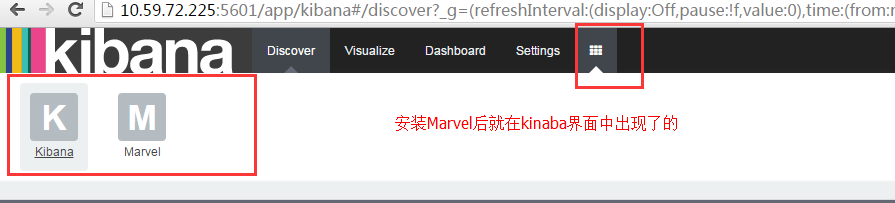
【参考】: https://www.elastic.co/guide/en/marvel/current/installing-marvel.html 实施步骤(安装elk前一定要规划好,marvel是对ELK的elasticsearch和kinaba有版本要求的) 【我的安装版本是】我的elasticsearch是rpm包安装的 Marvel 2.2.1 requires: Elasticsearch 2.2.1. Kibana 4.4.0. A modern web browser - Supported Browsers. 【步骤】 cd /usr/share/elasticsearch bin/plugin installfile:///path/to/file/license-2.2.1.zip bin/plugin installfile:///path/to/file/marvel-agent-2.2.1.zip bin/kibana plugin --install marvel --urlfile:///path/to/file/marvel-2.2.1.tar.gz 实际步骤:(主节点上含有kinaba的节点操作) cd /usr/share/elasticsearch/ 1 2 3 . /bin/plugin install file : ///data1/elk/license-2 .2.1.zip . /bin/plugin install file : ///data1/elk/marvel-agent-2 .2.1.zip . /data1/elk/kibana/bin/kibana plugin-- install marvel--url file : ///data1/elk/marvel-2 .2.1. tar .gz 实际步骤:(其他ES节点上的操作) 1 2 . /bin/plugin install file : ///data1/elk/license-2 .2.1.zip . /bin/plugin install file : ///data1/elk/marvel-agent-2 .2.1.zip 安装成功后: 重启kinaba ES的各个节点都要重启 /etc/init.d/elasticsearch restart 【结果】 【安装过程中可能遇到的错误及解决方法】 1版本不对 解决方法,参考官网安装对于适合marvel的ELK版本 2 没有任何数据,解决方法,你没有重启elasticsearch 和其他所有节点的elasticsearch 本文转自残剑博客51CTO博客,原文链接http://blog.51cto.com/cuidehua/1774052如需转载请自行联系原作者 cuizhiliang

资源下载

更多资源
腾讯云软件源

腾讯云软件源

为解决软件依赖安装时官方源访问速度慢的问题,腾讯云为一些软件搭建了缓存服务。您可以通过使用腾讯云软件源站来提升依赖包的安装速度。为了方便用户自由搭建服务架构,目前腾讯云软件源站支持公网访问和内网访问。

Nacos

Nacos

Nacos /nɑ:kəʊs/ 是 Dynamic Naming and Configuration Service 的首字母简称,一个易于构建 AI Agent 应用的动态服务发现、配置管理和AI智能体管理平台。Nacos 致力于帮助您发现、配置和管理微服务及AI智能体应用。Nacos 提供了一组简单易用的特性集,帮助您快速实现动态服务发现、服务配置、服务元数据、流量管理。Nacos 帮助您更敏捷和容易地构建、交付和管理微服务平台。

Spring

Spring

Spring框架(Spring Framework)是由Rod Johnson于2002年提出的开源Java企业级应用框架,旨在通过使用JavaBean替代传统EJB实现方式降低企业级编程开发的复杂性。该框架基于简单性、可测试性和松耦合性设计理念,提供核心容器、应用上下文、数据访问集成等模块,支持整合Hibernate、Struts等第三方框架,其适用范围不仅限于服务器端开发,绝大多数Java应用均可从中受益。

Rocky Linux

Rocky Linux

Rocky Linux(中文名:洛基)是由Gregory Kurtzer于2020年12月发起的企业级Linux发行版,作为CentOS稳定版停止维护后与RHEL(Red Hat Enterprise Linux)完全兼容的开源替代方案,由社区拥有并管理,支持x86_64、aarch64等架构。其通过重新编译RHEL源代码提供长期稳定性,采用模块化包装和SELinux安全架构,默认包含GNOME桌面环境及XFS文件系统,支持十年生命周期更新。

用户登录
用户注册