BinSentry 自研二进制哨兵调试引擎接口规范
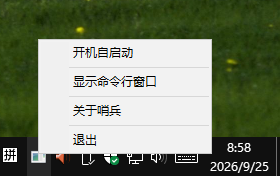
BinSentry 二进制哨兵,由 LYSHARK 独立自研,是一款运行于 Windows 平台的二进制动态调试引擎。该调试引擎从零手写开发,C++ 代码 2 万余行,实现 200 + 调试方法;原生采用 CMD 命令行 HTTP 服务器架构,专为 AI Agent 打造。配合配套 AI 智能体,能够对二进制文件、木马等恶意样本进行深层次分析,是二进制样本研究的实用工具。 **哨兵可以部署到任意的虚拟机沙盒之中,并可以搭载目前流行的jev等大模型产品,AI驱动速度有质的提升,是Windows平台下AI动态调试的优质项目。** 哨兵运行后会在后台,并默认侦听6891端口,且可以设置开机自启动。 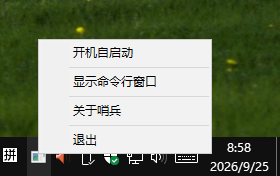 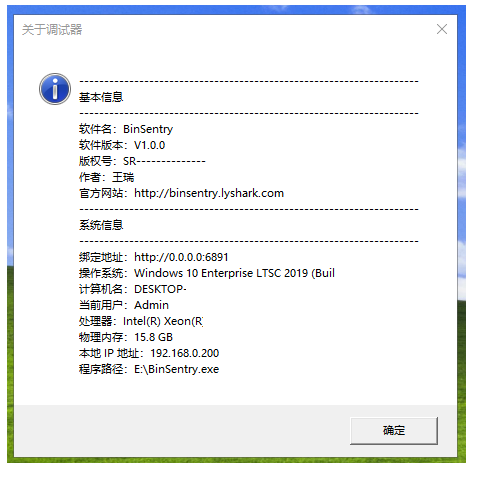 ### 无会话 ||接口|params(JSON)|期望| | --- | --- | --- | --- | |1|SystemInfo|{}|ok=true, 返回系统信息| |2|ProcessList|{}|ok=true, 进程列表| |3|EnumErrorCodes|{}|ok=true, 错误码表| |4|EnumExceptions|{}|ok=true, 异常码表| |5|EnumWindows|{"pid":4}|ok=true, 窗口枚举完成| |6|IsProcessElevated|{}|ok=true, 返回是否提权| |7|ClearLog|{}|ok=true, 日志已清空| |8|SaveLog|{"path":"E:\LyDebugger 2.3\x86\Release\_full_log.txt"}|ok=true, 日志已保存| |9|Logs|{}|ok=true, 日志查询| |10|Help|{}|ok=true| |11|GetJIT|{}|ok=true, JIT配置| |12|SetJIT|{"path":"C:\LyDebugger\x86\LyDebugger.exe -- -p %ld -e %ld"}|ok=true| |13|GetCommandLine|{}|ok=true| |14|SetCommandLine|{"args":"--test-arg"}|ok=true, 下次启动生效| |15|SetBPXOptions|{"option":"FASTRESUME","enable":1}|ok=true, 位掩码| |16|SetExceptionBPX|{"code":"0xC0000005"}|ok=true, 异常断点已设| |17|DelExceptionBPX|{"code":"0xC0000005"}|ok=true, 已删除| |18|GetExceptionBPXList|{}|ok=true, 列表| |19|SetDllBreakPoint|{"dll":"test.dll"}|ok=true| |20|DelDllBreakPoint|{"dll":"test.dll"}|ok=true| |21|GetDllBreakPoints|{}|ok=true| |22|SetVar|{"name":"testvar","value":"0x1234"}|ok=true| |23|DelVar|{"name":"testvar"}|ok=true| |24|GetVars|{}|ok=true, 数量| |25|AddArgument|{"start":"0x009015C0","end":"0x00901600","name":"func1"}|ok=true| |26|DelArgument|{"start":"0x009015C0"}|ok=true| |27|GetArguments|{}|ok=true| |28|GetComments|{}|ok=true| |29|GetLabels|{}|ok=true| |30|GetBookMarks|{}|ok=true| |31|Functions|{}|ok=true| |32|ShowBreakPoint|{}|ok=true, 软断点数量| |33|ShowHbreakPoint|{}|ok=true, 硬断点数量| |34|ShowMemBreakPoint|{}|ok=true, 内存断点数量| |35|ShowApiBreakPoint|{}|ok=true, API断点数量| |36|LoadDatabase|{"path":"E:\LyDebugger 2.3\x86\Release\_dbg.dat"}|ok=true| |37|SaveDatabase|{"path":"E:\LyDebugger 2.3\x86\Release\_dbg.dat"}|ok=true| ### 启动会话 ||接口|params(JSON)|期望| | --- | --- | --- | --- | |1|Debug|{"path":"E:\LyDebugger 2.3\x86\Win32Project1.exe","args":"","cwd":"E:\LyDebugger 2.3\x86\Release"}|ok=true, 返回pid/tid| |2|SetDebug|"Logs"|ok=true (params传命令字符串)| |3|RunToUserCode|{}|ok=true, 设OEP断点运行到用户代码| |4|Register|{}|EIP==0x009015BB| ### 停止态-基础 ||接口|params(JSON)|期望| | --- | --- | --- | --- | |1|ProcessInfo|{}|ok=true| |2|Threads|{}|ok=true, 取第一个threadId作TID| |3|ThreadInfo|{"tid":}|ok=true| |4|GetActiveThread|{}|ok=true| |5|SetActiveThread|{"tid":}|ok=true| |6|Register|{}|ok=true| |7|SetRegister|{"reg":"eax","value":"0x12345678"}|ok=true, 再设回0| |8|GetPageRights|{"address":"0x009015BB"}|ok=true| |9|SetPageRights|{"address":"0x009015BB","protect":"RWX"}|ok=true, 改后还原protect=0x20| |10|Modules|{}|ok=true| |11|ModuleInfo|{"module":"Win32Project1.exe"}|ok=true| |12|Sections|{"module":"Win32Project1.exe"}|ok=true| |13|PEInfo|{"path":"E:\LyDebugger 2.3\x86\Win32Project1.exe"}|ok=true, ImageBase=0x400000 OEP=0x15BB| |14|RichHeader|{"module":"Win32Project1.exe"}|ok=true| |15|TLSCallbacks|{"module":"Win32Project1.exe"}|ok=true (无TLS返回error字段)| |16|RelocationList|{"module":"Win32Project1.exe"}|ok=true| |17|DebugDirectory|{"module":"Win32Project1.exe"}|ok=true| |18|ImportList|{"module":"Win32Project1.exe"}|ok=true| |19|ExportList|{"module":"kernel32.dll"}|ok=true| |20|GetImportAddress|{"module":"Win32Project1.exe","name":"MessageBoxA"}|ok=true| |21|GetExportAddress|{"module":"kernel32.dll","name":"LoadLibraryA"}|ok=true| |22|AddrToModule|{"address":"0x009015BB"}|ok=true| |23|GetSectionData|{"module":"Win32Project1.exe","name":".text"}|ok=true| |24|GetSectionInfo|{"module":"Win32Project1.exe","name":".text"}|ok=true| |25|Symbol|{"expr":"Win32Project1.exe+0x15BB"}|ok=true| |26|GetSymbolInfo|{"address":"0x009015BB"}|ok=true| |27|GetFunctionSize|{"address":"0x009015BB"}|ok=true| |28|Heaps|{}|ok=true| |29|Handles|{"max":20}|ok=true| |30|SEHList|{}|ok=true| |31|MemoryInfo|{"address":"0x009015BB"}|ok=true| |32|Regions|{}|ok=true| |33|Memory|{"address":"0x009015BB","size":16}|ok=true| |34|ReadMemoryValue|{"address":"0x009015BB","size":4}|ok=true| |35|WriteMemory|{"address":"0x009015BB","hex":"CC"}|ok=true, 再写回E8| |36|GetString|{"address":"0x00901000","max":64,"type":"ascii"}|ok=true, JSON可解析| |37|GetOpcodeSize|{"address":"0x009015BB"}|ok=true| |38|DisassembleAt|{"address":"0x009015BB","count":5}|ok=true| |39|Dissasembler|{"address":"0x009015BB","count":5}|ok=true| |40|GetBranchTarget|{"address":"0x009015BB"}|ok=true| |41|Assemble|{"instr":"mov eax, 1","cip":"0x009015C0"}|ok=true| |42|AssembleAt|{"address":"0x00901050","instr":"nop"}|ok=true| |43|MatchPattern|{"address":"0x009015BB","pattern":"E8","size":64}|ok=true| |44|SearchMemory|{"pattern":"E8","start":"0x00901000","size":0x1000}|ok=true| |45|SearchAllMemory|{"pattern":"E8","max":5}|ok=true| |46|SearchStrings|{"address":"0x00901000","size":0x400}|ok=true| |47|FindRef|{"address":"0x009015BB","max":5}|ok=true| |48|xrefs|{"address":"0x009015BB","max":5}|ok=true| |49|HashMemory|{"address":"0x009015BB","size":16,"algo":"md5"}|ok=true| |50|CallStack|{"max":16}|ok=true| |51|Stack|{"count":8}|ok=true| |52|StackPush|{"value":"0x11223344"}|ok=true| |53|StackPop|{}|ok=true| |54|StackPeek|{"offset":0}|ok=true| |55|SetFlag|{"flag":"ZF","value":0}|ok=true| |56|Eval|{"expr":"eip+4"}|ok=true| |57|AllocateMemory|{"size":0x1000}|ok=true, 记下address作MEM| |58|SetMemory|{"address":MEM,"hex":"9090"}|ok=true (在分配区写, 勿写代码区)| |59|FillMemory|{"address":MEM,"size":8,"value":"0x90"}|ok=true| |60|Memcpy|{"src":"0x009015BB","dst":"0x"+(MEM+0x100),"size":5}|ok=true| |61|FreeMemory|{"address":MEM}|ok=true| |62|VaToFileOffset|{"address":"0x009015BB"}|ok=true| |63|FileOffsetToVa|{"offset":"0x9BB"}|ok=true| |64|minidump|{"path":"E:\LyDebugger 2.3\x86\Release\_full.dmp"}|ok=true| |65|mnemonicbrief|{"address":"0x009015BB"}|ok=true| |66|LastException|{}|ok=true| |67|GetThreadLastError|{"tid":}|ok=true| |68|GetThreadPriority|{"tid":}|ok=true| |69|SetThreadPriority|{"tid":,"priority":"NORMAL"}|ok=true| |70|SetThreadName|{"tid":,"name":"main-thread"}|ok=true| |71|StartTraceRecord|{}|ok=true| |72|GetTraceRecord|{"count":5}|ok=true| |73|StopTraceRecord|{}|ok=true| |74|JmpHistory|{}|ok=true| |75|PatchMemory|{"address":"0x009015BB","hex":"CC"}|ok=true| |76|Patches|{}|ok=true| |77|RevertPatch|{"address":"0x009015BB"}|ok=true| |78|DeletePatch|{"address":"0x009015BB"}|ok=true| |79|ShowDebugger|{}|ok=true| |80|HideDebugger|{}|ok=true| |81|gpa|{"dll":"kernel32.dll","api":"LoadLibraryA"}|ok=true| ### 断点 ||接口|params(JSON)|期望| | --- | --- | --- | --- | |1|SetBreakPoint|{"address":"0x009015BB"}|ok=true| |2|GetBreakpointInfo|{"address":"0x009015BB"}|ok=true| |3|GetBreakpointType|{"address":"0x009015BB"}|ok=true| |4|SetBreakpointName|{"address":"0x009015BB","name":"OEP"}|ok=true| |5|SetBreakpointSingleshoot|{"address":"0x009015BB","enable":0}|ok=true| |6|SetBreakpointFastResume|{"address":"0x009015BB","enable":0}|ok=true| |7|SetBreakpointSilent|{"address":"0x009015BB","enable":0}|ok=true| |8|SetBreakpointLog|{"address":"0x009015BB","text":"hit OEP"}|ok=true| |9|SetBreakpointLogFile|{"address":"0x009015BB","file":"E:\LyDebugger 2.3\x86\Release\_bp.log"}|ok=true| |10|SetBreakpointHitCount|{"address":"0x009015BB","count":3}|ok=true| |11|GetBreakpointHitCount|{"address":"0x009015BB"}|ok=true| |12|ResetBreakpointHitCount|{"address":"0x009015BB"}|ok=true| |13|SetCondBreakPoint|{"address":"0x009015BB","cond":"1","thread":TID}|ok=true| |14|DelCondBreakPoint|{"address":"0x009015BB"}|ok=true| |15|SetHbreakPoint|{"address":"0x009015C0","len":"1","flag":"e"}|ok=true (勿与软断点同址)| |16|DelHbreakPoint|{"address":"0x009015C0"}|ok=true| |17|SetMemBreakPoint|{"address":"0x009015C0","flag":"e"}|ok=true| |18|DelMemBreakPoint|{"address":"0x009015C0"}|ok=true| |19|SetApiBreakPoint|{"dll":"kernel32.dll","api":"ExitProcess"}|ok=true| |20|DelApiBreakPoint|{"dll":"kernel32.dll","api":"ExitProcess"}|ok=true| |21|SetPageMemory|{"address":"0x00901000","protect":"RWX"}|ok=true| |22|DisableBreakpoint|{"address":"0x009015BB"}|ok=true| |23|EnableBreakpoint|{"address":"0x009015BB"}|ok=true| |24|BreakpointCommand|{"address":"0x009015BB","command":""}|ok=true| |25|DelBreakPoint|{"address":"0x009015BB"}|ok=true, 清场后进P4| ### 执行控制 ||接口|params(JSON)|期望| | --- | --- | --- | --- | |1|Run|{}|ok=true, 发送后等停止(Status.stopped)| |2|StepIn|{}|ok=true, 等停止| |3|StepOver|{}|ok=true, 等停止| |4|StepOut|{}|ok=true, 等停止| |5|EStepOver|{}|ok=true, 等停止| |6|EStepInto|{}|ok=true, 等停止(注意是EStepInto非EStepIn)| |7|EStepOut|{}|ok=true, 等停止| |8|Skip|{"count":1}|ok=true, 保持停止| |9|InstrUndo|{}|ok=true, EIP回退一条| |10|ExecuteCommand|"StepOver"|ok=true (params传字符串子命令)| |11|StepUser|{}|ok=true (用户代码处返回"无需运行")| |12|RunToUserCode|{}|ok=true| |13|TraceInto|{"count":3}|ok=true, 等停止| |14|TraceOver|{"count":3}|ok=true, 等停止| |15|TraceLine|{"address":"0x009015BB"}|ok=true, 等停止| |16|ERun|{}|ok=true, 等停止| |17|SERun|{}|ok=true, 等停止| |18|DebugContinue|{"status":0}|ok=true, 等停止| |19|RunTo|{"address":"0x009015BB"}|ok=true, 临时断点命中移除| ### 运行态 ||接口|params(JSON)|期望| | --- | --- | --- | --- | |1|SetBreakPoint|{"address":"0x009015BB"}|ok=true| |2|Run|{}|ok=true, 等停止(OEP断点命中)| |3|PauseAllThreads|{}|ok=true| |4|ResumeAllThreads|{}|ok=true| |5|ThreadPause|{"tid":次线程threadId}|ok=true (用非活动线程)| |6|ThreadResume|{"tid":次线程threadId}|ok=true| |7|DelBreakPoint|{"address":"0x009015BB"}|ok=true| |8|Run|{}|ok=true, 目标自由运行| |9|Pause|{}|ok=true, 等停止| |10|SetBreakPoint|{"address":"0x009015BB"}|ok=true| |11|AnimateInto|{"count":3}|ok=true, 1.5s后| |12|AnimateStop|{}|ok=true, 等停止| |13|AnimateOver|{"count":3}|ok=true, 1.5s后| |14|AnimateStop|{}|ok=true, 等停止| |15|Run|{}|ok=true, 等停止| |16|StepSystem|{}|ok=true (最后测, 会停系统代码)| ### 会话管理 ||接口|params(JSON)|期望| | --- | --- | --- | --- | |1|DumpProcess|{"path":"E:\LyDebugger 2.3\x86\Release\_dump.bin","base":"0x00900000","size":0x2000}|ok=true| |2|LoadConfig|{"module":"Win32Project1.exe"}|ok=true| |3|SaveDatabase|{"path":"E:\LyDebugger 2.3\x86\Release\_dbg2.dat"}|ok=true| |4|LoadDatabase|{"path":"E:\LyDebugger 2.3\x86\Release\_dbg2.dat"}|ok=true| |5|Restart|{}|ok=true, 等2.5s| |6|Stop|{}|ok=true, 会话终止| |7|Debug|{"path":"E:\LyDebugger 2.3\x86\Win32Project1.exe","cwd":"E:\LyDebugger 2.3\x86\Release"}|ok=true, 重启会话等2.5s| |8|Detach|{}|ok=true, 分离会话| ### 测试用例 ``` { "status": "success", "result": { "sessionActive": false, "mode": "None", "pid": 0, "tid": 0, "stopped": false, "firstRun": true, "softBreakpoints": 0, "memoryBreakpoints": 0, "hardwareBreakpoints": 0, "apiBreakpoints": 0, "labels": 0, "comments": 0, "logCount": 0, "watches": 0, "bookmarks": 0, "variables": 0, "traceActive": false, "traceIntoActive": false, "traceResult": "", "engine": "TitanEngine", "interfaces": [ { "interface": "Debug", "usage": "启动调试会话: params.path = 进程路径" }, { "interface": "Attach", "usage": "附加进程: params.pid = 进程ID" }, { "interface": "Detach", "usage": "分离调试会话" }, { "interface": "Stop", "usage": "终止被调试进程" }, { "interface": "Status", "usage": "查询调试器状态(含接口列表)" }, { "interface": "WaitStop", "usage": "等待调试器停止: params.timeout = 超时秒数(默认60)" }, { "interface": "Run", "usage": "继续运行程序" }, { "interface": "StepIn", "usage": "单步步入(TitanEngine)" }, { "interface": "StepOver", "usage": "单步步过(TitanEngine)" }, { "interface": "StepOut", "usage": "单步步出(TitanEngine)" }, { "interface": "SetBreakPoint", "usage": "设置软件断点: address, thread(可选), temp(可选)" }, { "interface": "DelBreakPoint", "usage": "删除软件断点: address" }, { "interface": "ShowBreakPoint", "usage": "显示软件断点列表" }, { "interface": "SetMemBreakPoint", "usage": "设置内存断点: address, flag(r/w/e)" }, { "interface": "DelMemBreakPoint", "usage": "删除内存断点: address" }, { "interface": "ShowMemBreakPoint", "usage": "显示内存断点列表" }, { "interface": "SetHbreakPoint", "usage": "设置硬件断点: address, len(1/2/4), flag(r/w/e)" }, { "interface": "DelHbreakPoint", "usage": "删除硬件断点: dr(可选, 默认全部)" }, { "interface": "ShowHbreakPoint", "usage": "显示硬件断点列表" }, { "interface": "SetApiBreakPoint", "usage": "设置API断点: dll, api(可选--end为函数返回处)" }, { "interface": "DelApiBreakPoint", "usage": "删除API断点: dll, api(可选--end)" }, { "interface": "ShowApiBreakPoint", "usage": "显示API断点列表" }, { "interface": "SearchMemory", "usage": "搜索内存: pattern(hex, ?=通配), start(可选), size(可选)" }, { "interface": "PatchMemory", "usage": "内存补丁: address, hex(字节串), nop(可选)" }, { "interface": "DumpProcess", "usage": "转储进程(脱壳): path, entry(可选)" }, { "interface": "HideDebugger", "usage": "隐藏调试器(CheckRemoteDebuggerPresent等)" }, { "interface": "ShowDebugger", "usage": "恢复调试器可见" }, { "interface": "ThreadPause", "usage": "暂停线程: tid" }, { "interface": "ThreadResume", "usage": "恢复线程: tid" }, { "interface": "PauseAllThreads", "usage": "暂停所有线程" }, { "interface": "ResumeAllThreads", "usage": "恢复所有线程" }, { "interface": "PEInfo", "usage": "PE文件信息: path" }, { "interface": "Register", "usage": "显示寄存器" }, { "interface": "SetRegister", "usage": "修改寄存器: reg(eax/ebx/...), value" }, { "interface": "Stack", "usage": "显示栈: count(可选)" }, { "interface": "Memory", "usage": "显示内存: address, size(可选)" }, { "interface": "SetMemory", "usage": "修改内存: address, value" }, { "interface": "Dissasembler", "usage": "反汇编: address(可选, 默认EIP), size(可选)" }, { "interface": "Modules", "usage": "显示模块列表" }, { "interface": "Threads", "usage": "显示线程列表" }, { "interface": "SetDebug", "usage": "执行调试命令字符串: params = \"命令行\" 或 {command: \"命令行\"}" }, { "interface": "ProcessList", "usage": "进程列表: filter(可选, 名称模糊过滤)" }, { "interface": "Regions", "usage": "内存区域列表(VirtualQueryEx)" }, { "interface": "CallStack", "usage": "调用栈: count(可选, 默认32, StackWalk64+符号)" }, { "interface": "SearchStrings", "usage": "搜索进程字符串: max(可选, 默认100, ASCII+Unicode)" }, { "interface": "FillMemory", "usage": "内存填充: address, size, value (TitanEngine FillEx)" }, { "interface": "SetCondBreakPoint", "usage": "设置条件断点: address, cond(表达式, 如 \"eax == 0x5\"), thread(可选)" }, { "interface": "DelCondBreakPoint", "usage": "清除断点条件: address (转为普通断点)" }, { "interface": "SetLabel", "usage": "设置标签: address, name" }, { "interface": "DelLabel", "usage": "删除标签: address" }, { "interface": "GetLabels", "usage": "显示标签列表" }, { "interface": "SetComment", "usage": "设置注释: address, text" }, { "interface": "DelComment", "usage": "删除注释: address" }, { "interface": "GetComments", "usage": "显示注释列表" }, { "interface": "Logs", "usage": "查询调试日志: count(可选, 默认50)" }, { "interface": "Eval", "usage": "表达式求值: expr(寄存器/0x十六进制/十进制/运算, 需停止态)" }, { "interface": "SetFlag", "usage": "设置标志位: flag(CF PF AF ZF SF TF IF DF OF), value(0/1)" }, { "interface": "GetBranchTarget", "usage": "分支指令目标地址: address (TitanEngine GetJumpDestinationEx)" }, { "interface": "GetArguments", "usage": "参数标记列表" }, { "interface": "AddArgument", "usage": "添加参数标记: start, end(可选), name(可选)" }, { "interface": "DelArgument", "usage": "删除参数标记: start" }, { "interface": "RevertPatch", "usage": "还原补丁: address(恢复原字节并移除记录)" }, { "interface": "DeletePatch", "usage": "删除补丁记录: address(不写内存)" }, { "interface": "ReadMemoryValue", "usage": "读数值: address, size(1/2/4/8)" }, { "interface": "GetThreadPriority", "usage": "读线程优先级: tid" }, { "interface": "SystemInfo", "usage": "系统信息(架构/页大小/CPU/内存/OS版本)" }, { "interface": "GetSectionInfo", "usage": "指定节详情: module, name" }, { "interface": "GetBreakpointInfo", "usage": "指定地址断点详情: address (软/内存/硬件)" }, { "interface": "InjectDll", "usage": "远程注入DLL: path (LoadLibraryA+CreateRemoteThread)" }, { "interface": "HashMemory", "usage": "内存哈希: address, size, algo(可选 md5/sha1/crc32)" }, { "interface": "AddrToModule", "usage": "地址归属模块: address (模块名+基址+RVA)" }, { "interface": "RunTo", "usage": "运行到目标地址: address (临时断点, 命中自动移除)" }, { "interface": "SetExceptionIgnore", "usage": "设置异常忽略: code, ignore(0/1; 断点/单步不可忽略)" }, { "interface": "GetExceptionSettings", "usage": "异常忽略列表" }, { "interface": "StartTraceRecord", "usage": "开始执行足迹记录(每次停止记录EIP, 上限4096)" }, { "interface": "StopTraceRecord", "usage": "停止执行足迹记录" }, { "interface": "GetTraceRecord", "usage": "执行足迹列表" }, { "interface": "GetImportAddress", "usage": "导入函数IAT地址: module, name (或 #序号)" }, { "interface": "GetSectionData", "usage": "节内容转储: module, name (hex, 限4KB)" }, { "interface": "TraceOver", "usage": "步过跟踪: count(步数,可选), condition(表达式,可选); call 自动跳过" }, { "interface": "LoadLibrary", "usage": "目标进程远程加载DLL: path (返回 moduleHandle)" }, { "interface": "FreeLibrary", "usage": "目标进程远程卸载DLL: handle (LoadLibrary 返回值)" }, { "interface": "gpa", "usage": "远程API地址解析: dll, api 或 expr(模块:函数)" }, { "interface": "VaToFileOffset", "usage": "虚拟地址->文件偏移: address" }, { "interface": "FileOffsetToVa", "usage": "文件偏移->虚拟地址: offset, module(可选,默认主模块)" }, { "interface": "GetPageRights", "usage": "页权限查询: address (返回 rights 如 RX/RWX)" }, { "interface": "SetPageRights", "usage": "页权限修改: address, protect(hex或RWX串)" }, { "interface": "minidump", "usage": "生成目标进程转储: path (.dmp, 含全内存)" }, { "interface": "xrefs", "usage": "代码引用查找: address, max(可选)" }, { "interface": "mnemonicbrief", "usage": "指令助记符简介: address(可选,默认EIP)" }, { "interface": "EnumWindows", "usage": "枚举目标进程窗口: pid(可选,默认会话进程)" }, { "interface": "IsProcessElevated", "usage": "进程提权检查: pid(可选,默认本进程)" }, { "interface": "ClearLog", "usage": "清空调试日志缓冲区" }, { "interface": "SaveLog", "usage": "保存日志到文件: path" }, { "interface": "EnumErrorCodes", "usage": "常见Win32错误码表: code(可选过滤)" }, { "interface": "EnumExceptions", "usage": "常见异常码表: code(可选过滤)" }, { "interface": "GetFunctionSize", "usage": "函数边界: address (函数表优先, 反汇编扫描兜底)" }, { "interface": "BreakpointCommand", "usage": "断点命令: address, command (命中时自动入队执行; 空清除)" }, { "interface": "JmpHistory", "usage": "跳转历史(恢复运行前记录分支指令)" }, { "interface": "GetSymbolInfo", "usage": "符号详情: address (dbghelp: 名称/模块/偏移/行号)" }, { "interface": "TCPConnections", "usage": "目标进程 TCP 连接列表" }, { "interface": "StackPush", "usage": "栈压入: value (ESP-4 写入)" }, { "interface": "StackPop", "usage": "栈弹出(读栈顶+ESP+4)" }, { "interface": "StackPeek", "usage": "栈窥视: offset (ESP+offset*4)" }, { "interface": "SetThreadName", "usage": "线程命名: tid, name (SetThreadDescription)" }, { "interface": "Restart", "usage": "重启目标进程(分离旧会话并重新创建)" }, { "interface": "SetJIT", "usage": "设置系统JIT调试器: path (HKLM AeDebug, 需管理员)" }, { "interface": "GetJIT", "usage": "查询当前JIT调试器" }, { "interface": "TraceLine", "usage": "单步跟踪到目标地址: address, timeout(可选, 秒)" }, { "interface": "Handles", "usage": "句柄列表: max(可选, NtQuerySystemInformation+对象名)" }, { "interface": "FindRef", "usage": "查找引用: address(目标地址), max(可选, 反汇编扫描代码区)" }, { "interface": "SearchAllMemory", "usage": "全内存搜索: pattern(hex, ?=通配), max(可选)" }, { "interface": "ExportList", "usage": "模块导出表: module(模块名)" }, { "interface": "SetWatch", "usage": "添加/更新监视: name, expr(表达式, 含 $变量)" }, { "interface": "DelWatch", "usage": "删除监视: id 或 name" }, { "interface": "GetWatches", "usage": "查询监视(实时求值, 需停止态)" }, { "interface": "SetVar", "usage": "设置用户变量: name, value (表达式 $name 引用)" }, { "interface": "DelVar", "usage": "删除用户变量: name" }, { "interface": "GetVars", "usage": "查询用户变量列表" }, { "interface": "SetBookMark", "usage": "添加书签: address" }, { "interface": "DelBookMark", "usage": "删除书签: address" }, { "interface": "GetBookMarks", "usage": "查询书签列表" }, { "interface": "Assemble", "usage": "汇编指令为字节码(XEDParse): instr, cip(可选)" }, { "interface": "AssembleAt", "usage": "汇编并写入目标进程: address, instr, fillnop(可选)" }, { "interface": "EnableBreakpoint", "usage": "启用软断点: address" }, { "interface": "DisableBreakpoint", "usage": "禁用软断点: address" }, { "interface": "SetThreadPriority", "usage": "设置线程优先级: tid, priority(数值或名称)" }, { "interface": "Memcpy", "usage": "进程内内存复制: src, dst, size" }, { "interface": "AllocateMemory", "usage": "目标进程分配内存: size, protect(可选)" }, { "interface": "FreeMemory", "usage": "释放目标进程内存: address" }, { "interface": "Symbol", "usage": "符号解析(模块名+偏移 或 表达式): expr" }, { "interface": "MemoryInfo", "usage": "地址内存信息(区域/保护/模块归属): address" }, { "interface": "IsValidPointer", "usage": "地址是否可读: address" }, { "interface": "LastException", "usage": "最近一次异常信息" }, { "interface": "Pause", "usage": "暂停运行中的程序(DebugBreakProcess)" }, { "interface": "CreateRemoteThread", "usage": "目标进程创建远程线程: start 或 hex(shellcode), param(可选)" }, { "interface": "TerminateThread", "usage": "结束线程: tid" }, { "interface": "GetThreadLastError", "usage": "读取线程 TEB.LastErrorValue: tid" }, { "interface": "WriteMemory", "usage": "按 hex 字节串写内存: address, hex" }, { "interface": "GetString", "usage": "读取内存字符串: address, max(可选), type(ascii/unicode)" }, { "interface": "GetOpcodeSize", "usage": "指令长度: address (TitanEngine LengthDisassembleEx)" }, { "interface": "Functions", "usage": "函数标记列表" }, { "interface": "AddFunction", "usage": "添加函数标记: start, end(可选), name(可选)" }, { "interface": "DelFunction", "usage": "删除函数标记: start" }, { "interface": "ProcessInfo", "usage": "进程详细信息: pid(可选, 默认会话进程)" }, { "interface": "GetExportAddress", "usage": "模块导出函数地址: module, name 或 ordinal" }, { "interface": "Help", "usage": "显示帮助" } ] }, "timestamp": 42916062 } ```