Android 为你的应用程序添加快捷方式【优先级高的快捷方式】
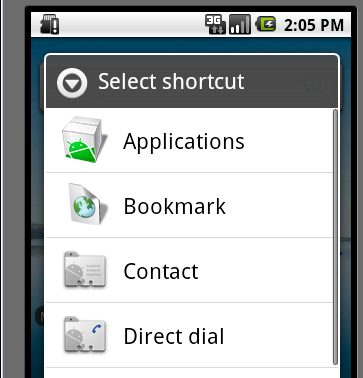
有人会说,快捷方式,不是安装完应用程序后,长按应用程序的ICON然后将它拖到桌面上不就行了吗?没错,这样是一种方法,但这种方法有一个缺点,看图吧: 如上图,如果我们长按桌面点击快捷方式,将会跳到如下界面,如果单从这个界面选择的话,我们就必须进入Applications 目录,然后再在Applications 里面选择我们对应的应用程序,这样的话用户可能得麻烦的去找咯。但我们同时会发现,在Applications 的下面有很多另外的ICON比如 上图的BookMark ,Contact 等,这些也是应用,那么这些是怎么做到不用进去Applications 而在第一页就出现供用户选择呢?今天我们就针对这点来讲讲吧。 要做这一功能首先我们先来了解一下manifest 里面的这一标签: <activity-alias> syntax:语法: <activity-alias android:=["true" | "false"] android:=["true" | "false"] android:="drawable resource" android:="string resource" android:="string" android:="string" android:="string" > . . . </activity-alias>contained in:隶属于: <application>can contain:可以包含: <intent-filter> <meta-data>description:说明:An alias for an activity, named by the targetActivityattribute. The target must be in the same application as the alias and it must be declared before the alias in the manifest. activity的一个别名,用 targetActivity属性命名。目标activity必须与别名在同一应用程序的manifest里,并且在别名之前声明。 The alias presents the target activity as a independent entity. It can have its own set of intent filters, and they, rather than the intent filters on the target activity itself, determine which intents can activate the target through the alias and how the system treats the alias. For example, the intent filters on the alias may specify the "android.intent.action.MAIN" and "android.intent.category.LAUNCHER" flags, causing it to be represented in the application launcher, even though none of the filters on the target activity itself set these flags. 别名作为一个独立的实体代表目标activity。它可以有它自己的一套intent filter,它们,而不是目标activity自己的intent filter,决定哪个intent能够活性化目标通过别名以及系统如何处理别名。例如,别名的intent filter可以指定"android.intent.action.MAIN"和"android.intent.category.LAUNCHER"标签,使之显示在应用程序启动器上,即使目标activity自己没有设置这些标签。 With the exception oftargetActivity,<activity-alias>attributes are a subset of<activity>attributes. For attributes in the subset, none of the values set for the target carry over to the alias. However, for attributes not in the subset, the values set for the target activity also apply to the alias.targetActivity的例外,<activity-alias>属性是<activity>属性的一个子集。对于该子集中的属性,目标activity中设置的值不会覆盖别名的值。然而,对于那些子集中没有设置的属性,设置给目标activity的值同样适用于别名。 上面给出的解释我们来配置一下manifest,配置为如下: < activity android:name =".shortcut" > < intent-filter > < action android:name ="android.intent.action.MAIN" /> </ intent-filter > </ activity > < activity-alias android:name =".CreateShortcuts" android:targetActivity =".shortcut" android:label ="@string/shortcut" > < intent-filter > < action android:name ="android.intent.action.CREATE_SHORTCUT" /> < category android:name ="android.intent.category.DEFAULT" /> </ intent-filter > </ activity-alias > Activity: .shortcut 是我们快捷方式需要的Activity activity-alias: 对应的targetActivity是指向应用创建快捷方式使用的Activity android:label对应的创建快捷方式列表显示的文字,而该应用对应的快捷方式的图标则默认使用我们给定的application的图标。如图: 好了,这是第一步步骤,下面进入代码阶段,先看代码: packagecom.terry.attrs; importandroid.app.Activity; importandroid.content.Intent; importandroid.os.Bundle; importandroid.os.Parcelable; importandroid.widget.LinearLayout; importandroid.widget.TextView; public class shortcutextendsActivity{ private static finalStringSHORT_CUT_EXTRAS = " com.terry.extra.short " ; @Override protected void onCreate(BundlesavedInstanceState){ // TODOAuto-generatedmethodstub super.onCreate(savedInstanceState); finalIntentintent = getIntent(); finalStringaction = intent.getAction(); if (Intent.ACTION_CREATE_SHORTCUT.equals(action)){ createShortCut(); finish(); return ; } Stringextra = intent.getStringExtra(SHORT_CUT_EXTRAS); LinearLayoutlayout = new LinearLayout(getApplicationContext()); TextViewtv = new TextView(getApplicationContext()); if (extra != null ) tv.setText(extra); layout.addView(tv); setContentView(layout); } void createShortCut(){ IntentshortcutIntent = new Intent(Intent.ACTION_MAIN); shortcutIntent.setClass( this , this .getClass()); shortcutIntent.putExtra(SHORT_CUT_EXTRAS, " 测试的快捷方式 " ); Intentintent = new Intent(); intent.putExtra(Intent.EXTRA_SHORTCUT_INTENT,shortcutIntent); intent.putExtra(Intent.EXTRA_SHORTCUT_NAME, " 这里随便指定 " ); ParcelableshortIcon = Intent.ShortcutIconResource.fromContext( this ,com.terry.attrs.R.drawable.icon); intent.putExtra(Intent.EXTRA_SHORTCUT_ICON_RESOURCE,shortIcon); setResult(RESULT_OK,intent); } } 代码解释: onCreate方法,首先获取intent 的action如果接收到的action为创建快捷方式的请求,则执行创建快捷方式的代码,否则则通过得到的extra 为textView 赋值。 createShortCut方法,首先设置快捷方式点击后要跳转的intent 和要带入的参数,然后设置桌面快捷方式的名称,图标和对应的intent(即上面带入数据和跳转的界面的 class的Intent)最后将结果传入。 最近运行的结果: 跳击后到达的界面: TIP:这里可以是任何ACTIVITY界面。 最后给大家分享下源码吧: 就到这里,希望我的一篇废话能对你有所帮助。 附件:http://down.51cto.com/data/2357073 本文转自 terry_龙 51CTO博客,原文链接:http://blog.51cto.com/terryblog/415396,如需转载请自行联系原作者