首页 文章 精选 留言 我的

精选列表

搜索[ecmascript],共443篇文章
优秀的个人博客,低调大师

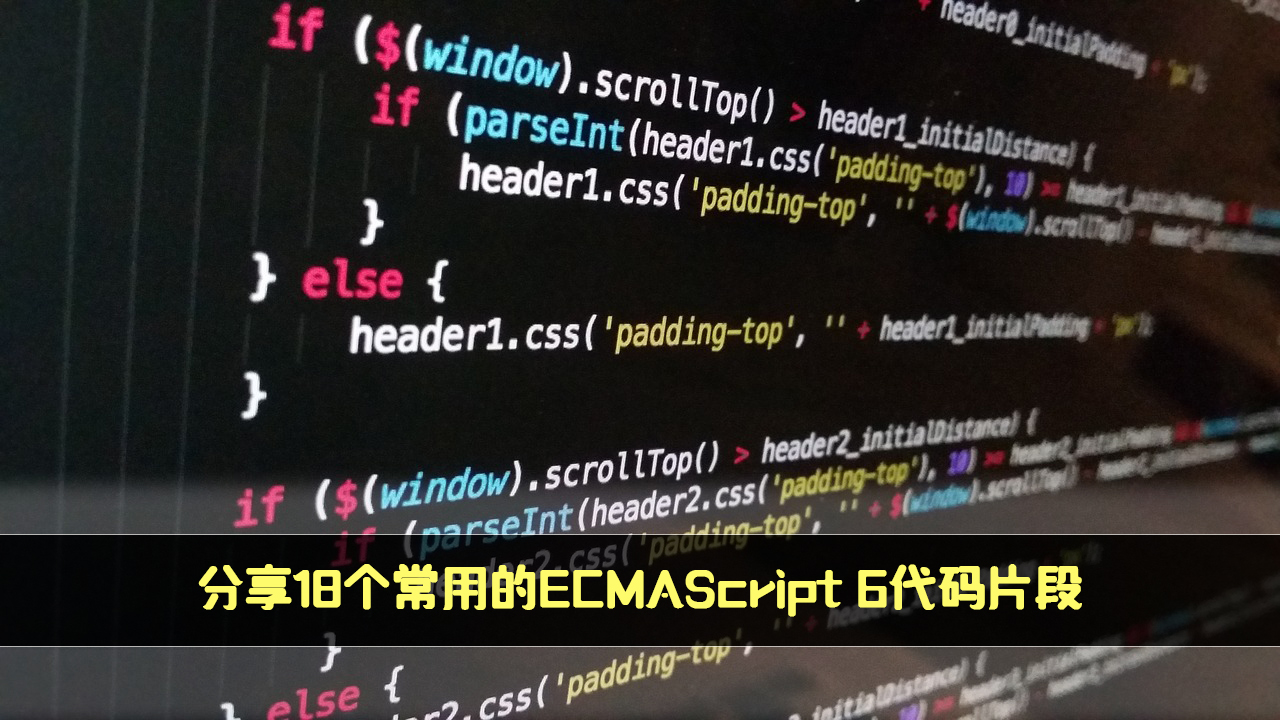
分享18个常用的ECMAScript 6代码片段

最近在整理电脑的项目,总结了一些常见的小功能(获取URL、URL参数解析、Form表单数据解析等),特别的reduce方法的妙用。 1.如何批量隐藏指定的元素? const hide = (...el) => [...el].forEach((e) => (e.style.display = "none")); // 调用示例 hide(document.querySelectorAll("img")); 2.如何检查元素是否具有指定的类? const hasClass = (el, className) => el.classList.contains(className); // 调用示例 hasClass(document.querySelector("p.special"), "special"); // true 3.如何切换元素的样式类? const toggleClass = (el, className) => el.classList.toggle(className); // 调用示例 toggleClass(document.querySelector("p.special"), "special"); 4.如何获取当前页面的滚动位置? const getScrollPosition = (el = window) => ({ x: el.pageXOffset !== undefined ? el.pageXOffset : el.scrollLeft, y: el.pageYOffset !== undefined ? el.pageYOffset : el.scrollTop, }); // 调用示例 getScrollPosition(); // {x: 0, y: 100} 5.如何平滑滚动到页面顶部? const scrollToTop = () => { const scrollTop = document.documentElement.scrollTop || document.body.scrollTop; if (scrollTop > 0) { window.requestAnimationFrame(scrollToTop); window.scrollTo(0, scrollTop - scrollTop / 8); } }; // 调用示例 scrollToTop(); 6.如何检查父元素是否包含子元素? const elementContains = (parent, child) => parent !== child && parent.contains(child); // 调用示例 elementContains( document.querySelector("head"), document.querySelector("title") ); // true elementContains(document.querySelector("body"), document.querySelector("body")); // false 7.如何检查指定的元素在视窗中是否可见? const elementIsVisibleInViewport = (el, partiallyVisible = false) => { const { top, left, bottom, right } = el.getBoundingClientRect(); const { innerHeight, innerWidth } = window; return partiallyVisible ? ((top > 0 && top < innerHeight) || (bottom > 0 && bottom < innerHeight)) && ((left > 0 && left < innerWidth) || (right > 0 && right < innerWidth)) : top >= 0 && left >= 0 && bottom <= innerHeight && right <= innerWidth; }; // 调用示例 elementIsVisibleInViewport(el); // 不完全可见 elementIsVisibleInViewport(el, true); // 部分可见 8.如何获取元素中的所有图像? const getImages = (el, includeDuplicates = false) => { const images = [...el.getElementsByTagName("img")].map((img) => img.getAttribute("src") ); return includeDuplicates ? images : [...new Set(images)]; }; // 调用示例 getImages(document, true); // ['image1.jpg', 'image2.png', 'image1.png', '...'] getImages(document, false); // ['image1.jpg', 'image2.png', '...'] 9.如何确定该设备是移动设备还是桌面端? const detectDeviceType = () => /Android|webOS|iPhone|iPad|iPod|BlackBerry|IEMobile|Opera Mini/i.test( navigator.userAgent ) ? "Mobile" : "Desktop"; // 调用示例 detectDeviceType(); // "移动端" or "桌面" 10.如何获取当前URL? const currentURL = () => window.location.href; // 调用示例 currentURL(); 11.将URL参数解析为对象? const getURLParameters = (url) => (url.match(/([^?=&]+)(=([^&]*))/g) || []).reduce( (a, v) => ( (a[v.slice(0, v.indexOf("="))] = v.slice(v.indexOf("=") + 1)), a ), {} ); // 调用示例 getURLParameters("http://url.com/page?n=DevPoint&s=Shenzhen"); // {n: 'DevPoint', s: 'Shenzhen'} getURLParameters("baidu.com"); // {} 12.如何将Form表单数据转为对象? const formToObject = (form) => Array.from(new FormData(form)).reduce( (account, [key, value]) => ({ ...account, [key]: value, }), {} ); // 调用示例 formToObject(document.querySelector("#form")); // { city: 'Shenzhen', name: 'DevPoint' } 13.延迟执行函数(毫秒)? const delay = (fn, wait, ...args) => setTimeout(fn, wait, ...args); delay( (text) => { console.log(text); }, 1000, "later" ); 14.如何删除DOM事件? const off = (el, evt, fn, opts = false) => el.removeEventListener(evt, fn, opts); const fn = () => console.log("!"); document.body.addEventListener("click", fn); off(document.body, "click", fn); 15.如何将时间戳转为直观的时间格式? const formatDuration = (ms) => { if (ms < 0) ms = -ms; const time = { day: Math.floor(ms / 86400000), hour: Math.floor(ms / 3600000) % 24, minute: Math.floor(ms / 60000) % 60, second: Math.floor(ms / 1000) % 60, millisecond: Math.floor(ms) % 1000, }; const timeZh = { day: "天", hour: "小时", minute: "分钟", second: "秒", millisecond: "毫秒", }; return Object.entries(time) .filter((val) => val[1] !== 0) .map(([key, val]) => `${val} ${timeZh[key]}`) .join(","); }; // 调用示例 formatDuration(1001); // 1 秒,1 毫秒 formatDuration(34325055574); // 397 天,6 小时,44 分钟,15 秒,574 毫秒 16.如何获得两个日期的时间差? const getDaysDiffBetweenDates = (dateInitial, dateFinal) => (dateFinal - dateInitial) / (1000 * 3600 * 24); // 调用示例,以天计算 getDaysDiffBetweenDates(new Date("2021-03-20"), new Date("2021-04-03")); // 14 17.如何将字符串复制到剪贴板? const copyToClipboard = (str) => { const el = document.createElement("textarea"); el.value = str; el.setAttribute("readonly", ""); el.style.position = "absolute"; el.style.left = "-9999px"; document.body.appendChild(el); const selected = document.getSelection().rangeCount > 0 ? document.getSelection().getRangeAt(0) : false; el.select(); document.execCommand("copy"); document.body.removeChild(el); if (selected) { document.getSelection().removeAllRanges(); document.getSelection().addRange(selected); } }; // 调用示例 copyToClipboard("DevPoint"); // 'DevPoint' copied to clipboard. 18.如何创建一个计数器? 指定一个DOM id,创建一个计数器,指定步长,结束数值,按照同样的频率计数。 const counter = (selector, start, end, step = 1, duration = 2000) => { let current = start; const _step = (end - start) * step < 0 ? -step : step; const timer = setInterval(() => { current += _step; document.querySelector(selector).innerHTML = current; if (current >= end) document.querySelector(selector).innerHTML = end; if (current >= end) clearInterval(timer); }, Math.abs(Math.floor(duration / (end - start)))); return timer; }; // 调用示例 counter("#counter", 1, 1000, 5, 2000); // 创建一个计数器,从1开始,步长为5,计数到1000结束 完


优秀的个人博客,低调大师

ECMAScript13中11个令人惊叹的 JavaScript 新特性

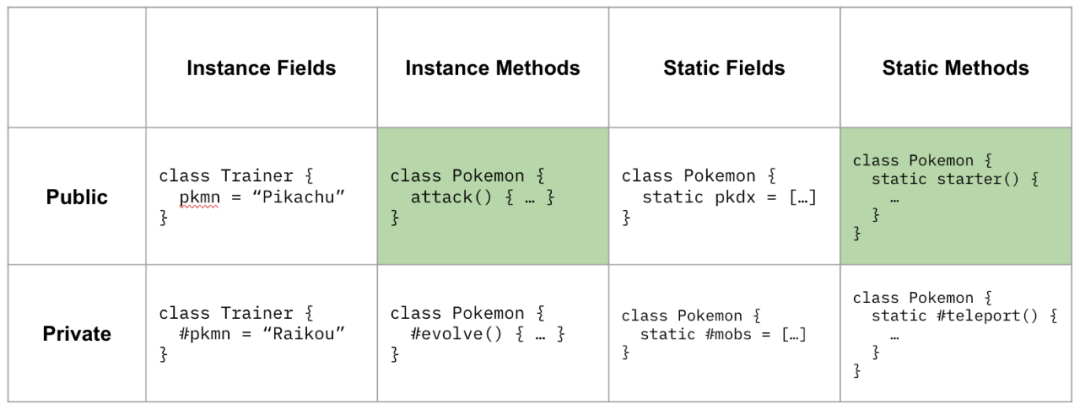
前言 与许多其他编程语言一样,JavaScript 也在不断发展。每年,该语言都会通过新功能变得更加强大,使开发人员能够编写更具表现力和简洁的代码。 本葡萄今天就为大家介绍ES13中添加的最新功能,并查看其用法示例以更好地理解它们。 1.类 在ES13之前,类字段只能在构造函数中声明。与许多其他语言不同,无法在类的最外层作用域中声明或定义它们。 class Car { constructor() { this.color = 'blue'; this.age = 2; } } const car = new Car(); console.log(car.color); // blue console.log(car.age); // 而ES13 消除了这个限制。现在我们可以编写这样的代码: class Car { color = 'blue'; age = 2; }const car = new Car(); console.log(car.color); // blue console.log(car.age); // 2 2.私有方法和字段 ES13以前,不可能在类中声明私有成员。成员传统上带有下划线 ( _) 前缀,以表明它是私有的,但仍然可以从类外部访问和修改它。 class Person { _firstName = 'Joseph'; _lastName = 'Stevens'; get name() { return `${this._firstName} ${this._lastName}`; } }const person = new Person(); console.log(person.name); // Joseph Stevens // 仍可以从类外部访问 // 原本打算设为私有的成员 console.log(person._firstName); // Joseph console.log(person._lastName); // Stevens // 也可以修改 person._firstName = 'Robert'; person._lastName = 'Becker';console.log(person.name); // Robert Becker 使用 ES13,我们现在可以通过在类前面添加 ( #) 来向类添加私有字段和成员。尝试从外部访问这些类将会引发错误: class Person { #firstName = 'Joseph'; #lastName = 'Stevens'; get name() { return `${this.#firstName} ${this.#lastName}`; } }const person = new Person(); console.log(person.name); // 语法错误:私有字段 '#firstName' 必须在一个外层类中声明 console.log(person.#firstName); console.log(person.#lastName); 3.await顶层操作 在 JavaScript 中,await运算符用于暂停执行,直到 一个Promise被解决(执行或拒绝)。 以前只能在async中使用此运算符。不可以在全局作用域中直接使用await。 function setTimeoutAsync(timeout) { return new Promise((resolve) => { setTimeout(() => { resolve(); }, timeout); }); } //语法错误:await 仅在异步函数中有效 await setTimeoutAsync(3000); 有了 ES13,现在我们可以: function setTimeoutAsync(timeout) { return new Promise((resolve) => { setTimeout(() => { resolve(); }, timeout); }); } // 等待超时 - 没有错误抛出 await setTimeoutAsync(3000); 4.静态类字段和静态私有方法 现在可以在 ES13 中为类声明静态字段和静态私有方法。静态方法可以使用关键字this访问类中的其他私有/公共静态成员,实例方法可以使用this.constructor访问他们。 class Person { static #count = 0; static getCount() { return this.#count; } constructor() { this.constructor.#incrementCount(); } static #incrementCount() { this.#count++; } }const person1 = new Person(); const person2 = new Person();console.log(Person.getCount()); // 2 5.类静态块 ES13 引入了一项特性,允许开发者定义仅在创建类时执行一次的静态块。这一特性与其他面向对象编程语言(如 C# 和 Java)中的静态构造函数相似。 在一个类的主体中,你可以定义任意数量的静态 {} 初始化块。它们会按照声明的顺序与任何交错的静态字段初始值设定项一起执行。此外,你还可以通过块中的 super 关键字访问超类的静态属性。这为开发者提供了更多的灵活性和控制能力。 class Vehicle { static defaultColor = 'blue'; }class Car extends Vehicle { static colors = []; static { this.colors.push(super.defaultColor, 'red'); } static { this.colors.push('green'); } }console.log(Car.colors); // [ 'blue', 'red', 'green' ] 6.检查对象中的私有字段 开发者如今可以利用这一新功能,使用运算符in来方便地检查对象是否包含某个特定的私有字段。 class Car { #color; hasColor() { return #color in this; } }const car = new Car(); console.log(car.hasColor()); // true; 通过运算符in,可以准确区分不同类中具有相同名称的私有字段。 class Car { #color; hasColor() { return #color in this; } }class House { #color; hasColor() { return #color in this; } }const car = new Car(); const house = new House();console.log(car.hasColor()); // true; console.log(car.hasColor.call(house)); // false console.log(house.hasColor()); // true console.log(house.hasColor.call(car)); // false 7.at() 索引方法 在 JavaScript 中,我们通常使用方括号[]来访问数组的第 t 个元素。这个过程非常简单,但实际上我们只是访问了索引为 t-1 的数组属性而已。 const arr = ['a', 'b', 'c', 'd']; console.log(arr[1]); // b 然而,当我们希望通过方括号来访问数组末尾的第 N 个元素时,我们需要使用索引 arr.length - N。 const arr = ['a', 'b', 'c', 'd']; // 从末尾开始第一个元素 console.log(arr[arr.length - 1]); // d // 倒数第二个元素 console.log console.log(arr[arr.length - 2]); // c 借助全新的at()方法,可以以更加精简和富有表现力的方式来实现这一目标。要访问数组末尾的第N个元素,只需将负值-N作为参数传递给at()方法即可。 const arr = ['a', 'b', 'c', 'd']; // 从末尾开始第一个元素 console.log(arr.at(-1)); // d // 倒数第二个元素 console.log console.log(arr.at(-2)); // c 除了数组之外,字符串和TypedArray对象现在也有at()方法。 const str = 'Coding Beauty'; console.log(str.at(-1)); // y console.log(str.at(-2)); // tconst typedArray = new Uint8Array([16, 32, 48, 64]); console.log(typedArray.at(-1)); // 64 console.log(typedArray.at(-2)); // 48 8.正则表达式匹配索引 在ES13之前,我们只能获取字符串中正则表达式匹配的起始索引, const str = 'sun and moon';const regex = /and/;const matchObj = regex.exec(str);// [ 'and', index: 4, input: 'sun and moon', groups: undefined ] console.log(matchObj); 使用ES13之后,可以通过指定一个/d正则表达式标志来获取匹配开始和结束的两个索引。这一特性赋予了更多的灵活性和控制能力。 const str = 'sun and moon'; const regex = /and/d; const matchObj = regex.exec(str); /** [ 'and', index: 4, input: 'sun and moon', groups: undefined, indices: [ [ 4, 7 ], groups: undefined ] ] */ console.log(matchObj); 设置标志后d,返回的对象将具有indices包含起始索引和结束索引的属性。 9.Object.hasOwn()方法 在 JavaScript 中,我们可以使用Object.prototype.hasOwnProperty()方法来检查对象是否具有给定的属性。 class Car { color = 'green'; age = 2; }const car = new Car();console.log(car.hasOwnProperty('age')); // true console.log(car.hasOwnProperty('name')); // false 然而,这种方法存在一些问题。首先,Object.prototype.hasOwnProperty()方法并未受到保护,这意味着我们可以通过自定义的hasOwnProperty()方法来覆盖它,而这个自定义方法可能会具有与Object.prototype.hasOwnProperty()不同的行为。需要额外注意的是这一点。 class Car { color = 'green'; age = 2; // This method does not tell us whether an object of // this class has a given property. hasOwnProperty() { return false; } }const car = new Car();console.log(car.hasOwnProperty('age')); // false console.log(car.hasOwnProperty('name')); // false 另外一个问题是,如果我们使用了 null 原型(通过 Object.create(null) 创建的对象),那么试图调用该方法将会产生错误。 const obj = Object.create(null); obj.color = 'green'; obj.age = 2; // TypeError: obj.hasOwnProperty 不是函数 console.log(obj.hasOwnProperty('color')); 为了克服这些问题,我们可以利用属性调用方法Object.prototype.hasOwnProperty.call()来解决。具体示例如下所示: const obj = Object.create(null); obj.color = 'green'; obj.age = 2; obj.hasOwnProperty = () => false;console.log(Object.prototype.hasOwnProperty.call(obj, 'color')); // true console.log(Object.prototype.hasOwnProperty.call(obj, 'name')); // false 这种方式并不十分便利。为了避免重复,我们可以编写一个可重用的函数,这样可以使我们的代码更加简洁和高效: function objHasOwnProp(obj, propertyKey) { return Object.prototype.hasOwnProperty.call(obj, propertyKey); }const obj = Object.create(null); obj.color = 'green'; obj.age = 2; obj.hasOwnProperty = () => false;console.log(objHasOwnProp(obj, 'color')); // true console.log(objHasOwnProp(obj, 'name')); // false 现在不需要在那样做了,我们还可以使用全新的内置方法Object.hasOwn()来处理这个问题。它与我们之前编写的可重用函数类似,接受对象和属性作为参数,并且返回一个布尔值,如果指定的属性是对象的直接属性,则返回true;否则返回false。 const obj = Object.create(null); obj.color = 'green'; obj.age = 2; obj.hasOwnProperty = () => false;console.log(Object.hasOwn(obj, 'color')); // true console.log(Object.hasOwn(obj, 'name')); // false 10.错误原因属性 现在,错误对象已经增加了一个cause属性,该属性用于指定导致错误抛出的原始错误。通过这种方式,我们可以为错误添加额外的上下文信息,从而更好地诊断意外的行为。要指定错误的原因,我们可以在作为构造函数的第二个参数传递给Error()的对象中设置属性来实现。这种方法能够提供更丰富的错误追踪和调试信息。 function userAction() { try { apiCallThatCanThrow(); } catch (err) { throw new Error('New error message', { cause: err }); } }try { userAction(); } catch (err) { console.log(err); console.log(`Cause by: ${err.cause}`); } 11.从数组最后查找 在 JavaScript 中,我们已经可以使用Array的find()方法来查找数组中满足指定测试条件的元素。类似地,我们也可以使用findIndex()方法来获取满足条件的元素的索引值。尽管find()和findIndex()都是从数组的第一个元素开始搜索,但在某些情况下,从最后一个元素开始搜索可能会更有效。 有些情况下,我们知道从数组的末尾进行查找可能会获得更好的性能表现。例如,在这里我们尝试查找数组中prop属性等于"value"的项目。这时候,可以通过使用reverse()方法将数组反转,然后使用find()和findIndex()方法来从末尾开始搜索。下面是具体的实现示例: const letters = [ { value: 'v' }, { value: 'w' }, { value: 'x' }, { value: 'y' }, { value: 'z' }, ];const found = letters.find((item) => item.value === 'y'); const foundIndex = letters.findIndex((item) => item.value === 'y');console.log(found); // { value: 'y' } console.log(foundIndex); // 3 上面的代码可以获取正确结果,但由于目标对象更接近数组的尾部,如果我们使用findLast()和findLastIndex()方法来从数组的末尾进行搜索,很可能能够显著提升程序的执行效率。通过这种方式,我们可以更快地找到所需的元素或索引,从而优化代码性能。 const letters = [ { value: 'v' }, { value: 'w' }, { value: 'x' }, { value: 'y' }, { value: 'z' }, ];const found = letters.findLast((item) => item.value === 'y'); const foundIndex = letters.findLastIndex((item) => item.value === 'y');console.log(found); // { value: 'y' } console.log(foundIndex); // 3 在一些特定的使用场景中,我们可能需要从数组的末尾开始搜索来获取准确的元素。举个例子,假设我们要查找数字列表中的最后一个偶数,使用find()或findIndex()方法可能会导致错误的结果: const nums = [7, 14, 3, 8, 10, 9]; // 给出 14,而不是 10 const lastEven = nums.find((value) => value % 2 === 0); // 给出 1,而不是 4 const lastEvenIndex = nums.findIndex((value) => value % 2 === 0);console.log(lastEven); // 14 console.log(lastEvenIndex); // 1 如果我们在调用reverse()方法之前使用数组的slice()方法创建新的数组副本,就可以避免不必要地改变原始数组的顺序。然而,在处理大型数组时,这种方法可能会导致性能问题,因为需要复制整个数组。 此外,findIndex()方法在反转数组时仍然无法达到预期效果,因为元素的反转会导致它们在原始数组中的索引改变。为了获取元素的原始索引,我们需要进行额外的计算,这意味着需要编写更多的代码来处理这种情况。 const nums = [7, 14, 3, 8, 10, 9]; // 在调用reverse()之前使用展开语法复制整个数组 // calling reverse() const reversed = [...nums].reverse(); // 正确给出 10 const lastEven = reversed.find((value) => value % 2 === 0); // 给出 1,而不是 4 const reversedIndex = reversed.findIndex((value) => value % 2 === 0); // 需要重新计算得到原始索引 const lastEvenIndex = reversed.length - 1 - reversedIndex;console.log(lastEven); // 10 console.log(reversedIndex); // 1 console.log(lastEvenIndex); // 4 使用findLast()和findLastIndex()方法在需要查找数组中最后一个符合条件的元素或索引时非常实用。它们能够准确地定位目标对象,并且从数组末尾开始搜索,提供了高效的解决方案。 const nums = [7, 14, 3, 8, 10, 9];const lastEven = nums.findLast((num) => num % 2 === 0); const lastEvenIndex = nums.findLastIndex((num) => num % 2 === 0);console.log(lastEven); // 10 console.log(lastEvenIndex); // 4 结论 ES13 为 JavaScript 带来了一系列令人振奋的新功能,我们已经有幸见识了它们的魅力。通过运用这些功能,开发人员的工作效率将得到极大提升,同时也能以更加简洁、明晰的方式书写出更加纯净、精炼的代码。这些新特性为我们带来了更大的灵活性和便利性,使得我们的开发过程更加高效、愉悦。 扩展链接: 高级SQL分析函数-如何用窗口函数进行排名计算 3D模型+BI分析,打造全新的交互式3D可视化大屏开发方案 React + Springboot + Quartz,从0实现Excel报表自动化

资源下载

更多资源
Mario

Mario

马里奥是站在游戏界顶峰的超人气多面角色。马里奥靠吃蘑菇成长,特征是大鼻子、头戴帽子、身穿背带裤,还留着胡子。与他的双胞胎兄弟路易基一起,长年担任任天堂的招牌角色。

Nacos

Nacos

Nacos /nɑ:kəʊs/ 是 Dynamic Naming and Configuration Service 的首字母简称,一个易于构建 AI Agent 应用的动态服务发现、配置管理和AI智能体管理平台。Nacos 致力于帮助您发现、配置和管理微服务及AI智能体应用。Nacos 提供了一组简单易用的特性集,帮助您快速实现动态服务发现、服务配置、服务元数据、流量管理。Nacos 帮助您更敏捷和容易地构建、交付和管理微服务平台。

Spring

Spring

Spring框架(Spring Framework)是由Rod Johnson于2002年提出的开源Java企业级应用框架,旨在通过使用JavaBean替代传统EJB实现方式降低企业级编程开发的复杂性。该框架基于简单性、可测试性和松耦合性设计理念,提供核心容器、应用上下文、数据访问集成等模块,支持整合Hibernate、Struts等第三方框架,其适用范围不仅限于服务器端开发,绝大多数Java应用均可从中受益。

Rocky Linux

Rocky Linux

Rocky Linux(中文名:洛基)是由Gregory Kurtzer于2020年12月发起的企业级Linux发行版,作为CentOS稳定版停止维护后与RHEL(Red Hat Enterprise Linux)完全兼容的开源替代方案,由社区拥有并管理,支持x86_64、aarch64等架构。其通过重新编译RHEL源代码提供长期稳定性,采用模块化包装和SELinux安全架构,默认包含GNOME桌面环境及XFS文件系统,支持十年生命周期更新。

用户登录
用户注册