![]()
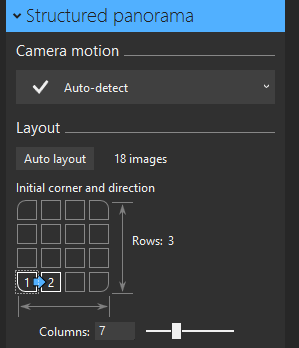
这个按钮的目的是用于手动排列图片序列,应该说写得比较精巧,我使用csharp进行模仿,主要采用的是自动控件创建技术。结果比较简陋,实现功能而已,放出来大家一起学习。
![]()
using System;
using System.Collections.Generic;
using System.ComponentModel;
using System.Data;
using System.Drawing;
using System.Linq;
using System.Text;
using System.Threading.Tasks;
using System.Windows.Forms;
namespace 动态创建
{
public partial
class Form1
: Form
{
int iclick1
=
-
1;
int iclick2
=
-
1;
Button[] btns
=
new Button[
16];
public Form1()
{
InitializeComponent();
}
private
void Form1_Load(object sender, EventArgs e)
{
//自动创建
for (
int i
=
0; i
<
16; i
++)
{
btns[i]
=
new Button();
btns[i].Name
= i.ToString();
//加个名字方便集中操作
btns[i].Size
=
new Size(
48,
48);
int ix
=
20
+
60
*(i
%
4);
int iy
=
20
+
60
*(i
/
4);
btns[i].Location
=
new Point(ix, iy);
this.Controls.Add(btns[i]);
//绑定事件
btns[i].Click
+=
new System.EventHandler(
this.btns_Click);
btns[i].MouseHover
+=
new System.EventHandler(
this.btns_MouseHover);
btns[i].MouseLeave
+=
new System.EventHandler(
this.btns_MouseLeave);
}
}
//集中事件处理
private
void btns_Click(object sender, EventArgs e)
{
Button btn
= (Button)sender;
int index
=
int.Parse(btn.Name);
if (index
==
0
|| index
==
3
|| index
==
12
|| index
==
15)
{
//将上一个选择的按钮状态变为空
if (iclick1
!=
-
1)
btns[iclick1].Text
=
"";
if (iclick2
!=
-
1)
btns[iclick2].Text
=
"";
iclick1
= index;
btn.BackColor
= Color.Empty;
btn.ForeColor
= Color.Black;
btn.Text
=
"1";
}
if (index
==
1
|| index
==
4)
{
if (iclick1
!=
0)
return;
//将上一个选择的按钮状态变为空
if(iclick2
!=
-
1)
btns[iclick2].Text
=
"";
iclick2
= index;
btn.BackColor
= Color.Empty;
btn.ForeColor
= Color.Black;
btn.Text
=
"2";
}
if (index
==
2
|| index
==
7)
{
if (iclick1
!=
3)
return;
//将上一个选择的按钮状态变为空
if (iclick2
!=
-
1)
btns[iclick2].Text
=
"";
iclick2
= index;
btn.BackColor
= Color.Empty;
btn.ForeColor
= Color.Black;
btn.Text
=
"2";
}
if (index
==
8
|| index
==
13)
{
if (iclick1
!=
12)
return;
//将上一个选择的按钮状态变为空
if (iclick2
!=
-
1)
btns[iclick2].Text
=
"";
iclick2
= index;
btn.BackColor
= Color.Empty;
btn.ForeColor
= Color.Black;
btn.Text
=
"2";
}
if (index
==
11
|| index
==
14)
{
if (iclick1
!=
15)
return;
//将上一个选择的按钮状态变为空
if (iclick2
!=
-
1)
btns[iclick2].Text
=
"";
iclick2
= index;
btn.BackColor
= Color.Empty;
btn.ForeColor
= Color.Black;
btn.Text
=
"2";
}
}
private
void btns_MouseHover(object sender, EventArgs e)
{
Button btn
= (Button)sender;
int index
=
int.Parse(btn.Name);
if (index
== iclick1)
return;
//4 个角可能按出1
if (index
==
0
|| index
==
3
|| index
==
12
|| index
==
15)
{
btn.BackColor
= Color.Gray;
btn.ForeColor
= Color.White;
btn.Text
=
"1";
}
//4个角旁边可能按出2
if (index
==
1
|| index
==
4)
{
if (iclick1
!=
0)
return;
btn.BackColor
= Color.Gray;
btn.ForeColor
= Color.White;
btn.Text
=
"2";
}
if (index
==
2
|| index
==
7)
{
if (iclick1
!=
3)
return;
btn.BackColor
= Color.Gray;
btn.ForeColor
= Color.White;
btn.Text
=
"2";
}
if (index
==
8
|| index
==
13)
{
if (iclick1
!=
12)
return;
btn.BackColor
= Color.Gray;
btn.ForeColor
= Color.White;
btn.Text
=
"2";
}
if (index
==
11
|| index
==
14)
{
if (iclick1
!=
15)
return;
btn.BackColor
= Color.Gray;
btn.ForeColor
= Color.White;
btn.Text
=
"2";
}
}
private
void btns_MouseLeave(object sender, EventArgs e)
{
Button btn
= (Button)sender;
int index
=
int.Parse(btn.Name);
if (index
== iclick1
|| index
== iclick2)
return;
btn.BackColor
= Color.Empty;
btn.ForeColor
= Color.Black;
btn.Text
=
"";
}
}
}
目前方向:图像拼接融合、图像识别 联系方式:jsxyhelu@foxmail.com