安装 MongoDB
配置 repo 源
[mongodb-org-3.4]
name=MongoDB Repository
#baseurl=https://repo.mongodb.org/yum/redhat//mongodb-org/3.4/x86_64/
baseurl=https://mirrors.aliyun.com/mongodb/yum/redhat/$releasever/mongodb-org/3.4/x86_64/
gpgcheck=0
enabled=1
gpgkey=https://www.mongodb.org/static/pgp/server-3.4.asc
选择国内 阿里云 镜像资源。
# yum install mongodb-org -y
配置 /etc/mongod.conf
# mongod.conf

# for documentation of all options, see:
#   http://docs.mongodb.org/manual/reference/configuration-options/

# where to write logging data.
systemLog:
  destination: file
  logAppend: true
  path: /var/log/mongodb/mongod.log

# Where and how to store data.
storage:
  dbPath: /var/lib/mongo
  journal:
    enabled: true
#  engine:
#  mmapv1:
#  wiredTiger:

# how the process runs
processManagement:
  fork: true  # fork and run in background
  pidFilePath: /var/run/mongodb/mongod.pid  # location of pidfile

# network interfaces
net:
  port: 27017
  bindIp: 0.0.0.0  # Listen to local interface only, comment to listen on all interfaces.


#security:

#operationProfiling:

replication:
    replSetName: shard-a

sharding:
    clusterRole: shardsvr

## Enterprise-Only Options

#auditLog:

#snmp:
replication 处配置 副本集 名,sharding 开启 shardsvr 模式。
启动 mongod 服务
[root@test1 ~]# service mongod start
Starting mongod:                                           [  OK  ]

[root@test2 ~]# service mongod start
Starting mongod:                                           [  OK  ]

[root@test3 ~]# service mongod start
Starting mongod:                                           [  OK  ]
配置 shard-a 副本集
[root@test1 ~]# mongo test1.lan:27017
MongoDB shell version v3.4.3
connecting to: test1.lan:27017
MongoDB server version: 3.4.3
Server has startup warnings:
2017-04-24T22:46:19.703+0800 I STORAGE  [initandlisten]
2017-04-24T22:46:19.703+0800 I STORAGE  [initandlisten] ** WARNING: Using the XFS filesystem is strongly recommended with the WiredTiger storage engine
2017-04-24T22:46:19.703+0800 I STORAGE  [initandlisten] **          See http://dochub.mongodb.org/core/prodnotes-filesystem
2017-04-24T22:46:20.321+0800 I CONTROL  [initandlisten]
> rs.initiate()
{
	"info2" : "no configuration specified. Using a default configuration for the set",
	"me" : "test1.lan:27017",
	"ok" : 1
}
shard-a:SECONDARY>
shard-a:PRIMARY> config  = rs.config()        # 保存配置对象
{
	"_id" : "shard-a",
	"version" : 1,
	"protocolVersion" : NumberLong(1),
	"members" : [
		{
			"_id" : 0,
			"host" : "test1.lan:27017",
			"arbiterOnly" : false,
			"buildIndexes" : true,
			"hidden" : false,
			"priority" : 1,
			"tags" : {

			},
			"slaveDelay" : NumberLong(0),
			"votes" : 1
		}
	],
	"settings" : {
		"chainingAllowed" : true,
		"heartbeatIntervalMillis" : 2000,
		"heartbeatTimeoutSecs" : 10,
		"electionTimeoutMillis" : 10000,
		"catchUpTimeoutMillis" : 2000,
		"getLastErrorModes" : {

		},
		"getLastErrorDefaults" : {
			"w" : 1,
			"wtimeout" : 0
		},
		"replicaSetId" : ObjectId("58fe111823612a418eb7f3fc")
	}
}
shard-a:PRIMARY> config.members[0].priority = 2        # 这里增加自身主机的优先级为 2,防止后面 PRIMARY 重新选举到其余主机
2
shard-a:PRIMARY> rs.reconfig(config)                    # 重新应用该配置
{ "ok" : 1 }
shard-a:PRIMARY> rs.add("test2.lan:27017")            # 添加副本集主机
{ "ok" : 1 }
shard-a:PRIMARY> rs.add("test3.lan")                # 添加副本集主机(默认端口为 27017)
{ "ok" : 1 }
shard-a:PRIMARY> rs.config()
{
	"_id" : "shard-a",
	"version" : 4,
	"protocolVersion" : NumberLong(1),
	"members" : [
		{
			"_id" : 0,
			"host" : "test1.lan:27017",
			"arbiterOnly" : false,
			"buildIndexes" : true,
			"hidden" : false,
			"priority" : 2,
			"tags" : {

			},
			"slaveDelay" : NumberLong(0),
			"votes" : 1
		},
		{
			"_id" : 1,
			"host" : "test2.lan:27017",
			"arbiterOnly" : false,
			"buildIndexes" : true,
			"hidden" : false,
			"priority" : 1,
			"tags" : {

			},
			"slaveDelay" : NumberLong(0),
			"votes" : 1
		},
		{
			"_id" : 2,
			"host" : "test3.lan:27017",
			"arbiterOnly" : false,
			"buildIndexes" : true,
			"hidden" : false,
			"priority" : 1,
			"tags" : {

			},
			"slaveDelay" : NumberLong(0),
			"votes" : 1
		}
	],
	"settings" : {
		"chainingAllowed" : true,
		"heartbeatIntervalMillis" : 2000,
		"heartbeatTimeoutSecs" : 10,
		"electionTimeoutMillis" : 10000,
		"catchUpTimeoutMillis" : 2000,
		"getLastErrorModes" : {

		},
		"getLastErrorDefaults" : {
			"w" : 1,
			"wtimeout" : 0
		},
		"replicaSetId" : ObjectId("58fe111823612a418eb7f3fc")
	}
}
这样,副本集 shard-a 就配置完成
接下来我们启动并配置副本集 shard-b
[root@test1 ~]# mkdir /var/lib/mongo2
[root@test1 ~]# mongod --shardsvr --replSet shard-b --dbpath /var/lib/mongo2/ --port 37017 --logpath /var/log/mongodb/mongod2.log --fork --journal
about to fork child process, waiting until server is ready for connections.
forked process: 14323
child process started successfully, parent exiting

[root@test2 ~]# mkdir /var/lib/mongo2
[root@test2 ~]# mongod --shardsvr --replSet shard-b --dbpath /var/lib/mongo2/ --port 37017 --logpath /var/log/mongodb/mongod2.log --fork --journal
about to fork child process, waiting until server is ready for connections.
forked process: 5623
child process started successfully, parent exiting

[root@test3 ~]# mkdir /var/lib/mongo2
[root@test3 ~]# mongod --shardsvr --replSet shard-b --dbpath /var/lib/mongo2/ --port 37017 --logpath /var/log/mongodb/mongod2.log --fork --journal
about to fork child process, waiting until server is ready for connections.
forked process: 4303
child process started successfully, parent exiting
配置 shard-b 副本集
[root@test1 ~]# mongo test1.lan:37017
MongoDB shell version v3.4.3
connecting to: test1.lan:37017
MongoDB server version: 3.4.3
Server has startup warnings:
2017-04-24T22:59:43.476+0800 I STORAGE  [initandlisten]
2017-04-24T22:59:43.476+0800 I STORAGE  [initandlisten] ** WARNING: Using the XFS filesystem is strongly recommended with the WiredTiger storage engine
2017-04-24T22:59:43.476+0800 I STORAGE  [initandlisten] **          See http://dochub.mongodb.org/core/prodnotes-filesystem
2017-04-24T22:59:44.019+0800 I CONTROL  [initandlisten]
> rs.initiate()
{
	"info2" : "no configuration specified. Using a default configuration for the set",
	"me" : "test1.lan:37017",
	"ok" : 1
}
shard-b:SECONDARY>
shard-b:PRIMARY> config = rs.config()
{
	"_id" : "shard-b",
	"version" : 1,
	"protocolVersion" : NumberLong(1),
	"members" : [
		{
			"_id" : 0,
			"host" : "test1.lan:37017",
			"arbiterOnly" : false,
			"buildIndexes" : true,
			"hidden" : false,
			"priority" : 1,
			"tags" : {

			},
			"slaveDelay" : NumberLong(0),
			"votes" : 1
		}
	],
	"settings" : {
		"chainingAllowed" : true,
		"heartbeatIntervalMillis" : 2000,
		"heartbeatTimeoutSecs" : 10,
		"electionTimeoutMillis" : 10000,
		"catchUpTimeoutMillis" : 2000,
		"getLastErrorModes" : {

		},
		"getLastErrorDefaults" : {
			"w" : 1,
			"wtimeout" : 0
		},
		"replicaSetId" : ObjectId("58fe1465f7a2e985d87b8bf8")
	}
}
shard-b:PRIMARY> config.members[0].priority = 2
2
shard-b:PRIMARY> rs.reconfig(config)
{ "ok" : 1 }
shard-b:PRIMARY> rs.add("test2.lan:37017")
{ "ok" : 1 }
shard-b:PRIMARY> rs.add("test3.lan:37017")
{ "ok" : 1 }
shard-b:PRIMARY> rs.isMaster()
{
	"hosts" : [
		"test1.lan:37017",
		"test2.lan:37017",
		"test3.lan:37017"
	],
	"setName" : "shard-b",
	"setVersion" : 4,
	"ismaster" : true,
	"secondary" : false,
	"primary" : "test1.lan:37017",
	"me" : "test1.lan:37017",
	"electionId" : ObjectId("7fffffff0000000000000001"),
	"lastWrite" : {
		"opTime" : {
			"ts" : Timestamp(1493046429, 1),
			"t" : NumberLong(1)
		},
		"lastWriteDate" : ISODate("2017-04-24T15:07:09Z")
	},
	"maxBsonObjectSize" : 16777216,
	"maxMessageSizeBytes" : 48000000,
	"maxWriteBatchSize" : 1000,
	"localTime" : ISODate("2017-04-24T15:07:24.475Z"),
	"maxWireVersion" : 5,
	"minWireVersion" : 0,
	"readOnly" : false,
	"ok" : 1
}
这样 shard-a shard-b 两个副本集已经配置完成
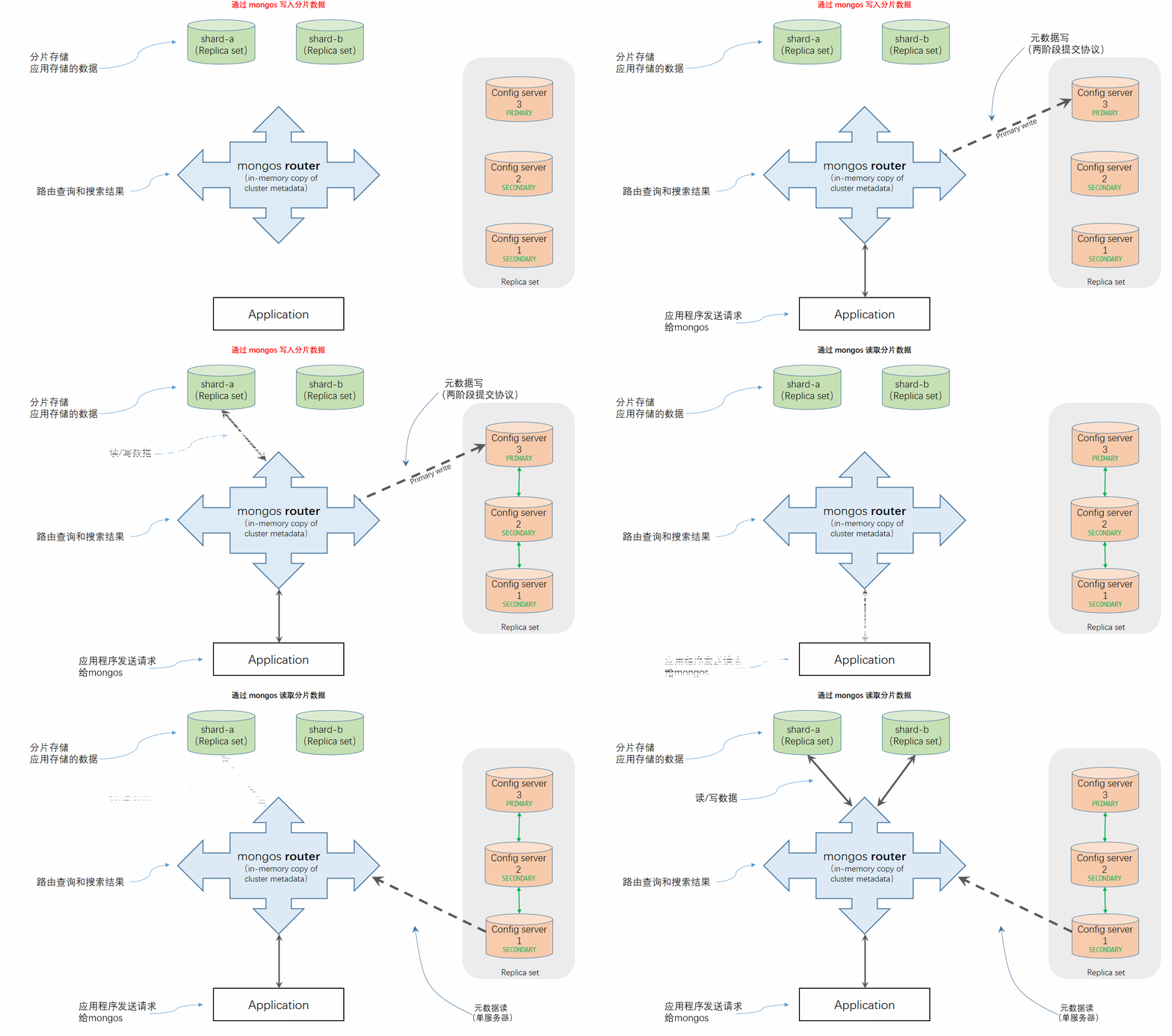
开始配置 config server,MongoDB 从3.2版本之后开始规定 config server 也必须要开启副本集功能。
config server 的配置文件如下:config server 一般情况下是监听在 27019 端口
# mongod.conf

# for documentation of all options, see:
#   http://docs.mongodb.org/manual/reference/configuration-options/

# where to write logging data.
systemLog:
  destination: file
  logAppend: true
  path: /var/log/mongodb/mongod.log

# Where and how to store data.
storage:
  dbPath: /var/lib/mongo
  journal:
    enabled: true
#  engine:
#  mmapv1:
#  wiredTiger:

# how the process runs
processManagement:
  fork: true  # fork and run in background
  pidFilePath: /var/run/mongodb/mongod.pid  # location of pidfile

# network interfaces
net:
  port: 27019
  bindIp: 0.0.0.0  # Listen to local interface only, comment to listen on all interfaces.


#security:

#operationProfiling:

replication:
  replSetName: cfgReplSet

sharding:
  clusterRole: configsvr

## Enterprise-Only Options

#auditLog:

#snmp:
启动三台config server 的mongod 服务
[root@test4 ~]# service mongod start
Starting mongod:                                           [  OK  ]

[root@test5 ~]# service mongod start
Starting mongod:                                           [  OK  ]

[root@test6 ~]# service mongod start
Starting mongod:                                           [  OK  ]
同样,config server 的副本集配置如上文所示,这里的代码就省略了。
配置启动 mongos 路由主机
[root@test7 ~]# mongos --configdb cfgReplSet/test4.lan,test5.lan,test6.lan:27019 --logpath /var/log/mongodb/mongos.log --fork --port 30000
about to fork child process, waiting until server is ready for connections.
forked process: 3338
child process started successfully, parent exiting
MongoDB 版本 >3.2 启动mongos 的时候,需要跟上 config server 的副本集名称 (这里是 cfgReplSet)
连接 mongos 测试
[root@test7 ~]# mongo test7.lan:30000
MongoDB shell version v3.4.4
connecting to: test7.lan:30000
MongoDB server version: 3.4.4
Server has startup warnings:
2017-04-24T23:30:47.285+0800 I CONTROL  [main]
2017-04-24T23:30:47.285+0800 I CONTROL  [main] ** WARNING: Access control is not enabled for the database.
2017-04-24T23:30:47.285+0800 I CONTROL  [main] **          Read and write access to data and configuration is unrestricted.
2017-04-24T23:30:47.285+0800 I CONTROL  [main] ** WARNING: You are running this process as the root user, which is not recommended.
2017-04-24T23:30:47.285+0800 I CONTROL  [main]
mongos> show dbs
admin   0.000GB
config  0.000GB
mongos> use config
switched to db config
mongos> show collections
chunks
lockpings
locks
migrations
mongos
shards
tags
version
mongos> db.shards.find()
# 这里没有返回文档,也说明分片集群中并没有添加可用分片集群。
配置分片集群:shard
mongos> sh.addShard("shard-a/test1.lan,test2.lan,test3.lan")
{ "shardAdded" : "shard-a", "ok" : 1 }

mongos> db.shards.find()
{ "_id" : "shard-a", "host" : "shard-a/test1.lan:27017,test2.lan:27017,test3.lan:27017", "state" : 1 }

mongos> sh.addShard("shard-b/test1.lan:37017,test2.lan:37017,test3.lan:37017")
{ "shardAdded" : "shard-b", "ok" : 1 }

mongos> db.shards.find()
{ "_id" : "shard-a", "host" : "shard-a/test1.lan:27017,test2.lan:27017,test3.lan:27017", "state" : 1 }
{ "_id" : "shard-b", "host" : "shard-b/test1.lan:37017,test2.lan:37017,test3.lan:37017", "state" : 1 }
# 检查分片集群的分片副本集数量,方法一

mongos> db.getSiblingDB('config').shards.find()
{ "_id" : "shard-a", "host" : "shard-a/test1.lan:27017,test2.lan:27017,test3.lan:27017", "state" : 1 }
{ "_id" : "shard-b", "host" : "shard-b/test1.lan:37017,test2.lan:37017,test3.lan:37017", "state" : 1 }
# 检查分片集群的分片副本集数量,方法二

mongos> use admin
switched to db admin
mongos> db.runCommand({listshards: 1})
{
	"shards" : [
		{
			"_id" : "shard-a",
			"host" : "shard-a/test1.lan:27017,test2.lan:27017,test3.lan:27017",
			"state" : 1
		},
		{
			"_id" : "shard-b",
			"host" : "shard-b/test1.lan:37017,test2.lan:37017,test3.lan:37017",
			"state" : 1
		}
	],
	"ok" : 1
}
# 检查分片集群的分片副本集数量,方法三
配置分片集合:接下来的步骤就是在数据库上启动分片。分片不会自动完成,而是需要在数据库里提前为集合做好设置才行。
mongos> sh.enableSharding("test2_db")        # 该库可以是已存在的,也可以是暂不存在的
{ "ok" : 1 }

mongos> db.getSiblingDB("config").databases.find()
{ "_id" : "test2_db", "primary" : "shard-a", "partitioned" : true }
# sharding 分片库的配置库 databases 集合已经有相应的配置记录了。

mongos> sh.status()
--- Sharding Status ---
  sharding version: {
	"_id" : 1,
	"minCompatibleVersion" : 5,
	"currentVersion" : 6,
	"clusterId" : ObjectId("58fe17e90b3df66581ff6b09")
}
  shards:
	{  "_id" : "shard-a",  "host" : "shard-a/test1.lan:27017,test2.lan:27017,test3.lan:27017",  "state" : 1 }
	{  "_id" : "shard-b",  "host" : "shard-b/test1.lan:37017,test2.lan:37017,test3.lan:37017",  "state" : 1 }
  active mongoses:
	"3.4.4" : 1
 autosplit:
	Currently enabled: yes
  balancer:
	Currently enabled:  yes
	Currently running:  no
		Balancer lock taken at Mon Apr 24 2017 23:21:13 GMT+0800 (CST) by ConfigServer:Balancer
	Failed balancer rounds in last 5 attempts:  0
	Migration Results for the last 24 hours:
		No recent migrations
  databases:
	{  "_id" : "test2_db",  "primary" : "shard-a",  "partitioned" : true }
# 分片状态中更能方便的查看当前分片的状态信息,包括分片集群成员 以及 分片数据库,分片机制等。

mongos> sh.shardCollection("test2_db.users", {username: 1, _id: 1})
{ "collectionsharded" : "test2_db.users", "ok" : 1 }
# 此处,我们选择 username _id 作为组合分片键,组合分片键必须是一个索引
# 如果集合为空,那么该行命令会自动在集合中创建该索引,如果集合已存在对应数据,且该组合键的索引没有事先创建好,那么这条语句就会抛出错误
# 需要手动到集合创建该组合的索引,之后才能作为分片键

mongos> db.getSiblingDB("config").collections.find().pretty()
{
	"_id" : "test2_db.users",
	"lastmodEpoch" : ObjectId("58fe21de224dc86230e9a8f7"),
	"lastmod" : ISODate("1970-02-19T17:02:47.296Z"),
	"dropped" : false,
	"key" : {
		"username" : 1,
		"_id" : 1
	},
	"unique" : false
}
# 配置完成后,config.collections 就存在了相应集合的分片键信息。
分割是把一个大的数据库分割为 2 个更小的数据块的过程。它只会在数据块大小超过最大限制的时候才会发生,目前的默认设置是 64MB。分割是必须的,因为数据块太大就难以在整个集合中分布。
迁移就是在分片之间移动数据块的过程。当某些分片服务器包含的数据块数量大大超过其他分片服务器就会触发迁移过程,这个触发器叫做迁移回合(migration round)。在一个迁移回合中,数据块从某些分片服务器迁移到其他分片服务器,直到集群看起来相对平衡为止。我们可以想象一下这两个操作,迁移比分割昂贵得多。
实际上,这些操作不应该影响我们,但是明白这一点非常有用,当遇到性能问题的时候就要想到可能它们正在迁移数据。如果插入的数据分布均匀,各个分片上的数据集应该差不多以相同的速度增长,则迁移应该不会频繁发生。