原文:
WPF整理--动态绑定到Logical Resource
“What happens if we replace a
specific resource? Would that be reflected in all objects using the resource? And if not, can we
bind to the resource dynamically?”
接上篇博文,如果我们需要在C#代码中动态替换某个logical resource,我们该如何做呢?
如,Window的Resources属性赋值如下:
<Window x:Class="DynamicallyBindingToALogicalResource.MainWindow"
        xmlns="http://schemas.microsoft.com/winfx/2006/xaml/presentation"
        xmlns:x="http://schemas.microsoft.com/winfx/2006/xaml"
        Title="MainWindow" Height="350" Width="525">
    <Window.Resources>
        <LinearGradientBrush x:Key="brush1">
            <GradientStop Offset="0.3" Color="Yellow"/>
            <GradientStop Offset="0.7" Color="Brown"/>
        </LinearGradientBrush>
    </Window.Resources>
    <StackPanel>
        <Rectangle Height="100" Stroke="Pink" StrokeThickness="20" Fill="{StaticResource brush1}"/>
        <Button x:Name="button1" Content="Replace Brush" Height="100" Click="OnReplaceBrush"/>
    </StackPanel>
</Window>
Button Click事件中Replace Window的key为"brush1"的Resources
        private void OnReplaceBrush(object sender, RoutedEventArgs e)
        {
            var brush = new LinearGradientBrush();
            brush.GradientStops.Add(new GradientStop(Colors.Pink, 0.2));
            brush.GradientStops.Add(new GradientStop(Colors.Blue, 0.5));
            brush.GradientStops.Add(new GradientStop(Colors.Violet, 0.8));

            this.Resources["brush1"] = brush;
        }
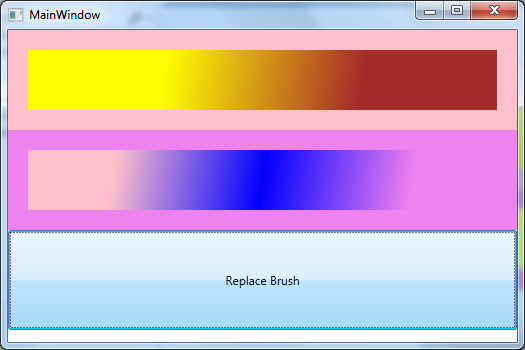
点击按钮,程序没有任何反应,可以通过DynamicResource这个markup extension实现。
“Run the application and click on the button. You'll notice nothing happens. Now
change the StaticResource markup extension to DynamicResource on the
Rectangle:”
<Rectangle Height="100" Stroke="Violet" StrokeThickness="20" Fill="{DynamicResource brush1}" />
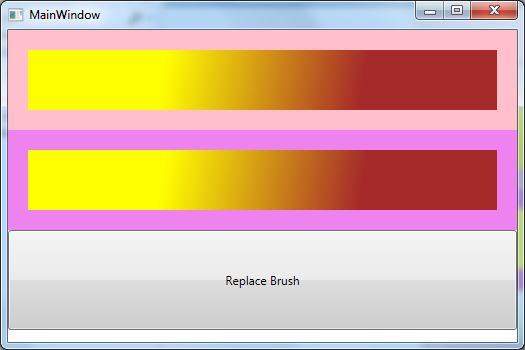
程序运行如下:
![]()
点击Button后:
![]()
附XAML和C#代码:
![]()
![]()
<Window x:Class="DynamicallyBindingToALogicalResource.MainWindow"
        xmlns="http://schemas.microsoft.com/winfx/2006/xaml/presentation"
        xmlns:x="http://schemas.microsoft.com/winfx/2006/xaml"
        Title="MainWindow" Height="350" Width="525">
    <Window.Resources>
        <LinearGradientBrush x:Key="brush1">
            <GradientStop Offset="0.3" Color="Yellow"/>
            <GradientStop Offset="0.7" Color="Brown"/>
        </LinearGradientBrush>
    </Window.Resources>
    <StackPanel>
        <Rectangle Height="100" Stroke="Pink" StrokeThickness="20" Fill="{StaticResource brush1}"/>
        <Rectangle Height="100" Stroke="Violet" StrokeThickness="20" Fill="{DynamicResource brush1}" />
        <Button x:Name="button1" Content="Replace Brush" Height="100" Click="OnReplaceBrush"/>
    </StackPanel>
</Window>
View Code
![]()
![]()
using System;
using System.Collections.Generic;
using System.Linq;
using System.Text;
using System.Threading.Tasks;
using System.Windows;
using System.Windows.Controls;
using System.Windows.Data;
using System.Windows.Documents;
using System.Windows.Input;
using System.Windows.Media;
using System.Windows.Media.Imaging;
using System.Windows.Navigation;
using System.Windows.Shapes;

namespace DynamicallyBindingToALogicalResource
{
    /// <summary>
    /// Interaction logic for MainWindow.xaml
    /// </summary>
    public partial class MainWindow : Window
    {
        public MainWindow()
        {
            InitializeComponent();
        }

        private void OnReplaceBrush(object sender, RoutedEventArgs e)
        {
            var brush = new LinearGradientBrush();
            brush.GradientStops.Add(new GradientStop(Colors.Pink, 0.2));
            brush.GradientStops.Add(new GradientStop(Colors.Blue, 0.5));
            brush.GradientStops.Add(new GradientStop(Colors.Violet, 0.8));

            this.Resources["brush1"] = brush;
        }
    }
}
View Code