我们知道要创建一张excel你得知道excel由什么组成,比如说sheet也就是一个工作表格,例如一行,一个单元格,单元格格式,单元格内容格式…这些都对应着poi里面的一个类。
一个excel表格:
| HSSFWorkbook wb = new HSSFWorkbook(); |
一个工作表格(sheet):
| HSSFSheet sheet = wb.createSheet("测试表格"); |
一行(row):
| HSSFRow row1 = sheet.createRow(0); |
一个单元格(cell):
| HSSFCell cell2 = row2.createCell((short)0) |
单元格格式(cellstyle):
| HSSFCellStyle style4 = wb.createCellStyle() |
单元格内容格式()
HSSFDataFormat format= wb.createDataFormat();
1:首先创建一个po对象
package entity;

public class Student {
    private int no;
    private String name;
    private int age;
    private String grage;
    public Student(int no, String name, int age, String grage) {
        super();
        this.no = no;
        this.name = name;
        this.age = age;
        this.grage = grage;
    }
    public int getNo() {
        return no;
    }
    public void setNo(int no) {
        this.no = no;
    }
    public String getName() {
        return name;
    }
    public void setName(String name) {
        this.name = name;
    }
    public int getAge() {
        return age;
    }
    public void setAge(int age) {
        this.age = age;
    }
    public String getGrage() {
        return grage;
    }
    public void setGrage(String grage) {
        this.grage = grage;
    }

}
2实现导出的功能:
 1 package demo;
 2
 3 import java.io.FileOutputStream;
 4 import java.io.IOException;
 5 import java.sql.SQLException;
 6 import java.util.ArrayList;
 7 import java.util.Date;
 8 import java.util.List;
 9
10 import org.apache.poi.hssf.usermodel.HSSFCell;
11 import org.apache.poi.hssf.usermodel.HSSFCellStyle;
12 import org.apache.poi.hssf.usermodel.HSSFDataFormat;
13 import org.apache.poi.hssf.usermodel.HSSFRow;
14 import org.apache.poi.hssf.usermodel.HSSFSheet;
15 import org.apache.poi.hssf.usermodel.HSSFWorkbook;
16 import org.apache.poi.hssf.util.Region;
17 import org.apache.poi.ss.usermodel.Font;
18
19 import entity.Student;
20
21 public class Export_demo {
22     public static void main(String[] args) {
23         export();
24     }
25
26     public static void export(){
27         List<Student> studens=new ArrayList<Student>();
28         for (int i = 1; i <=20; i++) {
29             Student s=new Student(i, "a"+i, 20+i-20, "三年级");
30             studens.add(s);
31         }
32
33         HSSFWorkbook wb = new HSSFWorkbook();//创建一个excel文件
34         HSSFSheet sheet=wb.createSheet("学生信息");//创建一个工作薄
35         sheet.setColumnWidth((short)3, 20* 256);    //---》设置单元格宽度,因为一个单元格宽度定了那么下面多有的单元格高度都确定了所以这个方法是sheet的
36         sheet.setColumnWidth((short)4, 20* 256);    //--->第一个参数是指哪个单元格,第二个参数是单元格的宽度
37         sheet.setDefaultRowHeight((short)300);    // ---->有得时候你想设置统一单元格的高度,就用这个方法
38         HSSFDataFormat format= wb.createDataFormat();   //--->单元格内容格式
39         HSSFRow row1 = sheet.createRow(0);   //--->创建一行
40           // 四个参数分别是:起始行,起始列,结束行,结束列 (单个单元格)
41         sheet.addMergedRegion(new Region(0, (short) 0, 0, (short)5));//可以有合并的作用
42         HSSFCell cell1 = row1.createCell((short)0);   //--->创建一个单元格
43         cell1.setCellValue("学生信息总览");
44
45
46         sheet.addMergedRegion(new Region(1, (short) 0, 1, (short)0));
47         HSSFRow row2= sheet.createRow(1);   ////创建第二列 标题
48         HSSFCell fen = row2.createCell((short)0);   //--->创建一个单元格
49         fen.setCellValue("编号/属性 ");
50         HSSFCell no = row2.createCell((short)1);   //--->创建一个单元格
51         no.setCellValue("姓名 ");
52         HSSFCell age = row2.createCell((short)2);   //--->创建一个单元格
53         age.setCellValue("年龄 ");
54         HSSFCell grage = row2.createCell((short)3);   //--->创建一个单元格
55         grage.setCellValue("年级 ");
56
57         for (int i = 0; i <studens .size(); i++) {
58              sheet.addMergedRegion(new Region(1+i+1, (short) 0, 1+i+1, (short)0));
59             HSSFRow rows= sheet.createRow(1+i+1);   ////创建第二列 标题
60             HSSFCell fens = rows.createCell((short)0);   //--->创建一个单元格
61             fens.setCellValue(studens.get(i).getNo());
62             HSSFCell nos = rows.createCell((short)1);   //--->创建一个单元格
63             nos.setCellValue(studens.get(i).getName());
64             HSSFCell ages = rows.createCell((short)2);   //--->创建一个单元格
65             ages.setCellValue(studens.get(i).getAge());
66             HSSFCell grages = rows.createCell((short)3);   //--->创建一个单元格
67             grages.setCellValue(studens.get(i).getGrage());
68         }
69         FileOutputStream fileOut = null;
70         try{
71             fileOut = new FileOutputStream("d:\\studens.xls");
72             wb.write(fileOut);
73             //fileOut.close();
74             System.out.print("OK");
75         }catch(Exception e){
76             e.printStackTrace();
77         }
78         finally{
79             if(fileOut != null){
80                 try {
81                     fileOut.close();
82                 } catch (IOException e) {
83                     // TODO Auto-generated catch block
84                     e.printStackTrace();
85                 }
86             }
87         }
88     }
89 }
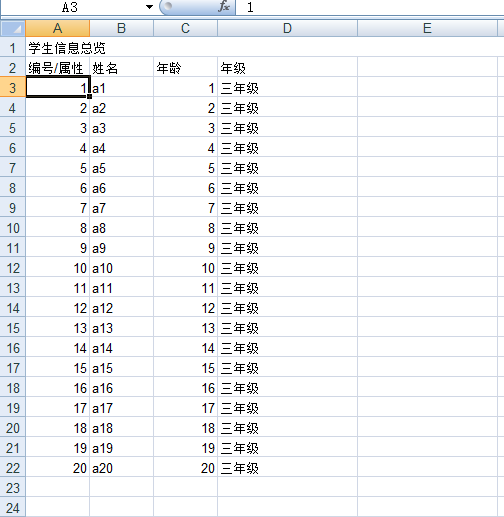
效果图:
![]()
3实现导入的功能:
 1 package demo;
 2
 3 import java.io.FileInputStream;
 4 import java.io.FileNotFoundException;
 5 import java.io.InputStream;
 6 import java.text.SimpleDateFormat;
 7 import java.util.ArrayList;
 8 import java.util.Date;
 9 import java.util.List;
10
11 import org.apache.poi.hssf.usermodel.HSSFCell;
12 import org.apache.poi.hssf.usermodel.HSSFDateUtil;
13 import org.apache.poi.hssf.usermodel.HSSFRow;
14 import org.apache.poi.hssf.usermodel.HSSFSheet;
15 import org.apache.poi.hssf.usermodel.HSSFWorkbook;
16 import org.apache.poi.poifs.filesystem.POIFSFileSystem;
17
18 import entity.Student;
19
20 public class Import_demo {
21     private static POIFSFileSystem fs;//poi文件流
22     private static HSSFWorkbook wb;//获得execl
23     private static HSSFRow row;//获得行
24     private static HSSFSheet sheet;//获得工作簿
25
26     public static void main(String[] args) throws FileNotFoundException {
27         InputStream in= new FileInputStream("d:\\studens.xls");
28         imports(in);
29     }
30
31     public static void imports(InputStream in ){
32         String str = "";
33         try {
34              fs = new POIFSFileSystem(in);
35              wb = new HSSFWorkbook(fs);
36              sheet=wb.getSheetAt(0);
37              //int rowfirst=sheet.getFirstRowNum();
38              int rowend=sheet.getLastRowNum();
39              for (int i = 2; i <=rowend; i++) {
40                 row=sheet.getRow(i);
41                 //System.out.println(row.get);
42                 int colNum = row.getPhysicalNumberOfCells();//一行总列数
43                  int j = 0;
44                     while (j < colNum) {
45                         str += getCellFormatValue(row.getCell((short) j)).trim() + "-";
46                         j++;
47                     }
48                     System.out.println(str);
49                     str="";
50             }
51         } catch (Exception e) {
52             // TODO: handle exception
53         }
54     }
55
56     private static String getCellFormatValue(HSSFCell cell) {
57         String cellvalue = "";
58         if (cell != null) {
59             // 判断当前Cell的Type
60             switch (cell.getCellType()) {
61                 // 如果当前Cell的Type为NUMERIC
62                 case HSSFCell.CELL_TYPE_NUMERIC:
63                 case HSSFCell.CELL_TYPE_FORMULA: {
64                     // 判断当前的cell是否为Date
65                     if (HSSFDateUtil.isCellDateFormatted(cell)) {
66                         Date date = cell.getDateCellValue();
67                         SimpleDateFormat sdf = new SimpleDateFormat("yyyy-MM-dd");
68                         cellvalue = sdf.format(date);
69                     }
70                     // 如果是纯数字
71                     else {
72                         // 取得当前Cell的数值
73                         cellvalue = String.valueOf(cell.getNumericCellValue());
74                     }
75                     break;
76                 }
77                 // 如果当前Cell的Type为STRIN
78                 case HSSFCell.CELL_TYPE_STRING:
79                     // 取得当前的Cell字符串
80                     cellvalue = cell.getRichStringCellValue().getString();
81                     break;
82                 // 默认的Cell值
83                 default:
84                     cellvalue = " ";
85             }
86         } else {
87             cellvalue = "";
88         }
89         return cellvalue;
90     }
91
92 }
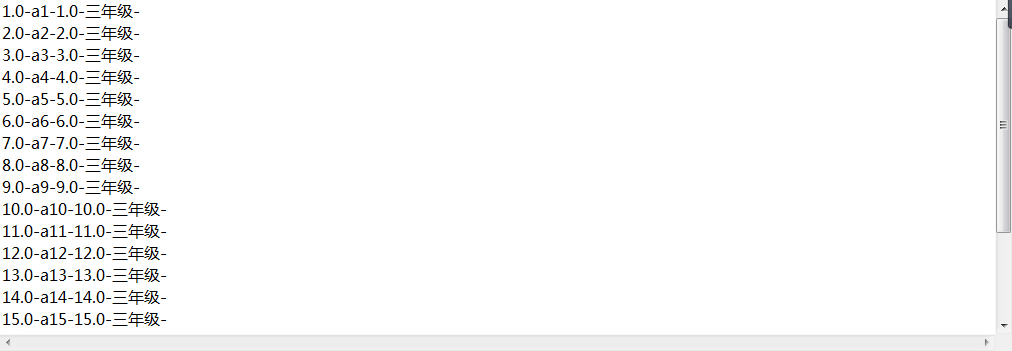
效果:
![]()
代码和jar宝下载路径
https://download.csdn.net/download/cengjianggh/10418815
---------------------------------------------------------------------------------------------------------------------更新分割线-------------------------------------------------------------------------------------------
2018年7月31日 14:54:00
实现导出poi数据到excel 在浏览器上弹出下载标签
接受数据查询的参数,然后查询数据库得到list集合的po对象转换为excel然后输出给浏览器
@RequiresPermissions("/actLog/postActLogSel")
    @RequestMapping(value = "/actLog/excel")
    public @ResponseBody  void getexcel(DataGridModel dgm,HttpServletResponse response,HttpServletRequest request) throws Exception {
        response.setCharacterEncoding("UTF-8");
        response.setContentType("application/x-download");
        String fileName = "埋点登录.xlsx";
        fileName = URLEncoder.encode(fileName, "UTF-8");
        response.addHeader("Content-Disposition", "attachment;filename=" + fileName);
        XSSFWorkbook wb=actLog.getExcel(dgm);
        try {
            OutputStream out = response.getOutputStream();
            wb.write(out);
            out.close();
            wb.close();
        } catch (IOException e) {
            // TODO Auto-generated catch block
            e.printStackTrace();
    }
        }
 1 if("post".equals(type)){
 2         List<BsActLog> log=actLog.getActPostcounts(map);
 3         wb = new XSSFWorkbook();
 4         XSSFSheet sheet = wb.createSheet("帖子埋点");
 5         sheet.setColumnWidth(0, 20 * 256);sheet.setColumnWidth(4, 20 * 256);sheet.setColumnWidth(8, 20 * 256);
 6         sheet.setColumnWidth(1, 20 * 256);sheet.setColumnWidth(5, 20 * 256);sheet.setColumnWidth(9, 20 * 256);
 7         sheet.setColumnWidth(2, 20 * 256);sheet.setColumnWidth(6, 20 * 256);sheet.setColumnWidth(10, 20 * 256);
 8         sheet.setColumnWidth(3, 20 * 256);sheet.setColumnWidth(7, 20 * 256);
 9         XSSFRow row = sheet.createRow(0);
10         XSSFCell cell = row.createCell(0);
11         cell=getStyle(wb, cell);//设置样式,可以不要
12         cell.setCellValue("日期 ");
13         XSSFCell cell2 = row.createCell(1);
14         cell2.setCellValue("标题 ");
15         cell2=getStyle(wb, cell2);
16         XSSFCell cell3 = row.createCell(2);
17         cell3.setCellValue("用户名 ");
18         cell3=getStyle(wb, cell3);
19         XSSFCell cell5 = row.createCell(3);
20         cell5.setCellValue("PV ");
21         cell5=getStyle(wb, cell5);
22         XSSFCell cell6 = row.createCell(4);
23         cell6.setCellValue("UV ");
24         cell6=getStyle(wb, cell6);
25         XSSFCell cell7 = row.createCell(5);
26         cell7.setCellValue("回复人数 ");
27         cell7=getStyle(wb, cell7);
28         XSSFCell cell8 = row.createCell(6);
29         cell8.setCellValue("回复次数 ");
30         cell8=getStyle(wb, cell8);
31         XSSFCell cell9 = row.createCell(7);
32         cell9.setCellValue("点赞数 ");
33         cell9=getStyle(wb, cell9);
34         XSSFCell cell10 = row.createCell(8);
35         cell10.setCellValue("收藏数 ");
36         cell10=getStyle(wb, cell10);
37         XSSFCell cell11 = row.createCell(9);
38         cell11.setCellValue("是否首页置顶 ");
39         cell11=getStyle(wb, cell11);
40         XSSFCell cell12 = row.createCell(10);
41         cell12.setCellValue("是否置顶 ");
42         cell12=getStyle(wb, cell12);
43         XSSFCell cell13 = row.createCell(11);
44         cell13.setCellValue("是否精华 ");
45         cell13=getStyle(wb, cell13);
46         int i=1;
47         for (BsActLog lo : log) {
48             XSSFRow rows = sheet.createRow(i);
49             XSSFCell cells = rows.createCell(0);
50             cells.setCellValue(lo.getDay());
51             cells=getStyle(wb, cells);
52             XSSFCell cells2 = rows.createCell(1);
53             cells2.setCellValue(lo.getTitle());
54             cells2=getStyle(wb, cells2);
55             XSSFCell cells3 = rows.createCell(2);
56             String name=filterEmoji(lo.getUsername());//对emoji表情过滤,可以不要
57             cells3.setCellValue(name);
58             cells3=getStyle(wb, cells3);
59             XSSFCell cells4 = rows.createCell(3);
60             cells4.setCellValue(lo.getPv());
61             cells4=getStyle(wb, cells4);
62             XSSFCell cells5 = rows.createCell(4);
63             cells5.setCellValue(lo.getUv());
64             cells5=getStyle(wb, cells5);
65             XSSFCell cells6 = rows.createCell(5);
66             cells6.setCellValue(lo.getReplyperson());
67             cells6=getStyle(wb, cells6);
68             XSSFCell cells7 = rows.createCell(6);
69             cells7.setCellValue(lo.getReplycount());
70             cells7=getStyle(wb, cells7);
71             XSSFCell cells8 = rows.createCell(7);
72             cells8.setCellValue(lo.getLikecount());
73             cells8=getStyle(wb, cells8);
74             XSSFCell cells9 = rows.createCell(8);
75             cells9.setCellValue(lo.getCollectcount());
76             cells9=getStyle(wb, cells9);
77             XSSFCell cells10 = rows.createCell(9);
78             cells10.setCellValue(lo.getIsmainpagetop());
79             cells10=getStyle(wb, cells10);
80             XSSFCell cells11 = rows.createCell(10);
81             cells11.setCellValue(lo.getIstop());
82             cells11=getStyle(wb, cells11);
83             XSSFCell cells12 = rows.createCell(11);
84             cells12.setCellValue(lo.getIsdigestpost());
85             cells12=getStyle(wb, cells12);
86             i+=1;
87         }
88     }
如果浏览器弹不出下载框,则把前台的请求改为get请求
window.open('地址?'参数);
过滤emoji表情的方法
 1 public static String filterEmoji(String source)//过滤emoji表情
 2 {
 3    if(source==null ||"".equals(source))
 4    {
 5        return "";
 6    }
 7     if (!containsEmoji(source))
 8     {
 9         return source; //如果不包含,直接返回
10     }
11     //到这里铁定包含
12     StringBuilder buf = null;
13     int len = source.length();
14     for (int i = 0; i < len; i++)
15     {
16         char codePoint = source.charAt(i);
17         if (!isEmojiCharacter(codePoint))
18         {
19             if (buf == null)
20             {
21                 buf = new StringBuilder();
22             }
23             buf.append(codePoint);
24         } else { } }
25     if (buf == null)
26     {
27         return source; //如果没有找到 emoji表情,则返回源字符串
28     }
29     else
30     {
31         if (buf.length() == len)
32         {
33             //这里的意义在于尽可能少的toString,因为会重新生成字符串
34             buf = null;
35             return source;
36         }
37         else
38         {
39             return buf.toString();
40         }
41     }
42 }
43 public static boolean containsEmoji(String source)
44 {
45     if (source==null ||"".equals(source))
46     {
47         return false;
48     }
49     int len = source.length();
50     for (int i = 0; i < len; i++)
51     {
52         char codePoint = source.charAt(i);
53         if (isEmojiCharacter(codePoint))
54         {
55             //do nothing,判断到了这里表明,确认有表情字符
56             return true;
57         }
58     }
59     return false;
60 }
61 public static boolean isEmojiCharacter(char codePoint)
62 {
63     return (codePoint >= 0x2600 && codePoint <= 0x27BF) // 杂项符号与符号字体
64            || codePoint == 0x303D
65            || codePoint == 0x2049
66            || codePoint == 0x203C
67            || (codePoint >= 0x2000 && codePoint <= 0x200F) //
68            || (codePoint >= 0x2028 && codePoint <= 0x202F) //
69            || codePoint == 0x205F //
70            || (codePoint >= 0x2065 && codePoint <= 0x206F) //
71                                                            /* 标点符号占用区域 */
72            || (codePoint >= 0x2100 && codePoint <= 0x214F) // 字母符号
73            || (codePoint >= 0x2300 && codePoint <= 0x23FF) // 各种技术符号
74            || (codePoint >= 0x2B00 && codePoint <= 0x2BFF) // 箭头A
75            || (codePoint >= 0x2900 && codePoint <= 0x297F) // 箭头B
76            || (codePoint >= 0x3200 && codePoint <= 0x32FF) // 中文符号
77            || (codePoint >= 0xD800 && codePoint <= 0xDFFF) // 高低位替代符保留区域
78            || (codePoint >= 0xE000 && codePoint <= 0xF8FF) // 私有保留区域
79            || (codePoint >= 0xFE00 && codePoint <= 0xFE0F) // 变异选择器
80                                                            //   || (codePoint >= U + 2600 && codePoint <= 0xFE0F)
81            || codePoint >= 0x10000; // Plane在第二平面以上的,char都不可以存,全部都转
82 }
欢迎大家一起说出自己的想法。