Kotlin中网络请求和Json解析:
Request(url).run()为Kotlin中的网络请求方式,Json解析是自己封装类的操作。
Json.get().toObject(Request(url).run(), GankNewsList::class.java).results 是将返回结果转换为具体的bean对象
DataLoader.kt
import com.soyoungboy.kotlinapp.util.json.Json

/**
 * Created by soyoungboy on 2018/1/29.
 */
class DataLoader {

    fun getGankNewsList(date: String): List<GankNews> {
        val url = Request.BASE_URL + date
        return Json.get().toObject(Request(url).run(), GankNewsList::class.java).results
    }

    fun getGankPictureList(date: String): ArrayList<GankPicture> {
        val url = Request.BASE_URL + date
        return Json.get().toObject(Request(url).run(), GankPictureList::class.java).results
    }
}
Json.kt
package com.soyoungboy.kotlinapp.util.json

abstract class Json internal constructor() {


    abstract fun toJson(src: Any): String

    abstract fun <T> toObject(json: String, claxx: Class<T>): T

    abstract fun <T> toObject(bytes: ByteArray, claxx: Class<T>): T

    abstract fun <T> toList(json: String, claxx: Class<T>): List<T>?

    companion object {
        private var json: Json? = null


        fun get(): Json {
            if (json == null) {
                json = GsonImpl()
            }
            return json as Json
        }
    }
}
具体的json解析封装:
package com.soyoungboy.kotlinapp.util.json

import com.google.gson.Gson
import com.google.gson.reflect.TypeToken
import java.util.*

/**
 * Created by soyoungboy on 2017/12/25.
 */

class GsonImpl : Json() {
    private val gson = Gson()


    override fun toJson(src: Any): String {
        return gson.toJson(src)
    }


    override fun <T> toObject(json: String, claxx: Class<T>): T {
        return gson.fromJson(json, claxx)
    }


    override fun <T> toObject(bytes: ByteArray, claxx: Class<T>): T {
        return gson.fromJson(String(bytes), claxx)
    }


    override fun <T> toList(json: String, claxx: Class<T>): List<T>? {
        val type = object : TypeToken<ArrayList<T>>() {

        }.type
        return gson.fromJson<List<T>>(json, type)
    }

}
bean对象:
GankNewsList.kt
package com.soyoungboy.kotlinapp.bean

/**
 * Created by soyoungboy on 2018/1/29.
 */
class GankNewsList(val error: Boolean, val results: List<GankNews>)
GankNews.kt
package com.soyoungboy.kotlinapp.bean

/**
 * Created by soyoungboy on 2018/1/29.
 */
data class GankNews(val _id: String,
                    val createdAt: String,
                    val desc: String,
                    val publishedAt: String,
                    val type: String,
                    val url: String,
                    val used: Boolean,
                    val who: String)
Kotlin异步线程和主线程之间的切换
async {}为异步代码块
uiThread {}为主线程代码块
private fun getGanksNewsList() = async {
        val news = DataLoader().getGankNewsList("data/all/20/2")
        uiThread {
            forecast_list.adapter = GankNewsAdapter(news) {
                val intent = Intent()
                intent.setClass(this@GankNewsListActivity, WebActivity::class.java)
                intent.putExtra("url", it.url)
                startActivity(intent)
            }
        }

    }
kotlin跳转和数据传递:
intent跳转并携带数据:
val intent = Intent()
intent.setClass(this@GankNewsListActivity, WebActivity::class.java)
intent.putExtra("url", it.url)
startActivity(intent)
接收数据:
intent.getStringExtra("url")为接收数据操作
override fun getUrl(): String {
        return intent.getStringExtra("url")
    }
kotlin图片加载:
由于Kotlin和Java代码之间可以相互操作,所以Kotlin可以调用Android相关的图片加载库,这里用Glide举例子:
引入Glide
compile 'com.github.bumptech.glide:glide:4.1.1'
annotationProcessor 'com.github.bumptech.glide:compiler:4.1.1'
compile 'com.github.bumptech.glide:okhttp3-integration:4.0.0'
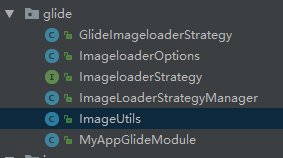
对Glide的封装
![]()
代码见:
https://github.com/soyoungboy/KotlinApp/tree/master/app/src/main/java/com/soyoungboy/kotlinapp/util/glide
调用如上ImageUtils进行图片加载缓存
class ViewHolder(val view: View, val itemClickListener: (GankPicture) -> Unit) : RecyclerView.ViewHolder(view) {
        fun bind(pictures: GankPicture) {
            val meizi = view.meizi as ImageView
            ImageUtils.loadImage(pictures.url,meizi)
            view.title.text = pictures.desc
            view.setOnClickListener {
                itemClickListener(pictures)
                view.context.longToast(pictures.url)
            }
        }
    }
kotlin之RecyclerView对应的Adapter
val items: List<GankPicture> 为要传进来进行展示的数据
view.setOnClickListener {
                itemClickListener(pictures)
                view.context.longToast(pictures.url)
            }
为点击事件
package com.soyoungboy.kotlinapp.adapter

import android.support.v7.widget.RecyclerView
import android.view.LayoutInflater
import android.view.View
import android.view.ViewGroup
import android.widget.ImageView
import com.soyoungboy.kotlinapp.R
import com.soyoungboy.kotlinapp.bean.GankPicture
import com.soyoungboy.kotlinapp.util.glide.ImageUtils
import kotlinx.android.synthetic.main.item_meizi.view.*
import org.jetbrains.anko.longToast

/**
 * Created by soyoungboy on 2018/1/29.
 */
class GankPictureAdapter(val items: List<GankPicture>, val itemClickListener: (GankPicture) -> Unit) : RecyclerView.Adapter<GankPictureAdapter.ViewHolder>() {

    override fun onCreateViewHolder(parent: ViewGroup, viewType: Int): ViewHolder {
        val view = LayoutInflater.from(parent.context).inflate(R.layout.item_meizi, parent, false)
        return ViewHolder(view, itemClickListener)
    }

    override fun getItemCount(): Int = items.size

    override fun onBindViewHolder(holder: ViewHolder, position: Int) {
        holder.bind(items[position])
    }

    class ViewHolder(val view: View, val itemClickListener: (GankPicture) -> Unit) : RecyclerView.ViewHolder(view) {
        fun bind(pictures: GankPicture) {
            val meizi = view.meizi as ImageView
            ImageUtils.loadImage(pictures.url,meizi)
            view.title.text = pictures.desc
            view.setOnClickListener {
                itemClickListener(pictures)
                view.context.longToast(pictures.url)
            }
        }
    }
}
实践的代码见我的github:https://github.com/soyoungboy/KotlinApp,里面是我学习Kotlin的一些小练习