作者:vivo 互联网服务器团队- Wang Zhi
Caffeine 作为一个高性能的缓存框架而被大量使用。本文基于Caffeine已有的基础进行定制化开发实现可视化功能。
Caffeine缓存是一个高性能、可扩展、内存优化的 Java 缓存库,基于 Google 的 Guava Cache演进而来并提供了接近最佳的命中率。
Caffeine 缓存包含以下特点:
-
高效快速:Caffeine 缓存使用近似算法和并发哈希表等优化技术,使得缓存的访问速度非常快。
-
内存友好:Caffeine 缓存使用一种内存优化策略,能够根据需要动态调整缓存的大小,有效地利用内存资源。
-
多种缓存策略:Caffeine 缓存支持多种缓存策略,如基于容量、时间、权重、手动移除、定时刷新等,并提供了丰富的配置选项,能够适应不同的应用场景和需求。
-
支持异步加载和刷新:Caffeine 缓存支持异步加载和刷新缓存项,可以与 Spring 等框架无缝集成。
-
清理策略:Caffeine 使用 Window TinyLFU 清理策略,它提供了接近最佳的命中率。
-
支持自动加载和自动过期:Caffeine 缓存可以根据配置自动加载和过期缓存项,无需手动干预。
-
统计功能:Caffeine 缓存提供了丰富的统计功能,如缓存命中率、缓存项数量等,方便评估缓存的性能和效果。
正是因为Caffeine具备的上述特性,Caffeine作为项目中本地缓存的不二选择,越来越多的项目集成了Caffeine的功能,进而衍生了一系列的业务视角的需求。
日常使用的需求之一希望能够实时评估Caffeine实例的内存占用情况并能够提供动态调整缓存参数的能力,但是已有的内存分析工具MAT需要基于dump的文件进行分析无法做到实时,这也是整个事情的起因之一。
-
能够对项目中的Caffeine的缓存实例能够做到近实时统计,实时查看缓存的实例个数。
-
能够对Caffeine的每个实例的缓存配置参数、内存占用、缓存命中率做到实时查看,同时能够支持单个实例的缓存过期时间,缓存条目等参数进行动态配置下发。
-
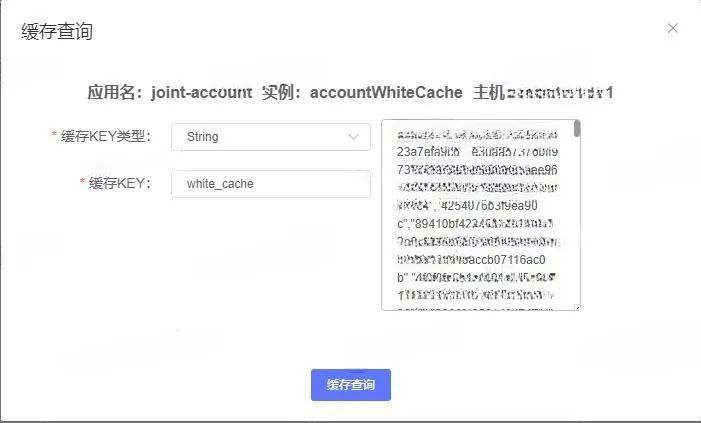
能够对Caffeine的每个实例的缓存数据做到实时查看,并且能够支持缓存数据的立即失效等功能。
基于上述的需求背景,结合caffeine的已有功能和定制的部分源码开发,整体作为caffeine可视化的技术项目进行推进和落地。
Caffeine可视化项目目前已支持功能包括:
3.1 缓存实例的全局管控
![]()
说明:
3.2 内存占用趋势
![]()
说明:
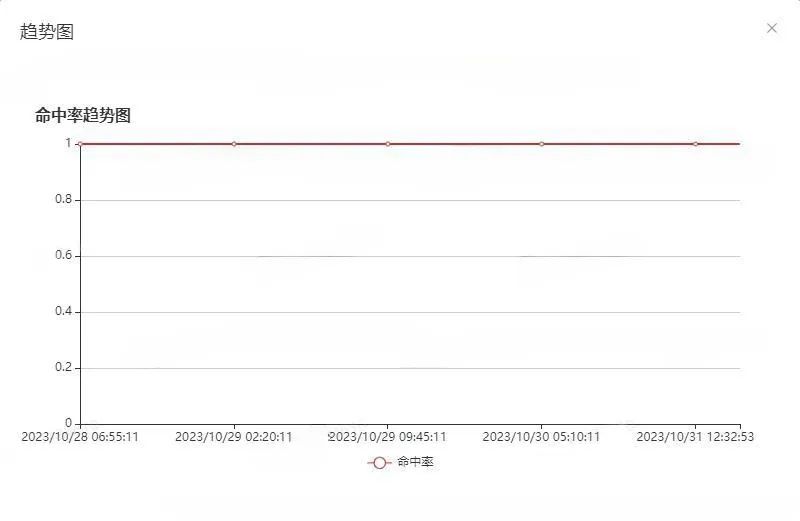
3.3 命中率趋势
![]()
说明:
3.4 配置变更
![]()
说明:
3.5 缓存查询
![]()
说明:
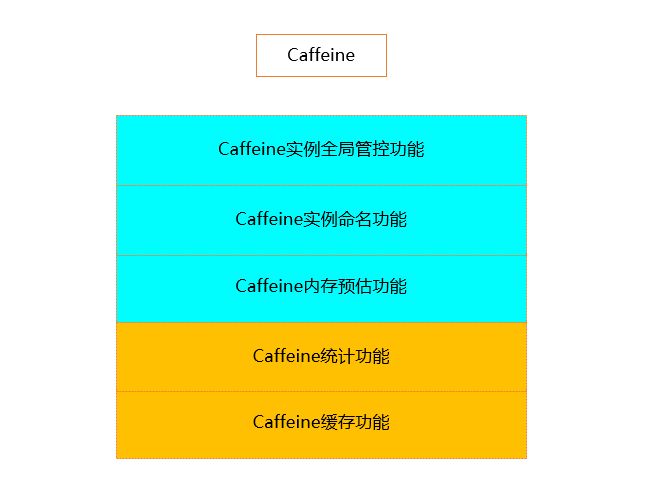
4.1 整体设计框架
说明:
-
沿用Caffeine的基础功能包括Caffeine的缓存功能和Caffeine统计功能。
-
新增Caffeine内存占用预估功能,该功能主要是预估缓存实例对象占用的内存情况。
-
新增Caffeine实例命名功能,该功能是针对每个实例对象提供命名功能,是全局管控的基础。
-
新增Caffeine实例全局管控功能,该功能主要维护项目运行中所有的缓存实例。
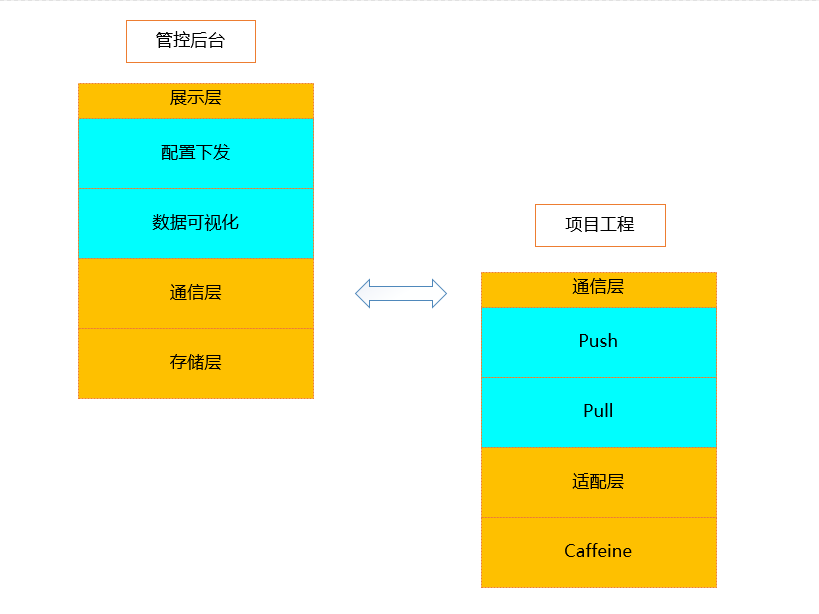
![]()
说明:
-
【项目工程侧】:Caffeine的可视化框架基于Caffeine框架功能整合的基础上增加通信层进行数据数据上报和配置的下发。
-
【管控平台侧】:负责缓存数据上报的接收展示,配置变更命令的下发。
-
【通信层支持push和pull两种模式】,push模式主要用于统计数据的实时上报,pull模式主要用于配置下发和缓存数据查询。
4.2 源码实现
static Cache<String, List<String>> accountWhiteCache = Caffeine.newBuilder() .expireAfterWrite(VivoConfigManager.getInteger("trade.account.white.list.cache.ttl", 10), TimeUnit.MINUTES) .recordStats().maximumSize(VivoConfigManager.getInteger("trade.account.white.list.cache.size", 100)).build();常规的Caffeine实例的创建方式 static Cache<String, List<String>> accountWhiteCache = Caffeine.newBuilder().applyName("accountWhiteCache") .expireAfterWrite(VivoConfigManager.getInteger("trade.account.white.list.cache.ttl", 10), TimeUnit.MINUTES) .recordStats().maximumSize(VivoConfigManager.getInteger("trade.account.white.list.cache.size", 100)).build();支持实例命名的Caffeine实例的创建方式
说明:
public final class Caffeine<K, V> { String instanceName; static Map<String, Cache> cacheInstanceMap = new ConcurrentHashMap<>(); @NonNull public <K1 extends K, V1 extends V> Cache<K1, V1> build() { requireWeightWithWeigher(); requireNonLoadingCache(); @SuppressWarnings("unchecked") Caffeine<K1, V1> self = (Caffeine<K1, V1>) this; Cache localCache = isBounded() ? new BoundedLocalCache.BoundedLocalManualCache<>(self) : new UnboundedLocalCache.UnboundedLocalManualCache<>(self); if (null != localCache && StringUtils.isNotEmpty(localCache.getInstanceName())) { cacheInstanceMap.put(localCache.getInstanceName(), localCache); } return localCache; }}
说明:
-
每个Caffeine都有一个实例名称instanceName。
-
全局通过cacheInstanceMap来维护Caffeine实例对象的名称和实例的映射关系。
-
通过维护映射关系能够通过实例的名称查询到缓存实例对象并对缓存实例对象进行各类的操作。
-
Caffeine实例的命名功能是其他功能整合的基石。
import jdk.nashorn.internal.ir.debug.ObjectSizeCalculator; public abstract class BoundedLocalCache<K, V> extends BLCHeader.DrainStatusRef<K, V> implements LocalCache<K, V> { final ConcurrentHashMap<Object, Node<K, V>> data; @Override public long getMemoryUsed() { return ObjectSizeCalculator.getObjectSize(data); }}
说明:
public static StatsData getCacheStats(String instanceName) { Cache cache = Caffeine.getCacheByInstanceName(instanceName); CacheStats cacheStats = cache.stats(); StatsData statsData = new StatsData(); statsData.setInstanceName(instanceName); statsData.setTimeStamp(System.currentTimeMillis()/1000); statsData.setMemoryUsed(String.valueOf(cache.getMemoryUsed())); statsData.setEstimatedSize(String.valueOf(cache.estimatedSize())); statsData.setRequestCount(String.valueOf(cacheStats.requestCount())); statsData.setHitCount(String.valueOf(cacheStats.hitCount())); statsData.setHitRate(String.valueOf(cacheStats.hitRate())); statsData.setMissCount(String.valueOf(cacheStats.missCount())); statsData.setMissRate(String.valueOf(cacheStats.missRate())); statsData.setLoadCount(String.valueOf(cacheStats.loadCount())); statsData.setLoadSuccessCount(String.valueOf(cacheStats.loadSuccessCount())); statsData.setLoadFailureCount(String.valueOf(cacheStats.loadFailureCount())); statsData.setLoadFailureRate(String.valueOf(cacheStats.loadFailureRate())); Optional<Eviction> optionalEviction = cache.policy().eviction(); optionalEviction.ifPresent(eviction -> statsData.setMaximumSize(String.valueOf(eviction.getMaximum()))); Optional<Expiration> optionalExpiration = cache.policy().expireAfterWrite(); optionalExpiration.ifPresent(expiration -> statsData.setExpireAfterWrite(String.valueOf(expiration.getExpiresAfter(TimeUnit.SECONDS)))); optionalExpiration = cache.policy().expireAfterAccess(); optionalExpiration.ifPresent(expiration -> statsData.setExpireAfterAccess(String.valueOf(expiration.getExpiresAfter(TimeUnit.SECONDS)))); optionalExpiration = cache.policy().refreshAfterWrite(); optionalExpiration.ifPresent(expiration -> statsData.setRefreshAfterWrite(String.valueOf(expiration.getExpiresAfter(TimeUnit.SECONDS)))); return statsData;}
说明:
public static void sendReportData() { try { if (!VivoConfigManager.getBoolean("memory.caffeine.data.report.switch", true)) { return; } Method listCacheInstanceMethod = HANDLER_MANAGER_CLASS.getMethod("listCacheInstance", null); List<String> instanceNames = (List)listCacheInstanceMethod.invoke(null, null); if (CollectionUtils.isEmpty(instanceNames)) { return; } String appName = System.getProperty("app.name"); String localIp = getLocalIp(); String localPort = String.valueOf(NetPortUtils.getWorkPort()); ReportData reportData = new ReportData(); InstanceData instanceData = new InstanceData(); instanceData.setAppName(appName); instanceData.setIp(localIp); instanceData.setPort(localPort); Method getCacheStatsMethod = HANDLER_MANAGER_CLASS.getMethod("getCacheStats", String.class); Map<String, StatsData> statsDataMap = new HashMap<>(); instanceNames.stream().forEach(instanceName -> { try { StatsData statsData = (StatsData)getCacheStatsMethod.invoke(null, instanceName); statsDataMap.put(instanceName, statsData); } catch (Exception e) { } }); reportData.setInstanceData(instanceData); reportData.setStatsDataMap(statsDataMap); HttpPost httpPost = new HttpPost(getReportDataUrl()); httpPost.setConfig(requestConfig); StringEntity stringEntity = new StringEntity(JSON.toJSONString(reportData)); stringEntity.setContentType("application/json"); httpPost.setEntity(stringEntity); HttpResponse response = httpClient.execute(httpPost); String result = EntityUtils.toString(response.getEntity(),"UTF-8"); EntityUtils.consume(response.getEntity()); logger.info("Caffeine 数据上报成功 URL {} 参数 {} 结果 {}", getReportDataUrl(), JSON.toJSONString(reportData), result); } catch (Throwable throwable) { logger.error("Caffeine 数据上报失败 URL {} ", getReportDataUrl(), throwable); }}
说明:
public static ExecutionResponse dispose(ExecutionRequest request) { ExecutionResponse executionResponse = new ExecutionResponse(); executionResponse.setCmdType(CmdTypeEnum.INSTANCE_CONFIGURE.getCmd()); executionResponse.setInstanceName(request.getInstanceName()); String instanceName = request.getInstanceName(); Cache cache = Caffeine.getCacheByInstanceName(instanceName); if (null != request.getMaximumSize() && request.getMaximumSize() > 0) { Optional<Eviction> optionalEviction = cache.policy().eviction(); optionalEviction.ifPresent(eviction ->eviction.setMaximum(request.getMaximumSize())); } if (null != request.getExpireAfterWrite() && request.getExpireAfterWrite() > 0) { Optional<Expiration> optionalExpiration = cache.policy().expireAfterWrite(); optionalExpiration.ifPresent(expiration -> expiration.setExpiresAfter(request.getExpireAfterWrite(), TimeUnit.SECONDS)); } if (null != request.getExpireAfterAccess() && request.getExpireAfterAccess() > 0) { Optional<Expiration> optionalExpiration = cache.policy().expireAfterAccess(); optionalExpiration.ifPresent(expiration -> expiration.setExpiresAfter(request.getExpireAfterAccess(), TimeUnit.SECONDS)); } if (null != request.getRefreshAfterWrite() && request.getRefreshAfterWrite() > 0) { Optional<Expiration> optionalExpiration = cache.policy().refreshAfterWrite(); optionalExpiration.ifPresent(expiration -> expiration.setExpiresAfter(request.getRefreshAfterWrite(), TimeUnit.SECONDS)); } executionResponse.setCode(0); executionResponse.setMsg("success"); return executionResponse;}
说明:
public static ExecutionResponse invalidate(ExecutionRequest request) { ExecutionResponse executionResponse = new ExecutionResponse(); executionResponse.setCmdType(CmdTypeEnum.INSTANCE_INVALIDATE.getCmd()); executionResponse.setInstanceName(request.getInstanceName()); try { String instanceName = request.getInstanceName(); Cache cache = Caffeine.getCacheByInstanceName(instanceName); Object cacheKeyObj = request.getCacheKey(); if (Objects.isNull(cacheKeyObj)) { cache.invalidateAll(); } else { if (Objects.equals(request.getCacheKeyType(), 2)) { cache.invalidate(Long.valueOf(request.getCacheKey().toString())); } else if (Objects.equals(request.getCacheKeyType(), 3)) { cache.invalidate(Integer.valueOf(request.getCacheKey().toString())); } else { cache.invalidate(request.getCacheKey().toString()); } } executionResponse.setCode(0); executionResponse.setMsg("success"); } catch (Exception e) { executionResponse.setCode(-1); executionResponse.setMsg("fail"); } return executionResponse; }}
public static ExecutionResponse inspect(ExecutionRequest request) { ExecutionResponse executionResponse = new ExecutionResponse(); executionResponse.setCmdType(CmdTypeEnum.INSTANCE_INSPECT.getCmd()); executionResponse.setInstanceName(request.getInstanceName()); String instanceName = request.getInstanceName(); Cache cache = Caffeine.getCacheByInstanceName(instanceName); Object cacheValue = cache.getIfPresent(request.getCacheKey()); if (Objects.equals(request.getCacheKeyType(), 2)) { cacheValue = cache.getIfPresent(Long.valueOf(request.getCacheKey().toString())); } else if (Objects.equals(request.getCacheKeyType(), 3)) { cacheValue = cache.getIfPresent(Integer.valueOf(request.getCacheKey().toString())); } else { cacheValue = cache.getIfPresent(request.getCacheKey().toString()); } if (Objects.isNull(cacheValue)) { executionResponse.setData(""); } else { executionResponse.setData(JSON.toJSONString(cacheValue)); } return executionResponse;}
说明:
public class ServerManager { private Server jetty; public ServerManager() throws Exception { int port = NetPortUtils.getAvailablePort(); jetty = new Server(port); ServletContextHandler context = new ServletContextHandler(ServletContextHandler.NO_SESSIONS); context.setContextPath("/"); context.addServlet(ClientServlet.class, "/caffeine"); jetty.setHandler(context); } public void start() throws Exception { jetty.start(); }} public class ClientServlet extends HttpServlet { private static final Logger logger = LoggerFactory.getLogger(ClientServlet.class); @Override protected void doGet(HttpServletRequest req, HttpServletResponse resp) throws ServletException, IOException { super.doGet(req, resp); } @Override protected void doPost(HttpServletRequest req, HttpServletResponse resp) throws ServletException, IOException { ExecutionResponse executionResponse = null; String requestJson = null; try { String contextPath = req.getContextPath(); String servletPath = req.getServletPath(); String requestUri = req.getRequestURI(); requestJson = IOUtils.toString(req.getInputStream(), StandardCharsets.UTF_8); ExecutionRequest executionRequest = JSON.parseObject(requestJson, ExecutionRequest.class); executionResponse = DisposeCenter.dispatch(executionRequest); } catch (Exception e) { logger.error("vivo-memory 处理请求异常 {} ", requestJson, e); } if (null == executionResponse) { executionResponse = new ExecutionResponse(); executionResponse.setCode(-1); executionResponse.setMsg("处理异常"); } resp.setContentType("application/json; charset=utf-8"); PrintWriter out = resp.getWriter(); out.println(JSON.toJSONString(executionResponse)); out.flush(); }}
说明:
public static void sendHeartBeatData() { try { if (!VivoConfigManager.getBoolean("memory.caffeine.heart.report.switch", true)) { return; } String appName = System.getProperty("app.name"); String localIp = getLocalIp(); String localPort = String.valueOf(NetPortUtils.getWorkPort()); HeartBeatData heartBeatData = new HeartBeatData(); heartBeatData.setAppName(appName); heartBeatData.setIp(localIp); heartBeatData.setPort(localPort); heartBeatData.setTimeStamp(System.currentTimeMillis()/1000); HttpPost httpPost = new HttpPost(getHeartBeatUrl()); httpPost.setConfig(requestConfig); StringEntity stringEntity = new StringEntity(JSON.toJSONString(heartBeatData)); stringEntity.setContentType("application/json"); httpPost.setEntity(stringEntity); HttpResponse response = httpClient.execute(httpPost); String result = EntityUtils.toString(response.getEntity(),"UTF-8"); EntityUtils.consume(response.getEntity()); logger.info("Caffeine 心跳上报成功 URL {} 参数 {} 结果 {}", getHeartBeatUrl(), JSON.toJSONString(heartBeatData), result); } catch (Throwable throwable) { logger.error("Caffeine 心跳上报失败 URL {} ", getHeartBeatUrl(), throwable); }}
说明:
vivo技术团队在Caffeine的使用经验上曾有过多次分享,可参考公众号文章《如何把 Caffeine Cache 用得如丝般顺滑》,此篇文章在使用的基础上基于使用痛点进行进一步的定制。
目前Caffeine可视化的项目已经在相关核心业务场景中落地并发挥作用,整体运行平稳。使用较多的功能包括项目维度的caffeine实例的全局管控,单实例维度的内存占用评估和缓存命中趋势评估。
如通过单实例的内存占用评估功能能够合理评估缓存条目设置和内存占用之间的关系;通过分析缓存命中率的整体趋势评估缓存的参数设置合理性。
期待此篇文章能够给业界缓存使用和监控带来一些新思路。