前两篇主要针对 NumPy 中的基本概念 ,即高维数组 ndarray 的数据结构以及关键方法作了介绍。本篇重点介绍广播机制以及针对高维数组的轴操作,最后对 NumPy 的 C 语言扩展作了介绍。
1 广播 NumPy 运算通常是在两个数组的元素级别上进行的。最简单情况就是,两个具有完全相同 shape 的数组运算,如下面例子所示,
a = np.array([1.0 , 2.0 , 3.0 ])2.0 , 2.0 , 2.0 ])numpy 的广播机制是指在执行算术运算时处理不同 shape 的数组的方式。在一定规则下,较小的数组在较大的数组上广播 ,从而使得数组具有兼容的 shape。
a = np.array([1.0 , 2.0 , 3.0 ])2.0 发现这两个计算的结果是一样的,但第二个是有广播机制在发挥作用。 广播规则 在两个数组上执行运算时,NumPy 比较它们的形状。它从 shape 的最右边开始往左一一比较。如果所有位子比较下来都是下面两种情况之一,
那么这两个数组可以运算。如果不满足这些条件,则将引发 ValueError,表明数组的 shape 不兼容。
可见,数组的 shape 好比人的八字,两个人如果八字不合,那是不能在一起滴。
在下面这些示例中,A 和 B 数组中长度为 1 的那些轴(缺失的轴自动补 1) ,在广播期间会扩展为另一个数组相同位子上更大的长度,
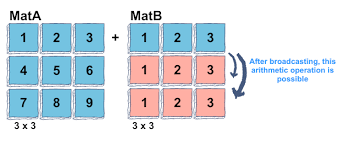
A (3 d array): 15 x 3 x 5 3 d array): 15 x 1 x 5 3 d array): 15 x 3 x 5 3 d array): 15 x 3 x 5 2 d array): 3 x 5 3 d array): 15 x 3 x 5 3 d array): 15 x 3 x 5 2 d array): 3 x 1 3 d array): 15 x 3 x 5 4 d array): 8 x 1 x 6 x 1 3 d array): 7 x 1 x 5 4 d array): 8 x 7 x 6 x 5 下面例子中第一个数组的 shape 为 (3,3),第二个数组的 shape 为 (3,),此时相当于 (1,3),因此先将第二个数组的 shape 改为 (3,3),相当于原来数组沿着 0 轴再复制 2 份。
〄 广播机制图解。
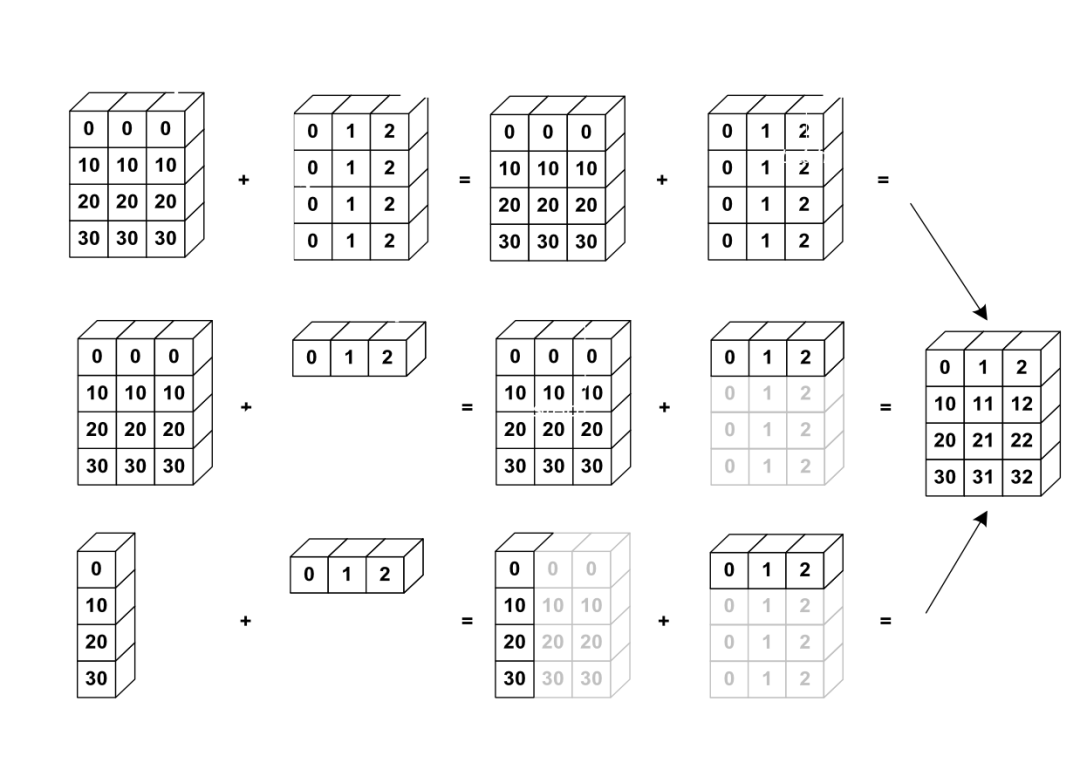
MatA = np.array([[1 , 2 , 3 ],[4 ,5 ,6 ],[7 ,8 ,9 ]])1 , 2 , 3 ])为了更好地理解这个机制,下面再给出几个例子。下图共三行,分别对应三种广播方式,请对照后面代码。
〄 每行对应一种广播。
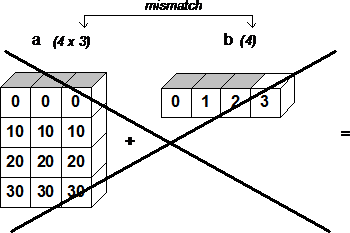
a = np.array([0 ,10 ,20 ,30 ])0 ,1 ,2 ])A = np.stack((a,a,a), axis=1 )B = np.stack((b,b,b,b))# 对应第一种情况 # 对应第二种情况 a1 = np.array([[0 ,10 ,20 ,30 ]]).T# 对应第三种情况 而下面例子不满足广播规则,因而不能执行运算。
A (1 d array): 3 1 d array): 4 # 倒数最后的轴长度不兼容 2 d array): 4 x 3 1 d array): 4 # 倒数最后的轴长度不兼容 2 d array): 2 x 1 3 d array): 8 x 4 x 3 # 倒数第二个轴长度不兼容
〄 不能广播的例子。
广播机制小结
话虽如此,它并非在所有情况下都有效,并且实际上强加了执行广播必须满足的严格规则。
仅当数组中每个维的形状相等或维的大小为 1 时,才能执行算术运算。
2 维度增减 维度增加 在需要增加轴的位子使用 np.newaxis 或者 None。
x = np.arange(6 ).reshape(2 ,3 )x1 = x[:,np.newaxis,:]# 或者 None ,:]维度压缩 有时候需要将数组中多余的轴去掉,以降低数组维度的目的。 numpy.squeeze( )
从数组中删除单维度的轴,即把 shape 中为 1 的维度去掉。
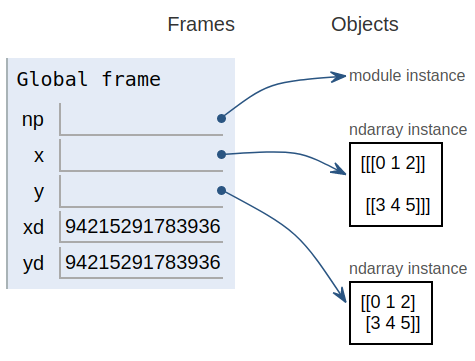
x = np.arange(6 ).reshape(2 ,1 ,3 )y = x.squeeze()xd = x.__array_interface__['data' ][0 ] 'data' ][0 ]
〄 查看数据在内存中的地址,验证是否指向同一块内存。
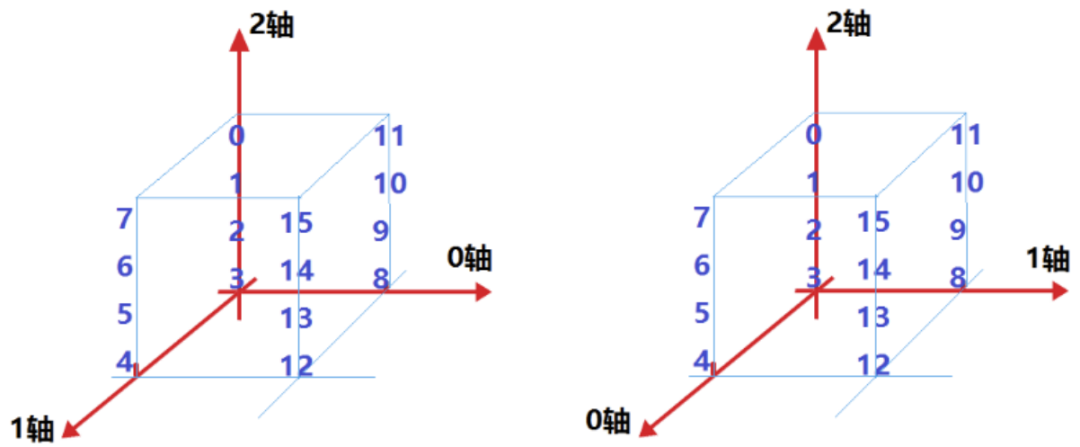
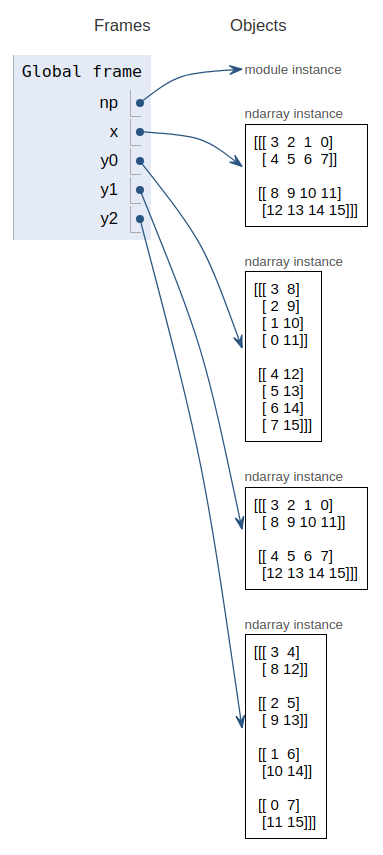
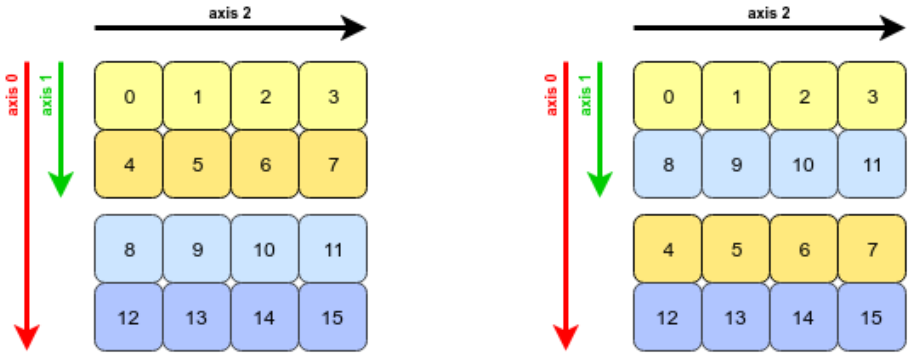
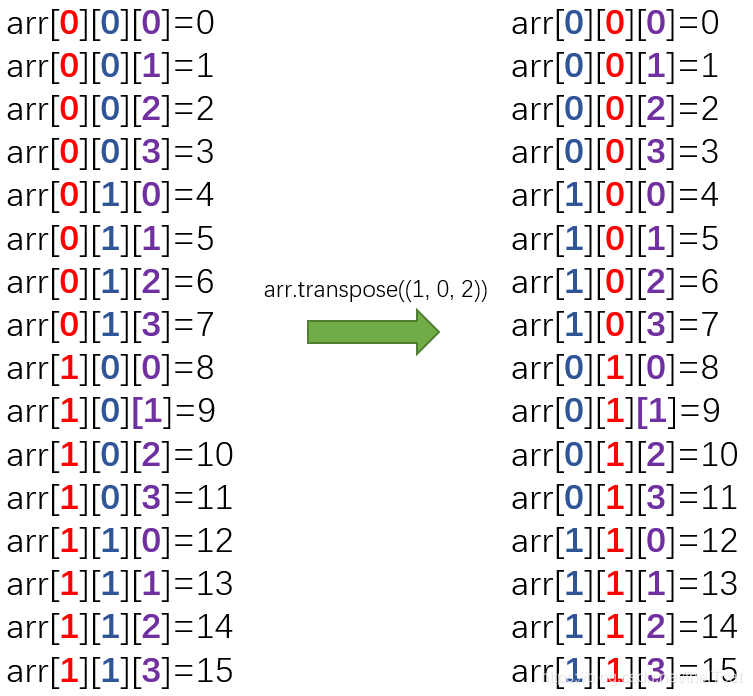
3 数组转置(换轴) x = np.arange(9 ).reshape(3 , 3 )y = np.transpose(x) # 或者 y = x.transpose() 或者 x.T y = np.transpose(x, [1 , 0 ])x = np.array([3 ,2 ,1 ,0 ,4 ,5 ,6 ,7 ,8 ,9 ,10 ,11 ,12 ,13 ,14 ,15 ]).reshape(2 , 2 , 4 )y1 = np.transpose(x, [1 , 0 , 2 ])请对照下图理解这个三维数组在内存中的样子以及对它的不同视图(view) 。关于这点,文末附上的进阶篇有详细解读。
〄 注意,轴可以换,但数据是不动的。
y2 = np.transpose(x, [2 , 0 , 1 ])# 代码放一起 3 ,2 ,1 ,0 ,4 ,5 ,6 ,7 ,8 ,9 ,10 ,11 ,12 ,13 ,14 ,15 ]).reshape(2 , 2 , 4 )1 , 2 , 0 ])1 , 0 , 2 ])2 , 0 , 1 ])看看变轴后各个数组的元素具体是怎样的,注意,它们都指向同一份数据。
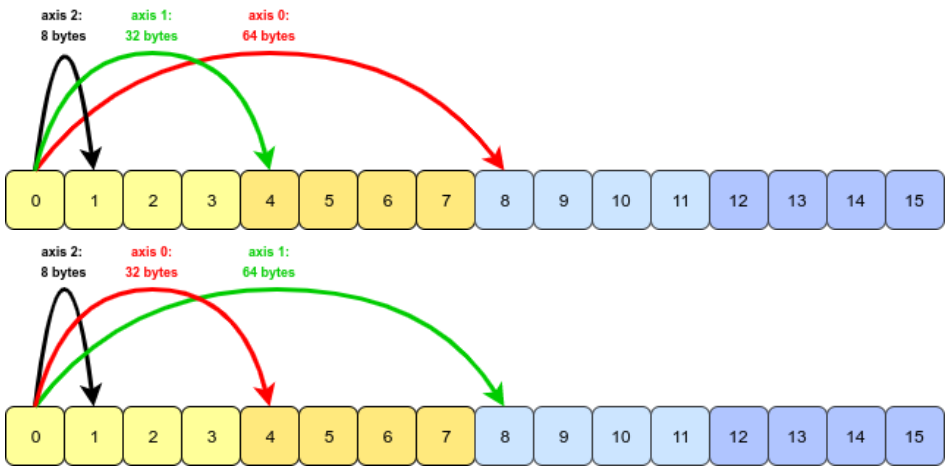
这是怎么实现对内存中同一份数据使用不同的轴序呢?实际上,数据还是那些数据,更改的是各个轴上的步长 stride。
x.strides, y1.strides, y2.strides# 数据还是同一份 再看一个例子,三维数组有三个轴,注意换轴后每个轴的步长。
x = np.arange(16 ).reshape(2 , 2 , 4 )y = x.transpose((1 , 0 , 2 ))
两个数组三个轴对应的步长不同了。
轴更换后,下标也跟着换了,所以换轴前后相同下标指向的数据是不同的。
〄 轴换了,下标也跟着换了。
其实,轴的意义主要体现在步长上,所以换轴一定意义上就是更换了步长。 实际例子 RGB 图像数据
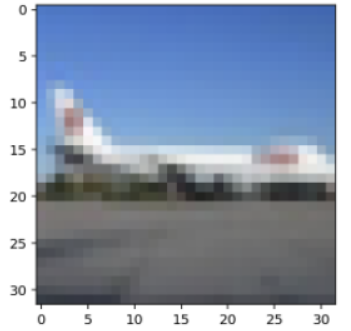
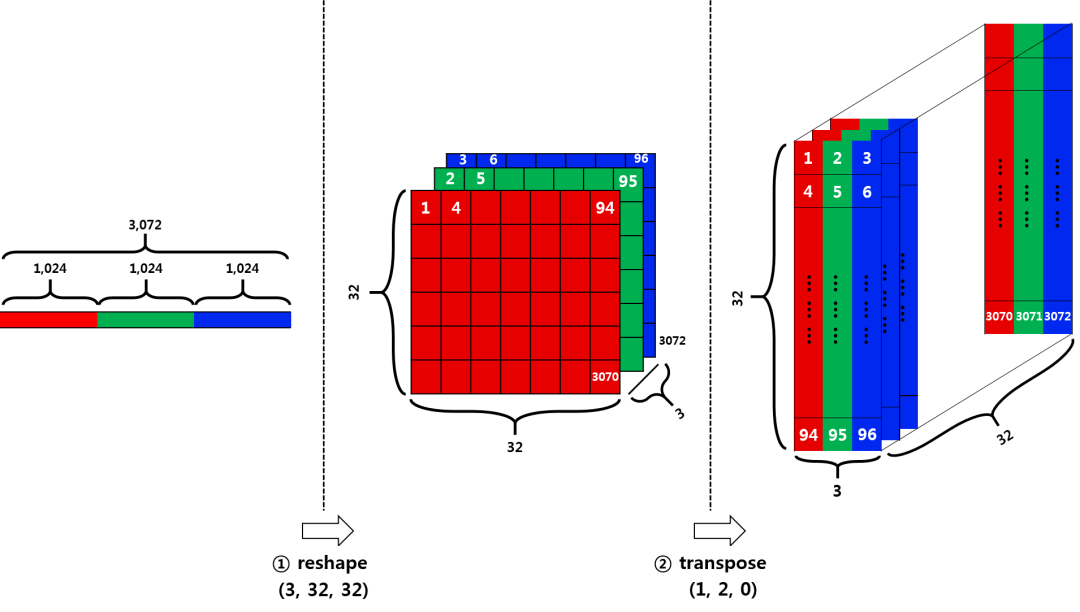
每张图像由红绿蓝三个通道组成,每个通道对应一个 32×32 的二维数组
〄 一张 32x32 像素的图像。
看下图,从左到右,分别对应图像数据在内存中的存放,将一维数组转化为三维数组,更换轴。
那么,为什么要换轴呢?因为不同程序包对数据的要求不同,我们为了使用它们,需要按照它们对参数的要求来对数据作相应调整。
而有时候,并不需要换轴,只需要更换某个轴上元素的次序即可,例如,
# 变换某个轴上元素的次序 3 , 2 , 1 , 0 )]4 通用函数 ufunc 函数
ufunc 是 universal function 的缩写,是指能对数组的每个元素进行操作的函数,而不是针对 narray 对象操作。
NumPy 提供了大量的 ufunc 函数。这些函数在对 narray 进行运算的速度比使用循环或者列表推导式要快得多。
NumPy 内置的许多 ufunc 函数是 C 语言实现的,因此计算效率很高。
x = np.linspace(0 , 2 *np.pi, 5 )y, z = np.sin(x), np.cos(x)# 将结果直接传给输入 x 性能比较 import timeimport mathimport numpy as npx = [i for i in range(1000000 )]# math.sin for i, t in enumerate(x):# numpy.sin # comparison reduce 操作
这是 NumPy 内置的通用函数,如果需要这样的计算,建议直接使用,不要自己实现。
沿着轴对数组进行操作,相当于将运算符 <op> 插入到沿轴的所有子数组或者元素当中。
格式为: <op>.reduce (array=, axis=0, dtype=None)
np.add.reduce([1 ,2 ,3 ])np.add.reduce([[1 ,2 ,3 ],[4 ,5 ,6 ]], axis=1 )np.multiply.reduce([[1 ,2 ,3 ],[4 ,5 ,6 ]], axis=1 )accumulate 操作 np.add.accumulate([1 ,2 ,3 ])np.add.accumulate([[1 ,2 ,3 ],[4 ,5 ,6 ]], axis=1 )自定义 ufunc 函数 # 定义一个 python 函数 def ufunc_diy (x) :0.618 , 0.518 , 1.0 if x >= c: 0.0 elif x < c0: else : return rx = np.linspace(0 , 2 , 1000000 )ufunc_diy(x)start = time.process_time()for t in x])np.frompyfunc 函数 ufunc = np.frompyfunc(ufunc_diy, 1 , 1 )start = time.process_time()NumPy 之 C 扩展 本文主要介绍两种扩展方式,
ctypes
ctypes 是 Python 的一个外部库,提供和 C 语言兼容的数据类型,可以很方便地调用 dll/so 中输出的 C 接口函数。
#ufunc.c ''' #ufunc.py """ Example of wrapping a C library function that accepts a C double array as import numpy as npimport numpy.ctypeslib as npctfrom ctypes import c_int1 , flags='CONTIGUOUS' )# load the library, using numpy mechanisms "lib_ufunc" , "." )# setup the return types and argument types None def ufunc_diy_func (in_array, out_array) :return lib.ufunc_diy(in_array, out_array, len(in_array))# 编译 # gcc -shared -fPIC -O2 ufunc.c -ldl -o lib_ufunc.so import timeimport numpy as npimport ufunc"ufunc_diy time: " , end-start)# python test_ufunc.py # ufunc_diy time: 0.003 - 0.008 Cython
Cython 是 Python 的一个超集,可以编译为 C,Cython 结合了 Python 的易用性和原生 C 代码的高效率。
# ufunc_diy.h # ufunc_diy.c 0.618 ,c0=0.518 ,hc=1.0 ;for (int i=0 ;i<size;i++) {if (xx>=c) r=0.0 ;else if (xx<c0) r=xx/c0*hc;else r=(c-xx)/(c-c0)*hc;# Cython支持 NumPy # 在代码中声明 a = np.array([0,10,20,30]) 0 ,1 ,2 ])cimport numpy,使用函数。#_ufunc_cython.pyx_ """ Example of wrapping a C function that takes C double arrays as input using # cimport the Cython declarations for numpy as np# if you want to use the Numpy-C-API from Cython # (not strictly necessary for this example, but good practice) # cdefine the signature of our c function from "ufunc_diy.h" :# create the wrapper code, with numpy type annotations def ufunc_diy_func (np.ndarray[double, ndim=1 , mode="c" ] in_array not Noa = np.array([0 ,10 ,20 ,30 ]) ([0 ,1 ,2 ]) ne,1 , mode="c" ] out_array not None) :0 ])# setup.py from distutils.core import setup, Extensionimport numpyfrom Cython.Distutils import build_ext'build_ext' : build_ext},"ufunc_cython" ,"_ufunc_cython.pyx" , "ufunc_diy.c" ],# 或者 from distutils.core import setupimport numpyfrom Cython.Build import cythonize"_ufunc_cython.pyx" , annotate=True ),# 编译
可以看到多了两个文件,一个是 _ufunc_cython.c ,一个是 ufunc_cython.so (如果是 windows,则是 .pyd) 。
c 文件就是 cython 将 pyx 文件解析成一个 c 文件,它不依赖平台,而 so 或者 pyd 文件,则是将 c 文件进行编译后的动态链接库,依赖于平台。
import timeimport numpy as npimport ufunc_cython"ufunc_diy time: " , end-start)
实际跑一下就知道,C 扩展下来有时候能得到上百倍的性能提升,这样来说,部分函数用 C 语言来实现还是值得。