-
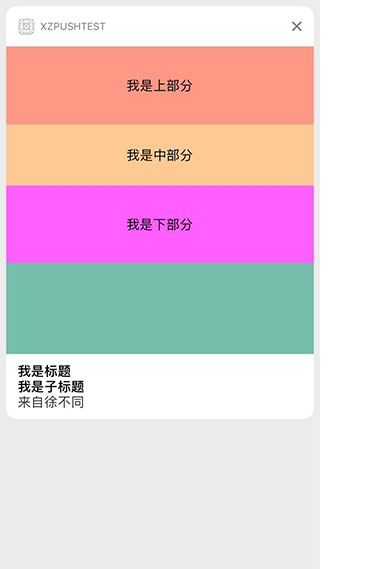
使用如下
    - (void)didReceiveNotification:(UNNotification *)notification {

        // 这个方法,可以给自己的控件赋值,调整 frame 等等,在这里打印出来了通知的内容。
        NSDictionary *dict =  notification.request.content.userInfo;

        // 这里可以把打印的所有东西拿出来
        NSLog(@"%@",dict);

        /**************************** 打印的信息是 ************
        aps = {
                alert = "This is some fancy message.";
                badge = 1;
                from = "大家好";
                imageAbsoluteString = "http://upload.univs.cn/2012/0104/1325645511371.jpg";
                "mutable-content" = 1;
                sound = default;
            };
        }
        *******************************************/

    }
-
说到这里,简单的 UNNotificationContentExtension 已经说完了。在 UNNotificationContentExtension.h 中,有着这么一个枚举
    typedef NS_ENUM(NSUInteger, UNNotificationContentExtensionMediaPlayPauseButtonType) {

        // 没有播放按钮
        UNNotificationContentExtensionMediaPlayPauseButtonTypeNone,

        // 有播放按钮,点击播放之后,按钮依旧存在,类似音乐播放的开关
        UNNotificationContentExtensionMediaPlayPauseButtonTypeDefault,

        // 有播放按钮,点击后,播放按钮消失,再次点击暂停播放后,按钮恢复
        UNNotificationContentExtensionMediaPlayPauseButtonTypeOverlay,
    }
-
看到这么枚举,大家一定纳闷怎么使用啊。请看下面的几个属性
    // 设置播放按钮的属性
    @property (nonatomic, readonly, assign) UNNotificationContentExtensionMediaPlayPauseButtonType mediaPlayPauseButtonType;

    // 设置播放按钮的frame
    @property (nonatomic, readonly, assign) CGRect mediaPlayPauseButtonFrame;

    // 设置播放按钮的颜色
    @property (nonatomic, readonly, copy) UIColor *mediaPlayPauseButtonTintColor;

    // 开始跟暂停播放
    - (void)mediaPlay;
    - (void)mediaPause;
-
还有以下的类,这个类虽然也有开始播放跟结束播放的方法,不过要注意,这个是属于 NSExtensionContext 的,而上面我们讲的方法是 UNNotificationContentExtension 协议方法里的。大家要注意。
    @interface NSExtensionContext (UNNotificationContentExtension)

    // 控制播放
    - (void)mediaPlayingStarted

    // 控制暂停
    - (void)mediaPlayingPaused
    @end
看到这些属性,想要知道如何使用,请看下面的步骤:
- 分析:首先这些属性都是 readonly 的,所以直接用 self.属性去修改肯定是报错的,所以我们能用的就只有 get 方法了。
-
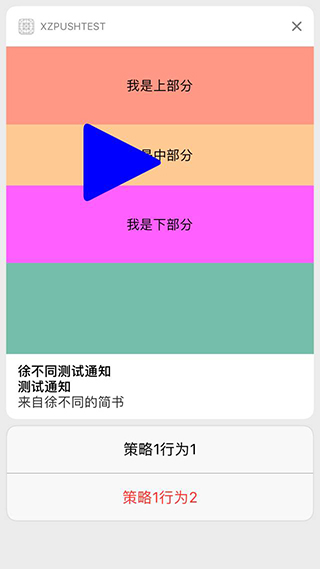
其次:根据 button 的类型,我们可以联想到,如果 button 没有,这个播放开始暂停的方法也没用了。如果有 button,自然我们就有了播放的操作,联想别的 UI 空间,我们得出了一定要重写它的 frame,来确定他的位置。设置颜色,来设置它的显示颜色。设置 button 的类型,让他显示出来。
    // 返回默认样式的 button
    - (UNNotificationContentExtensionMediaPlayPauseButtonType)mediaPlayPauseButtonType {
        return UNNotificationContentExtensionMediaPlayPauseButtonTypeDefault;
    }

    // 返回 button 的 frame
    - (CGRect)mediaPlayPauseButtonFrame {
        return CGRectMake(100, 100, 100, 100);
    }

    // 返回 button 的颜色
    - (UIColor *)mediaPlayPauseButtonTintColor {
        return [UIColor blueColor];
    }