首页 文章 精选 留言 我的

精选列表

搜索[小程序云开发],共10000篇文章
优秀的个人博客,低调大师

华为云主机CentOS 7.3安装LNMP

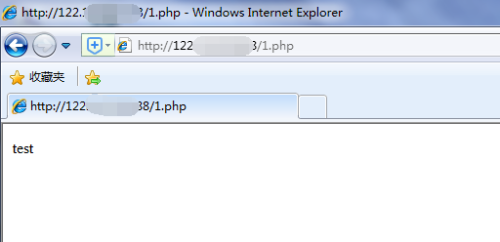
准备工作 1 2 3 4 5 6 7 cd/usr/local/src wgethttp://mirrors.sohu.com/mysql/MySQL-5.6/mysql-5.6.35-linux-glibc2.5-x86_64.tar.gz wgethttp://cn2.php.net/distributions/php-5.6.30.tar.gz wgethttp://nginx.org/download/nginx-1.12.1.tar.gz tarzxfmysql-5.6.35-linux-glibc2.5-x86_64.tar.gz tarzxfphp-5.6.30.tar.gz tarzxfnginx-1.12.1.tar.gz 软件安装 MySQL 1 2 3 4 5 6 7 8 9 10 11 12 13 mvmysql-5.6.35-linux-glibc2.5-x86_64/usr/local/mysql cd../mysql/ useraddmysql mkdir/data/ yuminstall-yperlperl-Data-Dumperlibaiolibaio-devel ./scripts/mysql_install_db--user=mysql--datadir=/data/mysql cpsupport-files/my-default.cnf/etc/my.cnf cpsupport-files/mysql.server/etc/init.d/mysqld vi/etc/init.d/mysqld basedir=/usr/local/mysql datadir=/data/mysql chkconfig--addmysqld servicemysqldstart PHP 1 2 3 4 5 6 7 8 9 10 11 12 13 14 15 16 17 18 19 20 21 22 23 24 25 26 27 28 29 useradd-s/sbin/nologinphp-fpm cd/usr/local/src/php-5.6.30 wgethttp://vault.centos.org/5.7/os/x86_64/CentOS/kernel-headers-2.6.18-274.el5.x86_64.rpm rpm-ivhkernel-headers-2.6.18-274.el5.x86_64.rpm yuminstall-ygcclibxml2-developenssl-develbzip2-devellibjpeg-turbo-devellibpng-develfreetype-devellibmcrypt-devellibcurl-devel ./configure--prefix=/usr/local/php-fpm--with-config-file-path=/usr/local/php-fpm/etc--enable-fpm--with-fpm-user=php-fpm--with-fpm-group=php-fpm--with-mysql=/usr/local/mysql--with-mysqli=/usr/local/mysql/bin/mysql_config--with-pdo-mysql=/usr/local/mysql--with-mysql-sock=/tmp/mysql.sock--with-libxml-dir--with-gd--with-jpeg-dir--with-png-dir--with-freetype-dir--with-iconv-dir--with-zlib-dir--with-mcrypt--enable-soap--enable-gd-native-ttf--enable-ftp--enable-mbstring--enable-exif--with-pear--with-curl--with-openssl make&&makeinstall cpphp.ini-production/usr/local/php-fpm/etc/php.ini cp/usr/local/src/php-5.6.30/sapi/fpm/init.d.php-fpm/etc/init.d/php-fpm vi/usr/local/php-fpm/etc/php-fpm.conf [global] pid=/usr/local/php-fpm/var/run/php-fpm.pid error_log=/usr/local/php-fpm/var/log/php-fpm.log [www] listen=/tmp/php-fcgi.sock listen.mode=666 user=php-fpm group=php-fpm pm=dynamic pm.max_children=50 pm.start_servers=20 pm.min_spare_servers=5 pm.max_spare_servers=35 pm.max_requests=500 rlimit_files=1024 chmod755/etc/init.d/php-fpm chkconfig--addphp-fpm chkconfigphp-fpmon servicephp-fpmstart Nginx 1 2 3 4 5 6 7 8 9 10 11 12 13 14 15 16 17 18 19 20 21 22 23 24 25 26 27 28 29 30 31 32 33 34 35 36 37 38 39 40 41 42 43 44 45 46 47 48 49 50 51 52 53 54 55 56 57 58 59 60 61 62 63 64 65 66 67 68 69 70 71 72 73 74 75 76 77 78 79 80 81 82 83 84 85 86 87 88 89 90 91 92 93 94 95 96 97 98 99 100 101 102 103 104 105 106 107 108 109 110 111 112 113 114 115 116 117 118 119 120 121 122 123 124 125 126 127 128 129 130 131 132 133 134 135 136 137 138 cd/usr/local/src/nginx-1.12.1 ./configure--prefix=/usr/local/nginx make&&makeinstall vi/etc/init.d/nginx #!/bin/bash #chkconfig:-3021 #description:httpservice. #SourceFunctionLibrary ./etc/init.d/functions #NginxSettings NGINX_SBIN="/usr/local/nginx/sbin/nginx" NGINX_CONF="/usr/local/nginx/conf/nginx.conf" NGINX_PID="/usr/local/nginx/logs/nginx.pid" RETVAL=0 prog="Nginx" start() { echo-n$"Starting$prog:" mkdir-p/dev/shm/nginx_temp daemon$NGINX_SBIN-c$NGINX_CONF RETVAL=$? echo return$RETVAL } stop() { echo-n$"Stopping$prog:" killproc-p$NGINX_PID$NGINX_SBIN-TERM rm-rf/dev/shm/nginx_temp RETVAL=$? echo return$RETVAL } reload() { echo-n$"Reloading$prog:" killproc-p$NGINX_PID$NGINX_SBIN-HUP RETVAL=$? echo return$RETVAL } restart() { stop start } configtest() { $NGINX_SBIN-c$NGINX_CONF-t return0 } case"$1"in start) start ;; stop) stop ;; reload) reload ;; restart) restart ;; configtest) configtest ;; *) echo$"Usage:$0{start|stop|reload|restart|configtest}" RETVAL=1 esac exit$RETVAL chmod755/etc/init.d/nginx chkconfig--addnginx chkconfignginxon cd/usr/local/nginx/conf/;mvnginx.confnginx.conf.bak vinginx.conf usernobodynobody; worker_processes2; error_log/usr/local/nginx/logs/nginx_error.logcrit; pid/usr/local/nginx/logs/nginx.pid; worker_rlimit_nofile51200; events { useepoll; worker_connections6000; } http { includemime.types; default_typeapplication/octet-stream; server_names_hash_bucket_size3526; server_names_hash_max_size4096; log_formatcombined_realip'$remote_addr$http_x_forwarded_for[$time_local]' '$host"$request_uri"$status' '"$http_referer""$http_user_agent"'; sendfileon; tcp_nopushon; keepalive_timeout30; client_header_timeout3m; client_body_timeout3m; send_timeout3m; connection_pool_size256; client_header_buffer_size1k; large_client_header_buffers84k; request_pool_size4k; output_buffers432k; postpone_output1460; client_max_body_size10m; client_body_buffer_size256k; client_body_temp_path/usr/local/nginx/client_body_temp; proxy_temp_path/usr/local/nginx/proxy_temp; fastcgi_temp_path/usr/local/nginx/fastcgi_temp; fastcgi_intercept_errorson; tcp_nodelayon; gzipon; gzip_min_length1k; gzip_buffers48k; gzip_comp_level5; gzip_http_version1.1; gzip_typestext/plainapplication/x-javascripttext/csstext/htm application/xml; server { listen80; server_namelocalhost; indexindex.htmlindex.htmindex.php; root/usr/local/nginx/html; location~\.php$ { includefastcgi_params; fastcgi_passunix:/tmp/php-fcgi.sock; fastcgi_indexindex.php; fastcgi_paramSCRIPT_FILENAME/usr/local/nginx/html$fastcgi_script_name; } } } /etc/init.d/nginxstart 效果测试 1 2 3 4 vi/usr/local/nginx/html/1.php <?php echo"test"; ?> 本文转自Grodd51CTO博客,原文链接:http://blog.51cto.com/juispan/1957718,如需转载请自行联系原作者

优秀的个人博客,低调大师

阿里云前端周刊 - 第 31 期

推荐 1. 利用 Dawn 工程化工具实践 MobX 数据流管理方案 https://zhuanlan.zhihu.com/p/30554301 项目在最初应用 MobX 时,对较为复杂的多人协作项目的数据流管理方案没有一个优雅的解决方案,通过对MobX官方文档中针对大型可维护项目最佳实践的学习和应用,把自己的理解抽象出一个简单的todoMVC应用,供大家交流和讨论。 2. FreeWheel 前后端分离改造实践 http://www.infoq.com/cn/articles/freewheel-refactoring 在现代前端应用的工程实践中,前后端分离的架构会为两端带来更多的灵活性,已成为主流趋势。与之相对的,传统的单体Web应用(Monolithic Web Application)则将前后端代码放在一起,虽然耦合性较强,但在产品研

资源下载

更多资源
Mario

Mario

马里奥是站在游戏界顶峰的超人气多面角色。马里奥靠吃蘑菇成长,特征是大鼻子、头戴帽子、身穿背带裤,还留着胡子。与他的双胞胎兄弟路易基一起,长年担任任天堂的招牌角色。

Nacos

Nacos

Nacos /nɑ:kəʊs/ 是 Dynamic Naming and Configuration Service 的首字母简称,一个易于构建 AI Agent 应用的动态服务发现、配置管理和AI智能体管理平台。Nacos 致力于帮助您发现、配置和管理微服务及AI智能体应用。Nacos 提供了一组简单易用的特性集,帮助您快速实现动态服务发现、服务配置、服务元数据、流量管理。Nacos 帮助您更敏捷和容易地构建、交付和管理微服务平台。

Spring

Spring

Spring框架(Spring Framework)是由Rod Johnson于2002年提出的开源Java企业级应用框架,旨在通过使用JavaBean替代传统EJB实现方式降低企业级编程开发的复杂性。该框架基于简单性、可测试性和松耦合性设计理念,提供核心容器、应用上下文、数据访问集成等模块,支持整合Hibernate、Struts等第三方框架,其适用范围不仅限于服务器端开发,绝大多数Java应用均可从中受益。

Rocky Linux

Rocky Linux

Rocky Linux(中文名:洛基)是由Gregory Kurtzer于2020年12月发起的企业级Linux发行版,作为CentOS稳定版停止维护后与RHEL(Red Hat Enterprise Linux)完全兼容的开源替代方案,由社区拥有并管理,支持x86_64、aarch64等架构。其通过重新编译RHEL源代码提供长期稳定性,采用模块化包装和SELinux安全架构,默认包含GNOME桌面环境及XFS文件系统,支持十年生命周期更新。


用户登录
用户注册