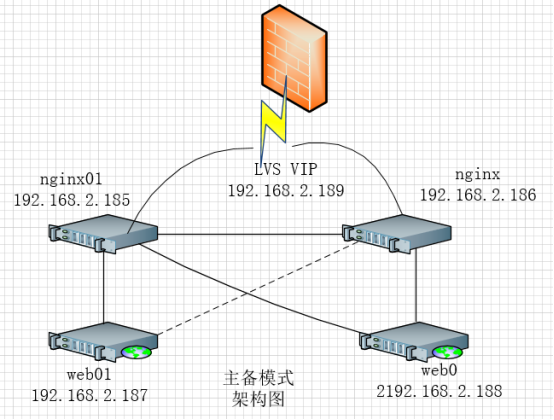
keepalived + nginx轮询方式 做高可用和负载均衡 访问后端apache web 服务
keepalived+nginx+apache主备及双活搭建测试 keepalived+nginx高可用有主备和双活两种方式。主备方式下对外提供一个vip,同时只有一台服务器工作,另一台作备机;双活方式下对外提供两个vip,两台机器互为备份,下面详细说明搭建测试步骤: 配置: 主机 ip 操作系统 软件 vip nginx01 192.168.2.185 Centos7 nginx 端口82 keepalived 192.168.2.189 nginx02 192.168.2.186 Centos7 nginx 端口82 keepalived 192.168.2.189 web01 192.168.2.187 Centos7 apache 端口80 / web02 192.168.2.188 Centos7 apache 端口80 / 1.nginx01安装nginx [root@nginx01 ~]# cat /etc/redhat-release CentOS Linux release 7.3.1611 (Core) [root@nginx01 ~]# yum -y install gcc-c++ [root@nginx01 ~]# yum -y install pcre pcre-devel [root@nginx01 ~]# yum -y install zlib zlib-devel [root@nginx01 ~]# yum -y install openssl openssl-devel 下载https://nginx.org/en/download.html https://nginx.org/download/nginx-1.12.2.tar.gz [root@nginx01 ~]# mkdir software [root@nginx01 ~]# cd software/ [root@nginx01 software]# wget https://nginx.org/download/nginx-1.12.2.tar.gz [root@nginx01 software]# ls -ltr total 960 -rw-r--r--. 1 root root 981687 Oct 17 21:20 nginx-1.12.2.tar.gz [root@nginx01 software]# tar -zxvf nginx-1.12.2.tar.gz [root@nginx01 software]# chown -R root.root nginx-1.12.2 [root@nginx01 software]# groupadd nginx [root@nginx01 software]# useradd -g nginx -d /home/nginx -s /sbin/nologin nginx [root@nginx01 software]# id nginx uid=1000(nginx) gid=1000(nginx) groups=1000(nginx) [root@nginx01 software]# grep nginx /etc/passwd nginx:x:1000:1000::/home/nginx:/sbin/nologin [root@nginx01 software]# [root@nginx01 nginx-1.12.2]# ./configure --user=nginx --group=nginx --prefix=/usr/local/nginx --with-http_stub_status_module --with-http_ssl_module --with-http_sub_module --with-http_gzip_static_module | tee -a configure_nginx_20180417.log ....... ....... ....... Configuration summary + using system PCRE library + using system OpenSSL library + using system zlib library nginx path prefix: "/usr/local/nginx" nginx binary file: "/usr/local/nginx/sbin/nginx" nginx modules path: "/usr/local/nginx/modules" nginx configuration prefix: "/usr/local/nginx/conf" nginx configuration file: "/usr/local/nginx/conf/nginx.conf" nginx pid file: "/usr/local/nginx/logs/nginx.pid" nginx error log file: "/usr/local/nginx/logs/error.log" nginx http access log file: "/usr/local/nginx/logs/access.log" nginx http client request body temporary files: "client_body_temp" nginx http proxy temporary files: "proxy_temp" nginx http fastcgi temporary files: "fastcgi_temp" nginx http uwsgi temporary files: "uwsgi_temp" nginx http scgi temporary files: "scgi_temp" [root@nginx01 nginx-1.12.2]# make && make install | tee -a make_make_install_nginx_20180417.log ......... ......... ......... objs/ngx_modules.o \ -ldl -lpthread -lcrypt -lpcre -lssl -lcrypto -ldl -lz \ -Wl,-E sed -e "s|%%PREFIX%%|/usr/local/nginx|" \ -e "s|%%PID_PATH%%|/usr/local/nginx/logs/nginx.pid|" \ -e "s|%%CONF_PATH%%|/usr/local/nginx/conf/nginx.conf|" \ -e "s|%%ERROR_LOG_PATH%%|/usr/local/nginx/logs/error.log|" \ < man/nginx.8 > objs/nginx.8 make[1]: Leaving directory `/root/software/nginx-1.12.2' make -f objs/Makefile install make[1]: Entering directory `/root/software/nginx-1.12.2' test -d '/usr/local/nginx' || mkdir -p '/usr/local/nginx' test -d '/usr/local/nginx/sbin' \ || mkdir -p '/usr/local/nginx/sbin' test ! -f '/usr/local/nginx/sbin/nginx' \ || mv '/usr/local/nginx/sbin/nginx' \ '/usr/local/nginx/sbin/nginx.old' cp objs/nginx '/usr/local/nginx/sbin/nginx' test -d '/usr/local/nginx/conf' \ || mkdir -p '/usr/local/nginx/conf' cp conf/koi-win '/usr/local/nginx/conf' cp conf/koi-utf '/usr/local/nginx/conf' cp conf/win-utf '/usr/local/nginx/conf' test -f '/usr/local/nginx/conf/mime.types' \ || cp conf/mime.types '/usr/local/nginx/conf' cp conf/mime.types '/usr/local/nginx/conf/mime.types.default' test -f '/usr/local/nginx/conf/fastcgi_params' \ || cp conf/fastcgi_params '/usr/local/nginx/conf' cp conf/fastcgi_params \ '/usr/local/nginx/conf/fastcgi_params.default' test -f '/usr/local/nginx/conf/fastcgi.conf' \ || cp conf/fastcgi.conf '/usr/local/nginx/conf' cp conf/fastcgi.conf '/usr/local/nginx/conf/fastcgi.conf.default' test -f '/usr/local/nginx/conf/uwsgi_params' \ || cp conf/uwsgi_params '/usr/local/nginx/conf' cp conf/uwsgi_params \ '/usr/local/nginx/conf/uwsgi_params.default' test -f '/usr/local/nginx/conf/scgi_params' \ || cp conf/scgi_params '/usr/local/nginx/conf' cp conf/scgi_params \ '/usr/local/nginx/conf/scgi_params.default' test -f '/usr/local/nginx/conf/nginx.conf' \ || cp conf/nginx.conf '/usr/local/nginx/conf/nginx.conf' cp conf/nginx.conf '/usr/local/nginx/conf/nginx.conf.default' test -d '/usr/local/nginx/logs' \ || mkdir -p '/usr/local/nginx/logs' test -d '/usr/local/nginx/logs' \ || mkdir -p '/usr/local/nginx/logs' test -d '/usr/local/nginx/html' \ || cp -R html '/usr/local/nginx' test -d '/usr/local/nginx/logs' \ || mkdir -p '/usr/local/nginx/logs' make[1]: Leaving directory `/root/software/nginx-1.12.2' [root@nginx01 nginx-1.12.2]# cd /usr/local/nginx/sbin/ [root@nginx01 sbin]# ln -s /usr/local/nginx/sbin/nginx /usr/local/bin/nginx [root@nginx01 sbin]# nginx -v nginx version: nginx/1.12.2 [root@nginx01 sbin]# 查看加载模块 [root@nginx01 sbin]# nginx -V nginx version: nginx/1.12.2 built by gcc 4.8.5 20150623 (Red Hat 4.8.5-16) (GCC) built with OpenSSL 1.0.2k-fips 26 Jan 2017 TLS SNI support enabled configure arguments: --user=nginx --group=nginx --prefix=/usr/local/nginx --with-http_stub_status_module --with-http_ssl_module --with-http_sub_module --with-http_gzip_static_module [root@nginx01 sbin]# Nginx相关启动任务 [root@nginx01 sbin]# nginx [root@nginx01 sbin]# ps -ef | grep nginx root 5241 1 0 00:35 ? 00:00:00 nginx: master process nginx nginx 5242 5241 0 00:35 ? 00:00:00 nginx: worker process root 5244 2517 1 00:35 pts/0 00:00:00 grep --color=auto nginx [root@nginx01 sbin]# nginx -s stop [root@nginx01 sbin]# ps -ef | grep nginx root 5247 2517 0 00:35 pts/0 00:00:00 grep --color=auto nginx [root@nginx01 sbin]# nginx -s quit nginx: [error] open() "/usr/local/nginx/logs/nginx.pid" failed (2: No such file or directory) [root@nginx01 sbin]# nginx [root@nginx01 sbin]# nginx -s quit [root@nginx01 sbin]# ps -ef | grep nginx root 5254 2517 0 00:36 pts/0 00:00:00 grep --color=auto nginx [root@nginx01 sbin]# nginx [root@nginx01 sbin]# nginx -s reload [root@nginx01 sbin]# [root@nginx01 sbin]# ps -ef | grep nginx root 5257 1 0 00:36 ? 00:00:00 nginx: master process nginx nginx 5260 5257 0 00:36 ? 00:00:00 nginx: worker process root 5262 2517 0 00:36 pts/0 00:00:00 grep --color=auto nginx [root@nginx01 sbin]# nginx -t nginx: the configuration file /usr/local/nginx/conf/nginx.conf syntax is ok nginx: configuration file /usr/local/nginx/conf/nginx.conf test is successful [root@nginx01 sbin]# nginx -s quit:此方式停止步骤是待nginx进程处理任务完毕进行停止。 nginx -s stop:此方式相当于先查出nginx进程id再使用kill命令强制杀掉进程。 nginx -s reload:动态加载,当配置文件nginx.conf有变化时执行该命令动态加载。 Nginx开机自启动 [root@nginx01 sbin]# cd /etc/rc.d [root@nginx01 rc.d]# ls -ltr total 4 -rw-r--r--. 1 root root 473 Nov 7 2016 rc.local drwxr-xr-x. 2 root root 70 Mar 12 18:54 init.d drwxr-xr-x. 2 root root 45 Mar 12 18:54 rc6.d drwxr-xr-x. 2 root root 45 Mar 12 18:54 rc5.d drwxr-xr-x. 2 root root 45 Mar 12 18:54 rc4.d drwxr-xr-x. 2 root root 45 Mar 12 18:54 rc3.d drwxr-xr-x. 2 root root 45 Mar 12 18:54 rc2.d drwxr-xr-x. 2 root root 45 Mar 12 18:54 rc1.d drwxr-xr-x. 2 root root 45 Mar 12 18:54 rc0.d [root@nginx01 rc.d]# cat rc.local #!/bin/bash # THIS FILE IS ADDED FOR COMPATIBILITY PURPOSES # # It is highly advisable to create own systemd services or udev rules # to run scripts during boot instead of using this file. # # In contrast to previous versions due to parallel execution during boot # this script will NOT be run after all other services. # # Please note that you must run 'chmod +x /etc/rc.d/rc.local' to ensure # that this script will be executed during boot. touch /var/lock/subsys/local [root@nginx01 rc.d]# echo "/usr/local/nginx/sbin/nginx" > rc.local [root@nginx01 rc.d]# chmod u+x rc.local [root@nginx01 rc.d]# view rc.local [root@nginx01 rc.d]# cat rc.local /usr/local/nginx/sbin/nginx [root@nginx01 rc.d]# ls -ltr rc.local -rwxr--r--. 1 root root 28 Apr 18 00:39 rc.local [root@nginx01 rc.d]# ps -ef | grep nginx root 5257 1 0 00:36 ? 00:00:00 nginx: master process nginx nginx 5260 5257 0 00:36 ? 00:00:00 nginx: worker process root 5271 2517 0 00:39 pts/0 00:00:00 grep --color=auto nginx [root@nginx01 rc.d]# nginx -s quit [root@nginx01 rc.d]# ps -ef | grep nginx root 5274 2517 0 00:39 pts/0 00:00:00 grep --color=auto nginx [root@nginx01 rc.d]# ./rc.local [root@nginx01 rc.d]# ps -ef | grep nginx root 5277 1 0 00:39 ? 00:00:00 nginx: master process /usr/local/nginx/sbin/nginx nginx 5278 5277 0 00:39 ? 00:00:00 nginx: worker process root 5280 2517 0 00:39 pts/0 00:00:00 grep --color=auto nginx [root@nginx01 rc.d]# 至此nginx安装成功,nginx02也按nginx01的上面的操作执行一遍 2.配置nginx [root@nginx01 rc.d]# cp -p /usr/local/nginx/conf/nginx.conf /usr/local/nginx/conf/nginx.conf.bk.2018 [root@nginx01 rc.d]# grep -v '#' /usr/local/nginx/conf/nginx.conf worker_processes 1; events { worker_connections 1024; } http { include mime.types; default_type application/octet-stream; sendfile on; keepalive_timeout 65; server { listen 80; server_name localhost; location / { root html; index index.html index.htm; } error_page 500 502 503 504 /50x.html; location = /50x.html { root html; } } } [root@nginx01 rc.d]# cp -p /usr/local/nginx/conf/nginx.conf /usr/local/nginx/conf/nginx.conf.bk.2018 [root@nginx01 rc.d]# vi /usr/local/nginx/conf/nginx.conf [root@nginx01 rc.d]# diff /usr/local/nginx/conf/nginx.conf /usr/local/nginx/conf/nginx.conf.bk.2018 34,37d33 < upstream webser{ < server 192.168.2.187:80; < server 192.168.2.188:80; < } 48,50c44,45 < proxy_pass http://webser; < #root html; < #index index.html index.htm; --- > root html; > index index.html index.htm; [root@nginx01 rc.d]# cat /usr/local/nginx/conf/nginx.conf #user nobody; worker_processes 1; #error_log logs/error.log; #error_log logs/error.log notice; #error_log logs/error.log info; #pid logs/nginx.pid; events { worker_connections 1024; } http { include mime.types; default_type application/octet-stream; #log_format main '$remote_addr - $remote_user [$time_local] "$request" ' # '$status $body_bytes_sent "$http_referer" ' # '"$http_user_agent" "$http_x_forwarded_for"'; #access_log logs/access.log main; sendfile on; #tcp_nopush on; #keepalive_timeout 0; keepalive_timeout 65; #gzip on; upstream webser{ server 192.168.2.187:80; server 192.168.2.188:80; } server { listen 80; server_name localhost; #charset koi8-r; #access_log logs/host.access.log main; location / { proxy_pass http://webser; #root html; #index index.html index.htm; } #error_page 404 /404.html; # redirect server error pages to the static page /50x.html # error_page 500 502 503 504 /50x.html; location = /50x.html { root html; } # proxy the PHP scripts to Apache listening on 127.0.0.1:80 # #location ~ \.php$ { # proxy_pass http://127.0.0.1; #} # pass the PHP scripts to FastCGI server listening on 127.0.0.1:9000 # #location ~ \.php$ { # root html; # fastcgi_pass 127.0.0.1:9000; # fastcgi_index index.php; # fastcgi_param SCRIPT_FILENAME /scripts$fastcgi_script_name; # include fastcgi_params; #} # deny access to .htaccess files, if Apache's document root # concurs with nginx's one # #location ~ /\.ht { # deny all; #} } # another virtual host using mix of IP-, name-, and port-based configuration # #server { # listen 8000; # listen somename:8080; # server_name somename alias another.alias; # location / { # root html; # index index.html index.htm; # } #} # HTTPS server # #server { # listen 443 ssl; # server_name localhost; # ssl_certificate cert.pem; # ssl_certificate_key cert.key; # ssl_session_cache shared:SSL:1m; # ssl_session_timeout 5m; # ssl_ciphers HIGH:!aNULL:!MD5; # ssl_prefer_server_ciphers on; # location / { # root html; # index index.html index.htm; # } #} } [root@nginx01 rc.d]# [root@nginx01 rc.d]# grep -v '#' /usr/local/nginx/conf/nginx.conf worker_processes 1; events { worker_connections 1024; } http { include mime.types; default_type application/octet-stream; sendfile on; keepalive_timeout 65; upstream webser{ server 192.168.2.187:80; server 192.168.2.188:80; } server { listen 80; server_name localhost; location / { proxy_pass http://webser; } error_page 500 502 503 504 /50x.html; location = /50x.html { root html; } } } 重启nginx生效 [root@nginx01 rc.d]# nginx -s reload [root@nginx01 rc.d]# nginx -t nginx: the configuration file /usr/local/nginx/conf/nginx.conf syntax is ok nginx: configuration file /usr/local/nginx/conf/nginx.conf test is successful [root@nginx01 rc.d]# nginx -s quit [root@nginx01 rc.d]# ps -ef | grep nginx root 5299 2517 0 00:52 pts/0 00:00:00 grep --color=auto nginx [root@nginx01 rc.d]# nginx -t nginx: the configuration file /usr/local/nginx/conf/nginx.conf syntax is ok nginx: configuration file /usr/local/nginx/conf/nginx.conf test is successful [root@nginx01 rc.d]# nginx [root@nginx01 rc.d]# ps -ef | grep nginx root 5302 1 0 00:52 ? 00:00:00 nginx: master process nginx nginx 5303 5302 0 00:52 ? 00:00:00 nginx: worker process root 5305 2517 0 00:52 pts/0 00:00:00 grep --color=auto nginx [root@nginx01 rc.d]# nginx01 nginx配置完成 nginx02 也按照上面一样的配置 [root@nginx02 rc.d]# cp -p /usr/local/nginx/conf/nginx.conf /usr/local/nginx/conf/nginx.conf.bk.20180417 [root@nginx01 rc.d]# scp -p /usr/local/nginx/conf/nginx.conf 192.168.2.186:/usr/local/nginx/conf/nginx.conf The authenticity of host '192.168.2.186 (192.168.2.186)' can't be established. ECDSA key fingerprint is eb:04:83:e8:3d:6e:e6:95:f0:c6:9c:6c:ba:78:34:66. Are you sure you want to continue connecting (yes/no)? yes Warning: Permanently added '192.168.2.186' (ECDSA) to the list of known hosts. root@192.168.2.186's password: nginx.conf 100% 2800 2.7KB/s 00:00 [root@nginx01 rc.d]# [root@nginx02 rc.d]# grep -v '#' /usr/local/nginx/conf/nginx.conf worker_processes 1; events { worker_connections 1024; } http { include mime.types; default_type application/octet-stream; sendfile on; keepalive_timeout 65; upstream webser{ server 192.168.2.187:80; server 192.168.2.188:80; } server { listen 80; server_name localhost; location / { proxy_pass http://webser; } error_page 500 502 503 504 /50x.html; location = /50x.html { root html; } } } [root@nginx02 rc.d]# nginx -t nginx: the configuration file /usr/local/nginx/conf/nginx.conf syntax is ok nginx: configuration file /usr/local/nginx/conf/nginx.conf test is successful [root@nginx02 rc.d]# nginx [root@nginx02 rc.d]# ps -ef | grep nginx root 5306 1 0 00:57 ? 00:00:00 nginx: master process nginx nginx 5307 5306 0 00:57 ? 00:00:00 nginx: worker process root 5309 2524 0 00:57 pts/0 00:00:00 grep --color=auto nginx [root@nginx02 rc.d]# 至此2台nginx配置成功 3.keepalived 的安装 [root@nginx01 softare]# pwd /root/softare [root@nginx01 software]# yum -y install keepalived | tee -a install_keepalived_20180417.log [root@nginx02 softare]# yum -y install keepalived | tee -a install_keepalived_20180417.log Keepalived 配置 查看keepalived 安装了那些文件 [root@nginx01 softare]# rpm -qa keepalived keepalived-1.3.5-1.el7.x86_64 [root@nginx02 softare]# rpm -ql keepalived /etc/keepalived /etc/keepalived/keepalived.conf /etc/sysconfig/keepalived /usr/bin/genhash /usr/lib/systemd/system/keepalived.service /usr/libexec/keepalived /usr/sbin/keepalived /usr/share/doc/keepalived-1.3.5 /usr/share/doc/keepalived-1.3.5/AUTHOR /usr/share/doc/keepalived-1.3.5/CONTRIBUTORS /usr/share/doc/keepalived-1.3.5/COPYING /usr/share/doc/keepalived-1.3.5/ChangeLog /usr/share/doc/keepalived-1.3.5/NOTE_vrrp_vmac.txt /usr/share/doc/keepalived-1.3.5/README /usr/share/doc/keepalived-1.3.5/TODO /usr/share/doc/keepalived-1.3.5/keepalived.conf.SYNOPSIS /usr/share/doc/keepalived-1.3.5/samples /usr/share/doc/keepalived-1.3.5/samples/keepalived.conf.HTTP_GET.port /usr/share/doc/keepalived-1.3.5/samples/keepalived.conf.IPv6 /usr/share/doc/keepalived-1.3.5/samples/keepalived.conf.SMTP_CHECK /usr/share/doc/keepalived-1.3.5/samples/keepalived.conf.SSL_GET /usr/share/doc/keepalived-1.3.5/samples/keepalived.conf.fwmark /usr/share/doc/keepalived-1.3.5/samples/keepalived.conf.inhibit /usr/share/doc/keepalived-1.3.5/samples/keepalived.conf.misc_check /usr/share/doc/keepalived-1.3.5/samples/keepalived.conf.misc_check_arg /usr/share/doc/keepalived-1.3.5/samples/keepalived.conf.quorum /usr/share/doc/keepalived-1.3.5/samples/keepalived.conf.sample /usr/share/doc/keepalived-1.3.5/samples/keepalived.conf.status_code /usr/share/doc/keepalived-1.3.5/samples/keepalived.conf.track_interface /usr/share/doc/keepalived-1.3.5/samples/keepalived.conf.virtual_server_group /usr/share/doc/keepalived-1.3.5/samples/keepalived.conf.virtualhost /usr/share/doc/keepalived-1.3.5/samples/keepalived.conf.vrrp /usr/share/doc/keepalived-1.3.5/samples/keepalived.conf.vrrp.localcheck /usr/share/doc/keepalived-1.3.5/samples/keepalived.conf.vrrp.lvs_syncd /usr/share/doc/keepalived-1.3.5/samples/keepalived.conf.vrrp.routes /usr/share/doc/keepalived-1.3.5/samples/keepalived.conf.vrrp.rules /usr/share/doc/keepalived-1.3.5/samples/keepalived.conf.vrrp.scripts /usr/share/doc/keepalived-1.3.5/samples/keepalived.conf.vrrp.static_ipaddress /usr/share/doc/keepalived-1.3.5/samples/keepalived.conf.vrrp.sync /usr/share/doc/keepalived-1.3.5/samples/sample.misccheck.smbcheck.sh /usr/share/man/man1/genhash.1.gz /usr/share/man/man5/keepalived.conf.5.gz /usr/share/man/man8/keepalived.8.gz /usr/share/snmp/mibs/KEEPALIVED-MIB.txt /usr/share/snmp/mibs/VRRP-MIB.txt /usr/share/snmp/mibs/VRRPv3-MIB.txt [root@nginx02 softare]# [root@nginx01 software]# cat /etc/keepalived/keepalived.conf ! Configuration File for keepalived global_defs { notification_email { acassen@firewall.loc failover@firewall.loc sysadmin@firewall.loc } notification_email_from Alexandre.Cassen@firewall.loc #smtp_server 192.168.200.1 #smtp_connect_timeout 30 router_id LVS_DEVEL1 vrrp_skip_check_adv_addr vrrp_strict vrrp_garp_interval 0 vrrp_gna_interval 0 } vrrp_script chk_nginx { script "/etc/keepalived/check_nginx.sh" interval 2 weight 20 fall 1 rise 10 } vrrp_instance VI_1 { state MASTER interface ens33 virtual_router_id 51 priority 100 advert_int 1 authentication { auth_type PASS auth_pass 1111 } virtual_ipaddress { 192.168.2.189 } track_script { chk_nginx } } [root@nginx01 software]# [root@nginx01 software]# vi /etc/keepalived/check_nginx.sh [root@nginx01 software]# chmod u+x /etc/keepalived/check_nginx.sh [root@nginx01 software]# cat /etc/keepalived/check_nginx.sh #!/bin/bash A=`ps -C nginx --no-header |wc -l` if [ $A -eq 0 ];then /usr/local/nginx/sbin/nginx if [ `ps -C nginx --no-header |wc -l` -eq 0 ];then pkill keep fi fi [root@nginx01 software]# [root@nginx01 ~]# systemctl start keepalived [root@nginx01 ~]# systemctl enable keepalived Created symlink from /etc/systemd/system/multi-user.target.wants/keepalived.service to /usr/lib/systemd/system/keepalived.service. [root@nginx01 ~]# nginx01上的keepalived 配置完成 配置nginx02上的keepalived [root@nginx02 softare]# cat /etc/keepalived/keepalived.conf ! Configuration File for keepalived global_defs { notification_email { acassen@firewall.loc failover@firewall.loc sysadmin@firewall.loc } notification_email_from Alexandre.Cassen@firewall.loc #smtp_server 192.168.200.1 #smtp_connect_timeout 30 router_id LVS_DEVEL2 vrrp_skip_check_adv_addr vrrp_strict vrrp_garp_interval 0 vrrp_gna_interval 0 } vrrp_script chk_nginx { script "/etc/keepalived/check_nginx.sh" interval 2 weight 20 fall 2 rise 1 } vrrp_instance VI_1 { state BACKUP interface ens33 virtual_router_id 51 priority 90 advert_int 1 authentication { auth_type PASS auth_pass 1111 } virtual_ipaddress { 192.168.2.189 } track_script { chk_nginx } } 该脚本用户检测nginx进程是否存在,若不存在则重启,若重启失败则直接杀掉keepalived进程,触发切换。(若没有pkill命令请先安装) [root@nginx02 softare]# vi "/etc/keepalived/check_nginx.sh" [root@nginx02 softare]# cat "/etc/keepalived/check_nginx.sh" #!/bin/bash A=`ps -C nginx --no-header |wc -l` if [ $A -eq 0 ];then /usr/local/nginx/sbin/nginx if [ `ps -C nginx --no-header |wc -l` -eq 0 ];then pkill keep fi fi [root@nginx02 ~]# chmod u+x "/etc/keepalived/check_nginx.sh" [root@nginx02 softare]# [root@nginx02 ~]# systemctl start keepalived [root@nginx02 ~]# systemctl enable keepalived Created symlink from /etc/systemd/system/multi-user.target.wants/keepalived.service to /usr/lib/systemd/system/keepalived.service. Nginx02上的keepalived配置完成 Apache安装 在web01和web02上分别安装apache [root@web01 software]# yum -y install httpd httpd-devel | tee -a yum_install_apache_20180417.log Loaded plugins: fastestmirror Loading mirror speeds from cached hostfile * base: mirrors.aliyun.com * extras: mirrors.aliyun.com * updates: mirrors.aliyun.com Resolving Dependencies --> Running transaction check ---> Package httpd.x86_64 0:2.4.6-67.el7.centos.6 will be installed --> Processing Dependency: httpd-tools = 2.4.6-67.el7.centos.6 for package: httpd-2.4.6-67.el7.centos.6.x86_64 --> Processing Dependency: /etc/mime.types for package: httpd-2.4.6-67.el7.centos.6.x86_64 --> Processing Dependency: libaprutil-1.so.0()(64bit) for package: httpd-2.4.6-67.el7.centos.6.x86_64 --> Processing Dependency: libapr-1.so.0()(64bit) for package: httpd-2.4.6-67.el7.centos.6.x86_64 ---> Package httpd-devel.x86_64 0:2.4.6-67.el7.centos.6 will be installed --> Processing Dependency: perl >= 5.004 for package: httpd-devel-2.4.6-67.el7.centos.6.x86_64 --> Processing Dependency: perl(strict) for package: httpd-devel-2.4.6-67.el7.centos.6.x86_64 --> Processing Dependency: apr-util-devel for package: httpd-devel-2.4.6-67.el7.centos.6.x86_64 --> Processing Dependency: apr-devel for package: httpd-devel-2.4.6-67.el7.centos.6.x86_64 --> Processing Dependency: /usr/bin/perl for package: httpd-devel-2.4.6-67.el7.centos.6.x86_64 --> Running transaction check ---> Package apr.x86_64 0:1.4.8-3.el7_4.1 will be installed ---> Package apr-devel.x86_64 0:1.4.8-3.el7_4.1 will be installed ---> Package apr-util.x86_64 0:1.5.2-6.el7 will be installed ---> Package apr-util-devel.x86_64 0:1.5.2-6.el7 will be installed --> Processing Dependency: openldap-devel(x86-64) for package: apr-util-devel-1.5.2-6.el7.x86_64 --> Processing Dependency: libdb-devel(x86-64) for package: apr-util-devel-1.5.2-6.el7.x86_64 --> Processing Dependency: expat-devel(x86-64) for package: apr-util-devel-1.5.2-6.el7.x86_64 ---> Package httpd-tools.x86_64 0:2.4.6-67.el7.centos.6 will be installed ---> Package mailcap.noarch 0:2.1.41-2.el7 will be installed ---> Package perl.x86_64 4:5.16.3-292.el7 will be installed --> Processing Dependency: perl-libs = 4:5.16.3-292.el7 for package: 4:perl-5.16.3-292.el7.x86_64 --> Processing Dependency: perl(Socket) >= 1.3 for package: 4:perl-5.16.3-292.el7.x86_64 --> Processing Dependency: perl(Scalar::Util) >= 1.10 for package: 4:perl-5.16.3-292.el7.x86_64 --> Processing Dependency: perl-macros for package: 4:perl-5.16.3-292.el7.x86_64 --> Processing Dependency: perl-libs for package: 4:perl-5.16.3-292.el7.x86_64 --> Processing Dependency: perl(threads::shared) for package: 4:perl-5.16.3-292.el7.x86_64 --> Processing Dependency: perl(threads) for package: 4:perl-5.16.3-292.el7.x86_64 --> Processing Dependency: perl(constant) for package: 4:perl-5.16.3-292.el7.x86_64 --> Processing Dependency: perl(Time::Local) for package: 4:perl-5.16.3-292.el7.x86_64 --> Processing Dependency: perl(Time::HiRes) for package: 4:perl-5.16.3-292.el7.x86_64 --> Processing Dependency: perl(Storable) for package: 4:perl-5.16.3-292.el7.x86_64 --> Processing Dependency: perl(Socket) for package: 4:perl-5.16.3-292.el7.x86_64 --> Processing Dependency: perl(Scalar::Util) for package: 4:perl-5.16.3-292.el7.x86_64 --> Processing Dependency: perl(Pod::Simple::XHTML) for package: 4:perl-5.16.3-292.el7.x86_64 --> Processing Dependency: perl(Pod::Simple::Search) for package: 4:perl-5.16.3-292.el7.x86_64 --> Processing Dependency: perl(Getopt::Long) for package: 4:perl-5.16.3-292.el7.x86_64 --> Processing Dependency: perl(Filter::Util::Call) for package: 4:perl-5.16.3-292.el7.x86_64 --> Processing Dependency: perl(File::Temp) for package: 4:perl-5.16.3-292.el7.x86_64 --> Processing Dependency: perl(File::Spec::Unix) for package: 4:perl-5.16.3-292.el7.x86_64 --> Processing Dependency: perl(File::Spec::Functions) for package: 4:perl-5.16.3-292.el7.x86_64 --> Processing Dependency: perl(File::Spec) for package: 4:perl-5.16.3-292.el7.x86_64 --> Processing Dependency: perl(File::Path) for package: 4:perl-5.16.3-292.el7.x86_64 --> Processing Dependency: perl(Exporter) for package: 4:perl-5.16.3-292.el7.x86_64 --> Processing Dependency: perl(Cwd) for package: 4:perl-5.16.3-292.el7.x86_64 --> Processing Dependency: perl(Carp) for package: 4:perl-5.16.3-292.el7.x86_64 --> Processing Dependency: libperl.so()(64bit) for package: 4:perl-5.16.3-292.el7.x86_64 --> Running transaction check ---> Package expat-devel.x86_64 0:2.1.0-10.el7_3 will be installed --> Processing Dependency: expat = 2.1.0-10.el7_3 for package: expat-devel-2.1.0-10.el7_3.x86_64 ---> Package libdb-devel.x86_64 0:5.3.21-21.el7_4 will be installed --> Processing Dependency: libdb(x86-64) = 5.3.21-21.el7_4 for package: libdb-devel-5.3.21-21.el7_4.x86_64 ---> Package openldap-devel.x86_64 0:2.4.44-5.el7 will be installed --> Processing Dependency: openldap(x86-64) = 2.4.44-5.el7 for package: openldap-devel-2.4.44-5.el7.x86_64 --> Processing Dependency: cyrus-sasl-devel(x86-64) for package: openldap-devel-2.4.44-5.el7.x86_64 ---> Package perl-Carp.noarch 0:1.26-244.el7 will be installed ---> Package perl-Exporter.noarch 0:5.68-3.el7 will be installed ---> Package perl-File-Path.noarch 0:2.09-2.el7 will be installed ---> Package perl-File-Temp.noarch 0:0.23.01-3.el7 will be installed ---> Package perl-Filter.x86_64 0:1.49-3.el7 will be installed ---> Package perl-Getopt-Long.noarch 0:2.40-2.el7 will be installed --> Processing Dependency: perl(Pod::Usage) >= 1.14 for package: perl-Getopt-Long-2.40-2.el7.noarch --> Processing Dependency: perl(Text::ParseWords) for package: perl-Getopt-Long-2.40-2.el7.noarch ---> Package perl-PathTools.x86_64 0:3.40-5.el7 will be installed ---> Package perl-Pod-Simple.noarch 1:3.28-4.el7 will be installed --> Processing Dependency: perl(Pod::Escapes) >= 1.04 for package: 1:perl-Pod-Simple-3.28-4.el7.noarch --> Processing Dependency: perl(Encode) for package: 1:perl-Pod-Simple-3.28-4.el7.noarch ---> Package perl-Scalar-List-Utils.x86_64 0:1.27-248.el7 will be installed ---> Package perl-Socket.x86_64 0:2.010-4.el7 will be installed ---> Package perl-Storable.x86_64 0:2.45-3.el7 will be installed ---> Package perl-Time-HiRes.x86_64 4:1.9725-3.el7 will be installed ---> Package perl-Time-Local.noarch 0:1.2300-2.el7 will be installed ---> Package perl-constant.noarch 0:1.27-2.el7 will be installed ---> Package perl-libs.x86_64 4:5.16.3-292.el7 will be installed ---> Package perl-macros.x86_64 4:5.16.3-292.el7 will be installed ---> Package perl-threads.x86_64 0:1.87-4.el7 will be installed ---> Package perl-threads-shared.x86_64 0:1.43-6.el7 will be installed --> Running transaction check ---> Package cyrus-sasl-devel.x86_64 0:2.1.26-21.el7 will be installed --> Processing Dependency: cyrus-sasl-lib(x86-64) = 2.1.26-21.el7 for package: cyrus-sasl-devel-2.1.26-21.el7.x86_64 --> Processing Dependency: cyrus-sasl(x86-64) = 2.1.26-21.el7 for package: cyrus-sasl-devel-2.1.26-21.el7.x86_64 ---> Package expat.x86_64 0:2.1.0-8.el7 will be updated ---> Package expat.x86_64 0:2.1.0-10.el7_3 will be an update ---> Package libdb.x86_64 0:5.3.21-19.el7 will be updated --> Processing Dependency: libdb(x86-64) = 5.3.21-19.el7 for package: libdb-utils-5.3.21-19.el7.x86_64 ---> Package libdb.x86_64 0:5.3.21-21.el7_4 will be an update ---> Package openldap.x86_64 0:2.4.40-13.el7 will be updated ---> Package openldap.x86_64 0:2.4.44-5.el7 will be an update ---> Package perl-Encode.x86_64 0:2.51-7.el7 will be installed ---> Package perl-Pod-Escapes.noarch 1:1.04-292.el7 will be installed ---> Package perl-Pod-Usage.noarch 0:1.63-3.el7 will be installed --> Processing Dependency: perl(Pod::Text) >= 3.15 for package: perl-Pod-Usage-1.63-3.el7.noarch --> Processing Dependency: perl-Pod-Perldoc for package: perl-Pod-Usage-1.63-3.el7.noarch ---> Package perl-Text-ParseWords.noarch 0:3.29-4.el7 will be installed --> Running transaction check ---> Package cyrus-sasl.x86_64 0:2.1.26-21.el7 will be installed ---> Package cyrus-sasl-lib.x86_64 0:2.1.26-20.el7_2 will be updated ---> Package cyrus-sasl-lib.x86_64 0:2.1.26-21.el7 will be an update ---> Package libdb-utils.x86_64 0:5.3.21-19.el7 will be updated ---> Package libdb-utils.x86_64 0:5.3.21-21.el7_4 will be an update ---> Package perl-Pod-Perldoc.noarch 0:3.20-4.el7 will be installed --> Processing Dependency: perl(parent) for package: perl-Pod-Perldoc-3.20-4.el7.noarch --> Processing Dependency: perl(HTTP::Tiny) for package: perl-Pod-Perldoc-3.20-4.el7.noarch ---> Package perl-podlators.noarch 0:2.5.1-3.el7 will be installed --> Running transaction check ---> Package perl-HTTP-Tiny.noarch 0:0.033-3.el7 will be installed ---> Package perl-parent.noarch 1:0.225-244.el7 will be installed --> Finished Dependency Resolution Dependencies Resolved ================================================================================ Package Arch Version Repository Size ================================================================================ Installing: httpd x86_64 2.4.6-67.el7.centos.6 updates 2.7 M httpd-devel x86_64 2.4.6-67.el7.centos.6 updates 194 k Installing for dependencies: apr x86_64 1.4.8-3.el7_4.1 updates 103 k apr-devel x86_64 1.4.8-3.el7_4.1 updates 188 k apr-util x86_64 1.5.2-6.el7 base 92 k apr-util-devel x86_64 1.5.2-6.el7 base 76 k cyrus-sasl x86_64 2.1.26-21.el7 base 88 k cyrus-sasl-devel x86_64 2.1.26-21.el7 base 310 k expat-devel x86_64 2.1.0-10.el7_3 base 57 k httpd-tools x86_64 2.4.6-67.el7.centos.6 updates 88 k libdb-devel x86_64 5.3.21-21.el7_4 updates 38 k mailcap noarch 2.1.41-2.el7 base 31 k openldap-devel x86_64 2.4.44-5.el7 base 801 k perl x86_64 4:5.16.3-292.el7 base 8.0 M perl-Carp noarch 1.26-244.el7 base 19 k perl-Encode x86_64 2.51-7.el7 base 1.5 M perl-Exporter noarch 5.68-3.el7 base 28 k perl-File-Path noarch 2.09-2.el7 base 26 k perl-File-Temp noarch 0.23.01-3.el7 base 56 k perl-Filter x86_64 1.49-3.el7 base 76 k perl-Getopt-Long noarch 2.40-2.el7 base 56 k perl-HTTP-Tiny noarch 0.033-3.el7 base 38 k perl-PathTools x86_64 3.40-5.el7 base 82 k perl-Pod-Escapes noarch 1:1.04-292.el7 base 51 k perl-Pod-Perldoc noarch 3.20-4.el7 base 87 k perl-Pod-Simple noarch 1:3.28-4.el7 base 216 k perl-Pod-Usage noarch 1.63-3.el7 base 27 k perl-Scalar-List-Utils x86_64 1.27-248.el7 base 36 k perl-Socket x86_64 2.010-4.el7 base 49 k perl-Storable x86_64 2.45-3.el7 base 77 k perl-Text-ParseWords noarch 3.29-4.el7 base 14 k perl-Time-HiRes x86_64 4:1.9725-3.el7 base 45 k perl-Time-Local noarch 1.2300-2.el7 base 24 k perl-constant noarch 1.27-2.el7 base 19 k perl-libs x86_64 4:5.16.3-292.el7 base 688 k perl-macros x86_64 4:5.16.3-292.el7 base 43 k perl-parent noarch 1:0.225-244.el7 base 12 k perl-podlators noarch 2.5.1-3.el7 base 112 k perl-threads x86_64 1.87-4.el7 base 49 k perl-threads-shared x86_64 1.43-6.el7 base 39 k Updating for dependencies: cyrus-sasl-lib x86_64 2.1.26-21.el7 base 155 k expat x86_64 2.1.0-10.el7_3 base 81 k libdb x86_64 5.3.21-21.el7_4 updates 719 k libdb-utils x86_64 5.3.21-21.el7_4 updates 132 k openldap x86_64 2.4.44-5.el7 base 354 k Transaction Summary ================================================================================ Install 2 Packages (+38 Dependent packages) Upgrade ( 5 Dependent packages) Total download size: 17 M Downloading packages: Delta RPMs disabled because /usr/bin/applydeltarpm not installed. -------------------------------------------------------------------------------- Total 667 kB/s | 17 MB 00:26 Running transaction check Running transaction test Transaction test succeeded Running transaction Updating : libdb-5.3.21-21.el7_4.x86_64 1/50 Updating : expat-2.1.0-10.el7_3.x86_64 2/50 Installing : apr-1.4.8-3.el7_4.1.x86_64 3/50 Installing : apr-util-1.5.2-6.el7.x86_64 4/50 Updating : cyrus-sasl-lib-2.1.26-21.el7.x86_64 5/50 Updating : openldap-2.4.44-5.el7.x86_64 6/50 Installing : apr-devel-1.4.8-3.el7_4.1.x86_64 7/50 Installing : cyrus-sasl-2.1.26-21.el7.x86_64 8/50 Installing : cyrus-sasl-devel-2.1.26-21.el7.x86_64 9/50 Installing : openldap-devel-2.4.44-5.el7.x86_64 10/50 Installing : httpd-tools-2.4.6-67.el7.centos.6.x86_64 11/50 Installing : expat-devel-2.1.0-10.el7_3.x86_64 12/50 Installing : libdb-devel-5.3.21-21.el7_4.x86_64 13/50 Installing : apr-util-devel-1.5.2-6.el7.x86_64 14/50 Installing : 1:perl-parent-0.225-244.el7.noarch 15/50 Installing : perl-HTTP-Tiny-0.033-3.el7.noarch 16/50 Installing : perl-podlators-2.5.1-3.el7.noarch 17/50 Installing : perl-Pod-Perldoc-3.20-4.el7.noarch 18/50 Installing : 1:perl-Pod-Escapes-1.04-292.el7.noarch 19/50 Installing : perl-Text-ParseWords-3.29-4.el7.noarch 20/50 Installing : perl-Encode-2.51-7.el7.x86_64 21/50 Installing : perl-Pod-Usage-1.63-3.el7.noarch 22/50 Installing : 4:perl-macros-5.16.3-292.el7.x86_64 23/50 Installing : 4:perl-libs-5.16.3-292.el7.x86_64 24/50 Installing : perl-Storable-2.45-3.el7.x86_64 25/50 Installing : perl-Exporter-5.68-3.el7.noarch 26/50 Installing : perl-constant-1.27-2.el7.noarch 27/50 Installing : perl-Time-Local-1.2300-2.el7.noarch 28/50 Installing : perl-Socket-2.010-4.el7.x86_64 29/50 Installing : perl-Carp-1.26-244.el7.noarch 30/50 Installing : 4:perl-Time-HiRes-1.9725-3.el7.x86_64 31/50 Installing : perl-PathTools-3.40-5.el7.x86_64 32/50 Installing : perl-Scalar-List-Utils-1.27-248.el7.x86_64 33/50 Installing : perl-File-Temp-0.23.01-3.el7.noarch 34/50 Installing : perl-File-Path-2.09-2.el7.noarch 35/50 Installing : perl-threads-shared-1.43-6.el7.x86_64 36/50 Installing : perl-threads-1.87-4.el7.x86_64 37/50 Installing : perl-Filter-1.49-3.el7.x86_64 38/50 Installing : 1:perl-Pod-Simple-3.28-4.el7.noarch 39/50 Installing : perl-Getopt-Long-2.40-2.el7.noarch 40/50 Installing : 4:perl-5.16.3-292.el7.x86_64 41/50 Installing : mailcap-2.1.41-2.el7.noarch 42/50 Installing : httpd-2.4.6-67.el7.centos.6.x86_64 43/50 Installing : httpd-devel-2.4.6-67.el7.centos.6.x86_64 44/50 Updating : libdb-utils-5.3.21-21.el7_4.x86_64 45/50 Cleanup : libdb-utils-5.3.21-19.el7.x86_64 46/50 Cleanup : openldap-2.4.40-13.el7.x86_64 47/50 Cleanup : cyrus-sasl-lib-2.1.26-20.el7_2.x86_64 48/50 Cleanup : libdb-5.3.21-19.el7.x86_64 49/50 Cleanup : expat-2.1.0-8.el7.x86_64 50/50 Verifying : perl-HTTP-Tiny-0.033-3.el7.noarch 1/50 Verifying : mailcap-2.1.41-2.el7.noarch 2/50 Verifying : perl-threads-shared-1.43-6.el7.x86_64 3/50 Verifying : perl-Storable-2.45-3.el7.x86_64 4/50 Verifying : apr-1.4.8-3.el7_4.1.x86_64 5/50 Verifying : perl-Exporter-5.68-3.el7.noarch 6/50 Verifying : perl-constant-1.27-2.el7.noarch 7/50 Verifying : perl-PathTools-3.40-5.el7.x86_64 8/50 Verifying : 4:perl-macros-5.16.3-292.el7.x86_64 9/50 Verifying : perl-File-Temp-0.23.01-3.el7.noarch 10/50 Verifying : httpd-devel-2.4.6-67.el7.centos.6.x86_64 11/50 Verifying : expat-devel-2.1.0-10.el7_3.x86_64 12/50 Verifying : 1:perl-parent-0.225-244.el7.noarch 13/50 Verifying : 4:perl-5.16.3-292.el7.x86_64 14/50 Verifying : cyrus-sasl-lib-2.1.26-21.el7.x86_64 15/50 Verifying : httpd-tools-2.4.6-67.el7.centos.6.x86_64 16/50 Verifying : cyrus-sasl-devel-2.1.26-21.el7.x86_64 17/50 Verifying : 1:perl-Pod-Simple-3.28-4.el7.noarch 18/50 Verifying : perl-Time-Local-1.2300-2.el7.noarch 19/50 Verifying : 4:perl-libs-5.16.3-292.el7.x86_64 20/50 Verifying : perl-Pod-Perldoc-3.20-4.el7.noarch 21/50 Verifying : perl-Socket-2.010-4.el7.x86_64 22/50 Verifying : perl-Carp-1.26-244.el7.noarch 23/50 Verifying : perl-podlators-2.5.1-3.el7.noarch 24/50 Verifying : apr-util-1.5.2-6.el7.x86_64 25/50 Verifying : 4:perl-Time-HiRes-1.9725-3.el7.x86_64 26/50 Verifying : openldap-2.4.44-5.el7.x86_64 27/50 Verifying : perl-Scalar-List-Utils-1.27-248.el7.x86_64 28/50 Verifying : 1:perl-Pod-Escapes-1.04-292.el7.noarch 29/50 Verifying : libdb-5.3.21-21.el7_4.x86_64 30/50 Verifying : perl-Pod-Usage-1.63-3.el7.noarch 31/50 Verifying : libdb-devel-5.3.21-21.el7_4.x86_64 32/50 Verifying : perl-Encode-2.51-7.el7.x86_64 33/50 Verifying : libdb-utils-5.3.21-21.el7_4.x86_64 34/50 Verifying : perl-Getopt-Long-2.40-2.el7.noarch 35/50 Verifying : apr-devel-1.4.8-3.el7_4.1.x86_64 36/50 Verifying : perl-File-Path-2.09-2.el7.noarch 37/50 Verifying : apr-util-devel-1.5.2-6.el7.x86_64 38/50 Verifying : httpd-2.4.6-67.el7.centos.6.x86_64 39/50 Verifying : perl-threads-1.87-4.el7.x86_64 40/50 Verifying : expat-2.1.0-10.el7_3.x86_64 41/50 Verifying : perl-Filter-1.49-3.el7.x86_64 42/50 Verifying : perl-Text-ParseWords-3.29-4.el7.noarch 43/50 Verifying : openldap-devel-2.4.44-5.el7.x86_64 44/50 Verifying : cyrus-sasl-2.1.26-21.el7.x86_64 45/50 Verifying : cyrus-sasl-lib-2.1.26-20.el7_2.x86_64 46/50 Verifying : libdb-5.3.21-19.el7.x86_64 47/50 Verifying : expat-2.1.0-8.el7.x86_64 48/50 Verifying : libdb-utils-5.3.21-19.el7.x86_64 49/50 Verifying : openldap-2.4.40-13.el7.x86_64 50/50 Installed: httpd.x86_64 0:2.4.6-67.el7.centos.6 httpd-devel.x86_64 0:2.4.6-67.el7.centos.6 Dependency Installed: apr.x86_64 0:1.4.8-3.el7_4.1 apr-devel.x86_64 0:1.4.8-3.el7_4.1 apr-util.x86_64 0:1.5.2-6.el7 apr-util-devel.x86_64 0:1.5.2-6.el7 cyrus-sasl.x86_64 0:2.1.26-21.el7 cyrus-sasl-devel.x86_64 0:2.1.26-21.el7 expat-devel.x86_64 0:2.1.0-10.el7_3 httpd-tools.x86_64 0:2.4.6-67.el7.centos.6 libdb-devel.x86_64 0:5.3.21-21.el7_4 mailcap.noarch 0:2.1.41-2.el7 openldap-devel.x86_64 0:2.4.44-5.el7 perl.x86_64 4:5.16.3-292.el7 perl-Carp.noarch 0:1.26-244.el7 perl-Encode.x86_64 0:2.51-7.el7 perl-Exporter.noarch 0:5.68-3.el7 perl-File-Path.noarch 0:2.09-2.el7 perl-File-Temp.noarch 0:0.23.01-3.el7 perl-Filter.x86_64 0:1.49-3.el7 perl-Getopt-Long.noarch 0:2.40-2.el7 perl-HTTP-Tiny.noarch 0:0.033-3.el7 perl-PathTools.x86_64 0:3.40-5.el7 perl-Pod-Escapes.noarch 1:1.04-292.el7 perl-Pod-Perldoc.noarch 0:3.20-4.el7 perl-Pod-Simple.noarch 1:3.28-4.el7 perl-Pod-Usage.noarch 0:1.63-3.el7 perl-Scalar-List-Utils.x86_64 0:1.27-248.el7 perl-Socket.x86_64 0:2.010-4.el7 perl-Storable.x86_64 0:2.45-3.el7 perl-Text-ParseWords.noarch 0:3.29-4.el7 perl-Time-HiRes.x86_64 4:1.9725-3.el7 perl-Time-Local.noarch 0:1.2300-2.el7 perl-constant.noarch 0:1.27-2.el7 perl-libs.x86_64 4:5.16.3-292.el7 perl-macros.x86_64 4:5.16.3-292.el7 perl-parent.noarch 1:0.225-244.el7 perl-podlators.noarch 0:2.5.1-3.el7 perl-threads.x86_64 0:1.87-4.el7 perl-threads-shared.x86_64 0:1.43-6.el7 Dependency Updated: cyrus-sasl-lib.x86_64 0:2.1.26-21.el7 expat.x86_64 0:2.1.0-10.el7_3 libdb.x86_64 0:5.3.21-21.el7_4 libdb-utils.x86_64 0:5.3.21-21.el7_4 openldap.x86_64 0:2.4.44-5.el7 Complete! [root@web01 software]# [root@web02 software]# yum -y install httpd httpd-devel | tee -a yum_install_apache_20180417.log [root@web01 software]# systemctl start httpd [root@web01 software]# systemctl enable httpd Created symlink from /etc/systemd/system/multi-user.target.wants/httpd.service to /usr/lib/systemd/system/httpd.service. [root@web01 software]# echo web01-192.168.2.187 > /var/www/html/index.html [root@web01 software]# [root@web02 software]# systemctl start httpd [root@web02 software]# systemctl enable httpd Created symlink from /etc/systemd/system/multi-user.target.wants/httpd.service to /usr/lib/systemd/system/httpd.service. [root@web02 software]# echo web02-192.168.2.188 > /var/www/html/index.html [root@web02 software]# 关闭所有服务器的防火墙和selinux [root@nginx01 ~]# systemctl stop firewalld.service [root@nginx01 ~]# systemctl disable firewalld.service Removed symlink /etc/systemd/system/dbus-org.fedoraproject.FirewallD1.service. Removed symlink /etc/systemd/system/basic.target.wants/firewalld.service. [root@nginx01 ~]# firewall-cmd --state not running [root@nginx01 ~]# sestatus SELinux status: enabled SELinuxfs mount: /sys/fs/selinux SELinux root directory: /etc/selinux Loaded policy name: targeted Current mode: enforcing Mode from config file: enforcing Policy MLS status: enabled Policy deny_unknown status: allowed Max kernel policy version: 28 [root@nginx01 ~]# setenforce 0 [root@nginx01 ~]# sestatus SELinux status: enabled SELinuxfs mount: /sys/fs/selinux SELinux root directory: /etc/selinux Loaded policy name: targeted Current mode: permissive Mode from config file: enforcing Policy MLS status: enabled Policy deny_unknown status: allowed Max kernel policy version: 28 [root@nginx01 ~]# vi /etc/selinux/config [root@nginx01 ~]# grep -v '#' /etc/selinux/config SELINUX=disabled SELINUXTYPE=targeted [root@nginx01 ~]# 重启所有服务 [root@nginx01 ~]# nginx -s reload [root@nginx01 ~]# systemctl restart keepalived [root@nginx02 ~]# nginx -s reload [root@nginx02 ~]# systemctl restart keepalived [root@nginx02 ~]# [root@web01 software]# systemctl restart httpd [root@web01 software]# [root@web02 software]# systemctl restart httpd [root@web02 software]# 高可用测试 [root@nginx01 ~]# ip ad 1: lo: <LOOPBACK,UP,LOWER_UP> mtu 65536 qdisc noqueue state UNKNOWN qlen 1 link/loopback 00:00:00:00:00:00 brd 00:00:00:00:00:00 inet 127.0.0.1/8 scope host lo valid_lft forever preferred_lft forever inet6 ::1/128 scope host valid_lft forever preferred_lft forever 2: ens33: <BROADCAST,MULTICAST,UP,LOWER_UP> mtu 1500 qdisc pfifo_fast state UP qlen 1000 link/ether 00:0c:29:6f:aa:40 brd ff:ff:ff:ff:ff:ff inet 192.168.2.185/24 brd 192.168.2.255 scope global ens33 valid_lft forever preferred_lft forever inet 192.168.2.189/32 scope global ens33 valid_lft forever preferred_lft forever inet6 fe80::6ceb:c635:2a8e:56b1/64 scope link valid_lft forever preferred_lft forever inet6 fe80::acee:8487:9f9d:5909/64 scope link tentative dadfailed valid_lft forever preferred_lft forever inet6 fe80::1766:5ed5:664c:7324/64 scope link tentative dadfailed valid_lft forever preferred_lft forever [root@nginx01 ~]# 无法通过访问192.168.2.189 修改keepalived 配置 [root@nginx01 ~]# cat /etc/keepalived/keepalived.conf ! Configuration File for keepalived global_defs { notification_email { acassen@firewall.loc failover@firewall.loc sysadmin@firewall.loc } notification_email_from Alexandre.Cassen@firewall.loc #smtp_server 192.168.200.1 #smtp_connect_timeout 30 router_id proxy1 #vrrp_skip_check_adv_addr #vrrp_strict #vrrp_garp_interval 0 #vrrp_gna_interval 0 } vrrp_script chk_nginx { script "/etc/keepalived/check_nginx.sh" interval 2 weight 20 fall 1 rise 10 } vrrp_instance VI_1 { state MASTER interface ens33 virtual_router_id 51 priority 100 advert_int 1 authentication { auth_type PASS auth_pass 1111 } virtual_ipaddress { 192.168.2.189 } track_script { chk_nginx } } [root@nginx01 ~]# [root@nginx02 ~]# cat /etc/keepalived/keepalived.conf ! Configuration File for keepalived global_defs { notification_email { acassen@firewall.loc failover@firewall.loc sysadmin@firewall.loc } notification_email_from Alexandre.Cassen@firewall.loc #smtp_server 192.168.200.1 #smtp_connect_timeout 30 router_id proxy2 #vrrp_skip_check_adv_addr #vrrp_strict #vrrp_garp_interval 0 #vrrp_gna_interval 0 } vrrp_script chk_nginx { script "/etc/keepalived/check_nginx.sh" interval 2 weight 20 fall 2 rise 1 } vrrp_instance VI_1 { state BACKUP interface ens33 virtual_router_id 51 priority 90 advert_int 1 authentication { auth_type PASS auth_pass 1111 } virtual_ipaddress { 192.168.2.189 } track_script { chk_nginx } } [root@nginx02 ~]# 重启上面2个keepalived. 继续测试 1.先确保web01和web02可以直接访问 Web01:  Web02:  查看nginx01和nginx02 IP [root@nginx01 ~]# ip ad | grep 192.168 inet 192.168.2.185/24 brd 192.168.2.255 scope global ens33 inet 192.168.2.189/32 scope global ens33 [root@nginx02 ~]# ip ad | grep 192.168 inet 192.168.2.186/24 brd 192.168.2.255 scope global ens33 [root@nginx02 ~]# 可见当前是nginx01提供keepalived 服务 访问vritual IP 192.168.2.189 可见keepalived 是基于nginx已IP轮询方式提供服务   停掉nginx01上的keepalived 相当于nginx01宕机 [root@nginx01 ~]# systemctl stop keepalived [root@nginx01 ~]# ip ad | grep 192.168 inet 192.168.2.185/24 brd 192.168.2.255 scope global ens33 [root@nginx01 ~]# [root@nginx02 ~]# ip ad | grep 192.168 inet 192.168.2.186/24 brd 192.168.2.255 scope global ens33 inet 192.168.2.189/32 scope global ens33 此时nginx02上的keepalived从backup提升为master 刷新访问virtual IP 192.168.2.189 ,keepalived 会以nginx 轮询方式接受访问web服务器。   测试通过。 双活架构模式: 配置主机 ip 操作系统 软件 vip nginx01 192.168.2.185 Centos7 nginx 端口82 keepalived 192.168.2.189 nginx02 192.168.2.186 Centos7 nginx 端口82 keepalived 192.168.2.190 web01 192.168.2.187 Centos7 apache 端口80 / web02 192.168.2.188 Centos7 apache 端口80 / Nginx01配置: [root@nginx01 ~]# cp -p /etc/keepalived/keepalived.conf /etc/keepal ived/keepalived.conf.bk.20140418_master_backup_mode [root@nginx01 ~]# cat /etc/keepalived/keepalived.conf ! Configuration File for keepalived global_defs { notification_email { acassen@firewall.loc failover@firewall.loc sysadmin@firewall.loc } notification_email_from Alexandre.Cassen@firewall.loc #smtp_server 192.168.200.1 #smtp_connect_timeout 30 router_id proxy1 #vrrp_skip_check_adv_addr #vrrp_strict #vrrp_garp_interval 0 #vrrp_gna_interval 0 } vrrp_script chk_nginx { script "/etc/keepalived/check_nginx.sh" interval 2 weight 20 fall 1 rise 10 } vrrp_instance VI_1 { state MASTER interface ens33 virtual_router_id 51 priority 100 advert_int 1 authentication { auth_type PASS auth_pass 1111 } virtual_ipaddress { 192.168.2.189 } track_script { chk_nginx } } vrrp_instance VI_2 { state BACKUP interface ens33 virtual_router_id 52 priority 90 advert_int 1 authentication { auth_type PASS auth_pass 1111 } virtual_ipaddress { 192.168.2.190 } track_script { chk_nginx } } [root@nginx01 ~]# systemctl restart keepalived [root@nginx01 ~]# ip a | grep 192.168 inet 192.168.2.185/24 brd 192.168.2.255 scope global ens33 inet 192.168.2.189/32 scope global ens33 Nginx02的配置 [root@nginx02 ~]# cp -p /etc/keepalived/keepalived.conf /etc/keepalived/keepalived.conf.bk.20140418_master_backup_mode [root@nginx02 ~]# cat /etc/keepalived/keepalived.conf ! Configuration File for keepalived global_defs { notification_email { acassen@firewall.loc failover@firewall.loc sysadmin@firewall.loc } notification_email_from Alexandre.Cassen@firewall.loc #smtp_server 192.168.200.1 #smtp_connect_timeout 30 router_id proxy2 #vrrp_skip_check_adv_addr #vrrp_strict #vrrp_garp_interval 0 #vrrp_gna_interval 0 } vrrp_script chk_nginx { script "/etc/keepalived/check_nginx.sh" interval 2 weight 20 fall 2 rise 1 } vrrp_instance VI_1 { state BACKUP interface ens33 virtual_router_id 51 priority 90 advert_int 1 authentication { auth_type PASS auth_pass 1111 } virtual_ipaddress { 192.168.2.189 } track_script { chk_nginx } } vrrp_instance VI_2 { state MASTER interface ens33 virtual_router_id 52 priority 100 advert_int 1 authentication { auth_type PASS auth_pass 1111 } virtual_ipaddress { 192.168.2.190 } track_script { chk_nginx } } [root@nginx02 ~]# ip a | grep 192.168 inet 192.168.2.186/24 brd 192.168.2.255 scope global ens33 inet 192.168.2.190/32 scope global ens33 页面访问测试 VIP 1 192.168.2.189  可知其以轮询方式去访问 VIP192.168.2.190  高可用测试 Stop nginx上的 keepalived 模拟宕机 [root@nginx01 ~]# systemctl stop keepalived [root@nginx01 ~]# ip a | grep 192.168 inet 192.168.2.185/24 brd 192.168.2.255 scope global ens33 [root@nginx01 ~]# [root@nginx02 ~]# ip a | grep 192.168 inet 192.168.2.186/24 brd 192.168.2.255 scope global ens33 inet 192.168.2.190/32 scope global ens33 inet 192.168.2.189/32 scope global ens33 [root@nginx02 ~]# 页面访问: VIP 1 192.168.2.189 VIP 1 192.168.2.190 发现vip1和vip2访问web服务正常 现vip1漂移至vip2,nginx02接管nginx01的vip1,此时nginx02单独对外提供服务。 总结: 1.主备模式对外只提供一个vip,访问便捷,但同时只有一台服务器对外提供服务; 2.双活模式对外提供两个vip,访问比较麻烦,但同时又两台服务器对外提供服务; 3.不管主备模式还是双活模式都能高可用运行。