[开源应用]-一个Android平台的 IM 应用
这是一个简单的 IM 应用,写这个应用的本意只是想练练手,暂且实现了私聊和群聊功能,后边再根据用户反馈情况再来更新吧~ 应用完全是以 MVVM 的思想来实现的,使用的是 Google 的 LiveData + ViewModel 框架,使用的后台服务是由腾讯云通信服务提供的 应用完全开源,觉得还不错的同学不如点击应用内的“赞赏支持”来赞助我喝杯咖啡? GitHub主页:Round Apk下载地址:Round QQ交流群:892434439
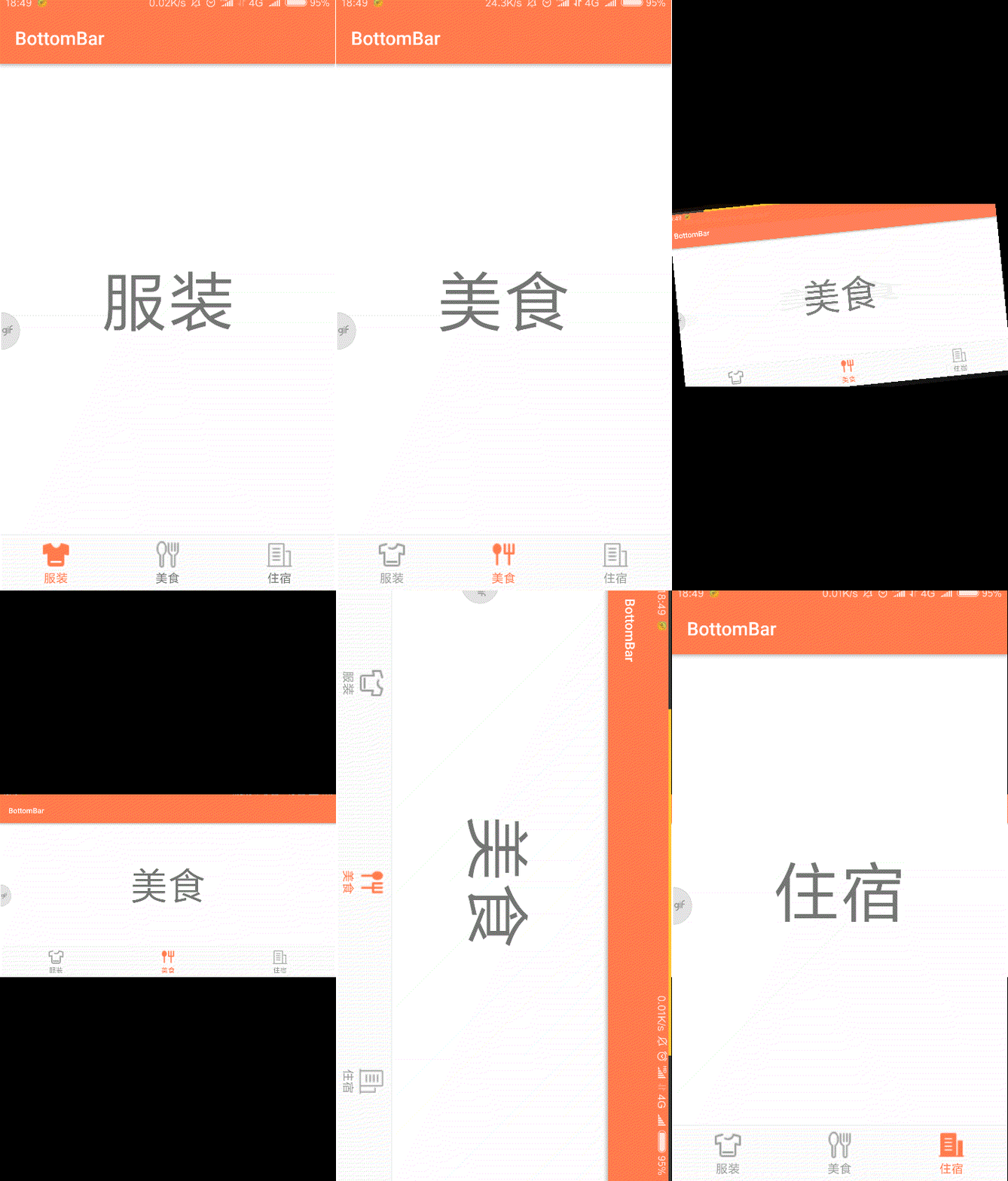
最初学习Android的时候,是边学习边做着一个小项目的,因为项目需求,需要实现一个底部导航栏的功能,由于基础知识受限,百度了很多博客,大致就找到两种实现方案:第一种就是直接用Fragment实现(点击切换),第二种是ViewPager+Fragment实现(除了点击切换,还支持左右滑动切换)。根据需求使用了第一种方法,后期产生了Fragment重叠的问题,由于这个bug时而出现,也不知道如何定位(学生时期),就暂且放下了。现在因为学习进度(系统学习Fragment),重新捡起这个问题,就想写一篇实现功能+解决bug的博客,如有不足之处,请留言指教。
当我们进入Activity时,首先展示第一个页面,即创建对应Fragment实例,使用add+show方法显示出来,当我们点击进入别的页面时,调用hide方法将已展示的Fragment页面隐藏(实际是设置Visiable属性为不可见),然后显示对应Fragment页面(已创建则直接调用show方法,未创建则创建,然后调用add+show方法显示)。
这里补充一点:切换页面也可以用replace方法,它和hide+show方法的直观区别就是:使用replace方法会先将fragment实例remove掉,然后重新add,这就导致Fragment每次切换都会重新走一遍生命周期,创建一个新的实例,不会保存每个Fragment的状态;而使用hide+show方法则仅仅是将不显示的Fragment设置为不可见,再次显示出来时会保存状态。
<LinearLayout xmlns:android="http://schemas.android.com/apk/res/android"
    android:layout_width="match_parent"
    android:layout_height="wrap_content"
    android:background="@color/colorBackGround"
    android:paddingTop="5dp"
    android:paddingBottom="5dp">

    <TextView
        android:id="@+id/text_clothes"
        android:layout_width="0dp"
        android:layout_weight="1"
        android:layout_height="wrap_content"
        android:drawableTop="@drawable/ic_clothes"
        android:text="@string/clothes"
        android:textSize="13sp"
        android:gravity="center_horizontal"/>

    <TextView
        android:id="@+id/text_food"
        android:layout_width="0dp"
        android:layout_weight="1"
        android:layout_height="wrap_content"
        android:drawableTop="@drawable/ic_food"
        android:text="@string/food"
        android:textSize="13sp"
        android:gravity="center_horizontal"/>

    <TextView
        android:id="@+id/text_hotel"
        android:layout_width="0dp"
        android:layout_weight="1"
        android:layout_height="wrap_content"
        android:drawableTop="@drawable/ic_hotel"
        android:text="@string/hotel"
        android:textSize="13sp"
        android:gravity="center_horizontal"/>

</LinearLayout>
<LinearLayout xmlns:android="http://schemas.android.com/apk/res/android"
    xmlns:tools="http://schemas.android.com/tools"
    android:layout_width="match_parent"
    android:layout_height="match_parent"
    android:orientation="vertical"
    tools:context=".MainActivity">

    <FrameLayout
        android:id="@+id/container"
        android:layout_width="match_parent"
        android:layout_height="0dp"
        android:layout_weight="1"/>

    <View
        android:background="@color/colorGray"
        android:layout_width="match_parent"
        android:layout_height="0.1dp"/>

    <include layout="@layout/bottombar"/>

</LinearLayout>
import android.os.Bundle;
import android.support.annotation.NonNull;
import android.support.v4.app.Fragment;
import android.view.LayoutInflater;
import android.view.View;
import android.view.ViewGroup;
import com.example.laughter.testdemo.R;

/**
 * A simple {@link Fragment} subclass.
 */
public class ClothesFragment extends Fragment {

    public ClothesFragment() {
        // Required empty public constructor
    }

    @Override
    public View onCreateView(@NonNull LayoutInflater inflater, ViewGroup container,
                             Bundle savedInstanceState) {
        // Inflate the layout for this fragment
        return inflater.inflate(R.layout.fragment_clothes, container, false);
    }
}
<FrameLayout xmlns:android="http://schemas.android.com/apk/res/android"
    xmlns:tools="http://schemas.android.com/tools"
    android:layout_width="match_parent"
    android:layout_height="match_parent"
    tools:context=".fragment.ClothesFragment">

    <TextView
        android:layout_width="match_parent"
        android:layout_height="match_parent"
        android:text="@string/clothes"
        android:textSize="72sp"
        android:gravity="center"/>

</FrameLayout>
我这里为了区分Fragment页面给每个页面添加了一个TextView,具体就根据自己的需求在Fragment中写代码就行了。
import android.support.v4.app.Fragment;
import android.support.v4.app.FragmentManager;
import android.support.v4.app.FragmentTransaction;
import android.support.v7.app.AppCompatActivity;
import android.os.Bundle;
import android.view.View;
import android.widget.TextView;

import com.example.laughter.testdemo.fragment.ClothesFragment;
import com.example.laughter.testdemo.fragment.FoodFragment;
import com.example.laughter.testdemo.fragment.HotelFragment;

public class MainActivity extends AppCompatActivity implements View.OnClickListener{

    //底部菜单栏3个TextView
    private TextView mTextClothes;
    private TextView mTextFood;
    private TextView mTextHotel;

    //3个Fragment
    private Fragment mClothesFragment;
    private Fragment mFoodFragment;
    private Fragment mHotelFragment;

    @Override
    protected void onCreate(Bundle savedInstanceState) {
        super.onCreate(savedInstanceState);
        setContentView(R.layout.activity_main);
        //初始化
        init();
        //设置第一个Fragment默认显示
        setFragment(0);
    }

    @Override
    public void onClick(View v) {
        switch (v.getId()){
            default:
                break;
            case R.id.text_clothes:
                setFragment(0);
                break;
            case R.id.text_food:
                setFragment(1);
                break;
            case R.id.text_hotel:
                setFragment(2);
                break;
        }
    }

    private void init(){
        //初始化控件
        mTextClothes = (TextView)findViewById(R.id.text_clothes);
        mTextFood = (TextView)findViewById(R.id.text_food);
        mTextHotel = (TextView)findViewById(R.id.text_hotel);

        //设置监听
        mTextClothes.setOnClickListener(this);
        mTextFood.setOnClickListener(this);
        mTextHotel.setOnClickListener(this);
    }

    private void setFragment(int index){
        //获取Fragment管理器
        FragmentManager mFragmentManager = getSupportFragmentManager();
        //开启事务
        FragmentTransaction mTransaction = mFragmentManager.beginTransaction();
        //隐藏所有Fragment
        hideFragments(mTransaction);
        switch (index){
            default:
                break;
            case 0:
                //设置菜单栏为选中状态(修改文字和图片颜色)
                mTextClothes.setTextColor(getResources()
                        .getColor(R.color.colorTextPressed));
                mTextClothes.setCompoundDrawablesWithIntrinsicBounds(0,
                        R.drawable.ic_clothes_pressed,0,0);
                //显示对应Fragment
                if(mClothesFragment == null){
                    mClothesFragment = new ClothesFragment();
                    mTransaction.add(R.id.container, mClothesFragment,
                            "clothes_fragment");
                }else {
                    mTransaction.show(mClothesFragment);
                }
                break;
            case 1:
                mTextFood.setTextColor(getResources()
                        .getColor(R.color.colorTextPressed));
                mTextFood.setCompoundDrawablesWithIntrinsicBounds(0,
                        R.drawable.ic_food_pressed,0,0);
                if(mFoodFragment == null){
                    mFoodFragment = new FoodFragment();
                    mTransaction.add(R.id.container, mFoodFragment,
                            "food_fragment");
                }else {
                    mTransaction.show(mFoodFragment);
                }
                break;
            case 2:
                mTextHotel.setTextColor(getResources()
                        .getColor(R.color.colorTextPressed));
                mTextHotel.setCompoundDrawablesWithIntrinsicBounds(0,
                        R.drawable.ic_hotel_pressed,0,0);
                if(mHotelFragment == null){
                    mHotelFragment = new HotelFragment();
                    mTransaction.add(R.id.container, mHotelFragment,
                            "hotel_fragment");
                }else {
                    mTransaction.show(mHotelFragment);
                }
                break;
        }
        //提交事务
        mTransaction.commit();
    }

    private void hideFragments(FragmentTransaction transaction){
        if(mClothesFragment != null){
            //隐藏Fragment
            transaction.hide(mClothesFragment);
            //将对应菜单栏设置为默认状态
            mTextClothes.setTextColor(getResources()
                    .getColor(R.color.colorText));
            mTextClothes.setCompoundDrawablesWithIntrinsicBounds(0,
                    R.drawable.ic_clothes,0,0);
        }
        if(mFoodFragment != null){
            transaction.hide(mFoodFragment);
            mTextFood.setTextColor(getResources()
                    .getColor(R.color.colorText));
            mTextFood.setCompoundDrawablesWithIntrinsicBounds(0,
                    R.drawable.ic_food,0,0);
        }
        if(mHotelFragment != null){
            transaction.hide(mHotelFragment);
            mTextHotel.setTextColor(getResources()
                    .getColor(R.color.colorText));
            mTextHotel.setCompoundDrawablesWithIntrinsicBounds(0,
                    R.drawable.ic_hotel,0,0);
        }
    }
}
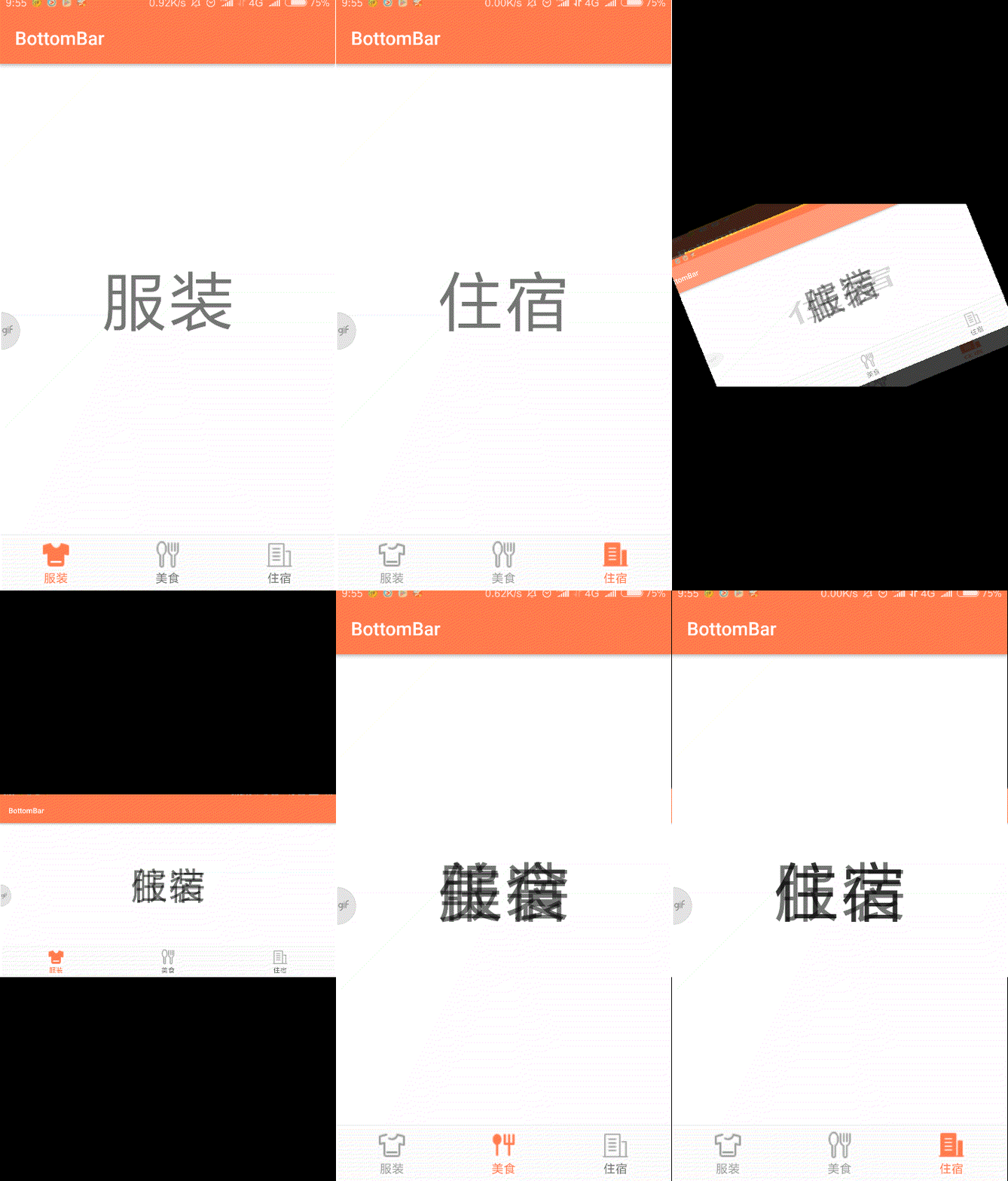
上面代码中逻辑很清晰,根据注释基本可以看明白,具体有些控件的用法自行百度。到这里功能就已经实现了,但是会出现Fragment重叠的bug。具体情况如下图:
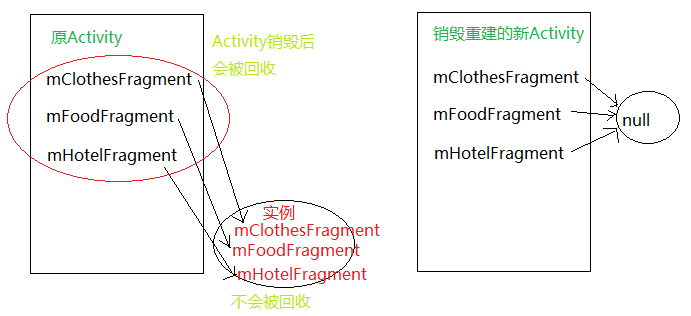
所以,在重建后的的Activity中,又会重新创建Fragment的实例,并且显示出来,而之前被系统恢复的Fragment也会恢复之前的显示状态,这就导致了多个Fragment重叠。当然,任何能导致Activity销毁重建的情况都会产生这个bug,比如说应用在后台时,因为内存资源不足导致Activity被kill。既然知道原因了,那么解决起来就不难了。
这里我想到的解决办法是从重新创建Fragment这里着手,既然保存的状态会恢复,那么Activity重建的时候我们不让Fragment重新创建不就行了。具体怎么做呢?这里还是需要熟悉Activity的生命周期。
    @Override
    protected void onCreate(Bundle savedInstanceState) {
        super.onCreate(savedInstanceState);
        setContentView(R.layout.activity_main);
        //初始化
        init();
        //根据传入的Bundle对象判断Activity是正常启动还是销毁重建
        if(savedInstanceState == null){
            //设置第一个Fragment默认选中
            setFragment(0);
        }
    }
public class MainActivity extends AppCompatActivity implements View.OnClickListener{

    ...

    //标记当前显示的Fragment
    private int fragmentId = 0;

    ...

    @Override
    protected void onSaveInstanceState(Bundle outState) {
        //通过onSaveInstanceState方法保存当前显示的fragment
        outState.putInt("fragment_id",fragmentId);
        super.onSaveInstanceState(outState);
    }

    @Override
    protected void onRestoreInstanceState(Bundle savedInstanceState) {
        super.onRestoreInstanceState(savedInstanceState);
        FragmentManager mFragmentManager = getSupportFragmentManager();
        //通过FragmentManager获取保存在FragmentTransaction中的Fragment实例
        mClothesFragment = (ClothesFragment)mFragmentManager
                .findFragmentByTag("clothes_fragment");
        mFoodFragment = (FoodFragment)mFragmentManager
                .findFragmentByTag("food_fragment");
        mHotelFragment = (HotelFragment)mFragmentManager
                .findFragmentByTag("hotel_fragment");
        //恢复销毁前显示的Fragment
        setFragment(savedInstanceState.getInt("fragment_id"));
    }

    ...
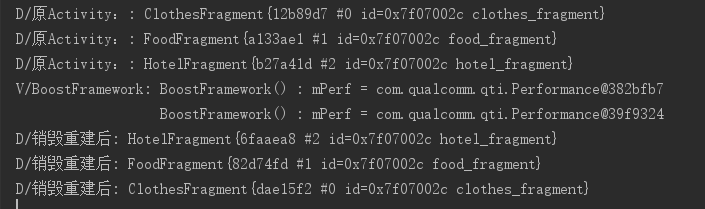
显然,销毁重建后Fragment对象所指向的实例与重建前相同。这样我们的BottomBar就完成了!
如果对Activity生命周期不太了解,可以看一看我的另一篇博客:
Android笔记(一) | Activity的生命周期

微信关注我们
转载内容版权归作者及来源网站所有!
低调大师中文资讯倾力打造互联网数据资讯、行业资源、电子商务、移动互联网、网络营销平台。持续更新报道IT业界、互联网、市场资讯、驱动更新,是最及时权威的产业资讯及硬件资讯报道平台。
Nacos /nɑ:kəʊs/ 是 Dynamic Naming and Configuration Service 的首字母简称,一个易于构建 AI Agent 应用的动态服务发现、配置管理和AI智能体管理平台。Nacos 致力于帮助您发现、配置和管理微服务及AI智能体应用。Nacos 提供了一组简单易用的特性集,帮助您快速实现动态服务发现、服务配置、服务元数据、流量管理。Nacos 帮助您更敏捷和容易地构建、交付和管理微服务平台。
Spring框架(Spring Framework)是由Rod Johnson于2002年提出的开源Java企业级应用框架,旨在通过使用JavaBean替代传统EJB实现方式降低企业级编程开发的复杂性。该框架基于简单性、可测试性和松耦合性设计理念,提供核心容器、应用上下文、数据访问集成等模块,支持整合Hibernate、Struts等第三方框架,其适用范围不仅限于服务器端开发,绝大多数Java应用均可从中受益。
Rocky Linux(中文名:洛基)是由Gregory Kurtzer于2020年12月发起的企业级Linux发行版,作为CentOS稳定版停止维护后与RHEL(Red Hat Enterprise Linux)完全兼容的开源替代方案,由社区拥有并管理,支持x86_64、aarch64等架构。其通过重新编译RHEL源代码提供长期稳定性,采用模块化包装和SELinux安全架构,默认包含GNOME桌面环境及XFS文件系统,支持十年生命周期更新。
WebStorm 是jetbrains公司旗下一款JavaScript 开发工具。目前已经被广大中国JS开发者誉为“Web前端开发神器”、“最强大的HTML5编辑器”、“最智能的JavaScript IDE”等。与IntelliJ IDEA同源,继承了IntelliJ IDEA强大的JS部分的功能。
扫码在手机上查看文章
扫描二维码,手机阅读更方便




有任何问题或合作意向欢迎联系我们
Email: 99873273@qq.com
QQ: 99873273