
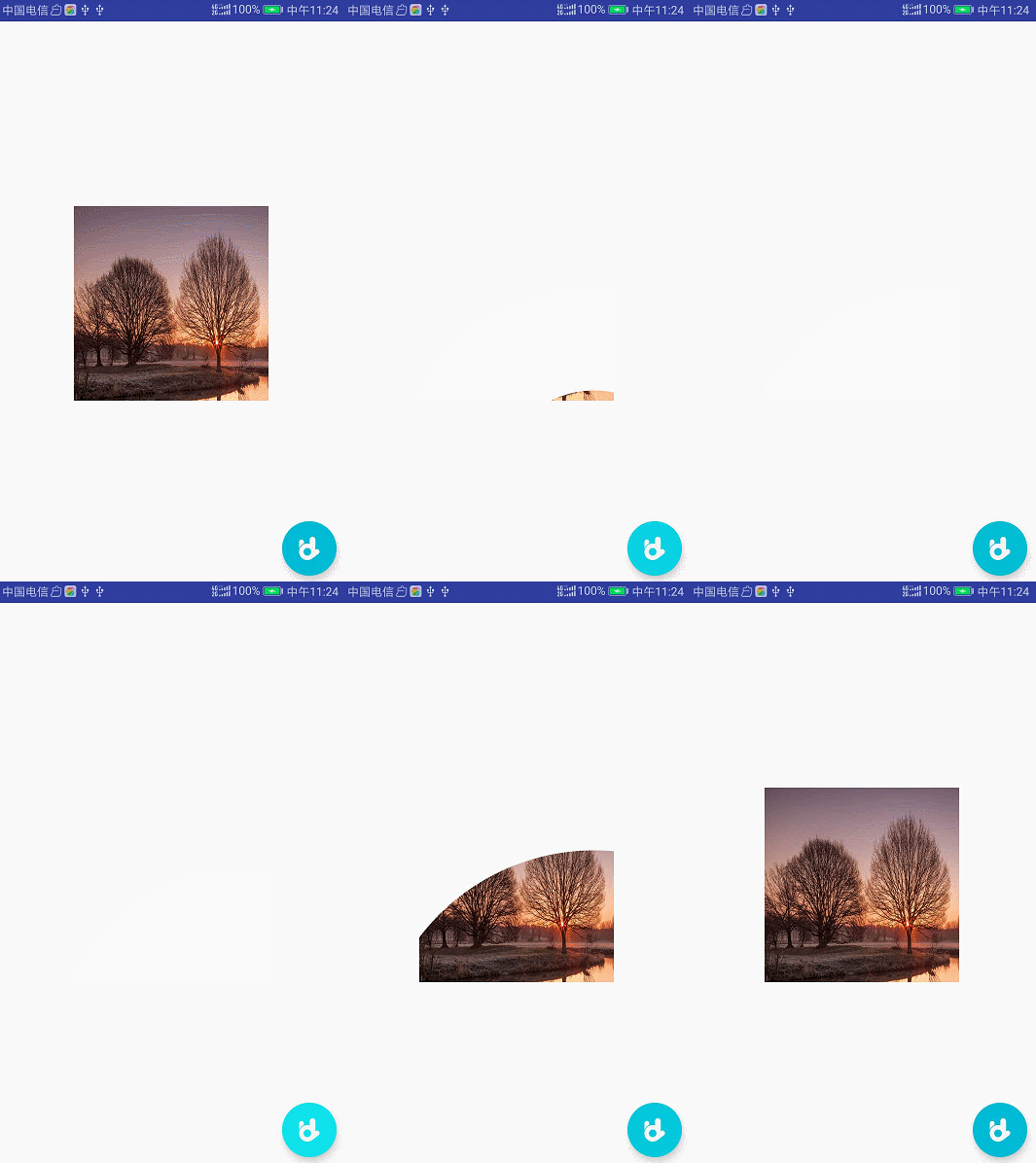
Android Studio 遇到的坑error while launching activity
Android studio 3.1.4运行 app 第一次能成功,后面突然运行不了,手机型号华为 mate10,解决方法 启动terminal 输入 adb uninstall 包名
public class CircularAnimUtil {

    public static final long PERFECT_MILLS = 618;
    public static final int MINI_RADIUS = 0;

    /**
     * 向四周伸张,直到完成显示。
     */
    @SuppressLint("NewApi")
    public static void show(View myView, float startRadius, long durationMills) {
        if (android.os.Build.VERSION.SDK_INT < android.os.Build.VERSION_CODES.LOLLIPOP) {
            myView.setVisibility(View.VISIBLE);
            return;
        }

        int cx = (myView.getLeft() + myView.getRight()) / 2;
        int cy = (myView.getTop() + myView.getBottom()) / 2;

        int w = myView.getWidth();
        int h = myView.getHeight();

        // 勾股定理 & 进一法
        int finalRadius = (int) Math.sqrt(w * w + h * h) + 1;

        Animator anim =
            ViewAnimationUtils.createCircularReveal(myView, cx, cy, startRadius, finalRadius);
        myView.setVisibility(View.VISIBLE);
        anim.setDuration(durationMills);
        anim.start();
    }

    /**
     * 由满向中间收缩,直到隐藏。
     */
    @SuppressLint("NewApi")
    public static void hide(final View myView, float endRadius, long durationMills) {
        if (android.os.Build.VERSION.SDK_INT < android.os.Build.VERSION_CODES.LOLLIPOP) {
            myView.setVisibility(View.INVISIBLE);
            return;
        }

        int cx = (myView.getLeft() + myView.getRight()) / 2;
        int cy = (myView.getTop() + myView.getBottom()) / 2;
        int w = myView.getWidth();
        int h = myView.getHeight();

        // 勾股定理 & 进一法
        int initialRadius = (int) Math.sqrt(w * w + h * h) + 1;

        Animator anim =
            ViewAnimationUtils.createCircularReveal(myView, cx, cy, initialRadius, endRadius);
        anim.setDuration(durationMills);
        anim.addListener(new AnimatorListenerAdapter() {
            @Override
            public void onAnimationEnd(Animator animation) {
                super.onAnimationEnd(animation);
                myView.setVisibility(View.INVISIBLE);
            }
        });

        anim.start();
    }

    /**
     * 从指定View开始向四周伸张(伸张颜色或图片为colorOrImageRes), 然后进入另一个Activity,
     * 返回至 @thisActivity 后显示收缩动画。
     */
    @SuppressLint("NewApi")
    public static void startActivityForResult(
            final Activity thisActivity, final Intent intent, final Integer requestCode, final Bundle bundle,
            final View triggerView, int colorOrImageRes, final long durationMills) {

        if (android.os.Build.VERSION.SDK_INT < android.os.Build.VERSION_CODES.LOLLIPOP) {
            thisActivity.startActivity(intent);
            return;
        }

        int[] location = new int[2];
        triggerView.getLocationInWindow(location);
        final int cx = location[0] + triggerView.getWidth() / 2;
        final int cy = location[1] + triggerView.getHeight() / 2;
        final ImageView view = new ImageView(thisActivity);
        view.setScaleType(ImageView.ScaleType.CENTER_CROP);
        view.setImageResource(colorOrImageRes);
        final ViewGroup decorView = (ViewGroup) thisActivity.getWindow().getDecorView();
        int w = decorView.getWidth();
        int h = decorView.getHeight();
        decorView.addView(view, w, h);
        final int finalRadius = (int) Math.sqrt(w * w + h * h) + 1;
        Animator
            anim = ViewAnimationUtils.createCircularReveal(view, cx, cy, 0, finalRadius);
        anim.setDuration(durationMills);
        anim.addListener(new AnimatorListenerAdapter() {
            @Override
            public void onAnimationEnd(Animator animation) {
                super.onAnimationEnd(animation);

                if (requestCode == null) {
                    thisActivity.startActivity(intent);
                } else if (bundle == null) {
                    thisActivity.startActivityForResult(intent, requestCode);
                } else {
                    thisActivity.startActivityForResult(intent, requestCode, bundle);
                }

                // 默认渐隐过渡动画.
                thisActivity.overridePendingTransition(android.R.anim.fade_in, android.R.anim.fade_out);

                // 默认显示返回至当前Activity的动画.
                triggerView.postDelayed(new Runnable() {
                    @Override
                    public void run() {

                        Animator anim =
                            ViewAnimationUtils.createCircularReveal(view, cx, cy, finalRadius, 0);
                        anim.setDuration(durationMills);
                        anim.addListener(new AnimatorListenerAdapter() {
                            @Override
                            public void onAnimationEnd(Animator animation) {
                                super.onAnimationEnd(animation);
                                try {
                                    decorView.removeView(view);
                                } catch (Exception e) {
                                    e.printStackTrace();
                                }
                            }
                        });
                        anim.start();

                    }
                }, 1000);


            }
        });
        anim.start();

    }


    /*下面的方法全是重载,用简化上面方法的构建*/

    public static void startActivityForResult(
            Activity thisActivity, Intent intent, Integer requestCode, View triggerView, int colorOrImageRes) {
        startActivityForResult(thisActivity, intent, requestCode, null, triggerView, colorOrImageRes, PERFECT_MILLS);
    }

    public static void startActivity(
            Activity thisActivity, Intent intent, View triggerView, int colorOrImageRes, long durationMills) {
        startActivityForResult(thisActivity, intent, null, null, triggerView, colorOrImageRes, durationMills);
    }

    public static void startActivity(
            Activity thisActivity, Intent intent, View triggerView, int colorOrImageRes) {
        startActivity(thisActivity, intent, triggerView, colorOrImageRes, PERFECT_MILLS);
    }

    public static void startActivity(Activity thisActivity, Class<?> targetClass, View triggerView, int colorOrImageRes) {
        startActivity(thisActivity, new Intent(thisActivity, targetClass), triggerView, colorOrImageRes, PERFECT_MILLS);
    }

    public static void show(View myView) {
        show(myView, MINI_RADIUS, PERFECT_MILLS);
    }

    public static void hide(View myView) {
        hide(myView, MINI_RADIUS, PERFECT_MILLS);
    }
}
//启动Activity,(MainActivity)
floatingActionButton.setOnClickListener(new View.OnClickListener() {
            @Override
            public void onClick(View view) {
                Intent intent = new Intent(MainActivity.this, TestOne.class);
                CircularAnimUtil.startActivity(MainActivity.this, intent, floatingActionButton, R.color.colorAnim);
            }
});
//销毁Activity(TestOne)
 @Override
 public void onBackPressed() {
        finish();
        overridePendingTransition(android.R.anim.fade_in, android.R.anim.fade_out);
}
public class ViewAnimTest extends AppCompatActivity {
    FloatingActionButton floatingActionButton;
    ImageView imageView;
    private boolean isShow=true;
    @Override
    protected void onCreate(@Nullable Bundle savedInstanceState) {
        super.onCreate(savedInstanceState);
        setContentView(R.layout.viewanimtest);
        floatingActionButton=findViewById(R.id.fab);
        imageView=findViewById(R.id.image);
        floatingActionButton.setOnClickListener(new View.OnClickListener() {
            @Override
            public void onClick(View view) {
                if(isShow){
                    CircularAnimUtil.hide(imageView);
                }else {
                    CircularAnimUtil.show(imageView);
                }
                isShow=!isShow;
            }
        });
    }
}

微信关注我们
转载内容版权归作者及来源网站所有!
低调大师中文资讯倾力打造互联网数据资讯、行业资源、电子商务、移动互联网、网络营销平台。持续更新报道IT业界、互联网、市场资讯、驱动更新,是最及时权威的产业资讯及硬件资讯报道平台。
马里奥是站在游戏界顶峰的超人气多面角色。马里奥靠吃蘑菇成长,特征是大鼻子、头戴帽子、身穿背带裤,还留着胡子。与他的双胞胎兄弟路易基一起,长年担任任天堂的招牌角色。
为解决软件依赖安装时官方源访问速度慢的问题,腾讯云为一些软件搭建了缓存服务。您可以通过使用腾讯云软件源站来提升依赖包的安装速度。为了方便用户自由搭建服务架构,目前腾讯云软件源站支持公网访问和内网访问。
Rocky Linux(中文名:洛基)是由Gregory Kurtzer于2020年12月发起的企业级Linux发行版,作为CentOS稳定版停止维护后与RHEL(Red Hat Enterprise Linux)完全兼容的开源替代方案,由社区拥有并管理,支持x86_64、aarch64等架构。其通过重新编译RHEL源代码提供长期稳定性,采用模块化包装和SELinux安全架构,默认包含GNOME桌面环境及XFS文件系统,支持十年生命周期更新。
Sublime Text具有漂亮的用户界面和强大的功能,例如代码缩略图,Python的插件,代码段等。还可自定义键绑定,菜单和工具栏。Sublime Text 的主要功能包括:拼写检查,书签,完整的 Python API , Goto 功能,即时项目切换,多选择,多窗口等等。Sublime Text 是一个跨平台的编辑器,同时支持Windows、Linux、Mac OS X等操作系统。
扫码在手机上查看文章
扫描二维码,手机阅读更方便




有任何问题或合作意向欢迎联系我们
Email: 99873273@qq.com
QQ: 99873273