处:http://blog.csdn.net/qinjuning
前言: 最近一直在看Launcher模块,经过差不多两个月学习,终于摸透了Launcher的一些主要功能实现,目前继续还处于
摸索状态。未看Launcher时,于我而言,只能膜拜,以为所有功能都是它实现的 ;入门后,才发现,Launcher的很多功能只是
集成了框架/应用程序提供的功能。很多陌生的东西,只有接触了才感叹:“oh ,原来是这样的!”
今天先给大家分享下Launcher如何实现添加快捷方式(Shortcut) ,后续会慢慢增加其他方面的功能,帮助大家“一叶而知秋”。
具体来说,Launcher中的快捷方式有两种类型:
1 、"伪"快捷方式 —— 应用程序类型
2 、"真"快捷方式 —— Activity具备<action/>为ACTION_CREATE_SHORTCUT的配置信息
这两种类型的快捷方式是怎么勾搭在一起的,在下面大家通过代码自己理解,也不方便细说了。
关于如何创建一个”真”快捷方式(Shortcut)的App ,大家可以先去看看杨丰盛老师的博客《Android特色开发之桌面组件》 ,
从中我们可以掌握如何创建一个快捷方式,实现也不是很难。
知识点介绍:
知识点一 、ACTION_PICK_ACTIVITY使用说明 ,具体可以参考SDK Intent类
功能:显示匹配附加值为EXTRA_INTENT的所有Activity,并将它们以列表呈现给用户。当用户从该列表选中一项
时,并不会启动该Activity(这与与ACTION_CHOOSER不同,此Action会启动用户选择的Activity),而是将该Activity的详细信
息(可能包括Action、ComponentName、data信息等)以Intent对象返回给调用者(通常为onActivityResult方法)。
附加值:EXTRA_INTENT 显示所有匹配显示所有匹配附加值为EXTRA_INTENT的Activity,
因此,根据ACTION_PICK_ACTIVITY的特性,真正地创建快捷方式需要两步走:
第一步:发送ACTION_PICK_ACTIVITY以及EXTRA_INTENT,找到我们希望能创建快捷方式的Activity列表。
第二步:根据第一步所选择的Activity返回的Intent对象,再次发送此Intent对象,即可创建该Activity提供给
我们快捷方式了。
例如,下面我们只是简单的发送一个请求显示所有应用程序的Intent,如下:
-
- Intent pickIntent = new Intent(Intent.ACTION_PICK_ACTIVITY);
- Intent mainIntent = new Intent () ;
- mainIntent.setAction(Intent.ACTION_MAIN);
- mainIntent.addCategory(Intent.CATEGORY_LAUNCHER);
-
- pickIntent.putExtra(Intent.EXTRA_INTENT, mainIntent);
- pickIntent.putExtra(Intent.EXTRA_TITLE, "选择应用程序");
-
-
- startActivityForResult(pickIntent,MY_REQUEST_ALL_APPLICATION );
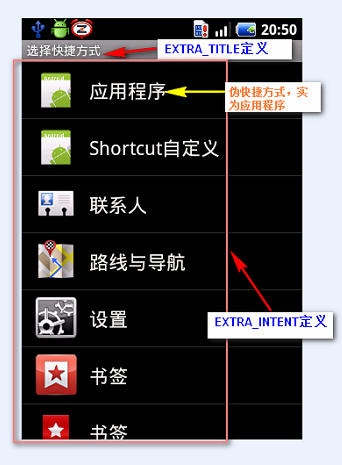
ACTION_PICK_ACTIVITY效果图如下:
![]()
点击某一具体Activity , 即可选择创建该Activity的快捷方式了。
知识点二、 Intent.ShortcutIconResource类介绍
功能: 为快捷方式(Shortcut)和文件夹(live folder)提供图片资源
常用方法为:
public static Intent.ShortcutIconResource fromContext(Context context, int resourceId)
功能: 创建一个 Intent.ShortcutIconResource 对象
参数说明:context Context类对象
resourceId 具体的图片资源id 。
常用属性:
packageName 该应用程序所在包名,类型为 packageName:type/entityname
resourceName resourceId所对应地的资源名
例如: 某个图片资源 R.id.icon = 0x7f020000, 则resourceName 为 packageName:drawable/icon
具体怎么通过 Intent.ShortcutIconResource对象获取图片资源,请参考示例Demo。
示例Demo
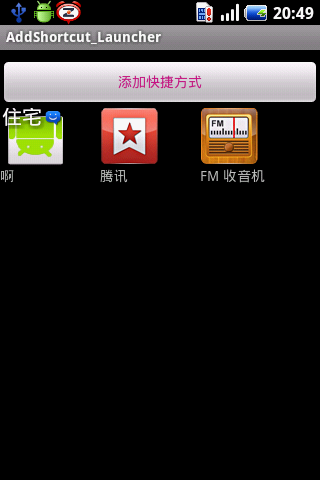
说明:点击创建快捷方式对话框后, 选择某一项具体的快捷方式,即可添加至MainActivity界面中 ,继续点击每个View,则
可启动该快快捷方式的App,挺给力的吧。
PS: 由于我只是简单的利用了LinearLayout去当容器,会存在局限性,大家可在此基础上,利用GridView/ListView构建更好
的布局,当然更NB的是,去提供类似Launcher的自定义布局。
由于执行快捷方式可能需要一些特定的权限,因此我们必须得在AndroidManifest.xml里配置对应的权限。例如,直接拨打电话
需要的权限为: <uses-permission android:name="android.permission.CALL_PHONE"></uses-permission>
如上效果图,增加几个快捷方式后截图如下,点击即可启动该应用。
![]()
主工程逻辑如下:
- package com.qin.addshortcut;
-
- import java.util.ArrayList;
-
- import android.app.Activity;
- import android.content.ComponentName;
- import android.content.Intent;
- import android.content.Intent.ShortcutIconResource;
- import android.content.pm.ActivityInfo;
- import android.content.pm.PackageManager;
- import android.content.pm.PackageManager.NameNotFoundException;
- import android.content.res.Resources;
- import android.graphics.Bitmap;
- import android.graphics.Rect;
- import android.graphics.drawable.BitmapDrawable;
- import android.graphics.drawable.Drawable;
- import android.os.Bundle;
- import android.os.Parcelable;
- import android.util.Log;
- import android.view.LayoutInflater;
- import android.view.View;
- import android.widget.Button;
- import android.widget.ImageView;
- import android.widget.LinearLayout;
- import android.widget.TextView;
- import android.widget.Toast;
-
-
-
-
- public class MainActivity extends Activity implements View.OnClickListener
- {
-
- private LinearLayout linearlayout ;
- private Button btAddShortCut;
-
-
- private static final int MY_REQUEST_SHORT_CUT = 1;
- private static final int MY_CREATE_SHOURT_CUT = 2;
- private static final int MY_REQUEST_ALL_APPLICATION = 3 ;
- private static String TAG = "AddShortActivity" ;
-
- private PackageManager mPackageManager = null ;
-
-
- @Override
- public void onCreate(Bundle savedInstanceState)
- {
- super.onCreate(savedInstanceState);
- setContentView(R.layout.main);
-
- btAddShortCut = (Button) findViewById(R.id.bt_addShortcut);
- linearlayout = (LinearLayout)findViewById(R.id.linearLayout) ;
- linearlayout.setOnClickListener(this) ;
-
-
-
- int iconId = this.getResources().getIdentifier("com.qin.addshortcut:drawable/icon", null, null);
- Log.i(TAG, " icon id : " + iconId);
-
-
- mPackageManager = getPackageManager();
-
- btAddShortCut.setOnClickListener(new View.OnClickListener()
- {
-
- @Override
- public void onClick(View v)
- {
-
- createShortDialog() ;
- }
- });
-
- }
- private void createShortDialog(){
-
-
-
- Bundle bundle = new Bundle() ;
-
- ArrayList<String> shortcutNames = new ArrayList<String>();
- shortcutNames.add("应用程序");
- bundle.putStringArrayList(Intent.EXTRA_SHORTCUT_NAME, shortcutNames);
-
- ArrayList<ShortcutIconResource> shortcutIconRes= new ArrayList<ShortcutIconResource>();
- shortcutIconRes.add(ShortcutIconResource.fromContext(MainActivity.this, R.drawable.icon));
- bundle.putParcelableArrayList(Intent.EXTRA_SHORTCUT_ICON_RESOURCE, shortcutIconRes);
-
-
- Intent pickIntent = new Intent(Intent.ACTION_PICK_ACTIVITY);
-
- Intent extraIntent = new Intent(Intent.ACTION_CREATE_SHORTCUT);
-
- pickIntent.putExtra(Intent.EXTRA_INTENT, extraIntent);
- pickIntent.putExtra(Intent.EXTRA_TITLE, "选择快捷方式");
-
- pickIntent.putExtras(bundle);
-
- startActivityForResult(pickIntent, MY_REQUEST_SHORT_CUT);
- }
-
-
- protected void onActivityResult(int requestCode, int resultCode, final Intent data)
- {
- super.onActivityResult(requestCode, resultCode, data);
-
- if(resultCode == RESULT_CANCELED )
- return ;
-
-
- switch(requestCode){
- case MY_REQUEST_SHORT_CUT:
-
-
- String label = data.getStringExtra(Intent.EXTRA_SHORTCUT_NAME);
-
- if(label.equals("应用程序")){
-
- Intent pickIntent = new Intent(Intent.ACTION_PICK_ACTIVITY);
- Intent mainIntent = new Intent () ;
- mainIntent.setAction(Intent.ACTION_MAIN);
- mainIntent.addCategory(Intent.CATEGORY_LAUNCHER);
-
- pickIntent.putExtra(Intent.EXTRA_INTENT, mainIntent);
- pickIntent.putExtra(Intent.EXTRA_TITLE, "选择应用程序");
-
-
- startActivityForResult(pickIntent,MY_REQUEST_ALL_APPLICATION );
-
- }
- else{
- Log.v(TAG, "MY_REQUEST_SHORT_CUT Intent Info--- >" + data);
-
- startActivityForResult(data, MY_CREATE_SHOURT_CUT);
- }
- break ;
-
-
- case MY_CREATE_SHOURT_CUT:
-
- Log.v(TAG, "MY_CREATE_SHOURT_CUT Intent Info--- >" + data);
- completeAddShortCut(data);
- break ;
-
- case MY_REQUEST_ALL_APPLICATION:
-
- Log.v(TAG, "MY_REQUEST_ALL_APPLICATION Intent Info--- >" + data);
- completeAddApplication(data) ;
- break ;
- default :
- break ;
-
- }
-
- }
-
-
- private void completeAddApplication(Intent data){
-
-
- Log.i(TAG, "Application intent info ---->" +data) ;
-
- ComponentName componentName = data.getComponent() ;
- Log.i(TAG, "ComponentName Info ----> " + componentName) ;
-
- try
- {
-
- ActivityInfo activityInfo = mPackageManager.getActivityInfo(componentName, 0);
- CharSequence applabel = activityInfo.loadLabel(mPackageManager) ;
- Drawable appIcon = activityInfo.loadIcon(mPackageManager) ;
-
-
- View view = makeViewForShortcut(applabel , appIcon) ;
-
- view.setOnClickListener(this) ;
-
- view.setTag(data) ;
-
-
-
- LinearLayout.LayoutParams llparams = new LinearLayout.LayoutParams(80,90) ;
- linearlayout.addView(view,llparams) ;
- }
- catch (NameNotFoundException e)
- {
- Log.e(TAG, "NameNotFoundException at completeAddApplication method") ;
- }
- }
-
-
- private void completeAddShortCut(Intent data){
-
- Drawable shortcutIcon = null;
-
-
- String label = data.getStringExtra(Intent.EXTRA_SHORTCUT_NAME);
-
- Parcelable bitmap = data.getParcelableExtra(Intent.EXTRA_SHORTCUT_ICON);
-
- if (bitmap != null && bitmap instanceof Bitmap)
- {
- shortcutIcon = new BitmapDrawable((Bitmap) bitmap);
- }
- else
- {
- Parcelable iconParcel = data .getParcelableExtra(Intent.EXTRA_SHORTCUT_ICON_RESOURCE);
- if(iconParcel != null && iconParcel instanceof ShortcutIconResource)
- {
-
- ShortcutIconResource iconRes = (ShortcutIconResource) iconParcel;
-
- try
- {
-
- Resources resources = mPackageManager.getResourcesForApplication(iconRes.packageName);
-
- int iconid = resources.getIdentifier(iconRes.resourceName, null, null);
- Log.i(TAG, "icon identifier is " + iconRes.resourceName) ;
-
- shortcutIcon = resources.getDrawable(iconid);
- }
- catch (NameNotFoundException e)
- {
- Log.e(TAG, "NameNotFoundException at completeAddShortCut method") ;
- }
-
- }
- }
-
- if ( shortcutIcon == null) {
-
- Toast.makeText(MainActivity.this, "sorry , we could not shortcut image", Toast.LENGTH_SHORT) ;
- return ;
- }
-
-
- Intent shortcut_intent = data.getParcelableExtra(Intent.EXTRA_SHORTCUT_INTENT);
-
- if (shortcut_intent != null)
- Log.i(TAG, "shortCut intent info ----> "+shortcut_intent) ;
-
-
- View view = makeViewForShortcut(label , shortcutIcon) ;
-
- view.setOnClickListener(this) ;
-
- view.setTag(shortcut_intent) ;
-
-
-
- LinearLayout.LayoutParams llparams = new LinearLayout.LayoutParams(100,90) ;
-
- linearlayout.addView(view,llparams) ;
-
- }
-
-
- @Override
- public void onClick(View v) {
- Object tag = v.getTag() ;
- if(tag !=null && tag instanceof Intent){
- Intent intent = (Intent)tag ;
- startActivityForSafely(intent) ;
- }
-
- }
-
- private void startActivityForSafely(Intent data) {
- Intent launchIntent = data ;
-
-
- launchIntent.setSourceBounds(new Rect(0,0,300,300));
- launchIntent.setFlags(Intent.FLAG_ACTIVITY_NEW_TASK);
-
- startActivity(launchIntent) ;
- }
-
-
- private View makeViewForShortcut(CharSequence label , Drawable icon){
- LayoutInflater inflater = LayoutInflater.from(this) ;
- View shortcut_view = inflater.inflate(R.layout.shortcut_view, null) ;
-
- TextView tv = (TextView)shortcut_view.findViewById(R.id.shortcut_label) ;
- tv.setText(label) ;
-
- ImageView img = (ImageView)shortcut_view.findViewById(R.id.shortcut_img) ;
- img.setImageDrawable(icon) ;
- return shortcut_view ;
- }
-
-
- }
某些快捷方式的功能实现起来还是很炫彩的 , 尤其是启动直接拨打、直接发送短信的Activity,最开始我以为是Launcher实
现地,如今才明白原来是快捷方式提供了一个Intent对象,Launcher直接采用了拿来主义了。 不多说了,大家慢慢感受体味吧。
示例DEMO下载地址: http://download.csdn.net/detail/qinjuning/4008605
本文转自wanqi博客园博客,原文链接:http://www.cnblogs.com/wanqieddy/archive/2012/05/05/2484535.html如需转载请自行联系原作者