![复制代码]()
1363157985066     13726230503    00-FD-07-A4-72-B8:CMCC    120.196.100.82    i02.c.aliimg.com        24    27    2481    24681    200
1363157995052     13826544101    5C-0E-8B-C7-F1-E0:CMCC    120.197.40.4            4    0    264    0    200
1363157991076     13926435656    20-10-7A-28-CC-0A:CMCC    120.196.100.99            2    4    132    1512    200
1363154400022     13926251106    5C-0E-8B-8B-B1-50:CMCC    120.197.40.4            4    0    240    0    200
1363157993044     18211575961    94-71-AC-CD-E6-18:CMCC-EASY    120.196.100.99    iface.qiyi.com    视频网站    15    12    1527    2106    200
1363157995074     84138413    5C-0E-8B-8C-E8-20:7DaysInn    120.197.40.4    122.72.52.12        20    16    4116    1432    200
1363157993055     13560439658    C4-17-FE-BA-DE-D9:CMCC    120.196.100.99            18    15    1116    954    200
1363157995033     15920133257    5C-0E-8B-C7-BA-20:CMCC    120.197.40.4    sug.so.360.cn    信息安全    20    20    3156    2936    200
1363157983019     13719199419    68-A1-B7-03-07-B1:CMCC-EASY    120.196.100.82            4    0    240    0    200
1363157984041     13660577991    5C-0E-8B-92-5C-20:CMCC-EASY    120.197.40.4    s19.cnzz.com    站点统计    24    9    6960    690    200
1363157973098     15013685858    5C-0E-8B-C7-F7-90:CMCC    120.197.40.4    rank.ie.sogou.com    搜索引擎    28    27    3659    3538    200
1363157986029     15989002119    E8-99-C4-4E-93-E0:CMCC-EASY    120.196.100.99    www.umeng.com    站点统计    3    3    1938    180    200
1363157992093     13560439658    C4-17-FE-BA-DE-D9:CMCC    120.196.100.99            15    9    918    4938    200
1363157986041     13480253104    5C-0E-8B-C7-FC-80:CMCC-EASY    120.197.40.4            3    3    180    180    200
1363157984040     13602846565    5C-0E-8B-8B-B6-00:CMCC    120.197.40.4    2052.flash2-http.qq.com    综合门户    15    12    1938    2910    200
1363157995093     13922314466    00-FD-07-A2-EC-BA:CMCC    120.196.100.82    img.qfc.cn        12    12    3008    3720    200
1363157982040     13502468823    5C-0A-5B-6A-0B-D4:CMCC-EASY    120.196.100.99    y0.ifengimg.com    综合门户    57    102    7335    110349    200
1363157986072     18320173382    84-25-DB-4F-10-1A:CMCC-EASY    120.196.100.99    input.shouji.sogou.com    搜索引擎    21    18    9531    2412    200
1363157990043     13925057413    00-1F-64-E1-E6-9A:CMCC    120.196.100.55    t3.baidu.com    搜索引擎    69    63    11058    48243    200
1363157988072     13760778710    00-FD-07-A4-7B-08:CMCC    120.196.100.82            2    2    120    120    200
1363157985079     13823070001    20-7C-8F-70-68-1F:CMCC    120.196.100.99            6    3    360    180    200
1363157985069     13600217502    00-1F-64-E2-E8-B1:CMCC    120.196.100.55            18    138    1080    186852    200
![复制代码]()
![复制代码]()
  1 import java.io.DataInput;
  2 import java.io.DataOutput;
  3 import java.io.IOException;
  4 import java.util.HashMap;
  5 import java.util.Map;
  6
  7 import org.apache.hadoop.conf.Configuration;
  8 import org.apache.hadoop.fs.Path;
  9 import org.apache.hadoop.io.LongWritable;
 10 import org.apache.hadoop.io.Text;
 11 import org.apache.hadoop.io.Writable;
 12 import org.apache.hadoop.mapreduce.Job;
 13 import org.apache.hadoop.mapreduce.Mapper;
 14 import org.apache.hadoop.mapreduce.Partitioner;
 15 import org.apache.hadoop.mapreduce.Reducer;
 16 import org.apache.hadoop.mapreduce.lib.input.FileInputFormat;
 17 import org.apache.hadoop.mapreduce.lib.output.FileOutputFormat;
 18
 19 public class TrafficApp {
 20     public static void main(String[] args) throws Exception {
 21         Job job = Job.getInstance(new Configuration(), TrafficApp.class.getSimpleName());
 22         job.setJarByClass(TrafficApp.class);
 23
 24         FileInputFormat.setInputPaths(job, args[0]);
 25
 26         job.setMapperClass(TrafficMapper.class);
 27         job.setMapOutputKeyClass(Text.class);
 28         job.setMapOutputValueClass(TrafficWritable.class);
 29
 30         //job.setNumReduceTasks(2);//设定Reduce的数量为2  这个针对TrafficPartitioner.class
 31         //job.setPartitionerClass(TrafficPartitioner.class);//设定一个Partitioner的类.
 32
 33         //job.setNumReduceTasks(3);//设定Reduce的数量为3 这个针对ProviderPartitioner
 34         //也可以通过参数指定
 35         job.setNumReduceTasks(Integer.parseInt(args[2]));
 36         job.setPartitionerClass(ProviderPartitioner.class);
 37
 38         /*
 39          *Partitioner是如何实现不同的Map输出分配到不同的Reduce中?
 40          *在不适用指定的Partitioner时,有 一个默认的Partitioner.
 41          *就是HashPartitioner.
 42          *其只有一行代码,其意思就是过来的key,不管是什么,模numberReduceTasks之后 返回值就是reduce任务的编号.
 43          *numberReduceTasks的默认值是1.  任何一个数模1(取余数)都是0.
 44          *这个地方0就是取编号为0的Reduce.(Reduce从0开始编号.)
 45          */
 46
 47         job.setReducerClass(TrafficReducer.class);
 48         job.setOutputKeyClass(Text.class);
 49         job.setOutputValueClass(TrafficWritable.class);
 50
 51         FileOutputFormat.setOutputPath(job, new Path(args[1]));
 52         job.waitForCompletion(true);
 53     }
 54
 55     public static class TrafficPartitioner extends Partitioner<Text,TrafficWritable>{//k2,v2
 56
 57         @Override
 58         public int getPartition(Text key, TrafficWritable value,int numPartitions) {
 59             long phoneNumber = Long.parseLong(key.toString());
 60             return (int)(phoneNumber%numPartitions);
 61         }
 62
 63     }
 64
 65     //根据号码所属的运营商进行分区,号码的前三位(也可以根据号码所在的行政区域进行分区,号码的前七位)
 66     public static class ProviderPartitioner extends Partitioner<Text,TrafficWritable>{//k2,v2
 67         //初始化映射关系
 68         /*
 69          * 这两个静态的static的执行的先后顺序是 从上往下,先执行providerMap 再 执行static静态块.
 70          */
 71         private static Map<String,Integer> providerMap = new HashMap<String,Integer>();
 72         static{
 73             providerMap.put("135", 1);//1是移动,2是联通,3是电信
 74             providerMap.put("136", 1);
 75             providerMap.put("137", 1);
 76             providerMap.put("138", 1);
 77             providerMap.put("139", 1);
 78             providerMap.put("134", 2);
 79             providerMap.put("150", 2);
 80             providerMap.put("159", 2);
 81             providerMap.put("183", 3);
 82             providerMap.put("182", 3);
 83         }
 84         @Override
 85         public int getPartition(Text key, TrafficWritable value,int numPartitions) {
 86             //15013685858
 87             String account = key.toString();
 88             //150
 89             String sub_account = account.substring(0,3);//从第0位开始取,取三位...这个东西不需要记,忘了就自己写个代码试一下.
 90             //2
 91             Integer code = providerMap.get(sub_account);
 92             if(code == null){
 93                 code = 0;//代表是其他的运行商.
 94             }
 95             return code;
 96         }
 97     }
 98
 99     /**
100      * 第一个参数是LongWritable类型是文本一行数据开头的字节数
101      * 第二个参数是文本中的一行数据  Text类型
102      * 第三个参数是要输出的手机号  Text类型
103      * 第四个参数是需要我们自定义的流量类型TrafficWritable
104      * @author ABC
105      *
106      */
107     public static class TrafficMapper extends Mapper<LongWritable, Text, Text, TrafficWritable>{
108         Text k2 = new Text();
109         TrafficWritable v2 = null;
110         @Override
111         protected void map(LongWritable key,Text value,    Mapper<LongWritable, Text, Text, TrafficWritable>.Context context)
112                 throws IOException, InterruptedException {
113             String line = value.toString();
114             String[] splited = line.split("\t");
115
116             k2.set(splited[1]);//这个值对应的是手机号码
117             v2 = new TrafficWritable(splited[6], splited[7], splited[8], splited[9]);
118             context.write(k2, v2);
119         }
120
121     }
122
123     public static class TrafficReducer extends Reducer <Text, TrafficWritable, Text, TrafficWritable>{
124         @Override
125         protected void reduce(Text k2,Iterable<TrafficWritable> v2s,
126                 Reducer<Text, TrafficWritable, Text, TrafficWritable>.Context context)
127                 throws IOException, InterruptedException {
128             //遍历v2s 流量都这个集合里面
129             long t1 = 0L;
130             long t2 = 0L;
131             long t3 = 0L;
132             long t4 = 0L;
133
134             for (TrafficWritable v2 : v2s) {
135                 t1 += v2.getT1();
136                 t2 += v2.getT2();
137                 t3 += v2.getT3();
138                 t4 += v2.getT4();
139             }
140             TrafficWritable v3 = new TrafficWritable(t1, t2, t3, t4);
141             context.write(k2, v3);
142         }
143     }
144
145     public static class TrafficWritable implements Writable{
146         private long t1;
147         private long t2;
148         private long t3;
149         private long t4;
150         //写两个构造方法,一个是有参数的构造方法,一个是无参数的构造方法.
151         //必须要有 一个无参数的构造方法,否则程序运行会报错.
152
153         public TrafficWritable(){
154             super();
155         }
156
157         public TrafficWritable(long t1, long t2, long t3, long t4) {
158             super();
159             this.t1 = t1;
160             this.t2 = t2;
161             this.t3 = t3;
162             this.t4 = t4;
163         }
164         //在程序中读取文本穿过来的都是字符串,所以再搞一个字符串类型的构造方法
165         public TrafficWritable(String t1, String t2, String t3, String t4) {
166             super();
167             this.t1 = Long.parseLong(t1);
168             this.t2 = Long.parseLong(t2);
169             this.t3 = Long.parseLong(t3);
170             this.t4 = Long.parseLong(t4);
171         }
172
173         public void write(DataOutput out) throws IOException {
174             //对各个成员变量进行序列化
175             out.writeLong(t1);
176             out.writeLong(t2);
177             out.writeLong(t3);
178             out.writeLong(t4);
179         }
180
181         public void readFields(DataInput in) throws IOException {
182             //对成员变量进行反序列化
183             this.t1 = in.readLong();
184             this.t2 = in.readLong();
185             this.t3 = in.readLong();
186             this.t4 = in.readLong();
187         }
188
189         public long getT1() {
190             return t1;
191         }
192
193         public void setT1(long t1) {
194             this.t1 = t1;
195         }
196
197         public long getT2() {
198             return t2;
199         }
200
201         public void setT2(long t2) {
202             this.t2 = t2;
203         }
204
205         public long getT3() {
206             return t3;
207         }
208
209         public void setT3(long t3) {
210             this.t3 = t3;
211         }
212
213         public long getT4() {
214             return t4;
215         }
216
217         public void setT4(long t4) {
218             this.t4 = t4;
219         }
220
221         @Override
222         public String toString() {
223             return t1 + "\t" + t2 + "\t" + t3 + "\t" + t4 ;
224         }
225
226     }
227 }
![复制代码]()
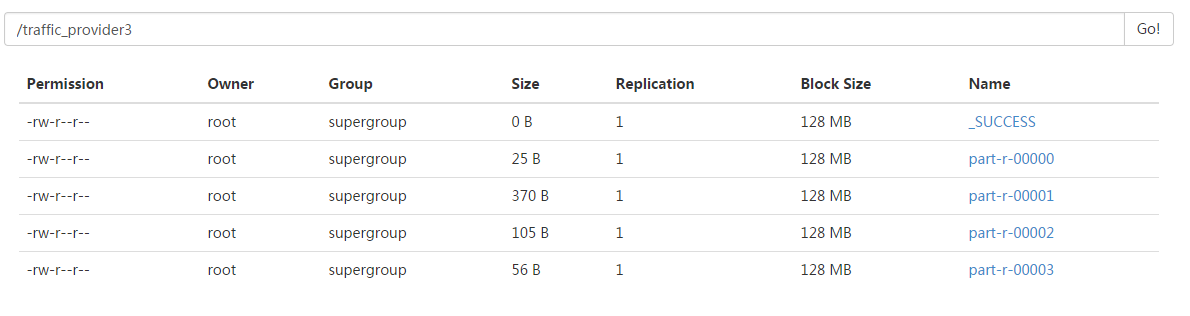
hadoop jar /root/itcastmr.jar mapreduce.TrafficApp /files/traffic /traffic_provider3 4
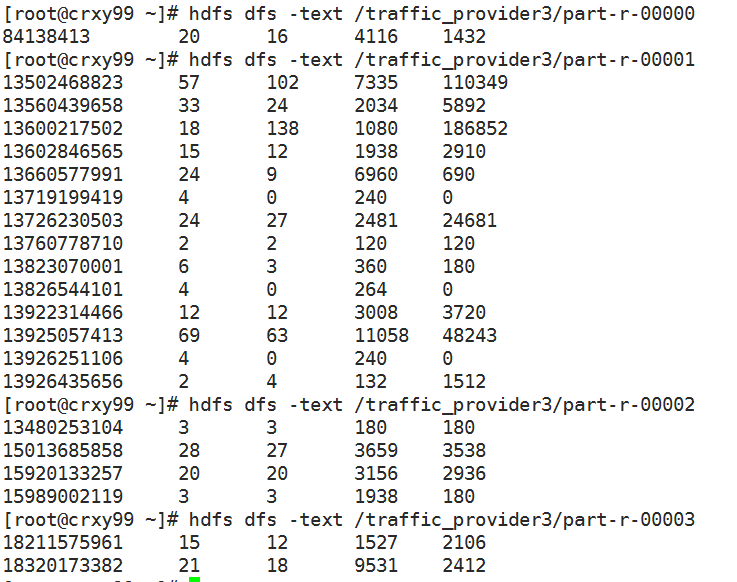
代码中的逻辑是对应4个分区,设置了4个分区,就产生了4个分区文件...
如果代码中不设置分区的数量: job.setNumReduceTasks(Integer.parseInt(args[2])); 运行命令执行会发现只产生了一个结果文件.
因为MR默认只启动一个reducer...一个reducer对应一个结果文件. 不是分区所要的效果.
如果代码中设置的分区数量大于实际的产生的分区数量. 比如以上代码根据数据情况只产生4个分区,但是设置6个分区.
同样会产生6个结果文件,但是后两个结果文件中是没有值的.
代码中的分区数量小于实际产生的分区数量. 比如以上代码根据数据情况会产生4个分区,但是只设置2个分区.
还有设置分区之后代码执行会变慢:因为之前只需要之前只需要把结果发给一个reducer,现在要根据某个属性把mapper的结果分发到不同的reducer中.