在上一篇博客中山寨了一下新浪微博,在之后的博客中会对上一篇代码进行优化和重用,上一篇的微博请求的文字中有一些表情没做处理,比如带有表情的文字是这样的“我要[大笑],[得意]”。显示的就是请求的字符串,那么我们如何把文字在本地转换成表情呢?下面将要说一下显示表情的解决方案。
要用到的知识:IOS开发中的资源文件.plist, 可变的属性字符串,TextView和正则表达式的使用。
解决的整体思路:把源字符串同过正则匹配获取到每个表情的range, 再通过range获取元字符串中的表情字符串,如[哈哈], 在把[哈哈] 和我们.plist中item下的chs字段匹配,然后获取对应的图片名,获取图片后把图片转换成可变字符串的附件,然后做一个替换即可。先这么大致一说,下面会详细的讲解一下。
1.要想在我们
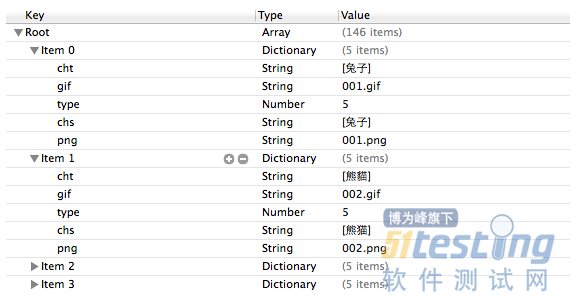
手机上显示网络请求的表情,首先我们本地得有相应的资源文件,在.plist文件中又我们想要的东西,其中存储的东西如下所示,整个root是一个数组,数组中的item是一个字典,字典中存放的时文字到图片名的一个映射,当然啦,图片名和我们本地资源的图片名相同。截图如下
2.如何从.plist文件中获取数据呢?先通过bundle获取资源文件的路径,在通过文件路径创建数组,数组中存储的数据就是文件中的内容代码如下:
//加载plist文件中的数据
NSBundle *bundle = [NSBundle mainBundle];
//寻找资源的路径
NSString *path = [bundle pathForResource:@"emoticons" ofType:@"plist"];
//获取plist中的数据
NSArray *face = [[NSArray alloc] initWithContentsOfFile:path];
3.生成我们的
测试字符串,最后一个不是任何表情,不做替换。
//我们要显示的字符串(模拟网路请求的字符串格式)
NSString *str = @"我[围观]你[威武]你[嘻嘻]我[爱你]你[兔子]我[酷]你[帅]我[思考]你[钱][123456]";
4.把上面的str转换为可变的属性字符串,因为我们要用可变的属性字符串在TextView上显示我们的表情图片,转换代码如下:
//创建一个可变的属性字符串
NSMutableAttributedString *attributeString = [[NSMutableAttributedString alloc] initWithString:str];
5.进行正则匹配,获取每个表情在字符串中的范围,下面的正则表达式会匹配[/*],所以[123567]也会被匹配上,下面我们会做相应的处理
//正则匹配要替换的文字的范围
//正则表达式
NSString * pattern = @"\\[[a-zA-Z0-9\\u4e00-\\u9fa5]+\\]";
NSError *error = nil;
NSRegularExpression * re = [NSRegularExpression regularExpressionWithPattern:pattern options:NSRegularExpressionCaseInsensitive error:&error];
if (!re) {
NSLog(@"%@", [error localizedDescription]);
}
//通过正则表达式来匹配字符串
NSArray *resultArray = [re matchesInString:str options:0 range:NSMakeRange(0, str.length)];
6.数据准备工作完成,下面开始遍历资源文件找到文字对应的图片,找到后把图片名存入字典中,图片在源字符串中的位置也要存入到字典中,最后把字典存入可变数组中。代码如下:
|
1 //用来存放字典,字典中存储的是图片和图片对应的位置
2 NSMutableArray *imageArray = [NSMutableArray arrayWithCapacity:resultArray.count];
3
4 //根据匹配范围来用图片进行相应的替换
5 for(NSTextCheckingResult *match in resultArray) {
6 //获取数组元素中得到range
7 NSRange range = [match range];
8
9 //获取原字符串中对应的值
10 NSString *subStr = [str substringWithRange:range];
11
12 for (int i = 0; i < face.count; i ++)
13 {
14 if ([face[i][@"chs"] isEqualToString:subStr])
15 {
16
17 //face[i][@"gif"]就是我们要加载的图片
18 //新建文字附件来存放我们的图片
19 NSTextAttachment *textAttachment = [[NSTextAttachment alloc] init];
20
21 //给附件添加图片
22 textAttachment.image = [UIImage imageNamed:face[i][@"png"]];
23
24 //把附件转换成可变字符串,用于替换掉源字符串中的表情文字
25 NSAttributedString *imageStr = [NSAttributedString attributedStringWithAttachment:textAttachment];
26
27 //把图片和图片对应的位置存入字典中
28 NSMutableDictionary *imageDic = [NSMutableDictionary dictionaryWithCapacity:2];
29 [imageDic setObject:imageStr forKey:@"image"];
30 [imageDic setObject:[NSValue valueWithRange:range] forKey:@"range"];
31
32 //把字典存入数组中
33 [imageArray addObject:imageDic];
34
35 }
36 }
37 }
|
7.转换完成,我们需要对attributeString进行替换,替换的时候要从后往前替换,弱从前往后替换,会造成range和图片要放的位置不匹配的问题。替换代码如下:
|
1 //从后往前替换
2 for (int i = imageArray.count -1; i >= 0; i--)
3 {
4 NSRange range;
5 [imageArray[i][@"range"] getValue:&range];
6 //进行替换
7 [attributeString replaceCharactersInRange:range withAttributedString:imageArray[i][@"image"]];
8
9 }
|
8.把替换好的可变属性字符串赋给TextView
1 //把替换后的值赋给我们的TextView
2 self.myTextView.attributedText = attributeString;
9.替换前后效果如下:
最新内容请见作者的GitHub页:http://qaseven.github.io/