推理服务
HeteroFlow V2 提供完整的 GPU 推理服务管理能力,支持从模型发现到 API 服务的全自动化流程。通过 TaskGroup 统一管理推理服务生命周期,内置 OpenAI 兼容网关,实现一键部署和调用。
系统架构
┌─────────────────────────────────────────────────────────────────────┐
│                         用户 / LLM 客户端                            │
│                    (浏览器 / curl / OpenAI SDK)                      │
└──────────┬──────────────────────────────────────────┬────────────────┘
           │ Web UI (React + Vite)                    │ OpenAI API
           │ :5173                                    │ :3333/v1/chat/completions
┌──────────▼──────────────────────────────────────────▼────────────────┐
│                       HeteroFlow Server (:3333)                      │
│  ┌────────────┐  ┌────────────┐  ┌──────────┐  ┌─────────────────┐ │
│  │ REST API   │  │ Gateway    │  │Scheduler │  │ Model Route     │ │
│  │ /api/v1/*  │  │ /v1/*      │  │          │  │ Manager         │ │
│  └─────┬──────┘  └─────┬──────┘  └────┬─────┘  └────────┬────────┘ │
│        │               │              │                   │          │
│  ┌─────▼───────────────▼──────────────▼───────────────────▼────────┐ │
│  │                    PostgreSQL Storage                            │ │
│  │  task_groups | tasks | inference_endpoints | model_routes       │ │
│  └─────────────────────────────────────────────────────────────────┘ │
└──────────┬──────────────────────────────────────────────────────────┘
           │ Heartbeat (30s) / Task Assignment
┌──────────▼──────────────────────────────────────────────────────────┐
│                    HeteroFlow Agent (per GPU Node)                   │
│  ┌────────────┐  ┌────────────┐  ┌────────────┐  ┌──────────────┐ │
│  │ Executor   │  │ Engine     │  │ Model      │  │ GPU          │ │
│  │ (Docker)   │  │ Router     │  │ Scanner    │  │ Detection    │ │
│  └────────────┘  └────────────┘  └────────────┘  └──────────────┘ │
└─────────────────────────────────────────────────────────────────────┘
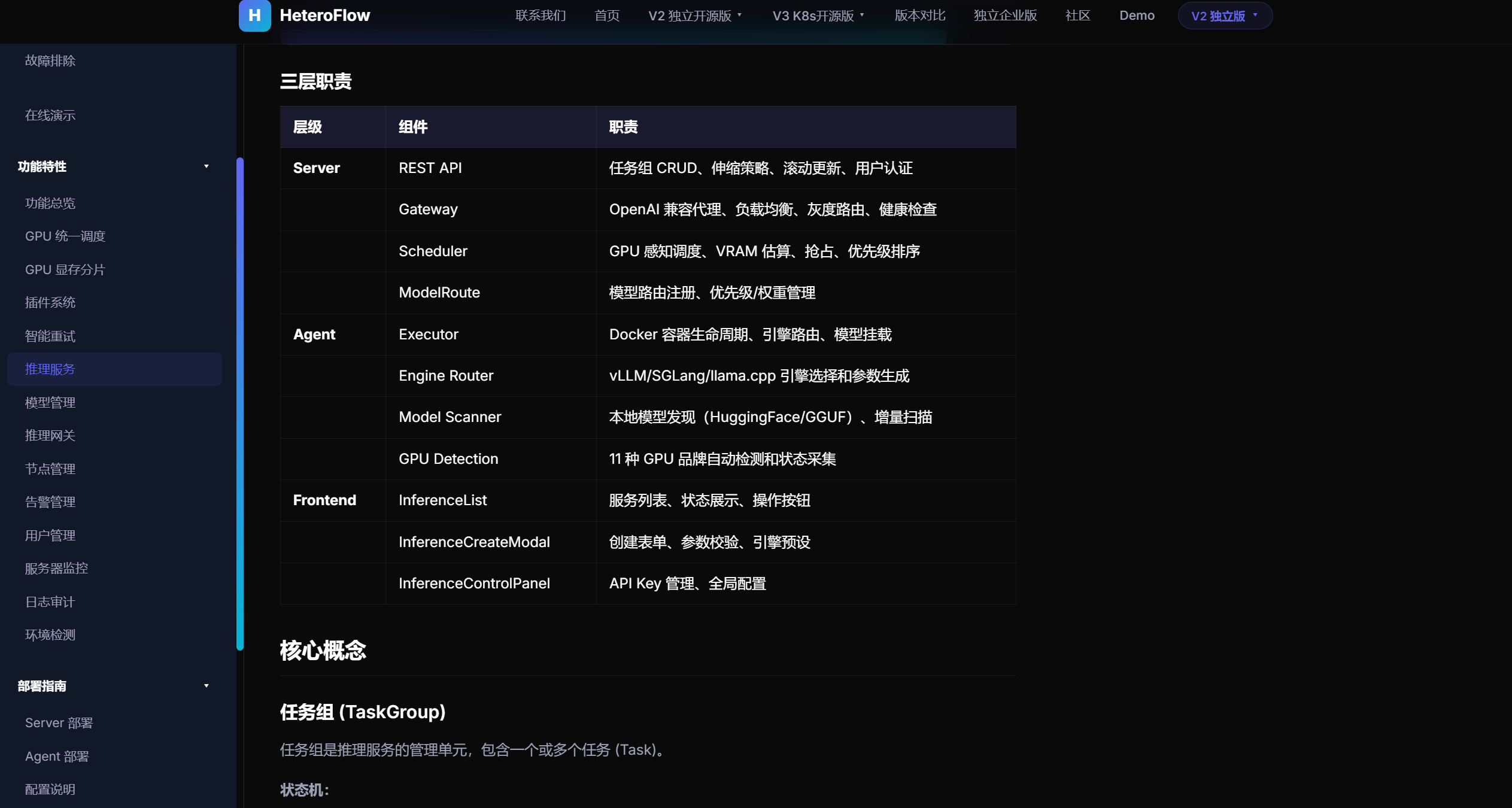
三层职责
|
层级
|
组件
|
职责
|
|
Server
|
REST API
|
任务组 CRUD、伸缩策略、滚动更新、用户认证
|
| |
Gateway
|
OpenAI 兼容代理、负载均衡、灰度路由、健康检查
|
| |
Scheduler
|
GPU 感知调度、VRAM 估算、抢占、优先级排序
|
| |
ModelRoute
|
模型路由注册、优先级/权重管理
|
|
Agent
|
Executor
|
Docker 容器生命周期、引擎路由、模型挂载
|
| |
Engine Router
|
vLLM/SGLang/llama.cpp 引擎选择和参数生成
|
| |
Model Scanner
|
本地模型发现(HuggingFace/GGUF)、增量扫描
|
| |
GPU Detection
|
11 种 GPU 品牌自动检测和状态采集
|
|
Frontend
|
InferenceList
|
服务列表、状态展示、操作按钮
|
| |
InferenceCreateModal
|
创建表单、参数校验、引擎预设
|
| |
InferenceControlPanel
|
API Key 管理、全局配置
|
核心概念
任务组 (TaskGroup)
任务组是推理服务的管理单元,包含一个或多个任务 (Task)。
状态机:
pending → scheduling → running ⇄ sleeping
                ↓          ↓
             failed    completed
|
字段
|
类型
|
说明
|
|
id
|
string
|
格式 tg-{unix_ns}-{hex4}
|
|
name
|
string
|
服务名称(用户定义)
|
|
status
|
string
|
pending/scheduling/running/sleeping/completed/failed
|
|
parallelism
|
string
|
并行策略
|
|
world_size
|
int
|
GPU 总数
|
|
node_count
|
int
|
节点数
|
|
current_replicas
|
int
|
当前运行副本数
|
|
min_replicas / max_replicas
|
int
|
自动伸缩范围
|
|
auto_scale
|
bool
|
是否启用自动伸缩
|
|
endpoint
|
string
|
关联的 InferenceEndpoint ID
|
|
rolling_update_state
|
string
|
idle/rolling/completed/failed/rollback
|
|
idle_timeout_minutes
|
int
|
空闲自动休眠时间
|
|
health_check
|
JSON
|
健康检查配置
|
|
scale_policy
|
JSON
|
自动伸缩策略
|
|
co_schedule
|
JSON
|
共调度策略
|
|
schedule_window
|
JSON
|
调度窗口
|
任务 (Task)
任务是实际的执行单元,对应一个 Docker 容器。
|
字段
|
类型
|
说明
|
|
id
|
string
|
格式 task-{hex}-r{rank}-{groupid}
|
|
group_id
|
string
|
所属任务组
|
|
rank
|
int
|
在组中的序号(0=master)
|
|
image
|
string
|
Docker 镜像
|
|
gpu_required
|
int
|
GPU 数量(≥1)
|
|
gpu_type
|
string
|
GPU 类型筛选
|
|
gpu_id
|
string
|
分配的具体 GPU ID
|
|
node_id
|
string
|
分配的节点
|
|
model_path
|
string
|
模型路径
|
|
ports
|
JSON
|
端口映射
|
|
volumes
|
JSON
|
卷挂载
|
|
status
|
string
|
pending/scheduled/running/sleeping/completed/failed
|
|
estimated_gpu_memory_mb
|
int
|
预估显存需求
|
推理端点 (InferenceEndpoint)
对外暴露的 API 访问入口。
|
字段
|
类型
|
说明
|
|
id
|
string
|
格式 ep-{hex16}
|
|
name
|
string
|
端点名称
|
|
task_group_id
|
string
|
关联任务组
|
|
protocol
|
string
|
http
|
|
port
|
int
|
服务端口
|
|
algorithm
|
string
|
负载均衡算法(round_robin/random/least_connections)
|
|
api_key
|
string
|
API 密钥,格式 sk-{uuid}
|
|
health_check
|
JSON
|
健康检查配置
|
模型路由 (ModelRoute)
同一模型多版本/多引擎的路由规则。
|
字段
|
类型
|
说明
|
|
id
|
string
|
格式 mr-{hex16}
|
|
model_name
|
string
|
模型名称
|
|
task_group_id
|
string
|
关联任务组
|
|
engine
|
string
|
引擎类型 vllm/sglang/llamacpp
|
|
priority
|
int
|
优先级(0 最高,数值越大优先级越低)
|
|
weight
|
int
|
权重(0-100,0 表示仅作备选)
|
|
version
|
string
|
版本标签(如 v1, canary)
|
|
algorithm
|
string
|
负载均衡算法覆盖
|
|
status
|
string
|
active/inactive
|
支持的推理引擎
|
引擎
|
支持 GPU
|
特点
|
|
vLLM
|
NVIDIA, AMD, 海光
|
高性能 PagedAttention、需 CC≥7.5
|
|
SGLang
|
NVIDIA, AMD, 海光
|
RadixAttention、continuous batching
|
|
llama.cpp
|
NVIDIA, AMD, 海光
|
轻量推理、兼容旧 GPU(如 P100 CC 6.0)
|
|
MINDIE
|
华为昇腾
|
昇腾专用推理引擎
|
|
vLLM-MTT
|
摩尔线程
|
摩尔线程专用
|
|
Transformers
|
通用
|
兜底引擎,device_map=auto
|
引擎路由优先级
默认按 GPU 类型选择最优引擎:
|
GPU 类型
|
优先级链
|
|
nvidia
|
vllm → sglang → llamacpp
|
|
amd
|
vllm → llamacpp
|
|
hygon
|
vllm → llamacpp
|
|
musa
|
vllm-mtt
|
|
ascend
|
mindie
|
|
biren
|
llamacpp
|
引擎配置参数
vLLM 启动参数:
--model /model                    # 模型路径
--host 0.0.0.0 --port 8000        # 监听地址
--tensor-parallel-size N          # 张量并行度
--served-model-name name          # 对外暴露的模型名
llama.cpp 启动参数:
--model /model/model.gguf         # GGUF 模型文件
--n-gpu-layers 99                 # 所有层放 GPU
--n-ctx 4096                      # 上下文长度
--host 0.0.0.0 --port 8000
SGLang 启动参数:
--model-path /model              # 模型路径
--host 0.0.0.0 --port 8000
--enable-sleep                    # 支持休眠模式
创建推理服务
部署模式
|
前端选项
|
parallelism 值
|
GPU 标签
|
world_size
|
说明
|
|
单卡
|
空/none
|
GPU 数量
|
1
|
单 GPU 推理
|
|
多卡 TP
|
tensor_parallel
|
GPU 数量
|
用户输入
|
张量并行,所有 GPU 在同一节点
|
|
多卡 Split
|
split
|
副本数量
|
用户输入
|
多副本独立,每副本 1 GPU
|
并行策略对 GPU 分配的影响:
|
策略
|
nodeCount
|
taskCount
|
每任务 GPU
|
|
single
|
1
|
1
|
gpuRequired
|
|
tensor_parallel
|
强制 1
|
world_size
|
gpuRequired
|
|
split
|
自动计算
|
world_size
|
1(固定)
|
|
data_parallel
|
⌈world_size/8⌉
|
world_size
|
gpuRequired
|
配置项详解
基本配置
|
配置项
|
必填
|
说明
|
示例
|
|
服务名称
|
是
|
推理服务唯一标识
|
my-qwen-service
|
|
Docker 镜像
|
是
|
推理引擎容器镜像
|
vllm/vllm-openai:latest
|
|
启动命令
|
否
|
容器启动命令,不填则自动生成
|
python -m vllm.entrypoints...
|
|
GPU 数量
|
是
|
范围 1-64
|
1
|
|
GPU 类型
|
否
|
不选时自动匹配
|
NVIDIA / 海光DCU / 自动
|
|
端口映射
|
否
|
格式 8000 或 8080:8000
|
8000
|
|
超时
|
否
|
运行超时(秒),0=不限
|
0
|
|
空闲超时
|
否
|
空闲休眠(分钟),0=不休眠
|
30
|
API 访问配置
启用后自动创建 InferenceEndpoint 和 API Key(格式 sk-{uuid}),可通过 OpenAI 兼容接口访问:
POST http://server:3333/v1/chat/completions
Authorization: Bearer sk-xxxxxxxx
Content-Type: application/json
{"model": "service-name", "messages": [...]}
路由配置(灰度/优先级)
|
配置
|
范围
|
说明
|
|
流量权重
|
0-100
|
同一模型多版本时按比例分配,0=仅备选
|
|
优先级
|
≥0
|
0 最高,主路由故障时降级到更高优先级
|
|
负载均衡
|
round_robin/random/least_connections
|
路由级别的算法覆盖
|
|
版本标签
|
字符串
|
如 v1, canary, experimental
|
灰度发布流程:
1. 创建生产版本:weight=100, priority=0, version=v1
2. 创建 canary 版本:weight=20, priority=0, version=canary
3. 调整生产权重为 80
4. 流量按 80:20 分配到 v1 和 canary
5. 验证 canary 正常后,权重改为 100:0
QoS 级别
|
级别
|
说明
|
GPU 分配
|
适用场景
|
|
Gold
|
硬件隔离
|
独占整张 GPU
|
生产推理,性能最稳定
|
|
Silver
|
驱动隔离
|
共享 GPU,驱动级隔离
|
平衡性能与利用率
|
|
Bronze
|
软件记账
|
共享 GPU,尽力而为
|
低优先级、测试任务
|
健康检查
|
字段
|
默认值
|
说明
|
|
检查路径
|
/health
|
HTTP GET 请求路径
|
|
检查间隔
|
10 秒
|
两次检查间隔
|
|
超时时间
|
3 秒
|
单次检查超时
|
|
不健康阈值
|
3 次
|
连续失败超过后标记不健康
|
支持 HTTP 和 TCP 两种检查类型。不健康的后端会被 Gateway 自动摘除。
自动伸缩
|
配置
|
说明
|
|
最小副本数
|
≥1,即使负载很低也保持
|
|
最大副本数
|
≥0,0=不限制
|
|
伸缩指标
|
gpu_utilization / cpu / request_queue / concurrent_requests / vllm_pending_requests / vllm_running_requests
|
|
目标值
|
指标超过时扩容,低于时缩容
|
|
冷却时间
|
≥30 秒,防止频繁抖动
|
if 当前指标 > targetValue and current_replicas < max_replicas: 扩容 (+1)
if 当前指标 < targetValue and current_replicas > min_replicas: 缩容 (-1)
冷却中则跳过本轮
共调度(混部)
|
配置
|
说明
|
|
单卡最大模型数
|
1-8,单张 GPU 上最多同时运行的模型数
|
|
预估显存占用
|
MB,调度器用于计算 GPU 是否有空间
|
|
显存超分比
|
1.0-2.0,1.0=不超分,2.0=允许 2 倍超分
|
|
高优先级抢占
|
高优先级任务可抢占低优先级 GPU 资源
|
推理服务生命周期
创建流程
用户填写表单 → 前端校验 → POST /api/v1/task-groups
                                    │
                        ┌───────────▼───────────┐
                        │  1. 参数校验            │
                        │  2. 计算 nodeCount      │
                        │  3. 创建 TaskGroup      │
                        │  4. 创建 N 个 Task      │
                        │  5. 注册 ModelRoute     │
                        │  6. 创建 Endpoint       │
                        │  7. 生成 API Key        │
                        │  8. 写入审计日志         │
                        └───────────┬───────────┘
                                    │
                        Scheduler 拾取 Task → 分配 GPU → Agent 启动容器
调度流程
Scheduler ticker (每秒) → 查询 pending/scheduled 任务
    │
    ├─ 1. GPU 类型过滤(gpu_type 匹配)
    ├─ 2. VRAM 感知过滤(estimated_gpu_memory_mb)
    ├─ 3. 模型位置感知(优先有模型的节点)
    ├─ 4. 推理引擎优先(有 vllm/sglang 的节点加分)
    ├─ 5. 负载阈值检查(CPU/内存/GPU温度)
    ├─ 6. 插件打分(binpack/spread/topology/rdma/preempt)
    └─ 7. CAS 状态更新 pending → scheduled → Agent 抢占 → running
休眠/唤醒流程
运行中 (running)
    │
    ├── 自动休眠(Agent 检测空闲超时)
    │   1. 检测 vLLM 请求队列为空超过 idle_timeout_minutes
    │   2. 调用 vLLM /sleep(原生休眠,释放显存)
    │   3. 或 docker pause(备用方案,不释放显存)
    │   4. 上报 sleeping 状态
    │   5. Server 释放 GPU 占用计数
    │
    └── 手动唤醒
        1. 用户点击唤醒按钮 / API 请求到达 Gateway
        2. 状态更新 sleeping → waking
        3. 调用 vLLM /wake_up 或 docker unpause
        4. 重新分配 GPU 资源
        5. 状态更新 waking → running
滚动更新流程
PUT /api/v1/task-groups/{id}/update
    │
    ├── strategy: "rolling"(逐个替换)
    │   for each task:
    │     1. 停止旧 task (running → stopping)
    │     2. 创建新 task(继承配置 + 新 image)
    │     3. 调度新 task 到节点
    │     4. 等待健康检查通过
    │     5. 继续下一个
    │
    └── strategy: "recreate"(全量替换)
        1. 停止所有 task
        2. 一次性创建所有新 task
服务操作
|
操作
|
API
|
显示条件
|
效果
|
|
休眠
|
POST /tasks/{id}/sleep
|
running/starting
|
暂停服务,释放 GPU
|
|
唤醒
|
POST /tasks/{id}/wake
|
sleeping
|
恢复运行
|
|
停止
|
POST /tasks/{id}/stop
|
running/starting
|
终止容器
|
|
重试
|
POST /tasks/{id}?action=retry
|
failed
|
重新调度
|
|
删除
|
DELETE /task-groups/{id}
|
completed/failed
|
删除服务及关联资源
|
|
扩缩
|
PUT /task-groups/{id}/scale
|
running
|
调整副本数
|
OpenAI 兼容 API
推理服务完全兼容 OpenAI API 格式:
# Chat Completions
curl http://localhost:3333/v1/chat/completions
  -H "Authorization: Bearer sk-xxx"
  -H "Content-Type: application/json"
  -d ''{
    "model": "my-service",
    "messages": [{"role": "user", "content": "你好"}],
    "temperature": 0.7,
    "max_tokens": 512,
    "stream": true
  }''

# 列举可用模型
curl http://localhost:3333/v1/models
  -H "Authorization: Bearer sk-xxx"
Python SDK:
from openai import OpenAI

client = OpenAI(
    base_url="http://localhost:3333/v1",
    api_key="sk-xxxxxxxx-xxxx-xxxx-xxxx-xxxxxxxxxxxx"
)

# 流式调用
for chunk in client.chat.completions.create(
    model="my-service",
    messages=[{"role": "user", "content": "写一首诗"}],
    stream=True
):
    print(chunk.choices[0].delta.content or "", end="")
API 接口
任务组 API
|
方法
|
路径
|
说明
|
|
GET
|
/api/v1/task-groups
|
服务列表
|
|
POST
|
/api/v1/task-groups
|
创建服务
|
|
GET
|
/api/v1/task-groups/{id}
|
服务详情(含子任务)
|
|
DELETE
|
/api/v1/task-groups/{id}
|
删除服务
|
|
PUT
|
/api/v1/task-groups/{id}/scale
|
手动扩缩容
|
|
PUT
|
/api/v1/task-groups/{id}/scale-policy
|
设置自动伸缩策略
|
|
PUT
|
/api/v1/task-groups/{id}/update
|
滚动更新
|
|
PUT
|
/api/v1/task-groups/{id}/schedule-window
|
调度窗口
|
任务 API
|
方法
|
路径
|
说明
|
|
GET
|
/api/v1/tasks
|
任务列表(支持过滤)
|
|
GET
|
/api/v1/tasks/{id}
|
任务详情
|
|
POST
|
/api/v1/tasks/{id}/sleep
|
休眠
|
|
POST
|
/api/v1/tasks/{id}/wake
|
唤醒
|
|
POST
|
/api/v1/tasks/{id}/stop
|
停止
|
常见问题
推理服务一直 pending
GPU OOM
推理速度慢
官网
https://www.heteroflow.com.cn/