前言
自从在 搜狐技术产品 公众号看过 一文看破Swift枚举本质 后,就一直计划在该文章的基础更加深入地挖掘一下 Swift 枚举的内存布局。但是,Swift 枚举的内存布局 涉及的内容比较多。所以,就先把 Swift 的 MemoryLayout 是如何工作的 部分拆出来单独写两篇文章。
希望读者阅读本文后,能够从 Swift 编译器 的视角了解 MemoryLayout 是如何工作的。
本文会按照以下顺序进行讲解:
MemoryLayout 的 API 介绍
编译器与 SIL
编译器与 内置类型
编译器与 IR
MemoryLayout
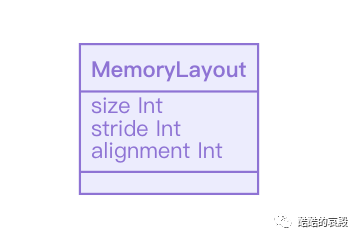
在 Swift 中,MemoryLayout 用于获取特定类型的内存布局信息。
![]()
作为一个枚举,它包含3个静态变量,分别返回 size stride alignment 信息。
Review 2 SE-0101: Reconfiguring sizeof and related functions into a unified MemoryLayout struct 解释了为什么是枚举而不是结构体。
更多内存对齐相关知识,请参阅 size-stride-alignment
struct Point { let x: Double let y: Double let isFilled: Bool}
我们现在以上面的结构体 Point为例,对3个静态变量进行简单的介绍:
size
size代表 Point 类型在内存中占用的空间。
所以,MemoryLayout<Point>.size == 17。
stride
stride翻译成中文是“步伐”,代表 Array<T> 中两个对象起始位置之间的距离。 为了提高性能,编译器会通过在 size 的基础上增加 7 个 byte 的方式进行内存对齐
MemoryLayout<Point>.stride == 24
alignment
同 stride 一样,为了提高性能,任何的对象都会先进行内存对齐再使用。
因为 Point 结构体中,占用空间最大的是 Double 类型。所以, MemoryLayout<Point>.alignment == 8。
SIL
本文后续将会以下面的函数为目标进行分析。
func getSize() -> Int { return MemoryLayout<Int16>.size}
该函数的实现非常简单,它会返回 Int16 类型的 size 信息。
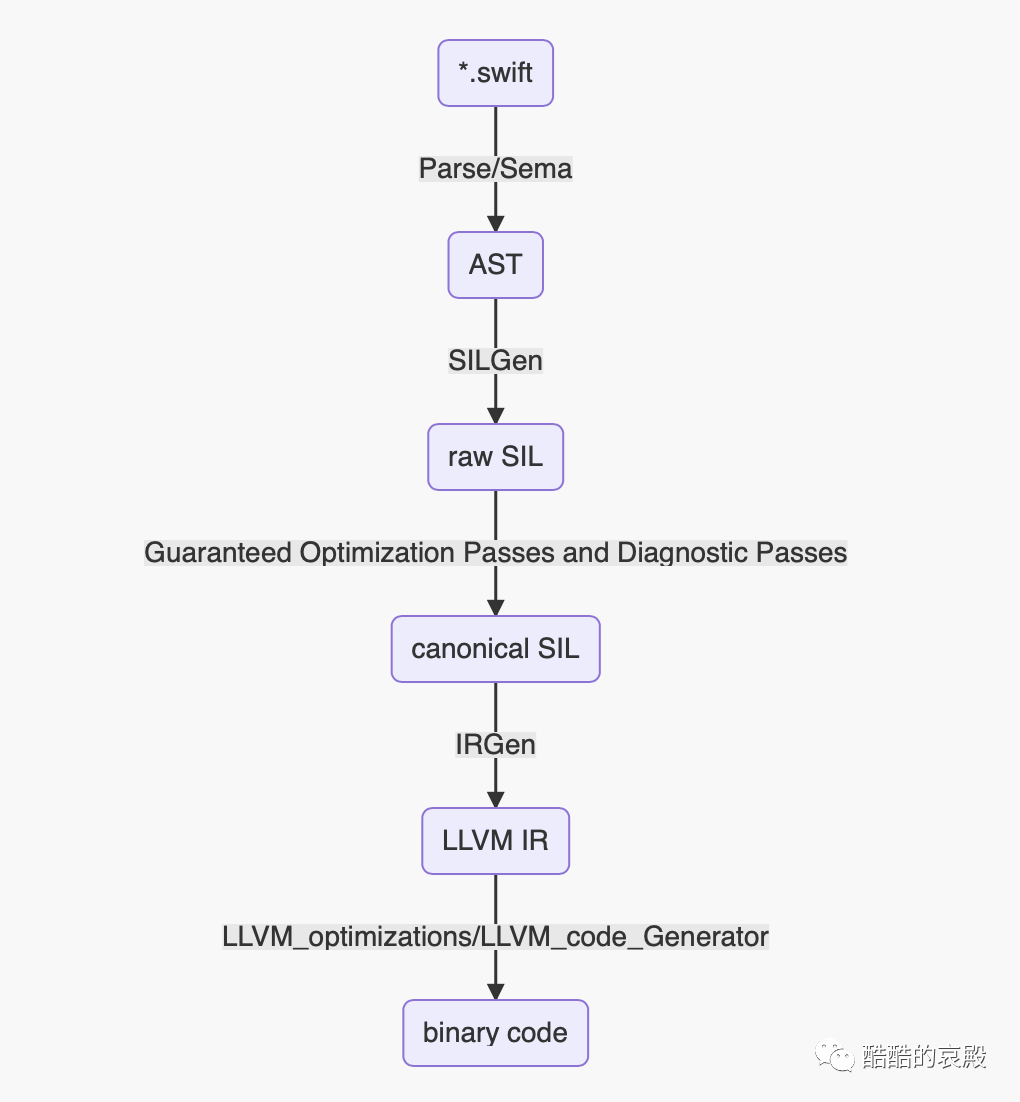
在实际场景中,Swift 编译器会按照以下方式进行对源码进行处理。我们后续会依次介绍每个阶段。
![]()
Parse/Sema
Parse/Sema 阶段会通过源码构建 AST,并组装类型信息。
xcrun swiftc -dump-ast file.swift
(source_file "file.swift" (func_decl range=[file.swift:7:1 - line:9:1] "getSize()" interface type='() -> Int' access=internal (parameter_list range=[file.swift:7:13 - line:7:14]) (result (type_ident (component id='Int' bind=Swift.(file).Int))) (brace_stmt range=[file.swift:7:23 - line:9:1] (return_stmt range=[file.swift:8:5 - line:8:32] (member_ref_expr type='Int' location=file.swift:8:32 range=[file.swift:8:12 - line:8:32] decl=Swift.(file).MemoryLayout.size [with (substitution_map generic_signature=<T> (substitution T -> Int16))] (type_expr type='MemoryLayout<Int16>.Type' location=file.swift:8:12 range=[file.swift:8:12 - line:8:30] typerepr='MemoryLayout<Int16>'))))))
SILGen
SILGen 会通过 AST 信息产出以 sil_stage raw 语言版本的代码。
xcrun swiftc -emit-silgen -O file.swift | swift demangle
为了提高可读性,下面的输出都会通过 swift demangle 进行一次解析。
sil_stage raw
import Builtinimport Swiftimport SwiftShims
func getSize() -> Int
sil [ossa] @main : $@convention(c) (Int32, UnsafeMutablePointer<Optional<UnsafeMutablePointer<Int8>>>) -> Int32 {bb0(%0 : $Int32, %1 : $UnsafeMutablePointer<Optional<UnsafeMutablePointer<Int8>>>): %2 = integer_literal $Builtin.Int32, 0 %3 = struct $Int32 (%2 : $Builtin.Int32) return %3 : $Int32 }
sil hidden [ossa] @file.getSize() -> Swift.Int : $@convention(thin) () -> Int {bb0: %0 = metatype $@thin MemoryLayout<Int16>.Type
%1 = function_ref @static Swift.MemoryLayout.size.getter : Swift.Int : $@convention(method) <τ_0_0> (@thin MemoryLayout<τ_0_0>.Type) -> Int
%2 = apply %1<Int16>(%0) : $@convention(method) <τ_0_0> (@thin MemoryLayout<τ_0_0>.Type) -> Int return %2 : $Int }
sil [transparent] [serialized] @static Swift.MemoryLayout.size.getter : Swift.Int : $@convention(method) <τ_0_0> (@thin MemoryLayout<τ_0_0>.Type) -> Int
Mandatory inlining 与 @_transparent
Guaranteed Optimization and Diagnostic Passes 是一类比较特殊的Pass。即使开发者传入的优化命令是 none,该类优化也会被强制执行。
我们下面要讲的 Mandatory inlining 就属于其中的一种。
@_transparent
大部分的 Swift 开发者都见过一类很特殊的函数 Transparent function。
这类函数被编译时,会在 Mandatory SIL passes 阶段被强制内联处理。
MemoryLayout 源码
以本次研究的 MemoryLayout 为例, 它对应的源码如下所示:
@frozen public enum MemoryLayout<T> { @_transparent public static var size: Swift.Int { @_transparent get { return Int(Builtin.sizeof(T.self)) } } @_transparent public static var stride: Swift.Int { @_transparent get { return Int(Builtin.strideof(T.self)) } } @_transparent public static var alignment: Swift.Int { @_transparent get { return Int(Builtin.alignof(T.self)) } }}
从上面的源码,我们可以发现三个函数都被 @_transparent 修饰。
并且,size 部分的源码很简单:
iOS 开发者,可以在下面的路径找 MemoryLayout 对应的源码。/Applications/Xcode.app/Contents/Developer/Platforms/iPhoneOS.platform/Developer/SDKs/iPhoneOS.sdk/usr/lib/swift/Swift.swiftmodule/arm64.swiftinterface
Mandatory SIL passes
下面,我们看看代码经过 Mandatory inlining 处理后的情况
xcrun swiftc -emit-sil -Onone file.swift | swift demangle
通过上面的编译命令处理后,size 函数对应 SIL 如下所示:
sil public_external [transparent] [serialized] @static Swift.MemoryLayout.size.getter : Swift.Int : $@convention(method) <T> (@thin MemoryLayout<T>.Type) -> Int {bb0(%0 : $@thin MemoryLayout<T>.Type): %1 = metatype $@thick T.Type %2 = builtin "sizeof"<T>(%1 : $@thick T.Type) : $Builtin.Word %3 = builtin "sextOrBitCast_Word_Int64"(%2 : $Builtin.Word) : $Builtin.Int64 %4 = struct $Int (%3 : $Builtin.Int64) return %4 : $Int }
而 getSize 函数对 var size: Swift.Int 的调用也变成了 Int(Builtin.sizeof(T.self)) 。
sil_stage canonical
// getSize()sil hidden @file.getSize() -> Swift.Int : $@convention(thin) () -> Int {bb0:  %0 = metatype $@thick Int16.Type                // user: %1  %1 = builtin "sizeof"<Int16>(%0 : $@thick Int16.Type) : $Builtin.Word // user: %2  %2 = builtin "sextOrBitCast_Word_Int64"(%1 : $Builtin.Word) : $Builtin.Int64 // user: %3  %3 = struct $Int (%2 : $Builtin.Int64)          // user: %4  return %3 : $Int                                // id: %4} // end sil function 'file.getSize() -> Swift.Int'
内置类型
在进一步分析 Builtin.sizeof 之前,我们先看看 Int16。
Int16
与 MemoryLayout 类似,我们可以在 Swift.swiftmodule/arm64.swiftinterface 文件获取到 Int16 对应的源码。
@frozen public struct Int16 : Swift.FixedWidthInteger, Swift.SignedInteger, Swift._ExpressibleByBuiltinIntegerLiteral { public var _value: Builtin.Int16 }
在 Swift 中,Int16 是一个结构体,它包含一个编译器内置类型 Builtin.Int16 的变量 _value。
从这里开始,我们将进入 swift 编译器的世界
Builtin.Int16
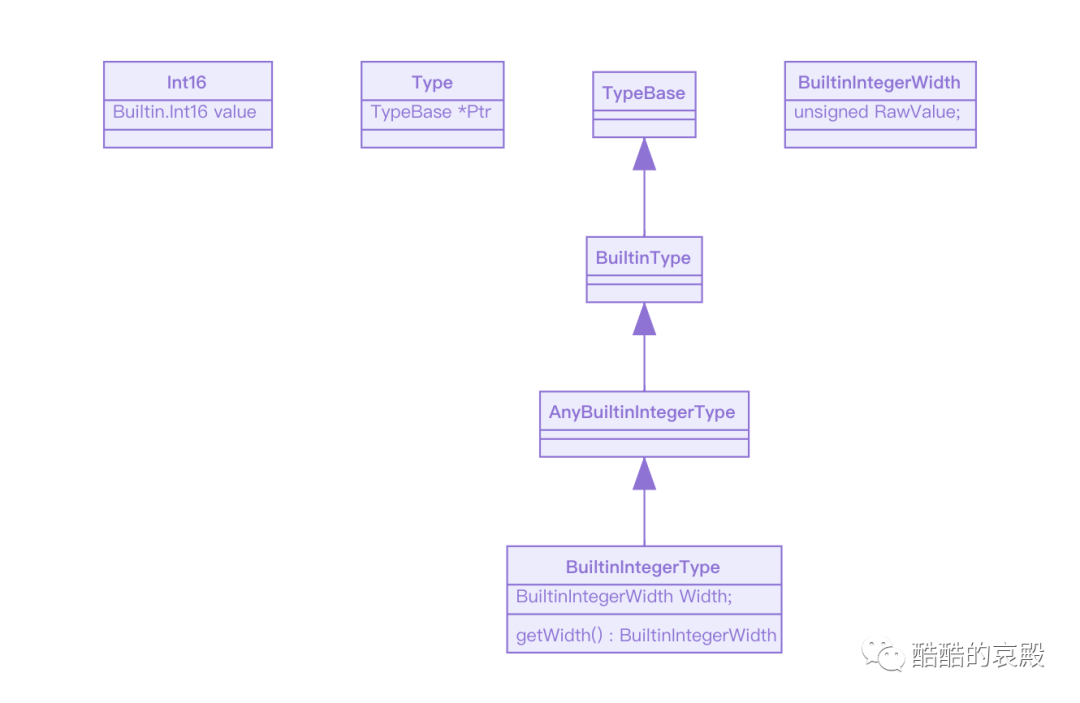
对于 Builtin.Int16,Swift 编译时,会通过转为 BuiltinIntegerType 类型的实例。
![]()
如下所示,BuiltinUnit::LookupCache::lookupValue 函数会调用 getBuiltinType 方法获取对应的类型 Type。
void BuiltinUnit::LookupCache::lookupValue( Identifier Name, NLKind LookupKind, const BuiltinUnit &M, SmallVectorImpl<ValueDecl*> &Result) {... if (Type Ty = getBuiltinType(Ctx, Name.str())) { auto *TAD = new (Ctx) TypeAliasDecl(SourceLoc(), SourceLoc(), Name, SourceLoc(), nullptr, const_cast<BuiltinUnit*>(&M)); TAD->setUnderlyingType(Ty); TAD->setAccess(AccessLevel::Public); Entry = TAD;...
而 getBuiltinType 会先计算出一个 BitWidth,再通过 BuiltinIntegerType::get 生成 BuiltinIntegerType 类型,并隐式转化为 Type 类型。
Type swift::getBuiltinType(ASTContext &Context, StringRef Name) ···· if (Name.substr(0, 3) == "Int") { unsigned BitWidth; if (!Name.substr(3).getAsInteger(10, BitWidth) && BitWidth <= 2048 && BitWidth != 0) return BuiltinIntegerType::get(BitWidth, Context); }····
通过在lookupValue 函数的第12行添加断点,并通过 lldb 调试工具进行 dump 的结果如下所示:
(lldb) p Name(swift::Identifier) $14 = (Pointer = "Int16")(lldb) p Ty.dump()(builtin_integer_type bit_width=16)(lldb) p TAD->dump()(typealias "Int16" access=public type='Builtin.Int16')
注意:Swift编译器的源码根据 Int16 生成 BuiltinIntegerType 类型的实例,并且将 Width 设置为16。
TypeInfo
![]()
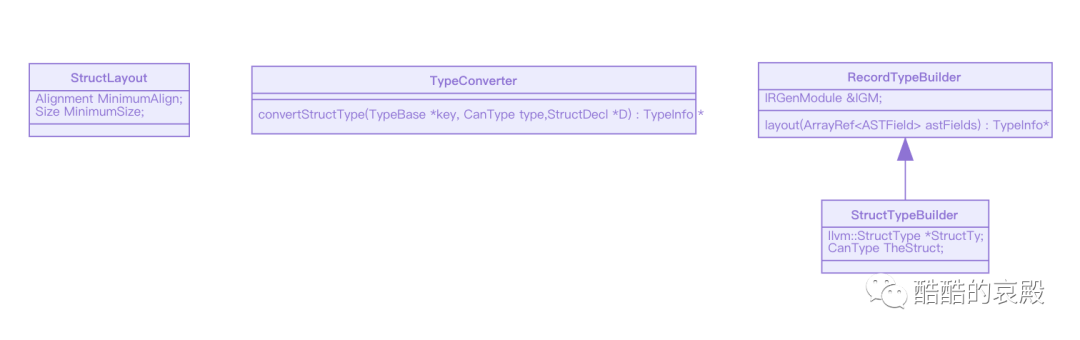
因为 Int16 是结构体,所以,编译器在产出 ir 时,会通过 swift::irgen::TypeConverter::convertStructType计算布局等信息。
考虑到 Swift 的结构体支持很多特殊的属性(比如 static let 计算属性 等)。所以,在构建信息前,会先筛选出能够存储值的属性(即程序运行时,需要内存空间保存属性值)。
const TypeInfo *TypeConverter::convertStructType(TypeBase *key, CanType type, StructDecl *D){
... SmallVector<VarDecl*, 8> fields; for (VarDecl *VD : D->getStoredProperties()) fields.push_back(VD);
StructTypeBuilder builder(IGM, ty, type); return builder.layout(fields);}
在本例中,Int16 的 _value属性( public var _value: Builtin.Int16)就支持存储值。
准备 fields 数组后,就会调用 StructTypeBuilder 父类 RecordTypeBuilder的 layout 方法进行布局。
layout 方法会遍历 fields 并依次通过TypeInfo &IRGenModule::getTypeInfo(SILType T)获取TypeInfo信息,最后再拼接为 StructLayout。
TypeInfo *layout(ArrayRef<ASTField> astFields) { SmallVector<FieldImpl, 8> fields; SmallVector<const TypeInfo *, 8> fieldTypesForLayout; fields.reserve(astFields.size()); fieldTypesForLayout.reserve(astFields.size());
bool loadable = true; auto fieldsABIAccessible = FieldsAreABIAccessible;
unsigned explosionSize = 0; for (unsigned i : indices(astFields)) { auto &astField = astFields[i]; auto &fieldTI = IGM.getTypeInfo(asImpl()->getType(astField)); fieldTypesForLayout.push_back(&fieldTI);
if (!fieldTI.isABIAccessible()) fieldsABIAccessible = FieldsAreNotABIAccessible;
fields.push_back(FieldImpl(asImpl()->getFieldInfo(i, astField, fieldTI)));
auto loadableFieldTI = dyn_cast<LoadableTypeInfo>(&fieldTI); if (!loadableFieldTI) { loadable = false; continue; }
auto &fieldInfo = fields.back(); fieldInfo.Begin = explosionSize; explosionSize += loadableFieldTI->getExplosionSize(); fieldInfo.End = explosionSize; }
StructLayout layout = asImpl()->performLayout(fieldTypesForLayout); for (unsigned i = 0, e = fields.size(); i != e; ++i) { fields[i].completeFrom(layout.getElements()[i]); }
if (loadable) { assert(layout.isFixedLayout()); assert(fieldsABIAccessible); return asImpl()->createLoadable(fields, std::move(layout), explosionSize); } else if (layout.isFixedLayout()) { assert(fieldsABIAccessible); return asImpl()->createFixed(fields, std::move(layout)); } else { return asImpl()->createNonFixed(fields, fieldsABIAccessible, std::move(layout)); } } };
TypeInfo &IRGenModule::getTypeInfo(SILType T)最终会调用 TypeInfo *TypeConverter::getTypeEntry(CanType canonicalTy) 函数。
const TypeInfo *TypeConverter::getTypeEntry(CanType canonicalTy) { ... auto *convertedTI = convertType(exemplarTy); ... return convertedTI;}
通过在第7行添加断点,并通过 lldb 调试工具进行 dump 的结果如下所示:
(lldb) p exemplarTy.dump()(builtin_integer_type bit_width=16)(lldb) p *convertedTI(const swift::irgen::TypeInfo) $7 = { Bits = { OpaqueBits = 8592015620 TypeInfo = { Kind = 4 AlignmentShift = 1 POD = 1 BitwiseTakable = 1 SubclassKind = 7 AlwaysFixedSize = 1 ABIAccessible = 1 } FixedTypeInfo = (Size = 2) } NextConverted = 0x0000000000000000 StorageType = 0x000000012f009e28 nativeReturnSchema = 0x0000000000000000 nativeParameterSchema = 0x0000000000000000}(lldb)
通过调试工具,我们很容易注意到 FixedTypeInfo = (Size = 2)。
convertPrimitiveBuiltin
实际上,对于 Builtin.Int16,编译器是通过 convertPrimitiveBuiltin 获取 size 等信息的。
LoadableTypeInfo 和 PrimitiveTypeInfo 之间的关系比较复杂,这里不再补充类图
如下, convertPrimitiveBuiltin 方法在处理 BuiltinInteger 类型时,会通过IRGenModule::getBuiltinIntegerWidth 间接调用BuiltinIntegerType::getWidth()方法。并将 width信息转为 ByteSize信息。
static std::tuple<llvm::Type *, Size, Alignment>convertPrimitiveBuiltin(IRGenModule &IGM, CanType canTy) {... case TypeKind::BuiltinInteger: { auto intTy = cast<BuiltinIntegerType>(ty); unsigned BitWidth = IGM.getBuiltinIntegerWidth(intTy); unsigned ByteSize = (BitWidth+7U)/8U; if (!llvm::isPowerOf2_32(ByteSize)) ByteSize = llvm::NextPowerOf2(ByteSize);
return RetTy{ llvm::IntegerType::get(ctx, BitWidth), Size(ByteSize), Alignment(ByteSize) }; }...}
unsigned IRGenModule::getBuiltinIntegerWidth(BuiltinIntegerType *t) { return getBuiltinIntegerWidth(t->getWidth());}
class BuiltinIntegerType { BuiltinIntegerWidth getWidth() const { return Width; }}
我们在上一节的 Builtin.Int16 已经知道:BuiltinIntegerType的 Width 是16。
所以,这里的结果就是 2。
IR
下面,我们通过将代码转为IR的方式,验证一下上面的结论。
xcrun swiftc -emit-ir -Xfrontend -disable-llvm-optzns -Onone file.swift | swift demangle
define hidden swiftcc i64 @"file.getSize() -> Swift.Int"() entry: ret i64 2}
因为返回类型是Int,属于无损转换,所以编译器将所有的类型转化代码都移除了。
考虑到篇幅问题,这里的代码优化会在下一篇文章进行详细分析。
很明显,getSize 在产生 ir 时,就直接返回了一个i64 类型的2。
结语
通过对 SIL 和 内置类型 的分析,我们从 Swift 编译器 的视角了解 MemoryLayout 是如何工作的。
推荐阅读
一文看破Swift枚举本质
相关文档
[SIL](https://github.com/apple/swift/blob/a24f5d37beab51852569423e59c1e8f293b52a18/docs/SIL.rst#apply)
[Swift SIL](https://woshiccm.github.io/posts/Swift%E7%BC%96%E8%AF%91%E5%99%A8%E4%B8%AD%E9%97%B4%E7%A0%81SIL/)
[[Review #2] SE-0101: Reconfiguring sizeof and related functions into a unified MemoryLayout struct](https://forums.swift.org/t/review-2-se-0101-reconfiguring-sizeof-and-related-functions-into-a-unified-memorylayout-struct/3376)
[MemoryLayout](https://github.com/apple/swift/blob/master/stdlib/public/core/MemoryLayout.swift)
[Reconfiguring sizeof and related functions into a unified MemoryLayout struct](https://github.com/apple/swift-evolution/blob/master/proposals/0101-standardizing-sizeof-naming.md)
[size stride alignment](https://swiftunboxed.com/internals/size-stride-alignment/)
[_transparent](https://github.com/apple/swift/blob/96aaf260cc843a81dd2043d13e71fdd45756a5dd/docs/TransparentAttr.md)