1、OS X 10.11、iOS 9 和 watchOS 2 SDK 采纳了一些 Objective-C 的特性用来提高 Swift 的编程体验, 如可空性、类型化集合和一些别的特性。
2、编译器对冗余的协议一致性,未被使用的绑定值以及可以设为常量的变量这些情况目前会给予警告或报错。
3、修复了跨文件协议遵循时符号不可见或者重复的错误。
4、Swift 语言的调用约定更加智能,能够理解 API 所发生的变化和 Swift 所给出的警告。
5、便利的可失败构造器(failable initializer)可以先返回 nil,而不必首先调用 self.init。这是有利的一 面,但指定了构造器在返回 nil 前仍要给所有字段初始化。
6、find 函数改名为 indexOf,sort 则变成了 sortInPlace,sorted 变成了 sort。
-
7、String.toInt() 重名为 Int(String) 的可失败构造器,因为构造器语法更适合类型转换。
String 类型不再遵循 SequenceType,可以使用 .characters,.utf8 和 .utf16 对应字符集的运算。允许对泛型添加公共扩展。
字符串长度长度计算由 count(String) 变为 String.characters.count。
字符串裁剪由 code.substringToIndex(advance(code.startIndex, 6)) 变为 let endIndex = code.startIndex.advancedBy(6) code.substringToIndex(endIndex)
-
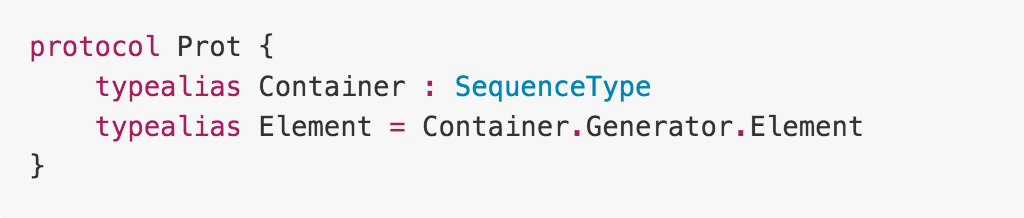
8、标准库中重构了很多泛型的全局函数(如 map、filter 和 sort),采用协议扩展方式增加这些方法。这个好处是对于其他的关联类型能很好的适配。
非泛型类类型可以继承泛型类(强制类型参数固定)。
修复了 Swift 中泛型需求打印时 “T==T” 的错误。
在泛型函数中声明了类型参数但是在函数中没有使用时将产生一个编译时错误,例如:
func foo<T> () {} // error:generic parameter ’T’ is not used in function signature
-
9、基本上可以使用 enum SomeEnum<T,U,V> 来声明 multi-payload 风格的枚举,这样就能正常运行。这用来提示未完成的指令寄存器(IR)引发的错误。
-
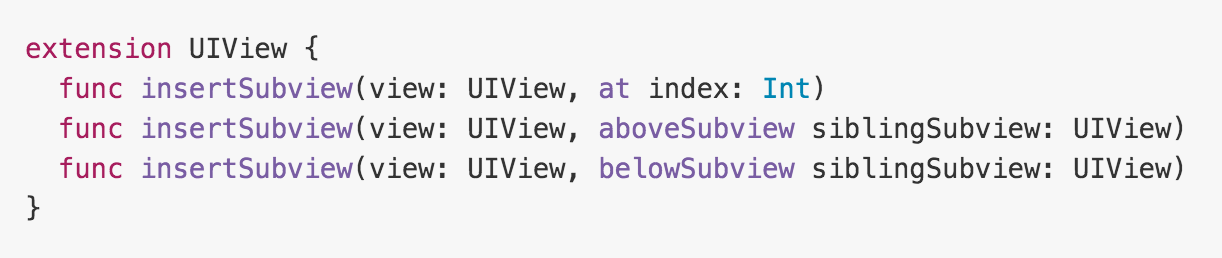
10、方法和函数现在使用同样的参数命名规则了,我们可以用 “_” 符号来省略一个外部的参数名,为了简化使用,用来指定参数名的简化符号 “#” 被移除,因为 Swift 为默认参数提供了特殊的规则:
-
声明:
    func printFunction(str:String, newline:Bool)
    func printMethod(str:String, newline:Bool)
    func printFunctionOmitParameterName(str:String, _newline:Bool)
-
调用:
    printFunction("hello", newline:true)
    printMethod("hello", newline:true)
    printFunctionOmitParameterName("hello", true)
-
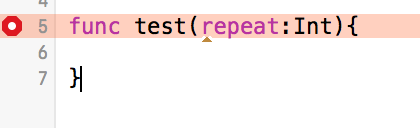
11、条件循环语句 do/while 循环被重名为 repeat/while。关键字 do 目前用来引入一个新的作用域(这对新引进的错误处理和 defer 关键字很重要)。
    Swift 1.2:

        do {
            ...
        } while <condition>

    Swift 2.0:

        repeat {
            ...
        } while <condition>
-
12、打印语句的改变,在 Swift1 中,有 println() 和 print() 两个在控制台打印语句的方法,前者是换行打印,后者是连行打印。在 Swift 2 中,println() 已成为过去,取而代之的是他俩的结合体。
    Swift 1.2:

        func print(<stuff to print>)
        func println(<stuff to print>)

    Swift 2.0:

        func print(<stuff to print>, appendNewline:Bool = true)

    如果你想做连行打印,现在需要这样写:

        print("我要换行!", appendNewline: true)
-
13、Swift 的文本注释(doc comments)换成了 Markdown 语法格式,与 Playgrounds 统一(Playgrounds 注释格式源于功能有限的 reStructured Text)。
    参数纵览语法:

        ‐ Parameters:
            ‐ x:...
            ‐ y:...

    单独参数语法:

        ‐ parameterx:...
        ‐ parametery:..

    返回值:

        ‐ returns:...

    其他需要在 QuickHelp 中高亮的语法字段,可以参考 Markdown 语法。
-
14、在 Swift 中增加了 @objc(propertyName) 属性,当该属性导入到 Objective-C 时可以采用这个 propertyName 作为 getter/setter 访问器的默认名,例如:
    class MyClass:NSObject {

        // Objective‐C 属性被命名为 “theProperty”
        @objc(theProperty) property:String

        // Objective‐Cgetter 访问器被命名为 “theProperty”
        // Objective‐Csetter 访问器被命名为 “setTheProperty:”
    }
-
15、注册通知由
        var types = UIUserNotificationType.Badge | UIUserNotificationType.Sound | UIUserNotificationType.Alert
        var acceptAction = UIMutableUserNotificationAction()

        acceptAction.identifier = "ACCEPT_IDENTIFIER"
        acceptAction.title = "Accept"
        acceptAction.activationMode = UIUserNotificationActivationMode.Foreground
        acceptAction.destructive = false
        acceptAction.authenticationRequired = false

        var inviteCategory = UIMutableUserNotificationCategory()

        inviteCategory.identifier = "INVITE_CATEGORY"
        inviteCategory.setActions([acceptAction], forContext: UIUserNotificationActionContext.Default)
        inviteCategory.setActions([acceptAction], forContext: UIUserNotificationActionContext.Minimal)

        var categories = NSSet(object: inviteCategory)
        var mySettings = UIUserNotificationSettings(forTypes: types, categories: categories as Set<NSObject>)

        UIApplication.sharedApplication().registerUserNotificationSettings(mySettings)
        UIApplication.sharedApplication().registerForRemoteNotifications()

    修改为:

        let acceptAction = UIMutableUserNotificationAction()

        acceptAction.identifier = "ACCEPT_IDENTIFIER"
        acceptAction.title = "Accept"
        acceptAction.activationMode = UIUserNotificationActivationMode.Foreground
        acceptAction.destructive = false
        acceptAction.authenticationRequired = false

        let inviteCategory = UIMutableUserNotificationCategory()

        inviteCategory.identifier = "INVITE_CATEGORY"
        inviteCategory.setActions([acceptAction], forContext: UIUserNotificationActionContext.Default)
        inviteCategory.setActions([acceptAction], forContext: UIUserNotificationActionContext.Minimal)

        let categories = NSSet(object: inviteCategory) as! Set<UIUserNotificationCategory>
        let mySettings = UIUserNotificationSettings( forTypes: [.Alert, .Badge, .Sound], categories: categories)

        UIApplication.sharedApplication().registerUserNotificationSettings(mySettings)
        UIApplication.sharedApplication().registerForRemoteNotifications()