首页 文章 精选 留言 我的

精选列表

搜索[三大系统],共10000篇文章
优秀的个人博客,低调大师

swift4.1 系统学习十二 枚举

/* 枚举 swift的枚举类型也是一个很强大的类型,与其他语言相比,swift中枚举应用更加灵活、广泛。 例如: 像C或者OC中都有枚举类型,但是他们的枚举类型默认为整数类型int兼容。 而在swift中,我们可以自己指定一个枚举类型与哪种类型兼容。 注意: swift中,枚举属于值类型,而不是引用类型。 */ // 1. 枚举类型与枚举对象的一般定义 do { // 定义简单的枚举类型 enum Type { case red case green case yellow } // 交通指示灯的枚举 enum TrafficLight { case red, yellow, green } let light = TrafficLight.green var light2 = TrafficLight.red // 根据类型推导,可以省略TrafficLight light2 = .yellow print("light = \(light), light2 = \(light2)") switch light { case .red: print("红灯") case .yellow: print("黄灯") case .green: print("绿灯") } //元组中使用枚举 let tuple: (TrafficLight, TrafficLight) = (.red, .yellow) print(tuple.0) } // 2. 指定基本类型与原生值 /* swift中,能够用于指定枚举的基本类型有: 1.各类整数类型 2.各类浮点数类型 3.字符类型 4.字符串类型 这些类型都遵循了rawrepresentable协议以及Equatable协议。 */ do { print("\n---------指定基本类型与原生值-----------") enum IntEnum: Int { case zero case one = 1, two, three case six = 6, seven, eight } print("one = \(IntEnum.one.rawValue)") print("two = \(IntEnum.two.rawValue)") print("three = \(IntEnum.three.rawValue)") print("six = \(IntEnum.six.rawValue)") print("seven = \(IntEnum.seven.rawValue)") print("eight = \(IntEnum.eight.rawValue)") enum DoubleEnum: Double { case one = 1.0, two = 2.0 case π = 3.141592653 case e = 2.71828 } print("one = \(DoubleEnum.one.rawValue)") print("two = \(DoubleEnum.two.rawValue)") print("π = \(DoubleEnum.π.rawValue)") print("e = \(DoubleEnum.e.rawValue)") enum CharEnum: Character { case apple = "" case orange = "" case banana = "" case cherry = "" } print("I like \(CharEnum.apple.rawValue), she likes \(CharEnum.cherry.rawValue).") print("But we all like \(CharEnum.orange.rawValue).") print("we don't like \(CharEnum.banana.rawValue).") /* 注意: 如果我们用整型来指定一个枚举,那么枚举值的原生值是可以省略的,默认第一个值为0,以后每次加1. 如果用字符串来指定枚举,也可以为枚举值省略原生值。对于制定了字符串类型的枚举中的某个枚举值 不指定原生值,那么该枚举值的原生值就是该枚举值的标识符所构成的字符串字面量。 枚举中的枚举值属于常量。 */ print("\n") do { enum TrafficLight: UInt { case red // 默认值为0 case yellow // 值为1 case green // 值为2 } // 使用初始化构造器来构造一个TrafficLight实例对象 var light = TrafficLight(rawValue: 0) if let l = light { print("light is \(l)") print("light value is \(l.rawValue)") } // TrafficLight中没有值为5的枚举值,这里light得到一个空值 light = TrafficLight(rawValue: 5) if light == nil { print("light is nil") } else { print("light is not nil") } enum MyNumber: Float { case 一 = 1.0 case 二点五 = 2.5 case 三 = 3.0 } var num = MyNumber(rawValue: 2.5) if let n = num { print("num is \(n)") print("num value is \(n.rawValue)") } } } // 3. 枚举关联值 /* 枚举关联值与原生值类似的是,它也是将某个值与指定的枚举case存放在一起。不过枚举关联值的语法对每个 case均可指定不同类型、不同个数的关联值。因此就所指定的值的类型与个数而言,枚举关联值比原生值要 灵活的多。 注意: 如果我们为一个枚举类型中的任意枚举case用上了枚举关联值,那么对于该枚举类型就不能为它指定一个 原生类型,也不能为其枚举case指定原生值。 */ do { print("\n") enum MyTestEnum { // 这里的value1具有Void类型的关联值 case value1(Void) // 这里的value2具有Int类型的关联值 case value2(Int) case value3(Float, Int, Void, String) case value4(dict: [String: Int], array: [Double], tuple: (Int, Double)) case value5 } // 使用 let e1 = MyTestEnum.value1(()) print("e1 = \(e1)") let e2 = MyTestEnum.value2(10) print("e2 = \(e2)") let e3 = MyTestEnum.value3(2.3, 4, (), "努力学习,天天向上") print("e3 = \(e3)") let e4 = MyTestEnum.value4(dict: ["one": 1, "two": 2], array: [1.0, 2.0, 3.0], tuple: (1, 2.0)) print("e4 = \(e4)") func processMyTest(en: MyTestEnum) { switch en { case .value1(let v): print("value1 = \(v)") case .value2(var v): print("value2 = \(v)") v += 10 print("new value2 = \(v)") case .value3(let a, let b, let c, let d): print("a = \(a)") print("b = \(b)") print("c = \(c)") print("d = \(d)") case .value4(let dict, let array, let tuple): print("dict: \(dict)") print("array: \(array)") print("tuple: \(tuple)") case .value5: print("这是第五个值") } } processMyTest(en: e1) processMyTest(en: e2) processMyTest(en: e3) processMyTest(en: e4) /* 从swift3.0开始,swift引入了通过if语句以及guard语句来捕获枚举关联值的语法形式。在这种 语法体系下,是将if或guard与case关键字连用指定一个枚举case,然后对该枚举case的关联值进行捕获。 */ if case let .value1(value) = e1 { print("value1 = \(value)") } if case let .value2(value) = e2 { print("value2 = \(value)") } guard case .value4(let dict, var arr, let tup) = e4 else{ exit(0) } print("dict = \(dict)") arr = [2.2, 3.4, 5.9] print("array = \(arr)") print("tuple = \(tup)") // 通过逗号对if中的捕获的值做进一步的判断 if case let .value2(value) = e2, value > 5 { print("哈哈哈哈,捕获的值大于五") } else { print("哎哟") } // 也可以在一个if中用两个case捕获两个值,这两个case是“并且”的关系。 if case let .value2(value) = e2, case let .value3(x, y, z, w) = e3, value > 5, x > 1.0 { print("哇卡卡卡卡") } // switch-case也有丰富的匹配特性 func fetch(enum en: MyTestEnum) { switch en { case .value1(()), .value5: print("没有关联值或者关联值为空") case .value2(10...20): if case let .value2(v) = en { print("value2 = \(v)") } case .value2(var value) where value >= 50 : print("哈哈哈哈") value -= 20 print("value = \(value)") default: print("没有匹配的") break } } fetch(enum: e1) let e5 = MyTestEnum.value5 fetch(enum: e5) fetch(enum: e2) fetch(enum: .value2(30)) fetch(enum: .value2(60)) fetch(enum: .value2(100)) } // 4. 递归枚举 /* 如果一个枚举类型中某一个枚举case的其中一个关联值的类型为该枚举类型本身,那么我们称之为“递归枚举”。 我们在声明该枚举case的时候需要在它前面加上indirect关键字,该关键字指示编译器在当前枚举case中 插入了一个间接层。 */ do { print("\n") enum MyEnum { case value1(Int) indirect case value2(MyEnum) } // 也可以在枚举的最前面加上indirect关键字,表示这里的每一个case都插入了间接层。 indirect enum indEnum { case value1(Int) case value2(indEnum) } // 使用举例 enum FoodAndDrink { case name(String) indirect case eat(FoodAndDrink) indirect case drink(FoodAndDrink) } func treatFoodAndDrink(item: FoodAndDrink) { switch item { case .name(let str): print("name = \(str)") case let .eat(food): if case let .name(foodName) = food { let newItem = FoodAndDrink.name("eat \(foodName)") treatFoodAndDrink(item: newItem) } else { print("不合法的食物") } case let .drink(drinks): if case let .name(drinkName) = drinks { let newItem = FoodAndDrink.name("drink \(drinkName)") treatFoodAndDrink(item: newItem) } else { print("不合法的饮品") } } } let orange = FoodAndDrink.name("橘子") let wine = FoodAndDrink.name("") let eatOrange = FoodAndDrink.eat(orange) let drinkWine = FoodAndDrink.drink(wine) let awfulCombination = FoodAndDrink.drink(eatOrange) treatFoodAndDrink(item: orange) treatFoodAndDrink(item: wine) treatFoodAndDrink(item: eatOrange) treatFoodAndDrink(item: drinkWine) treatFoodAndDrink(item: awfulCombination) } //5. 枚举中的属性和方法 /* swift中枚举类型十分的灵活,我们还可以为其定义属性和方法,与结构体中的属性和方法类似。 不过我们在枚举中不能为它定义存储式实例属性,其他都可以。 */ do { print("\n") enum MyEnum { case one(Int) case two(Int) case three(Int) init() { self = .one(0) } func fetchValue() -> (Int, String) { switch self { case let .one(value): return (value, "one") case .two(let value): return (value, "two") case .three(let value): return (value, "three") } } static func makeEnum(with value: Int) -> MyEnum { switch value { case 0..<10: return .one(value) case 20..<30: return .two(value) default: return .three(value) } } // 这里定义了一个计算式实例属性 var p: Int { set(i){ self = .two(i) } get { return self.fetchValue().0 } } // 这里定义了一个存储式属性 static var storedP: Int = 100 static var p2: Int { set(i) { storedP = i } get { return storedP } } } func process(enum value: MyEnum) { let (value, name) = value.fetchValue() print("value = \(value), name is \(name)") } process(enum: .makeEnum(with: 5)) process(enum: .makeEnum(with: 26)) process(enum: .makeEnum(with: -1)) var e = MyEnum() process(enum: e) e.p = 20 print("e = \(e)") MyEnum.storedP += 10 print("s = \(MyEnum.storedP)") }

优秀的个人博客,低调大师

swift4.1 系统学习十 函数

swift的函数与其他语言中的函数还是有很多的不同点的, 我们在本节中一起学习swift中的函数都有哪些特性。 辅助文件, 在“统一的函数引用体系”中会用到。 // // test.h // swift10 // // Created by iOS on 2018/10/10. // Copyright © 2018年 weiman. All rights reserved. // #import <Foundation/Foundation.h> NS_ASSUME_NONNULL_BEGIN @interface test : NSObject //g_block将是我们在是swift源文件中操作的Block对象 extern void (^ _Nullable g_block)(void); //CTest函数用于查看回调效果。 extern void CTest(void); @end NS_ASSUME_NONNULL_END // // test.m // swift10 // // Created by iOS on 2018/10/10. // Copyright © 2018年 weiman. All rights reserved. // #import "test.h" @implementation test void (^ _Nullable g_block)(void) = NULL; void CTest(void) { if (g_block != NULL) { g_block(); } } @end 本节主要内容: // 函数 /* 学过任何一门语言的小伙伴们对函数都会感到不陌生。 Apple官方将swift中的函数定义为: 执行一个特定任务的,自包含的代码块。 */ // 1. 函数的定义和调用 /* func 函数名(参数1,参数2,...) -> 返回值 { 函数体 } 注意: 如果没有返回值, “->返回值” 可以省略 */ // // main.swift // swift10 // // Created by iOS on 2018/9/29. // Copyright © 2018年 weiman. All rights reserved. // import Foundation do { //无参数、无返回值的函数 func hello() { print("你好") } //无参数,有返回值的函数 func helloWorld() -> String { return "你好啊, 嘈杂的世界" } //有参数,无返回值的函数 func hello(name: String) { print("你好, \(name)") } // 有参数,有返回值的函数 func helloWorld(name: String) -> String { return "你好, \(name)" } //函数调用 hello() hello(name: "太阳") let a = helloWorld() print(a) let b = helloWorld(name: "月亮") print(b) } do { func add(a1: [Int], a2: [Int]) -> [Int] { return a1 + a2 } let a = add(a1: [1, 2, 3], a2: [4, 5, 6]) print(a) // 求数组中的最大值和最小值 func maxAndMin(a: [Int]) -> (max: Int, min: Int) { var max = a[0] var min = a[0] for i in a { if i > max { max = i } if i < min { min = i } } return (max, min) } let value = maxAndMin(a: [8,3,5,3,2,5,78,4,3,2,3,45,43,333,65,456,886,3433,33,44,56]) print("max: \(value.max), min: \(value.min)") } // 2. 函数的实参标签 /* 每个函数否包含一个实参标签和一个形参名。 注意: 实参标签可以省略,但是形参名不能省略; 实参标签可以相同,形参名不能相同; */ do { func myFunc(firstName name: String, secondName name2: String) -> String { let str = name + "·" + name2 return str } // 调用 let name = myFunc(firstName: "迈克尔", secondName: "杰克逊") print(name) } // 3. 默认形参值 /* swift编程语言可以对函数形参设置一个默认值。如果一个形参具有一个默认值,那么我们在调用 这个函数的时候可以无需对此参数传递实参,也就是说带有默认值的形参所对应的实参可以缺省。 */ do { func hello(name: String = "wrold") { print("hello, \(name)") } //调用 hello() hello(name: "🇨🇳") /* 打印: hello, wrold hello, 🇨🇳 */ /* 注意: swift的默认参数与C++相比更加的灵活,因为它不仅仅可以放在最后, 还可以放在参数列表的任何位置。 */ func myHello(name: String, years: String = "2018", ages: Int) { print("hello, \(name), 今年是\(years)年, 我已经编程\(ages)年了") } myHello(name: "杰克", ages: 10) myHello(name: "小土豆", years: "2020", ages: 5) } // 4. 不定个数的形参 /* swift语言和C语言一样,支持不定个数的形参。 当我们使用不定个数的形参时,可以将它视作为它所指定类型的额数组,我们可以通过count属性获取实参所 传递过来的参数个数;通过下标操作符来获取对应的实参值。 */ do { func foo(a: Int, b: Int...) { var sum = a if b.count > 0 { for i in b { sum += i } } print("sum = \(sum)") } foo(a: 0) foo(a: 0, b: 1) foo(a: 0, b: 1, 2, 3, 4, 5) func boo(a: Int..., b: Int = -1) { if a.count > 0 { print("value = \(a[0] + a[1])") } else { print("value = \(b)") } } boo() boo(a: 1, 2, 3) boo(a: 1, 2, 3, 4, b: 10) boo(b: 100) } // 5. 输入输出形参(inout) /* 在swift语言中,所有的形参默认都是常量。因此我们在函数体内如果对一个普通的形参修改其值,那么 就会引发编译报错。 swift引入了一种输入输出形参,使得该形参的值不仅能被修改,而且还能影响它所对应的实参值。 //实现步骤 当函数在调用前,先将实参的值拷贝到所对应的输入输出形参中。 在执行函数中的代码时,对输入输出形参的值进行修改。 在函数返回之后,将修改后输入输出形参的值拷贝回对应的实参中。 */ do { func foo(a: Int, b: inout Int) { b += a } var x = 100 foo(a: 10, b: &x) print("x = \(x)") // 输出: x = 110 , 在函数内部,b = 110, 函数外部的参数x也跟着改变了,这就是 inout的作用 var array = [1, 2, 3] foo(a: array[0], b: &array[2]) print("array: \(array)") // 结果: array: [1, 2, 4] func boo(t: inout (Double, Double)) { t.0 *= 0.5 t.1 *= 0.5 } var point = (10.0, 20.0) boo(t: &point) print("point: \(point)") } // 6. 函数重载 /* swift 语言跟C++ 一样,默认支持函数重载。 什么是函数重载? 如果在同一作用域以及名字空间中出现一组相同名字的函数,这些函数具有不同的形参类型或者形参个数,或是 带有不同的返回类型,那么称这组函数为重载函数。 */ do { func foo() { print("无参数") } func foo(a: Int) { print("有一个整型参数 \(a)") } func foo(b: Float) { print("有一个浮点型参数 \(b)") } foo() foo(a: 10) foo(b: 20.0) } // 7. 函数类型和函数签名 /* 函数类型是由其形参列表中各个形参的类型与函数返回类型构成。 */ do { // 返回值为 () -> void func foo() { print("这是一个函数") } // 返回值为 (Int) -> void func foo(_ a: Int) { print("有参数的函数 \(a)") } // 返回值为 (Int, String) -> String func foo(a: Int, b: String) -> String { return "\(a), \(b)" } let b = foo(_ :) b(100) let a = foo(a: b:) let r = a(10, "11") print(r) // 定义一个函数magic,含有一个输入输出参数 func,类型是 (Int) -> Void // magic的函数的类型为 (inout (Int) -> Void) -> Void func magic(fun: inout (Int) -> Void) { fun = foo(_ :) } var ref = foo(_ :) magic(fun: &ref) ref(200) let magicRef: (inout (Int) -> Void) -> Void = magic magicRef(&ref) } /* 函数签名 函数签名这个语法特性其实引申自OC的方法签名。在swift语言中,一个函数名并不是唯一标识当前函数的标志。 而是需要通过结合每个形参所持有的实参标签。 */ do { func foo() { print("foo") } func boo(_ : Void) { print("boo") } func moo(a: Int) { print("moo") } func poo(a: Int, _: Int, c: Int) { print("poo") } //调用 foo() boo(()) moo(a: 10) poo(a: 100, 20, c: 77) } do { func foo(_ : Void) { print("foo Void") } func foo(a: Int) { print("foo Int") } func foo(i: Float) { print("foo float") } func foo(j: Double) { print("foo Double") } func foo(_: Void, _: Int) { print("foo Void,Int") } let ref1 = foo(_:) as (()) -> Void ref1(()) let ref2 = foo(a:) ref2(100) let ref3 = foo(i:) ref3(0.5) let ref4 = foo(_: _:) ref4((), 10) } print("\n") //8.嵌套函数定义 /* swift语言中,允许在函数中定义一个嵌套函数,这是很多其他语言多不具备的。 */ do { func hello(a: Int) { print("value = \(a)") } func outside() -> (Int) -> Void { let a = 10 var b = 20 //定义一个嵌套函数 func inner(input: Int) { print("inner value = \(input)") } func hello(input: Int) { b += a + input print("b = \(b)") } //调用内部函数 inner(input: a) return hello } hello(a: 100) let ref = outside() ref(5) ref(5) /* 输出结果: value = 100 inner value = 10 b = 35 b = 50 */ } // swift的嵌套函数不仅可以直接定义在函数体内,还可以定义在语句块作用域内。 do { func foo() { print("外面的foo") func foo() { print("中层的foo") func foo() { print("内部的foo") } //调用 foo() } foo() } foo() } /* 打印结果: 外面的foo 中层的foo 内部的foo 个人建议:在没有必要的情况下,还是不要这么写,可能自己都给绕晕了。 */ //9.统一的函数引用体系 /* 什么是统一的函数引用? 就是在swift中,我们可以定义一个引用对象,这个对象除了能够引用函数之外,还能引用闭包以及结构体、 枚举、类类型对象的实例方法。 */ print("\n ------------统一的函数引用体系----------------- ") do { func foo () { print("foo") } var ref = foo ref() // g_block是OC中定义的Block对象,现在指向foo函数 g_block = foo // 调用OC中的CTest,判断g_block是否为空 CTest() /* 打印结果 foo foo */ // 说明g_block已经指向了foo函数 // 定义一个boo函数,返回值是() -> Void func boo() -> () -> Void { var a = 10 /* 定义一个嵌套的函数inner,捕获了局部变量a,因此它是一个闭包 */ func inner() { a += 10 print("a = \(a)") } return inner } ref = boo() ref() g_block = boo() CTest() /* 打印结果: a = 20 a = 20 */ //从打印结果看,g_block还是不为空,并且指向了inner函数 // 定义了一个结构体类型 struct MyStruct { let a: Int, b: Double func method () { print("a = \(a), b = \(b)") } } let obj = MyStruct.init(a: 10, b: 100.0) //ref指向了一个结构体的实例方法 ref = obj.method ref() g_block = ref CTest() /* 结果: a = 10, b = 100.0 a = 10, b = 100.0 */ /* 小结: 我们发现,swift中的一个函数类型引用可以指向函数、闭包、实例方法三种类型中的任意一种,这是很方便也是很先进的。 我们跟其他语言做个对比: C++:指向函数的指针类型与指向成员函数的指针类型是完全不一样的。 OC:没有指向成员函数的指针,而是统一使用selector机制。 Java:使用指向方法的引用更加的繁琐。 比较遗憾的是,函数引用不能比较相等性,因为swift会对函数、闭包做相关优化,因此在运行时无法确定两个引用是否是完全相同的。 */ } // 把函数的引用放在数组、字典等容器中。 do { func foo () { print("这是一个函数") } let ref = foo let array = [foo, ref] // 调用第一个元素 array[0]() // 调用第二个元素 array[1]() // 报错:Binary operator '==' cannot be applied to two '() -> ()' operands // let isequal = foo == ref // print("isequal = \(isequal)") }

优秀的个人博客,低调大师

swift4.1 系统学习九 Optional

// // main.swift // swift09 // // Created by iOS on 2018/9/29. // Copyright © 2018年 weiman. All rights reserved. // import Foundation // swift学习笔记9 /* Optional:可选类型 ? 可选类型是swift特色之一,也是很多初学者不适应的原因之一。 Optional体现了swift对类型的安全性考虑。 特点: 1.只有Optional类型才能作为空值(nil),这一点在参数中使用的非常多; 2.swift中任何类型都能作为optional类型,甚至是元组! 3.Optional提供了一种非常简洁的表达可选执行表达式的方式。 什么时候使用? 当我们声明一个对象而无法确定其当前的值,这个时候就可以先将它声明成一个可选类型。 */ // 1. 基本使用 do { let a: Int? = 100 let f: Float? = nil var s: String? if s == nil { print("s是空") } s = "hello" let c = Int?(100) let arr: [Int?]? = [1, 2, 3, 4, c] let tuple: (Int?, Float?, String?)? = (a, f, s) if let arr = arr { print("arr = \(arr)") } if let t = tuple { print("tuple = \(t)") } /*打印: arr = [Optional(1), Optional(2), Optional(3), Optional(4), Optional(100)] tuple = (Optional(100), nil, Optional("hello")) */ } /* 我们还可以使用 Optional<类型>来声明可选类型 */ do{ // 可选整型a,初始化为100 let a: Optional<Int> = 100 let b: Optional<String> = nil let c = Optional<Float>(nilLiteral: ()) print("a = \(a)") if b == nil { print("b = nil") } print("c = \(c)") /* 注意,平时使用的时候还是使用 ?声明可选类型多一些,因为很方便啊。 */ } print("\n") // 2. Optional 链 do { var a: Int? = nil /* 这里使用 Optional 链 操作符 表示如果a不为空,就执行赋值操作 a = 10 否则不执行任何操作。 */ a? = 10 print("a = \(String(describing: a))") //输出:a = nil /* 这句话与上面的赋值是不一样的 这里的赋值一定会被执行,而不判断a是否为nil */ a = 10 print("a = \(String(describing: a))") // 输出: a = Optional(10) var arr: [Int]? = [1, 2, 3] // arr?.count 会先判断arr是否为nil,如不空才会继续执行.count print("数量: \(String(describing: arr?.count))") arr? [1] = 10 print("arr = \(String(describing: arr))") } print("\n") //3. Optional的强制拆解 ! /* 注意:这一功能还是谨慎使用,一旦被被强制拆解的可选类型为nil,那么程序就是崩溃。。。 什么是强制拆解? 强制拆解是和可选类型一起使用的,当我们确定一个可选类型不为nil了,我就可以把这个可选类型强制拆解成 一个普通的类型。 用法: 在可选类型的数据后面加上感叹号 ! */ do { var a: Int? = 100 let ca = a! print("ca = \(ca)") a! = a! * a! print("a! = \(a!)") } print("\n") // 4. Optional绑定 /* 上面我们介绍了强制解包的方式把一个可选类型变成一个正常的类型,但是我们也说了这种方式是不够安全的。 我们还有更加安全的解包的方式,就是 可选绑定 和 空结合操作符(??) 语法形势: if let obj = 可选类型 { } */ do { var a = Optional(0) if let c = a { print("c = \(c)") } a? = 100 if let c = a { print("c = \(c)") } let x: Int? = 10 var y: Int? = nil /* 我们可以在if声明中使用多个绑定局部变量,这个时候,每个可选绑定都要用let 或 var 引出。 此时,多个声明之间的关系是“并且”,有一个为假,则if语句块不执行。 */ if let x = x, let y = y { print("1: x = \(x), y = \(y)") } else { print("条件为假") } y = 20 if let x = x, var y = y { y += 20 print("2: x = \(x), y = \(y)") } else { print("条件2为假") } } //5.guard语句 /* guard,顾名思义,就是守卫的意思。 它也是swift语言中的新的语法,是一个很好用的语法,使用也和广泛。 作用: 也是用于Optional绑定的。 */ do { func test() { let a: Int? = 100 guard let b = a else { return } // 注意,这里可以使用b print("--------\(b)") } test() } /* 注意: guard 与 if 很相似,都可以作为条件语句,对条件表达式进行判断。但是,不同点是,if语句中声明的 常量或者变量的作用域是if语句块内部,而guard语句则是guard语句以下的部分都可以使用它声明的常量 或者变量,这在实际应用的时候是很方便的。 */ //6. 空结合操作符 (??) /* 什么是 空结合操作符? 这又是一种轻量便捷的拆解Optional对象的方式。 */ do { let a = Int?(0) let b = 10 var c = a ?? b print("c = \(c)") /* a ?? b的意思是,a为nil吗?如果为nil,c = b, 否则, c = a 使用三目运算符解释一下,相当于 */ c = a != nil ? a! : b print("c = \(c)") // 空结合表达式也是一种简便表达形势的语法糖,可以使用三目运算符来代替。 } // 7. 隐式拆解的Optional类型 /* 隐世拆解的Optional类型的表示与Optional类似,就是在类型名后紧跟 !。 比如 Int!, Float!, String! 等等。 它表示当前对象作为一个Optional类型,不过使用此对象时,它已经被断言确保不为空了。 */ print("\n") do { var a: Int! = 10 let b = a print("b = \(String(describing: b))") a! += 20 a? += 5 print("a = \(String(describing: a))") // 这里声明了一个隐式拆解的Optional数组变量arr var arr: [Int]! = [1, 2, 3] // 这里对arr使用 ! 操作符, // 使得 arr! 表达式作为 += 的左操作数 // 这里的 ! 不能缺省 arr! += [4, 5, 6] // 这里就彰显出隐式拆解的Optional的便捷性了。 // 这里可直接将arr作为下标操作符的操作数, // 而无需使用optional-chaining操作符 arr[0] = arr[1] + arr[2] // 这里需要使用强制拆解, // 因为 arr 作为 += 的右操作数时, // 它将会转回 Optional 类型,这里需要各位留意 arr! [0] += arr! [3] // 输出:arr[0] = 9, // 说明arr[0]是Int类型 print("arr[0] = \(arr[0])") // 这里声明了carr,其类型为[Int]? var carr = arr // 这里对carr操作时,? 或 ! 都不能缺省 carr![3] = carr![2] - carr![1] // 这里声明了一个指向 () -> Void 函数类型的 // 隐式拆解的Optional的引用常量ref let ref: (() -> Void)! = { print("This is a closure!") } // 这里可直接对ref做函数调用, // 无需使用optional-chaining操作符 ref() // 这里声明了一个String类型的 // 隐式拆解的Optional常量s let s: String! = "abcd" // 这里可直接对s使用成员访问操作符, // 而不需要添加optional-chaining操作符, // c的类型为Int let c = s.count // 输出:c = 4 print("c = \(c)") // 如果我们使用了optional-chaining操作符 ? // 那么整个表达式就变成了optional-chaining表达式了, // 这里count的类型就变为了 Int? let count = s?.count // 输出:count = Optional(4) print("count = \(String(describing: count))") // 这里请各位务必注意! // 由于之前已经提到了, // 一个隐式拆解的Optional类型,即ImplicitlyUnwrappedOptional, // 当它作为右值表达式时,其类型会被隐式转为Optional。 // 所以这里的option的类型为 String? ,而不是 String! let option = Optional("abc") // 这句没有问题 _ = option?.count }

优秀的个人博客,低调大师

SSM+maven实现答题管理系统(二)

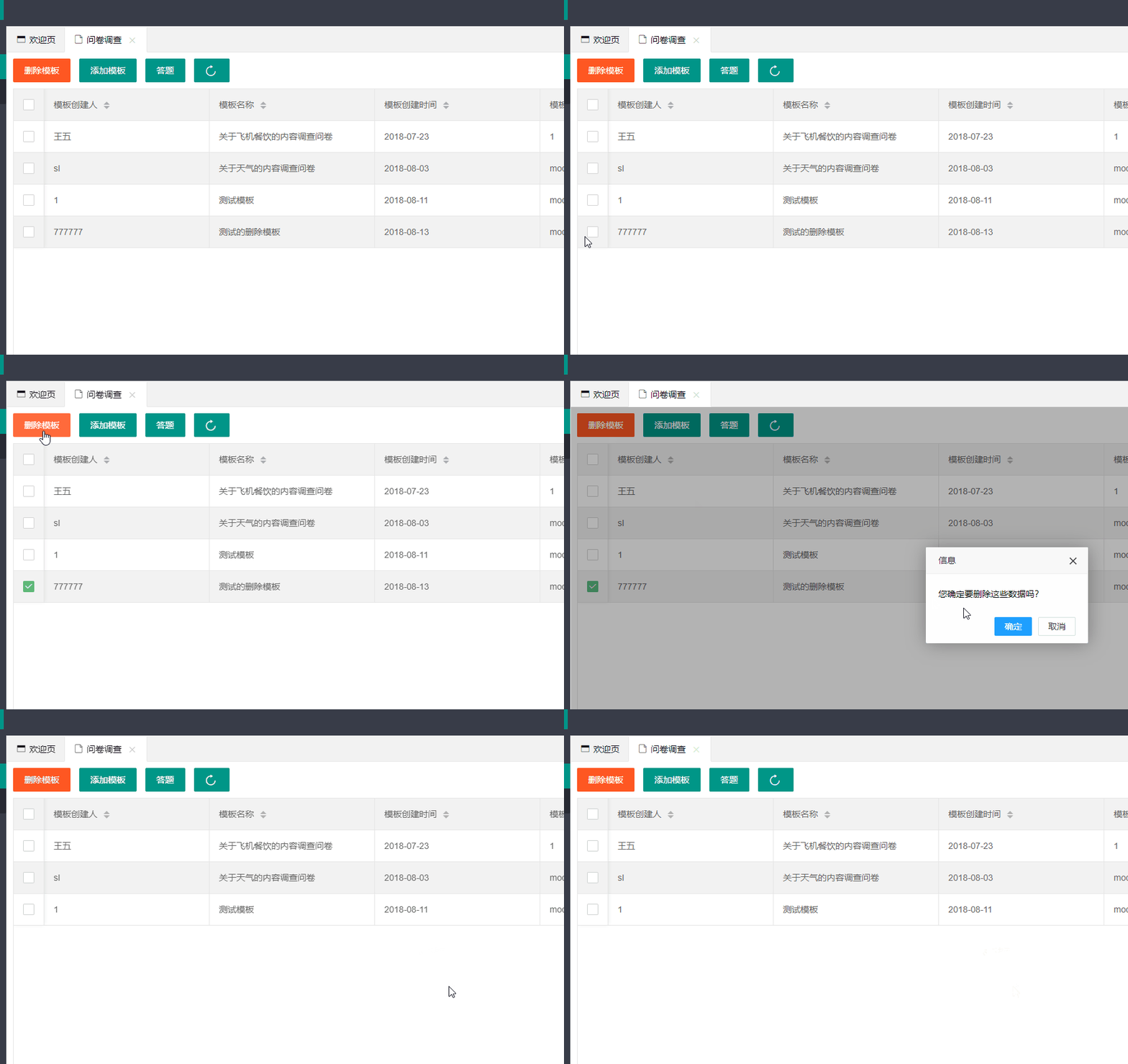
好的,现在我们来实现删除模板(model表删除记录)的功能,删除功能不难做,主要我们这次实现的是批量删除功能。 一.思路整理 首先我们删除模板是根据模板的id来删除的,不管是单项删除还是批量删除,我们这里使用layui获取当前行的功能就能获取模板的id 其次不管单项删除还是批量删除,只要将id放入数组中,后端对数组进行遍历,就能达到单项删除/批量删除 二.代码实现 思路实现以后,我们上代码。 View层: var id_array = []; //获取选中行 // 获取选中行 这里我们可以选择删除 这里的id_array是一个隐藏的值 device对应device_id user对应code survry对应model_id table.on('checkbox(test)', function(obj) { //监听复选框 if (obj.type == 'all') { if (obj.checked == true) { var data = table.cache.dataCheck; //批量操作的表格复选框 id_array = []; for (var l = 0; l < data.length; l++) { id_array.push(data[l].model_id); } console.log(id_array); } else { id_array = []; } } else { if (obj.checked == true) { id_array.push(obj.data.model_id); console.log(id_array); } else { var index = id_array.indexOf(obj.data.model_id); id_array.splice(index, 1); console.log(id_array); } } }); $('#btn-delete-all').click(function() { //删除全部通过一个获取选中行的值,来删除 layer.confirm('您确定要删除这些数据吗?', function(index) { //打开正在加载中弹出层 layer.msg('加载中', { icon: 16, shade: 0.01, time: '9999999' }); var url = "survey/del_model"; var data = { model_id: id_array //这里将当前的model_id传到后端 } $.post(url, data, function(data) { layer.close(layer.index); //关闭正在加载中弹出层 console.log(id_array); if (data.code == 1) { layer.msg(data.msg, { icon: 6 }); location.reload(); } else { layer.msg(data.msg, { icon: 5 }); } }, "json"); }); }); 首先对数据表格进行监听,如果数据表格的当前行被选中,则往id_array数组中push一个id,有多少个,push多少个,而后我们将数组用ajax上传,键名为model_id. Controller层: //返回数据用responseBody //删除model @RequestMapping(value="Index/survey/del_model") @ResponseBody public Map<String,Object> delModel(HttpServletRequest req) throws IOException { String[] arr = req.getParameterValues("model_id[]");//前端传来的modelId int code; String msg; // if(arr!=null) // return api.returnJson(3,arr[0]); for (int i = 0; i < arr.length; i++) { List<Choose> is_answer=chooseService.findChooseByModelId(arr[i]); if (!is_answer.isEmpty()) { return api.returnJson(3,"抱歉,题目已经被作答,无法删除"); } continue; } //如果没有 那么当前选中模板的题目都没有被答过 作级联删除 删除模板表 删除题目表 删除选项表(根据model查出Qsn 再根据qsnId删除Option) int is_del=modelService.deleteModelByIds(arr);//删除模板表 for (int i = 0; i <arr.length ; i++) { int is_del_qsn=qsnService.deleteModel2Qsn(arr[i]);//删除题目表 List<Qsn> qsnList=qsnService.findQsnList(arr[i]);//得到题目 System.out.println(qsnList); for (int j = 0; j <qsnList.size() ; j++) {//删除选项表 int isDelOptions=detailService.deleteOptionsByQsnId(qsnList.get(j).getQsnId()); } } //先查询模板下的题目list 然后遍历list,根据item.id 即qsnId来删除 // String[] is_del_option 还缺删除选项表的逻辑 if (is_del!=0){ code=1; msg="success"; }else { code=2; msg="fail"; } return api.returnJson(code,msg); } 这里进行说明一下,区别于tp5,我们使用httpservlet.request的getParameterValues()方法来获取前端传入的array数组 Service层: modelService: package com.sl.example.service; import com.sl.example.pojo.Model; import java.util.List; public interface ModelService { public List<Model> findAllModel(); public int deleteModelById(String modelId); public int deleteModelByIds(String[] arr); public int InsertModel(Model model); public Model selectModelById(String modelId); } modelServiceImpl: package com.sl.example.service; import com.sl.example.dao.ModelMapper; import com.sl.example.pojo.Model; import org.springframework.beans.factory.annotation.Autowired; import org.springframework.stereotype.Service; import org.springframework.transaction.annotation.Transactional; import javax.annotation.Resource; import java.util.List; @Service("modelService") @Transactional public class ModelServiceImpl implements ModelService{ @Resource private ModelMapper modelMapper; @Override public List<Model> findAllModel() { return modelMapper.selectAllModel(); } @Override public int deleteModelById(String modelId) { return modelMapper.deleteByPrimaryKey(modelId); } @Override public int deleteModelByIds(String[] arr) { return modelMapper.deleteByIds(arr); } @Override public int InsertModel(Model model) { return modelMapper.insertSelective(model); } @Override public Model selectModelById(String modelId) { return modelMapper.selectByPrimaryKey(modelId); } } 将DAO层也贴出来: package com.sl.example.dao; import com.sl.example.pojo.Model; import java.util.List; public interface ModelMapper { int deleteByPrimaryKey(String modelId); int deleteByIds(String[] list); int insert(Model record); int insertSelective(Model record); Model selectByPrimaryKey(String modelId); List<Model> selectAllModel(); int updateByPrimaryKeySelective(Model record); int updateByPrimaryKey(Model record); } 对应的ModelMapper.xml: <?xml version="1.0" encoding="UTF-8" ?> <!DOCTYPE mapper PUBLIC "-//mybatis.org//DTD Mapper 3.0//EN" "http://mybatis.org/dtd/mybatis-3-mapper.dtd" > <mapper namespace="com.sl.example.dao.ModelMapper" > <resultMap id="BaseResultMap" type="com.sl.example.pojo.Model" > <constructor > <idArg column="model_id" jdbcType="VARCHAR" javaType="java.lang.String" /> <arg column="name" jdbcType="VARCHAR" javaType="java.lang.String" /> <arg column="time" jdbcType="DATE" javaType="java.util.Date" /> <arg column="create_name" jdbcType="VARCHAR" javaType="java.lang.String" /> <arg column="rmk2" jdbcType="VARCHAR" javaType="java.lang.String" /> <arg column="rmk3" jdbcType="VARCHAR" javaType="java.lang.String" /> <arg column="rmk4" jdbcType="VARCHAR" javaType="java.lang.String" /> <arg column="rmk5" jdbcType="VARCHAR" javaType="java.lang.String" /> </constructor> </resultMap> <sql id="Base_Column_List" > model_id, name, time, create_name, rmk2, rmk3, rmk4, rmk5 </sql> <select id="selectByPrimaryKey" resultMap="BaseResultMap" parameterType="java.lang.String" > select <include refid="Base_Column_List" /> from t_gr_qsn_model where model_id = #{modelId,jdbcType=VARCHAR} </select> <select id="selectAllModel" resultMap="BaseResultMap" resultType="java.util.List"> select <include refid="Base_Column_List" /> from t_gr_qsn_model </select> <delete id="deleteByPrimaryKey" parameterType="java.lang.String" > delete from t_gr_qsn_model where model_id = #{modelId,jdbcType=VARCHAR} </delete> <delete id="deleteByIds" parameterType="java.util.Arrays"> delete from t_gr_qsn_model where model_id in <foreach collection="array" index="index" item="item" open="(" separator="," close=")"> #{item} </foreach> </delete> <insert id="insert" parameterType="com.sl.example.pojo.Model" > insert into t_gr_qsn_model (model_id, name, time, create_name, rmk2, rmk3, rmk4, rmk5) values (#{modelId,jdbcType=VARCHAR}, #{name,jdbcType=VARCHAR}, #{time,jdbcType=DATE}, #{createName,jdbcType=VARCHAR}, #{rmk2,jdbcType=VARCHAR}, #{rmk3,jdbcType=VARCHAR}, #{rmk4,jdbcType=VARCHAR}, #{rmk5,jdbcType=VARCHAR}) </insert> <insert id="insertSelective" parameterType="com.sl.example.pojo.Model" > insert into t_gr_qsn_model <trim prefix="(" suffix=")" suffixOverrides="," > <if test="modelId != null" > model_id, </if> <if test="name != null" > name, </if> <if test="time != null" > time, </if> <if test="createName != null" > create_name, </if> <if test="rmk2 != null" > rmk2, </if> <if test="rmk3 != null" > rmk3, </if> <if test="rmk4 != null" > rmk4, </if> <if test="rmk5 != null" > rmk5, </if> </trim> <trim prefix="values (" suffix=")" suffixOverrides="," > <if test="modelId != null" > #{modelId,jdbcType=VARCHAR}, </if> <if test="name != null" > #{name,jdbcType=VARCHAR}, </if> <if test="time != null" > #{time,jdbcType=DATE}, </if> <if test="createName != null" > #{createName,jdbcType=VARCHAR}, </if> <if test="rmk2 != null" > #{rmk2,jdbcType=VARCHAR}, </if> <if test="rmk3 != null" > #{rmk3,jdbcType=VARCHAR}, </if> <if test="rmk4 != null" > #{rmk4,jdbcType=VARCHAR}, </if> <if test="rmk5 != null" > #{rmk5,jdbcType=VARCHAR}, </if> </trim> </insert> <update id="updateByPrimaryKeySelective" parameterType="com.sl.example.pojo.Model" > update t_gr_qsn_model <set > <if test="name != null" > name = #{name,jdbcType=VARCHAR}, </if> <if test="time != null" > time = #{time,jdbcType=DATE}, </if> <if test="createName != null" > create_name = #{createName,jdbcType=VARCHAR}, </if> <if test="rmk2 != null" > rmk2 = #{rmk2,jdbcType=VARCHAR}, </if> <if test="rmk3 != null" > rmk3 = #{rmk3,jdbcType=VARCHAR}, </if> <if test="rmk4 != null" > rmk4 = #{rmk4,jdbcType=VARCHAR}, </if> <if test="rmk5 != null" > rmk5 = #{rmk5,jdbcType=VARCHAR}, </if> </set> where model_id = #{modelId,jdbcType=VARCHAR} </update> <update id="updateByPrimaryKey" parameterType="com.sl.example.pojo.Model" > update t_gr_qsn_model set name = #{name,jdbcType=VARCHAR}, time = #{time,jdbcType=DATE}, create_name = #{createName,jdbcType=VARCHAR}, rmk2 = #{rmk2,jdbcType=VARCHAR}, rmk3 = #{rmk3,jdbcType=VARCHAR}, rmk4 = #{rmk4,jdbcType=VARCHAR}, rmk5 = #{rmk5,jdbcType=VARCHAR} where model_id = #{modelId,jdbcType=VARCHAR} </update> </mapper> 我们来试验一下。 1.gif 成功啦,下一节我们讲对应某一套题目模板下的题目的增删。

资源下载

更多资源
优质分享App

优质分享App

近一个月的开发和优化,本站点的第一个app全新上线。该app采用极致压缩,本体才4.36MB。系统里面做了大量数据访问、缓存优化。方便用户在手机上查看文章。后续会推出HarmonyOS的适配版本。

Mario

Mario

马里奥是站在游戏界顶峰的超人气多面角色。马里奥靠吃蘑菇成长,特征是大鼻子、头戴帽子、身穿背带裤,还留着胡子。与他的双胞胎兄弟路易基一起,长年担任任天堂的招牌角色。

Spring

Spring

Spring框架(Spring Framework)是由Rod Johnson于2002年提出的开源Java企业级应用框架,旨在通过使用JavaBean替代传统EJB实现方式降低企业级编程开发的复杂性。该框架基于简单性、可测试性和松耦合性设计理念,提供核心容器、应用上下文、数据访问集成等模块,支持整合Hibernate、Struts等第三方框架,其适用范围不仅限于服务器端开发,绝大多数Java应用均可从中受益。

Rocky Linux

Rocky Linux

Rocky Linux(中文名:洛基)是由Gregory Kurtzer于2020年12月发起的企业级Linux发行版,作为CentOS稳定版停止维护后与RHEL(Red Hat Enterprise Linux)完全兼容的开源替代方案,由社区拥有并管理,支持x86_64、aarch64等架构。其通过重新编译RHEL源代码提供长期稳定性,采用模块化包装和SELinux安全架构,默认包含GNOME桌面环境及XFS文件系统,支持十年生命周期更新。