微软的MDT提供一个ZtiGather.wsf的tool来识别客户端的系统类别。对应不同的系统类型,会生成对应的OSD系统变量,如服务器(IsServer),台式机(IsDesktop),笔记本(IsLaptop)。
这个变量对于我们部署app来说是很方便的,可以在一个task sequence里安装各个硬件类型的app,而不用为每个硬件类型都创建1个task sequence,简化工作量,也简化了维护的复杂度。
比如,我们可以设置Laptop类型的机器安装***软件,而服务器和台式机类型不用安装,就可以设置***安装的条件为IsLaptop = True.
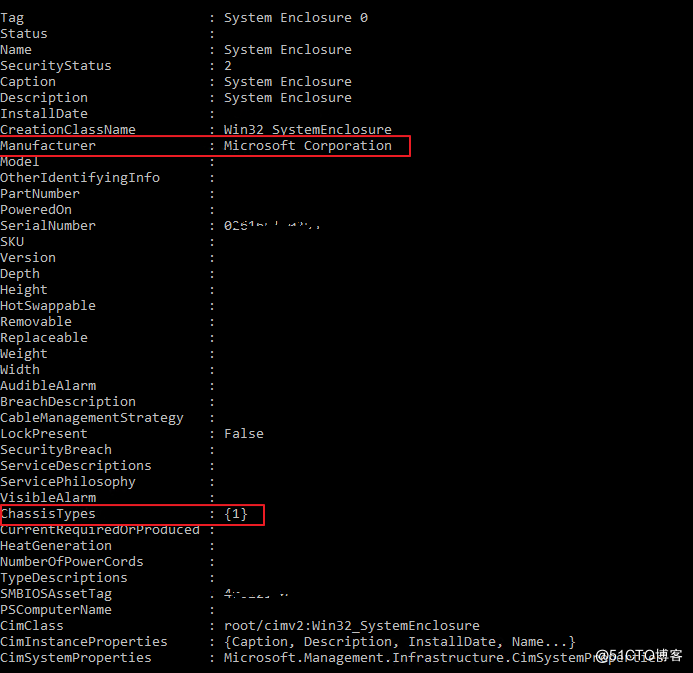
这个功能的实现是根据读取WMI的ChassiType来实现的, 具体的配置和值如下。
https://docs.microsoft.com/en-us/windows/win32/cimwin32prov/win32-systemenclosure
通过检测,我们可以看到ChassisTypes的值为1,根据上表,1 代表Other,和VM一样,所以当Surface Pro 7+做image的时候,OSD不认为机器类型是Laptop,IsLaptop变量值为false,带来的结果就是所有笔记本需要安装的app都不会安装。
根据和微软售后的确认,这个设置应该是个Bug,后面出的机器可能会修复这个问题,可是远水救不了近渴。

那么我们可以自己解决么?答案是肯定的。
既然我们已经知道MDT是通过ZtiGather这个脚本来识别机器类型的, 那我们可以尝试修改他识别的那个函数部分来修正这个问题。
找到GetAssetInfo()这个函数,替换为下面的部分,变更后的逻辑简单来说就根据WMI的Model信息来判断Surface Pro系列的机器类型,而不看ChassisType值了。
	'//---------------------------------------------------------------------------
	'//  Function:	GetAssetInfo()
	'//  Purpose:	Get asset information using WMI
	'//---------------------------------------------------------------------------
	Function GetAssetInfo

	 	Dim bIsLaptop, bIsDesktop, bIsServer, bOnBattery, bFoundBattery, bFoundAC
		Dim sAssetTag, sSerialNumber, sMake, sModel, sProduct, sUUID, sMemory, sArchitecture, sProcessorSpeed, sCapableArchitecture

		Dim objResults, objInstance
		Dim i
		Dim bisX64, bIsUEFI, bSupportsSLAT, bSupportsX64, bSupportsX86


		oLogging.CreateEntry "Getting asset info", LogTypeInfo


		' Get the SMBIOS asset tag from the Win32_SystemEnclosure class

		Set objResults = objWMI.InstancesOf("Win32_SystemEnclosure")
		bIsLaptop = false
		bIsDesktop = false
		bIsServer = false
		For each objInstance in objResults

			If objInstance.ChassisTypes(0) = 12 or objInstance.ChassisTypes(0) = 21 then
				' Ignore docking stations
			Else

				If not IsNull(objInstance.SMBIOSAssetTag) then
					sAssetTag = Trim(objInstance.SMBIOSAssetTag)
				End if
				Select Case objInstance.ChassisTypes(0)
				Case "8", "9", "10", "11", "12", "14", "18", "21", "17", "32" 	'Added Chassis Type 17 for Surface Pro , also added Chassis Type 32 for Latitude 5285
					bIsLaptop = true
				Case "3", "4", "5", "6", "7", "15", "16", "13" ' Added Chassis Type 13 for AIO models
					bIsDesktop = true
				Case "23"
					bIsServer = true
				Case Else
					' Do nothing
				End Select

			End if

		Next
		If sAssetTag = "" then
			oLogging.CreateEntry "Unable to determine asset tag via WMI.", LogTypeInfo
		End if


		' Get the serial number from the Win32_BIOS class.

		Set objResults = objWMI.InstancesOf("Win32_BIOS")
		For each objInstance in objResults

	                ' Get the serial number

			If not IsNull(objInstance.SerialNumber) then
				sSerialNumber = Trim(objInstance.SerialNumber)
			End if

		Next
		If sSerialNumber = "" then
			oLogging.CreateEntry "Unable to determine serial number via WMI.", LogTypeInfo
		End if


		' Figure out the architecture from the environment

		If oEnv("PROCESSOR_ARCHITEW6432") <> "" then
			If UCase(oEnv("PROCESSOR_ARCHITEW6432")) = "AMD64" then
				sArchitecture = "X64"
			Else
				sArchitecture = UCase(oEnv("PROCESSOR_ARCHITEW6432"))
			End if
		ElseIf UCase(oEnv("PROCESSOR_ARCHITECTURE")) = "AMD64" then
			sArchitecture = "X64"
		Else
			sArchitecture = UCase(oEnv("PROCESSOR_ARCHITECTURE"))
		End if


		' Get the processor speed from the Win32_Processor class.

		bSupportsX86 = false
		bSupportsX64 = false
		bSupportsSLAT = false
		Set objResults = objWMI.InstancesOf("Win32_Processor")
		For each objInstance in objResults

			' Get the processor speed

			If not IsNull(objInstance.MaxClockSpeed) then
				sProcessorSpeed = Trim(objInstance.MaxClockSpeed)
			End if


			' Determine if the machine supports SLAT (only supported with Windows 8)

			On Error Resume Next
			bSupportsSLAT = objInstance.SecondLevelAddressTranslationExtensions
			On Error Goto 0


			' Get the capable architecture

			If not IsNull(objInstance.Architecture) then
				Select Case objInstance.Architecture
				Case 0

					' If the processor is running a x86 OS, then there is *Still* the possibility that it can
					' support a x64 OS. We need to run a quick processor check to see if it supports x64.

					bisX64 = FALSE
					On Error Resume Next
					bisX64 = oUtility.BDDUtility.Is64Bit
					On Error Goto 0

					If bisX64 = TRUE then
						sCapableArchitecture = "AMD64 X64 X86"
						bSupportsX86 = true
						bSupportsX64 = true
					Else
						sCapableArchitecture = "X86"
						bSupportsX86 = true
					End if

				Case 6
					sCapableArchitecture = "IA64"
				Case 9
					sCapableArchitecture = "AMD64 X64 X86"
					bSupportsX86 = true
					bSupportsX64 = true
				Case Else
					SCapableArchitecture = "Unknown"
				End Select
			End if


			' Stop after first processor since all should match

			Exit For

		Next
		If sProcessorSpeed = "" then
			oLogging.CreateEntry "Unable to determine processor speed via WMI.", LogTypeInfo
		End if
		If sCapableArchitecture = "" then
			oLogging.CreateEntry "Unable to determine capable architecture via WMI.", LogTypeInfo
		End if


		' Get the make, model, and memory from the Win32_ComputerSystem class

		Set objResults = objWMI.InstancesOf("Win32_ComputerSystem")
		For each objInstance in objResults

			If not IsNull(objInstance.Manufacturer) then
				sMake = Trim(objInstance.Manufacturer)
			End if
			If not IsNull(objInstance.Model) then
				sModel = Trim(objInstance.Model)
			End if
			If not IsNull(objInstance.TotalPhysicalMemory) then
				sMemory = Trim(Int(objInstance.TotalPhysicalMemory / 1024 / 1024))
			End if

		Next
		If sMake = "" then
			oLogging.CreateEntry "Unable to determine make via WMI.", LogTypeInfo
		End if
		If sModel = "" then
			oLogging.CreateEntry "Unable to determine model via WMI.", LogTypeInfo
		End If


		' Get the Lenovo Model Version from the Win32_ComputerSystemProduct class
		' http://smulpuru.wordpress.com/2011/02/16/mdt-custom-variable-for-lenovo-model-drivergroup/
		' Added 10/08/2013 - dhedges

		'If sMake = "LENOVO" Then
			'Set objResults = objWMI.InstancesOf("Win32_ComputerSystemProduct")
			'For Each objInstance In objResults
				'sLenovoModel = objInstance.Version
			'Next
			'If sLenovoModel = "" Then
				'sLenovoModel = Null
				'oLogging.CreateEntry "Unable to determine LenovoModel tag via WMI", LogTypeInfo
			'End If
		'End If

		' Get the UUID from the Win32_ComputerSystemProduct class

		Set objResults = objWMI.InstancesOf("Win32_ComputerSystemProduct")
		For each objInstance in objResults

			If not IsNull(objInstance.UUID) then
				sUUID = Trim(objInstance.UUID)
			End if

		Next
		If sUUID = "" then
			oLogging.CreateEntry "Unable to determine UUID via WMI.", LogTypeInfo
		End if


		' Get the product from the Win32_BaseBoard class

		Set objResults = objWMI.InstancesOf("Win32_BaseBoard")
		For each objInstance in objResults

			If not IsNull(objInstance.Product) then
				sProduct = Trim(objInstance.Product)
			End if

		Next
		If sProduct = "" then
			oLogging.CreateEntry "Unable to determine product via WMI.", LogTypeInfo
		End if


		' Determine if we are running UEFI

		bIsUEFI = FALSE
		On Error Resume Next
		bIsUEFI = oUtility.BDDUtility.IsUEFI
		On Error Goto 0


		' See if we are running on battery

		If oEnv("SystemDrive") = "X:" and oFSO.FileExists("X:\Windows\Inf\Battery.inf") then

			' Load the battery driver

			oShell.Run "drvload X:\Windows\Inf\Battery.inf", 0, true

		End if

		bFoundAC = False
		bFoundBattery = False
		Set objResults = objWMI.InstancesOf("Win32_Battery")
		For each objInstance in objResults
			bFoundBattery = True
			If objInstance.BatteryStatus = 2 then
				bFoundAC = True
			End if
		Next
		If bFoundBattery and (not bFoundAC) then
			bOnBattery = True
		Else
			bOnBattery = False
		End if

		'set IsLaptop to true as long as Surface Pro model detected no matter what the chassistype is

		If ((instr(sModel,"Surface Pro")) > 0) and (sMake = "Microsoft Corporation") then
			bIsLaptop = true
		End if

		oEnvironment.Item("AssetTag") = sAssetTag
		oEnvironment.Item("SerialNumber") = sSerialNumber
		oEnvironment.Item("Make") = sMake
		oEnvironment.Item("Model") = sModel
		oEnvironment.Item("Product") = sProduct
		oEnvironment.Item("UUID") = sUUID
		oEnvironment.Item("Memory") = sMemory
		oEnvironment.Item("Architecture") = sArchitecture
		oEnvironment.Item("ProcessorSpeed") = sProcessorSpeed
		oEnvironment.Item("CapableArchitecture") = sCapableArchitecture
		oEnvironment.Item("IsLaptop") = oUtility.ConvertBooleanToString(bIsLaptop)
		oEnvironment.Item("IsDesktop") = oUtility.ConvertBooleanToString(bIsDesktop)
		oEnvironment.Item("IsServer") = oUtility.ConvertBooleanToString(bIsServer)
		oEnvironment.Item("IsUEFI") = oUtility.ConvertBooleanToString(bIsUEFI)
		oEnvironment.Item("IsOnBattery") = oUtility.ConvertBooleanToString(bOnBattery)
		oEnvironment.Item("SupportsX86") = oUtility.ConvertBooleanToString(bSupportsX86)
		oEnvironment.Item("SupportsX64") = oUtility.ConvertBooleanToString(bSupportsX64)
		If bSupportsSLAT or oEnvironment.Item("SupportsSLAT") = "" then
			oEnvironment.Item("SupportsSLAT") = oUtility.ConvertBooleanToString(bSupportsSLAT)
		Else
			oLogging.CreateEntry "Property SupportsSLAT = " & oEnvironment.Item("SupportsSLAT"), LogTypeInfo
		End if

		oLogging.CreateEntry "Finished getting asset info", LogTypeInfo

		GetAssetInfo = Success

	End Function
创建一个新的MDT包,在Surface Pro 7+ 上跑一次OSD image,会发现所有笔记本要安装的app全部成功安装了。
至此,问题解决,而且以后出的Surface Pro系列都会识别为Laptop类型。