它有:
calabash-android
calabash-ios
主页: http://calabash.sh
Calabash-android介绍
Calabash-android 是支持 android 的 UI
自动化测试框架,PC 端使用了 cucumber 框架,通过 http 和 json 与模拟器和真机上安装的测试 apk 通信,测试 apk 调用 Robotium 的方法来进行 UI 自动化测试,支持 webview 操作。
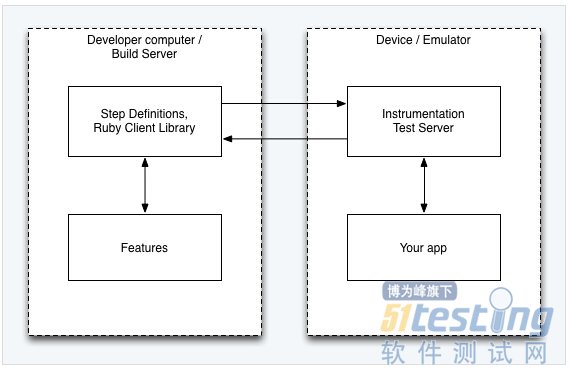
Calabash-android 架构图
Features —— 这里的 feature 就是 cucumber 的 feature,用来描述 user stories 。
Step Definitions —— Calabash Android 事先已经定义了一些通用的 step。你可以根据自己的需求,定义更加复杂的步骤。
Your app —— 测试之前,你不必对你的应用修改。(这里其实是有问题,后面我们会说到。)
Instrumentation
Test Server —— 这是一个应用,在运行测试的时候会被安装到设备中去。 这个应用是基于 Android SDK 里的 ActivityInstrumentationTestCase2。它是 Calabash Android 框架的一部分。Robotium 就集成在这个应用里。
Calabash-android 环境搭建
rvm
rbenv
RubyInstaller.org for windows
Android 开发环境
JAVA
Android SDK
Ant
指定 JAVA 环境变量, Android SDK 环境变量(ANDROID_HOME), Ant 加入到 PATH 中去。
安装 Calabash-android
gem install calabash-android
sudo gem install calabash-android # 如果权限不够用这个。
如有疑问,请参考: https://github.com/calabash/calabash-android/blob/master/documentation/installation.md
创建 calabash-android 的骨架
calabash-android gen
会生成如下的目录结构:
? calabash tree
.
features
|_support
| |_app_installation_hooks.rb
| |_app_life_cycle_hooks.rb
| |_env.rb
|_step_definitions
| |_calabash_steps.rb
|_my_first.feature
写测试用例
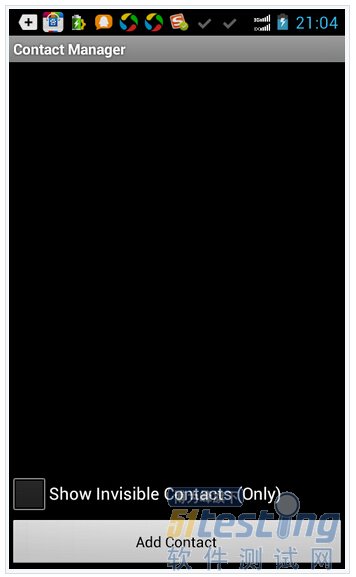
像一般的 cucumber 测试一样,我们只要在 feature 文件里添加测试用例即可。比如我们测试 ContactManager.apk (android sdk sample 里面的, Appium 也用这个 apk)。
我们想实现,
打开这个应用
点击 Add Contact 按钮
添加 Contact Name 为 hello
添加 Contact Phone 为 13817861875
添加 Contact Email 为 hengwen@hotmail.com
保存
所以我们的 feature 应该是这样的:
Feature: Login feature Scenario: As a valid user I can log into my app When I press "Add Contact"
Then I see "Target Account"
Then I enter "hello" into input field number 1 Then I enter "13817861875" into input field number 2 Then I enter "hengwen@hotmail.com" into input field number 3 When I press "Save"
Then I wait for 1 second Then I toggle checkbox number 1 Then I see "hello"
这里 input field number 就针对了 ContactAdder Activity 中输入框。我现在这样写其实不太友好,比较好的方式是进行再次封装,对 DSL 撰写者透明。比如:
|
When I enter "hello" as "Contact Name"
step_definition
When (/^I enter "([^\"]*)" as "([^\"]*)"$/) do | text, target |
index = case target
when "Contact Name": 1
...
end
steps %{
Then I enter #{text} into input field number #{index}
}end
|
这样 feature 可读性会强一点。
运行 feature
在运行之前,我们对 apk 还是得处理下,否则会遇到一些问题。
App did not start (RuntimeError)
因为calabash-android的client和test server需要通信,所以要在 AndroidManifest.xml 中添加权限:
<uses-permission android:name="android.permission.INTERNET" />
ContacterManager 代码本身的问题
由于 ContacerManager 运行时候,需要你一定要有一个账户,如果没有账户 Save 的时候会出错。为了便于运行,我们要修改下。
源代码地址在 $ANDROID_HOME/samples/android-19/legacy/ContactManager,大家自己去找。
需要修改 com.example.android.contactmanager.ContactAdder 类里面的 createContactEntry 方法,我们需要对 mSelectedAccount 进行判断, 修改地方如下:
|
// Prepare contact creation request
//
// Note: We use RawContacts because this data must be associated with a particular account.
// The system will aggregate this with any other data for this contact and create a
// coresponding entry in the ContactsContract.Contacts provider for us.
ArrayList<ContentProviderOperation> ops = new ArrayList<ContentProviderOperation>();
if(mSelectedAccount != null ) {
ops.add(ContentProviderOperation.newInsert(ContactsContract.RawContacts.CONTENT_URI)
.withValue(ContactsContract.RawContacts.ACCOUNT_TYPE, mSelectedAccount.getType())
.withValue(ContactsContract.RawContacts.ACCOUNT_NAME, mSelectedAccount.getName())
.build());
} else {
ops.add(ContentProviderOperation.newInsert(ContactsContract.RawContacts.CONTENT_URI)
.withValue(ContactsContract.RawContacts.ACCOUNT_TYPE, null)
.withValue(ContactsContract.RawContacts.ACCOUNT_NAME, null)
.build());
}....
if (mSelectedAccount != null) {
// Ask the Contact provider to create a new contact
Log.i(TAG,"Selected account: " + mSelectedAccount.getName() + " (" +
mSelectedAccount.getType() + ")");
} else {
Log.i(TAG,"No selected account");
}
|
代码修改好之后,导出 apk 文件。
运行很简单:
calabash-android run <apk>
如果遇到签名问题,请用: calabash-android resign apk。
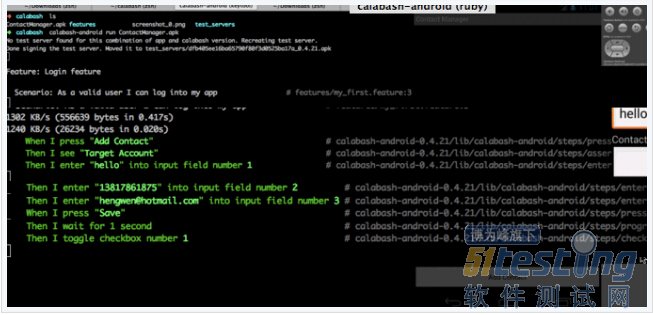
可以看看我运行的情况:
|
? calabash calabash-android run ContactManager.apk
Feature: Login feature
Scenario: As a valid user I can log into my app # features/my_first.feature:33135 KB/s (556639 bytes in 0.173s)3315 KB/s (26234 bytes in 0.007s)
When I press "Add Contact" # calabash-android-0.4.21/lib/calabash-android/steps/press_button_steps.rb:17
Then I see "Target Account" # calabash-android-0.4.21/lib/calabash-android/steps/assert_steps.rb:5
Then I enter "hello" into input field number 1 # calabash-android-0.4.21/lib/calabash-android/steps/enter_text_steps.rb:5
Then I enter "13817861875" into input field number 2 # calabash-android-0.4.21/lib/calabash-android/steps/enter_text_steps.rb:5
Then I enter "hengwen@hotmail.com" into input field number 3 # calabash-android-0.4.21/lib/calabash-android/steps/enter_text_steps.rb:5
When I press "Save" # calabash-android-0.4.21/lib/calabash-android/steps/press_button_steps.rb:17
Then I wait for 1 second # calabash-android-0.4.21/lib/calabash-android/steps/progress_steps.rb:18
Then I toggle checkbox number 1 # calabash-android-0.4.21/lib/calabash-android/steps/check_box_steps.rb:1
Then I see "hello" # calabash-android-0.4.21/lib/calabash-android/steps/assert_steps.rb:51 scenario (1 passed)9 steps (9 passed)0m28.304s
All pass!
|
![]()
大家看到 gif 是 failed,是因为在模拟器上运行的。而上面全部通过的是我在海信手机上运行的。环境不一样,略有差异。
总结
本文是对 calabash-android 的一个简单介绍,做的是抛砖引玉的活。移动测试框架并非 Appium 一家,TesterHome 希望其他框架的话题也能热火起来。watch and learn!\
最新内容请见作者的GitHub页:http://qaseven.github.io/